

In this video, Mark builds a reaction-based catch game inspired by a classic TV challenge, using an Arduino Nano, relay-driven actuators, and a simple but effective control system. The setup drops sticks at random intervals, testing reflexes while showcasing practical electronics design, from power regulation and PCB assembly to embedded programming and mechanical integration. This project balances accessibility with clever implementation, making it ideal for makers looking to build something interactive and fun, watch the build and find the supporting code below.
Watch the Build
Can you Catch the Game?
When he was young, Mark didn’t have access to modern gaming platforms. Like many at the time, entertainment came from broadcast television, limited channels, scheduled programming, and a reliance on anticipation rather than instant access. One particular show left a lasting impression: The Honeymoon Quiz. Among its many challenges was a deceptively simple game that stood out for its difficulty and tension.
The concept was straightforward. A frame positioned above the player held several sticks. Without warning, they would drop at random, and the player’s only task was to catch them before they hit the ground. Simple in design, but demanding in execution.
Decades later, Mark revisits this concept with a modern, electronics-driven interpretation, building a fully autonomous, microcontroller-based version of the game. As he puts it:
“It will hold several sticks that will drop down randomly one by one… and you need to try to catch them. That’s the game.”
The Schematic
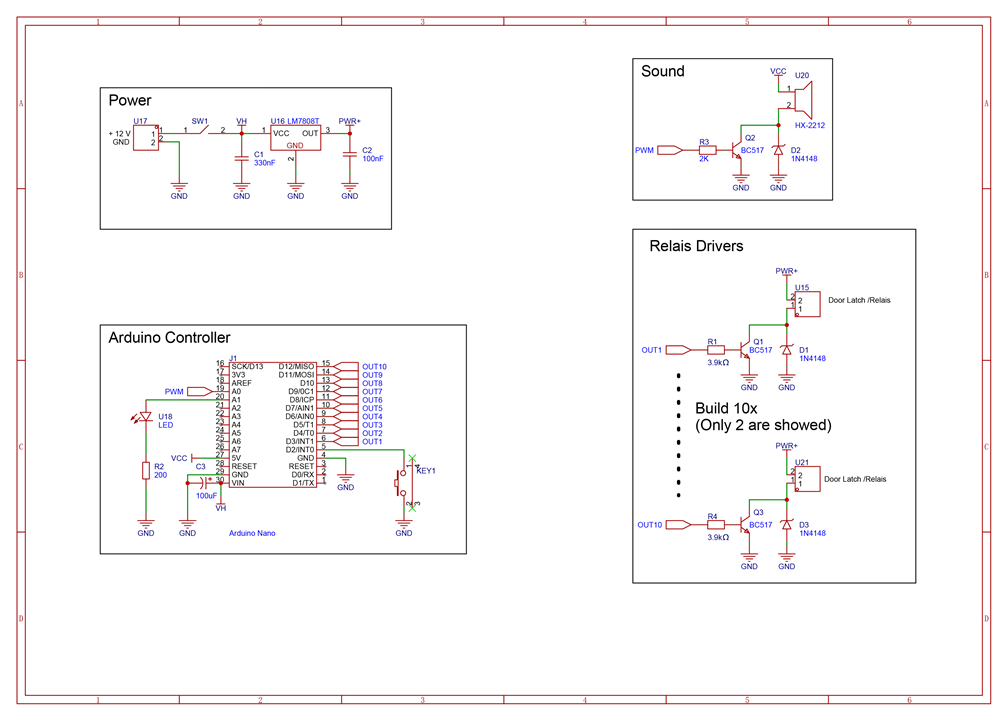
The system is divided cleanly into four functional sections: power, control, sound, and actuation.
The power design reflects Mark’s preference for simplicity and reliability over modern optimisation. While acknowledging newer approaches, he intentionally uses a linear regulator:
“I know it's not the most elegant regulator nowadays, but it's analog and it's proven and tested… that's why I use it.”
An input supply (e.g. 12V) is stepped down to 8V for the actuators. This is a deliberate choice to provide sufficient drive strength to the relay-based mechanisms responsible for releasing the sticks.
The Arduino Nano operates using its onboard regulator, while also serving as the central controller. A push button connected to digital pin D2 serves dual purposes: starting the game and toggling difficulty.
This behaviour is clearly implemented in the code:
#define StartButton 2
EasyButton button(StartButton);

void buttonPressed() {
  running = !running;
}

void sequenceEllapsed() {
  expertmode = !expertmode;
  digitalWrite(ModeLed, expertmode);
}

button.onPressed(buttonPressed);
button.onSequence(2, 1500, sequenceEllapsed);
Here, a single press toggles the game state, while a double press (within 1500 ms) activates “expert mode” — a faster-paced variant of gameplay.
The sound system is implemented using a PWM-driven speaker, producing simple tones to indicate game states. Mark describes this pragmatically:
“It’s only used to generate a beeping sound to indicate the start and the end of a game… it will do the job quick and dirty.”

Game logic and behaviour
The game’s operation is governed by a simple but effective state-driven loop. Once started, it progresses through a fixed lifecycle:
- Play a start tone
- Sequentially drop sticks in random order
- Ensure no stick is dropped twice
- Play an end tone and reset
The randomness is carefully handled to avoid repetition:
int randStick = random(3, 13);

while (valueExistsInArray(droplog, arraySize, randStick)) {
  randStick = random(3, 13);
}
This ensures that each actuator is triggered only once per game cycle, a detail not explicitly called out in the original blog, but critical to gameplay integrity.
Timing is also adjustable based on difficulty:
if (expertmode == 1) randTime = randTime * 500;
else randTime = randTime * 1000;

Placing the components
Component placement follows a logical and structured layout, aided by the available space on the prototyping board. While the blog presents this as straightforward. Mark notes:
“I know this is not the most elegant way of soldering… but I have to make do with what I have at home.”
This highlights a key aspect of the project: it is intentionally accessible and built using available tools rather than precision manufacturing.
After soldering, the board requires manual refinement. Traces are selectively removed using a rotary tool to prevent unintended connections:
“If I don't we will have a big short circuit… so this needs to be done.”

Baseplate
The baseplate serves as a practical integration point for the electronics. It houses the PCB, speaker, LED, and control button in a compact arrangement.
Mark emphasises the importance of keeping wiring short and manageable:
“I made a base plate… to keep wires short and compact.”

Building a Rig
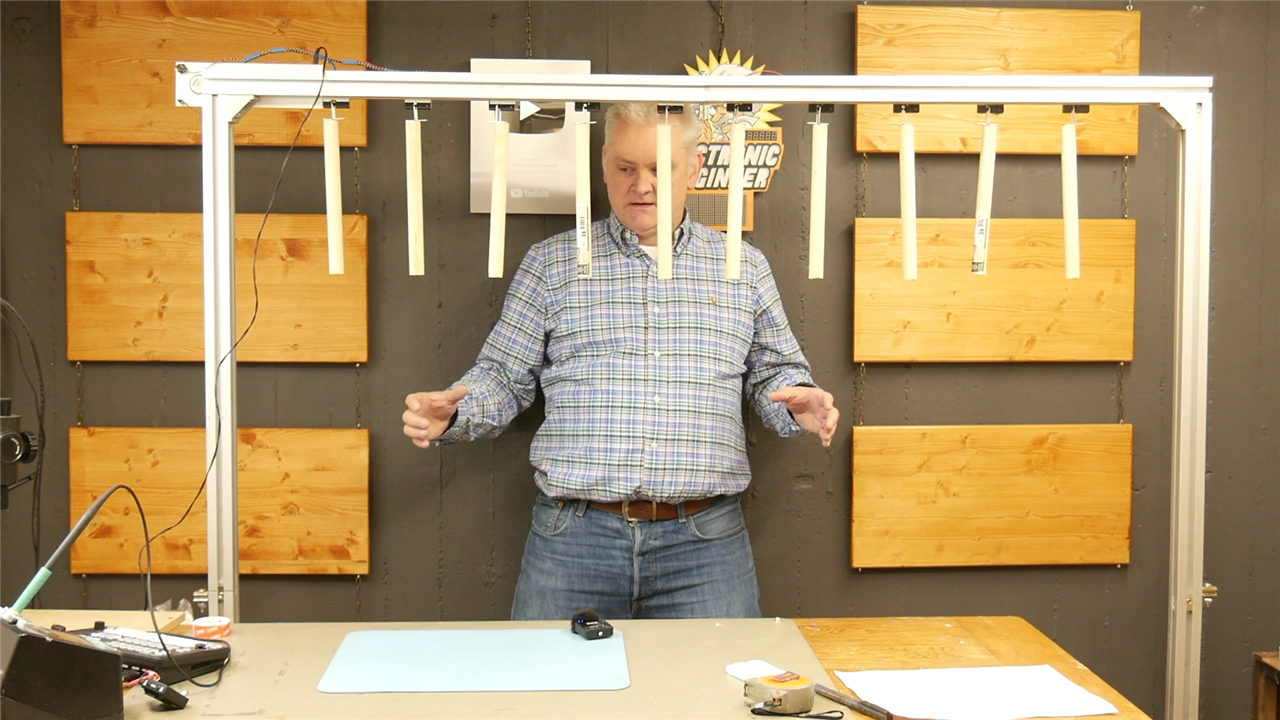
The mechanical structure is deliberately flexible. While the blog suggests building a frame, the transcript shows Mark adapting available materials:
“You can use some wood bars… I happen to have aluminum frames laying around from an old table.”
This reinforces the project’s ethos: use what you have, adapt creatively.
Actuators are mounted to the horizontal bar using strong double-sided tape. Interestingly, this is not just a convenience but a considered mechanical decision:
“Make sure you use proper double-sided tape… you don’t want the actuator to fall off completely.”
The goal is controlled release, only the sticks should fall, not the mechanisms themselves.
Another practical insight not present in the original write-up is wiring flexibility:
“All I need to worry about later is which wire is the common… all the other wires I can just connect randomly because the actuators are controlled randomly.”
Cut to approximately 25 cm and fitted with hooks, they interface directly with the latch mechanisms. While the blog presents this briefly, the transcript reinforces the intended gameplay experience, lightweight sticks that drop cleanly and predictably.
Sketch upload
Programming the Arduino completes the system. Mark uses the Arduino IDE, selecting the correct board and port before uploading the sketch.
The only dependency is the EasyButton library:
#include <EasyButton.h>
if (button.supportsInterrupt()) {
  button.enableInterrupt(buttonISR);
}
Testing reveals a key insight: the game is harder than it looks.
“As you can guess… this is more difficult than I expected.”
Even with a basic prototype setup, the random timing and human reaction limits quickly become apparent. This validates the original TV concept, and demonstrates the effectiveness of Mark’s implementation.
Reflection and future considerations
While the blog frames the build as complete, the transcript makes it clear that this is still a prototype:
“Of course I will put a casing over the electronics… for now it’s an experimental setup.”
This suggests several natural future improvements:
- Enclosing electronics for safety and durability
- Refining the frame structure for portability
- Adjusting difficulty scaling further
- Potentially expanding actuator count or configurability
There is also a strong intended use case beyond personal experimentation:
“I’m going to have lots of fun on this… especially with the kids at my youth school.”
This positions the project as both a technical exercise and a practical interactive installation. Mark’s catch game successfully recreates a classic concept using accessible electronics and straightforward mechanical design. It balances simplicity with enough technical depth to make the build engaging, while the gameplay itself delivers genuine challenge.
By combining randomness, physical interaction, and clear feedback mechanisms, the project highlights how effective even relatively simple embedded systems can be in creating engaging experiences, especially when paired with thoughtful implementation and iterative testing.
Most importantly, it remains true to its roots: a simple idea, executed well, that is far more difficult than it first appears.
Supporting Files and Links
Bill of Materials
| Product Name | Manufacturer | Quantity | Buy Kit | |
|---|---|---|---|---|
| MOLEX Pin Header, Wire-to-Board, 2.5 mm, 1 Rows, 2 Contacts, Through Hole Straight, KK 5045 | Molex | 5 | Buy Now | |
| ONSEMI Linear Voltage Regulator, 7808, Fixed, Positive, 10V To 35V In, 8V/1A Out, TO-220-3 | Onsemi | 1 | Buy Now | |
| KYCON DC Power Connector, Jack, 3.5 A, 2 mm, PCB Mount, Through Hole | KYCON | 1 | Buy Now | |
| ONSEMI Small Signal Diode, Single, 100 V, 200 mA, 1 V, 4 ns, 4 A 1n4148 | ONSEMI | 11 | Buy Now | |
| Transistor BC517-D74Z | ONSEMI | 11 | Buy Now | |
| VISATON Speaker, Mini, 2 ", 500 mW, 8 ohm, 83 dB, 250 Hz to 10000 Hz | Visaton | 1 | Buy Now | |
| MENTOR LED Panel Mount Indicator, Chrome Plated, Green, 2 VDC, 8 mm, 20 mA, 20 mcd, Not Rated | Mentor | 1 | Buy Now | |
| MULTICOMP PRO Pushbutton Switch, 12 mm, SPST, (On)-Off, Round Raised, Red | Multicomp Pro | 1 | Buy Now | |
| Ressitor 2K | Multicomp Pro | 1 | Buy Now | |
| Resistor 3.9K | Multicomp Pro | 10 | Buy Now | |
| Resistor 200E | Multicomp Pro | 1 | Buy Now | |
| KEMET Multilayer Ceramic Capacitor, 0.1 µF, 50 V, ± 10%, Radial Leaded, X7R, 5.08 mm | Kemet | 2 | Buy Now | |
| 330nF | Kemet | 1 | Buy Now | |
| Arduino Nano | Arduino | 1 | Buy Now | |
| MULTICOMP PRO 6MS1S3M1RESlide Switch, SPDT, On-On, Through Hole, Side Actuator, 100 mA, 20 V | Multicomp Pro | 1 | Buy Now | |
| Striped prototyping pcb board | CIF | 1 | Buy Now | |
| Product Name | Manufacturer | Quantity | **BUY_KIT** | |
| Lock mechanism 3~5V | BADODO Security | 10 | ||
Power adapter 12V / 1A
|


