

Milos takes AI notifications into the physical world with the Claude Notifier, a monitor-mounted companion powered by an ESP32-S3 touchscreen that reacts to activity with animated expressions, touchscreen interactions and even a real mechanical bell. Using Claude Code hooks, custom firmware, 3D-printed enclosures and a servo-driven bell mechanism, the project makes sure important prompts and alerts never get missed, even during the most determined doom-scrolling sessions.
Follow along as he designs the hardware, develops the notification system, creates custom faces and puts the notifier through its paces.
If you've spent any time working with AI-assisted development tools, you'll know the pattern. You kick off a task, wait for a response, then drift off to check messages, social media, a video, or three. Before long, the AI has been waiting for your input for half an hour. Rather than changing that habit, Milos decided to solve it with hardware.
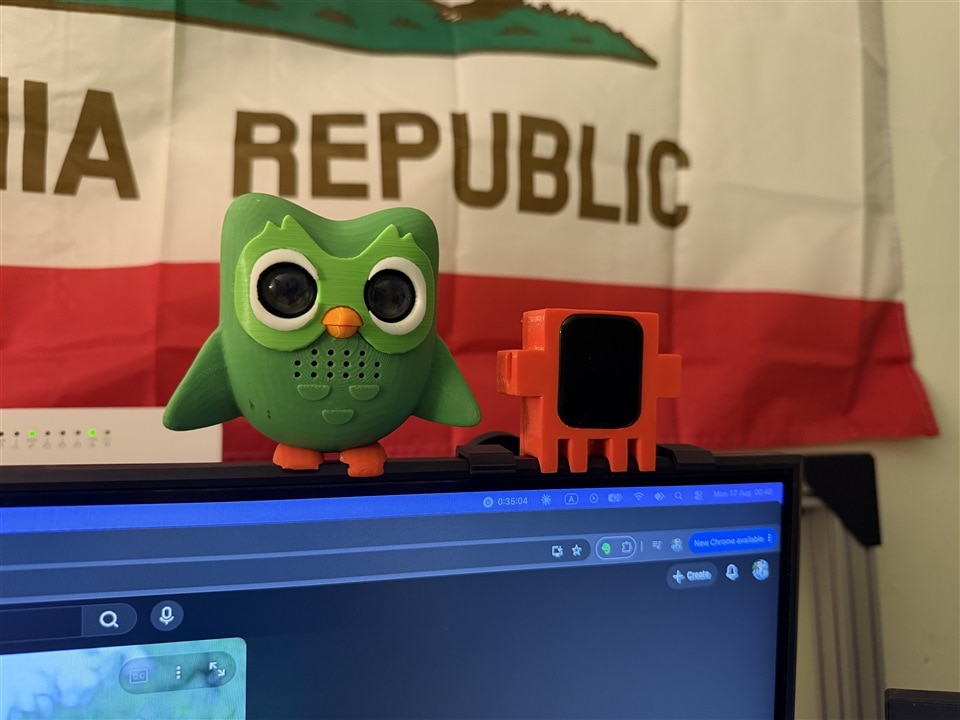
The result is a delightfully over-engineered desktop companion called the Claude Notifier, a small ESP32-powered mascot that sits on top of a monitor, watches what Claude Code is doing and reacts with animated expressions, status updates and, when necessary, an actual mechanical bell.
"The obvious reason is not to stop doom scrolling, of course, is to make an overall complicated device that will actually alert you when Claude needs an input."
What started as a humorous idea quickly evolved into a surprisingly capable system that combines Claude Code hooks, custom firmware, a touchscreen user interface, a mechanical notification system and a carefully designed character that feels alive on the desktop.
Turning Claude Code Into a Physical Companion
The foundation of the project came from digging into Claude Code's hook system. By creating a custom settings.json configuration, Claude Code can execute commands whenever specific events occur, such as a prompt being submitted, a response completing, an error occurring or the system requesting additional user input.
Instead of creating a complicated desktop integration, Milos used simple HTTP requests sent from Claude Code directly to an ESP32 on the local network. These hooks allow the notifier to react immediately whenever Claude changes state.
"You don't really need to install anything. You need this settings file, and Claude will just automatically keep calling all of these curl commands as soon as something happens."
One particularly elegant aspect of the implementation is how the firmware separates raw events from emotional responses. Rather than Claude deciding what expression should appear, the device receives simple events and runs its own mood engine. This means boredom, sleeping and attention-seeking behaviour continue even when the host machine stops communicating.
Looking through the firmware reveals a surprisingly sophisticated state model. Events such as PromptSubmitted, TurnFinished, NeedsInput, Error and LimitReached trigger transitions between moods including:
- Chill
- Working
- Excited
- Confused
- Angry
- Bored
- Sleeping
- Usage Limit
This allows the notifier to behave more like a desktop pet than a simple status indicator.
A Claude Mascot Designed for the Monitor
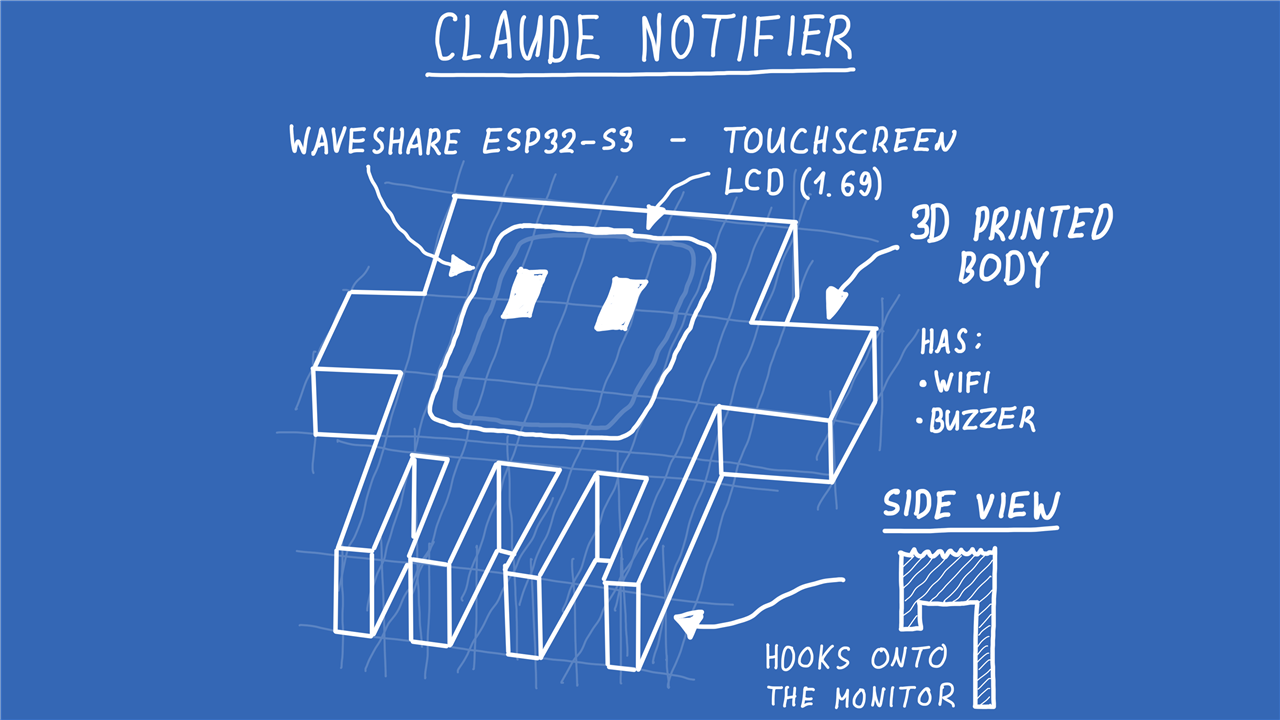
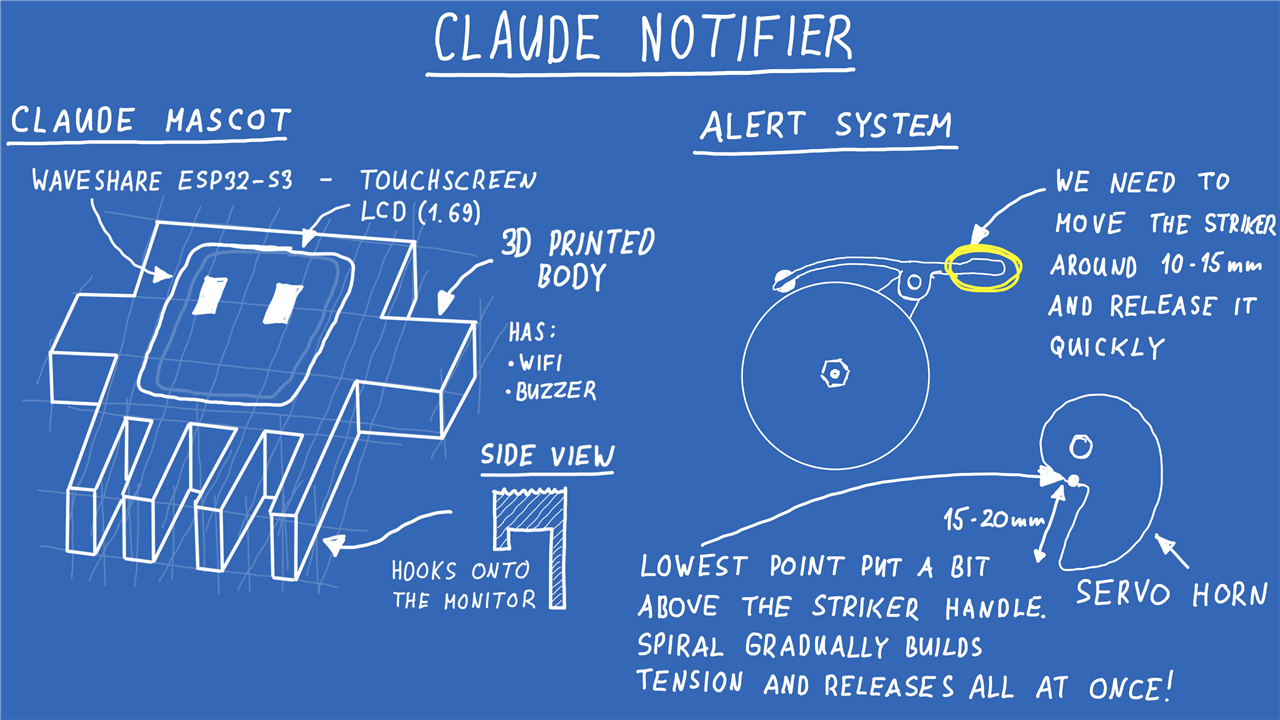
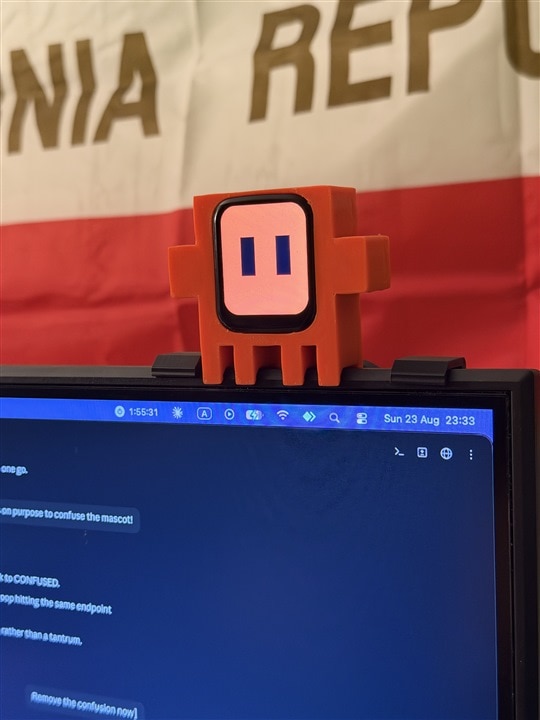
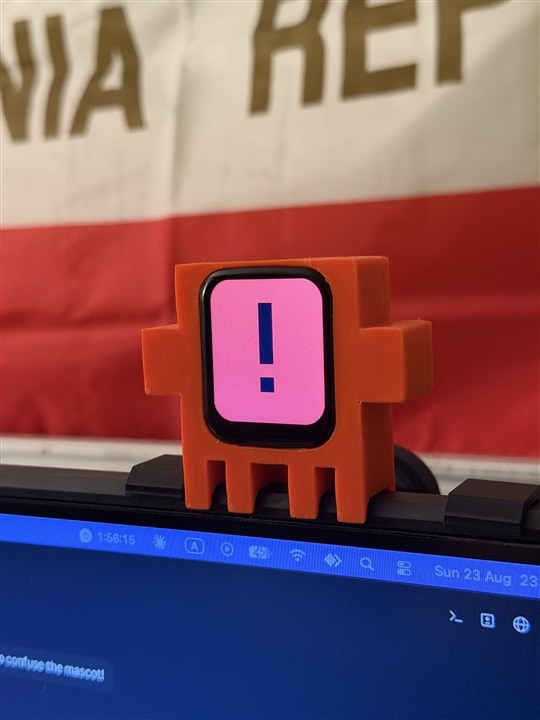
The physical design deliberately mirrors the small crab-like mascot used by Claude Code. The body is fully 3D printed, with the display fitting neatly into the centre of the enclosure and hooks built into the legs allowing it to hang directly from the monitor.
To keep the hardware as compact as possible, Milos used a Waveshare ESP32-S3 Touch LCD board with a 1.69-inch touchscreen. The module combines Wi-Fi connectivity, a colour display, touch input and a built-in buzzer, giving the project almost everything required on a single board.
"It's a great all-in-one board that also has a piezo buzzer inside. It also has Wi-Fi, so it will cover all of the functionality that we need."
The finished design routes everything through a single connector and includes a dedicated opening for USB programming access, allowing firmware updates without removing the electronics from the enclosure.
Four M2 fasteners secure the shell together, while internal mounting points ensure the ESP32 board slots neatly into position. STEP files are also provided with the project, allowing builders to customise the design for different monitors and mechanical preferences.
When a Buzzer Isn't Annoying Enough
Initially, the notifier was going to use only the onboard buzzer. That idea lasted right up until Milos decided that a tiny piezo alert wasn't sufficiently capable of breaking the spell of endless scrolling.
His answer was refreshingly excessive.
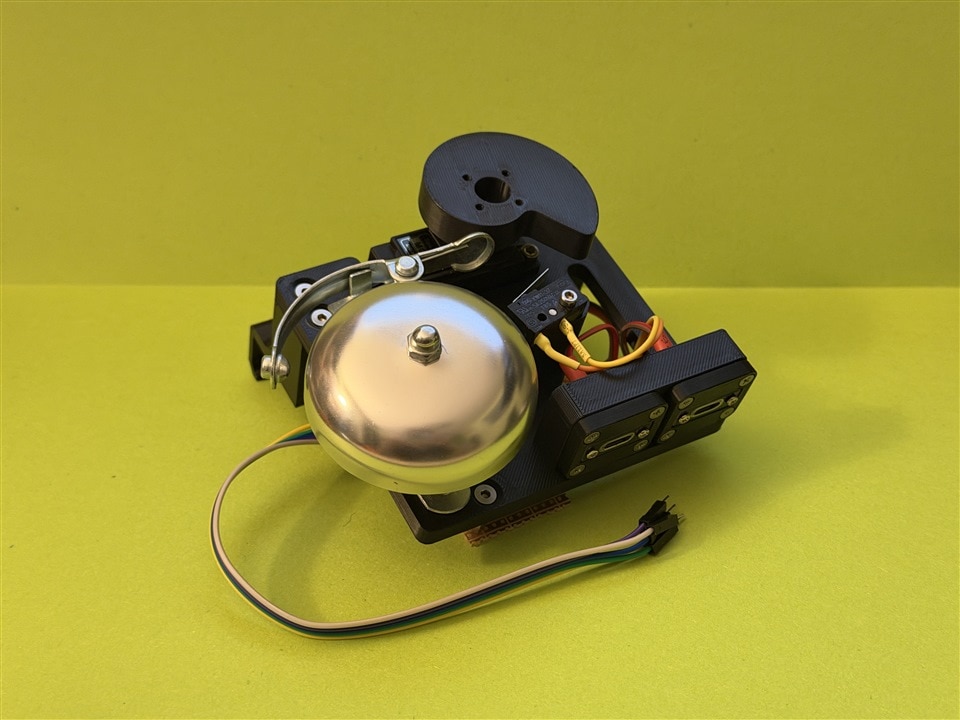
A separate bell-striking mechanism was designed using a continuous rotation servo, a custom printed cam and an actual mechanical bicycle bell.
"We need something a bit more diabolical, something a bit more loud, something that will actually stop you from doom scrolling."
The bell mechanism works by using a spiral-shaped cam attached to the continuous rotation servo. As the servo rotates, the cam gradually builds tension on the bell striker before suddenly releasing it. This creates a clean, satisfying ring using the bell's original striking mechanism rather than a solenoid or linear actuator.
Describing the design, Milos explains:
"As the servo motor rotates, it gradually builds up tension, and in the end it releases all of that tension."
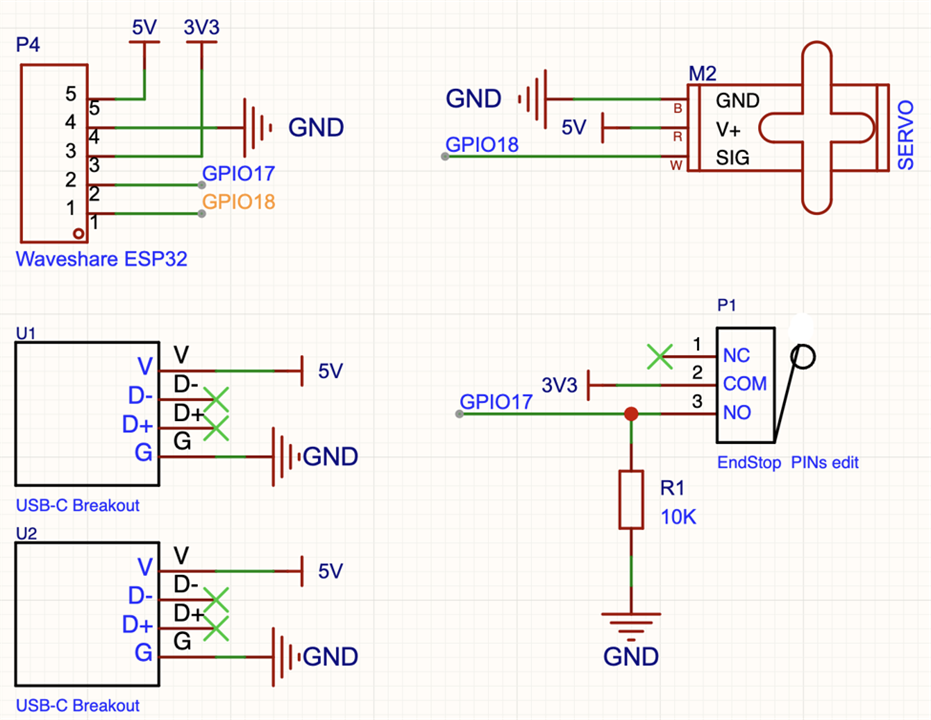
The hardware uses a microswitch to detect the striker position, allowing the firmware to count completed bell strikes accurately and stop at the correct location rather than relying entirely on timed movement.
The final bell assembly also contains USB breakout boards that allow power to be daisy-chained, making cable management much easier when mounted on top of a monitor.
Firmware Written by Claude, for Claude
Perhaps fittingly, much of the firmware was developed using Claude itself. Rather than generating code in a single conversation, Milos describes a structured workflow involving multiple Claude models working together on individual tasks.
"I take Opus 5 and tell it to use that as the orchestrator and to spawn sub agents for different things."
Those agents are assigned coding, testing and validation responsibilities before their outputs are compared and reviewed.
"That's how you get code that's pretty stable and pretty well tested."
The resulting firmware is extensive. Beyond handling notifications, it includes:
- Wi-Fi configuration and diagnostics
- A hosted web interface
- Custom face creation and storage
- Touchscreen gesture support
- Usage tracking
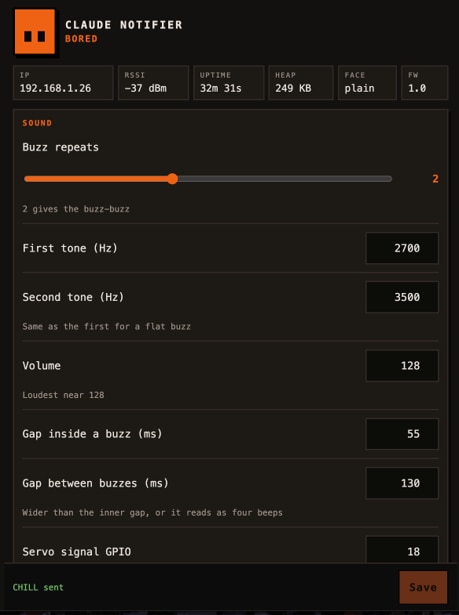
- Bell and buzzer configuration
- Mood management
- Real-time status reporting
One particularly thoughtful feature is the handling of Claude's usage limits. The project not only processes hook events but also incorporates a supplementary Python-based status monitoring system.
As noted during development:
"The only two things that we can't do from here are the five-hour limit and weekly usage, which needs to go through a Python script that's polling."
Looking at the supporting code reveals dedicated tooling for generating Claude hook configurations automatically. The firmware also tracks usage windows, reset times and percentage consumption, presenting them directly on the notifier's display.
Custom Faces, Moods and Interactions
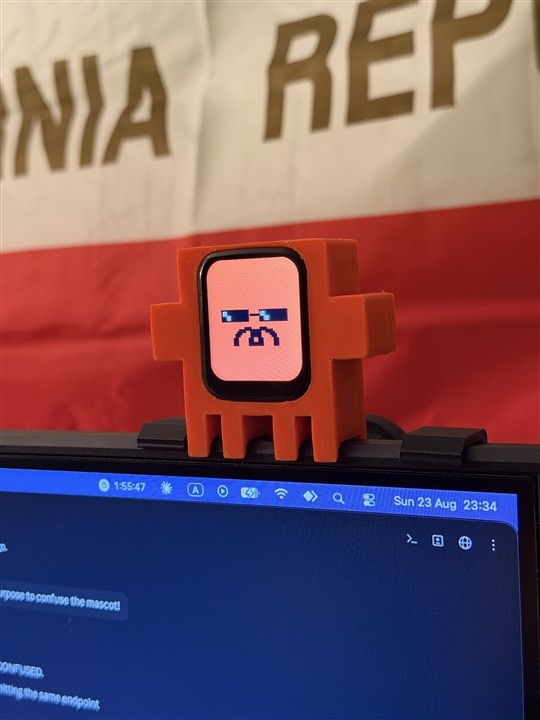
The most charming aspect of the project is how much personality has been built into the device. The touchscreen allows users to change faces and interact directly with the mascot. Different expressions appear when Claude is working, sleeping, confused, excited or waiting for input. The facial system is considerably more advanced than a few static images. The firmware animates eye movement, blinking, sleeping behaviour, boredom, excitement and even annoyance.
If the mascot is tapped repeatedly, it eventually loses patience.
"If you try annoying it a bit... you can see that it gets pissed off and it rings the bell at you."
The web interface allows virtually every aspect of the experience to be customised, including:
- Buzzer frequencies
- Bell behaviour
- Servo configuration
- Face styles
- Mood testing
- Brightness levels
- Network settings
- Custom artwork
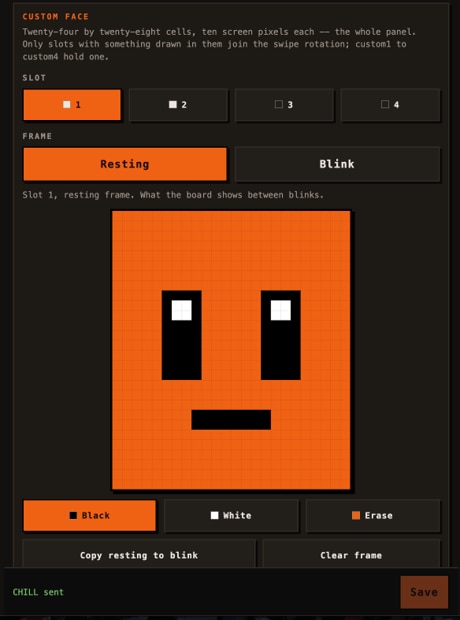
One standout feature is the built-in face editor. Users can design entirely new expressions using a pixel-art interface and save them directly to the ESP32's non-volatile storage.
The implementation supports multiple user-created face slots, custom blink frames and persistent storage that survives power cycles.
The firmware comments neatly summarise the philosophy:
"A drawn face gets the same mood vocabulary as a built-in one without the user drawing a single extra frame."
Putting the Notifier to Work
Once configured, the notifier operates automatically. When Claude finishes a task, the mascot becomes visibly excited. When an error occurs, it looks confused. If rate limits are reached, the display switches to a dedicated warning state. Most importantly, when Claude requires user input, the notifier demands attention with both visual and audible alerts.
"This will for sure stop the doom scrolling."
Whether it's the animated expressions, the touchscreen interaction or the mechanical bell that sounds suspiciously like fresh cookies emerging from the oven, the device succeeds at grabbing attention without requiring another browser tab or desktop notification. The finished Claude Notifier is a wonderful combination of software engineering, embedded systems, CAD design and a healthy sense of humour. It transforms a very modern problem into an excuse to build expressive hardware, and in doing so turns an AI coding assistant into a desktop companion that feels oddly alive.
If you'd like to build your own version, all design files, firmware and supporting resources are linked below, along with the complete project resources and downloadable models.
Supporting Files and Links
Parts Used
| Product Name | Manufacturer | Quantity | Buy Kit |
|---|---|---|---|
| Continous Servo | ADAFRUIT | 1 | Buy Now |
| Microswitch | MULTICOMP PRO | 1 | Buy Now |
Additional Parts
| Product Name | Manufacturer | Quantity |
|---|---|---|
| ESP32 S3 Touchscreen 1.69 | waveshare | 1 |
| Mechanical Bell | ||
| 3D Printing Filament | ||
| M3 and M2 Screws | ||
| Wires and Perfboard |


