

Table of contents

Abstract
The spell is the horns sign, and it makes the skull cry blue tears. Until then, two webcams track your hand in 3D and the creature whips the bowl away on an old 3D printer's axis in about half a second, sometimes faking you out and laughing.
Project
A creature guards this bowl of sweets, and it doesn't want you to have one. Reach in and it snatches the bowl away from your hand, snarling at you. Want a sweet? You'll have to defeat it with a spell.
My turn: one full game, from asleep to a sweet.
My nephew's turn: the same game, played by a real trick-or-treater.
1 What it is
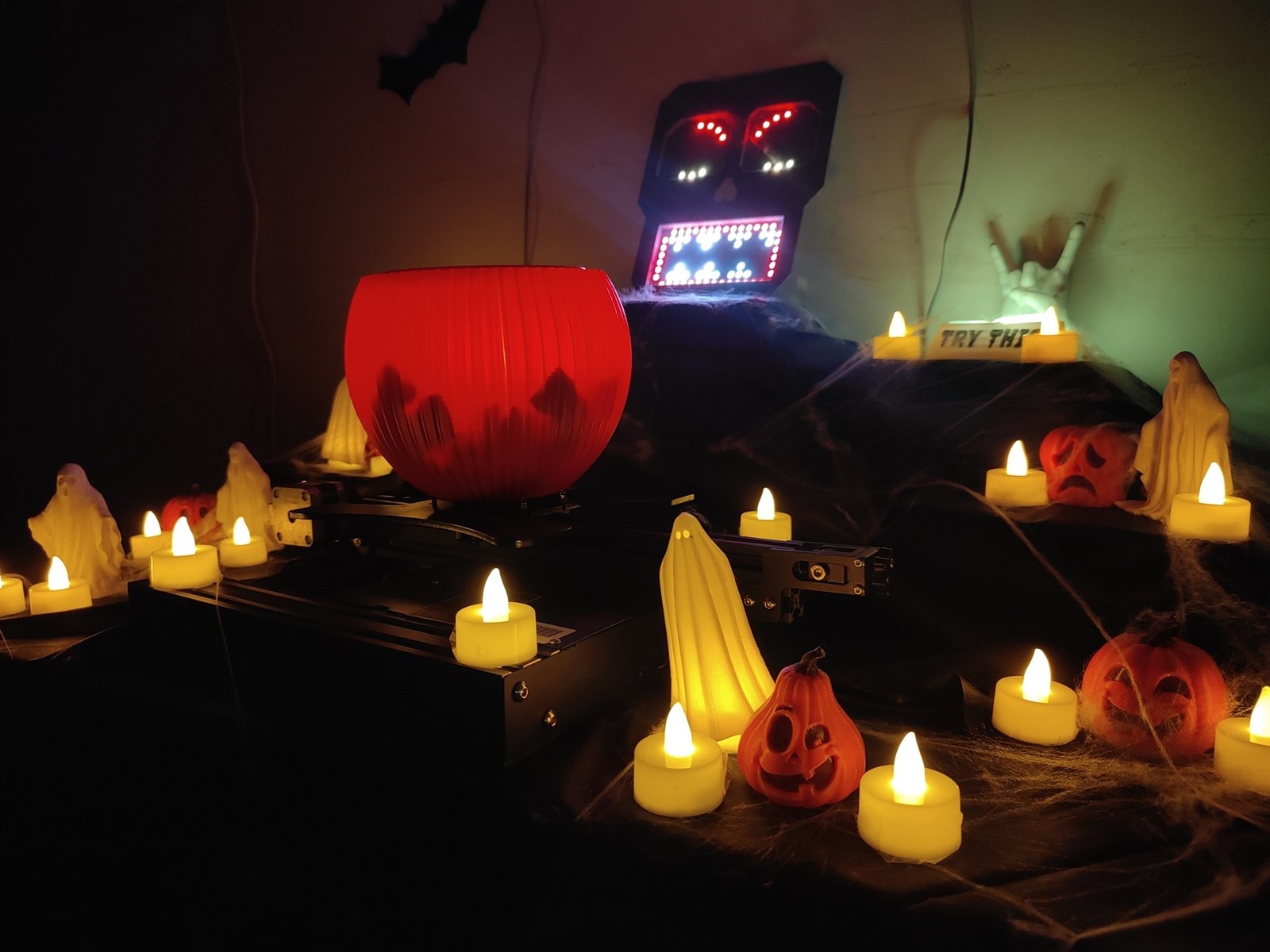
The creature is a skull face with LED ring eyes and an LED matrix mouth. The bowl rides on the Y axis of my old Ender 3 printer, which can whip it from one end of the rail to the other in about half a second. Two webcams up on the wall, hidden among paper bats, watch your hands in 3D. A mini PC runs it all, and a speaker fills the room with wind, wolves, crows and thunder.
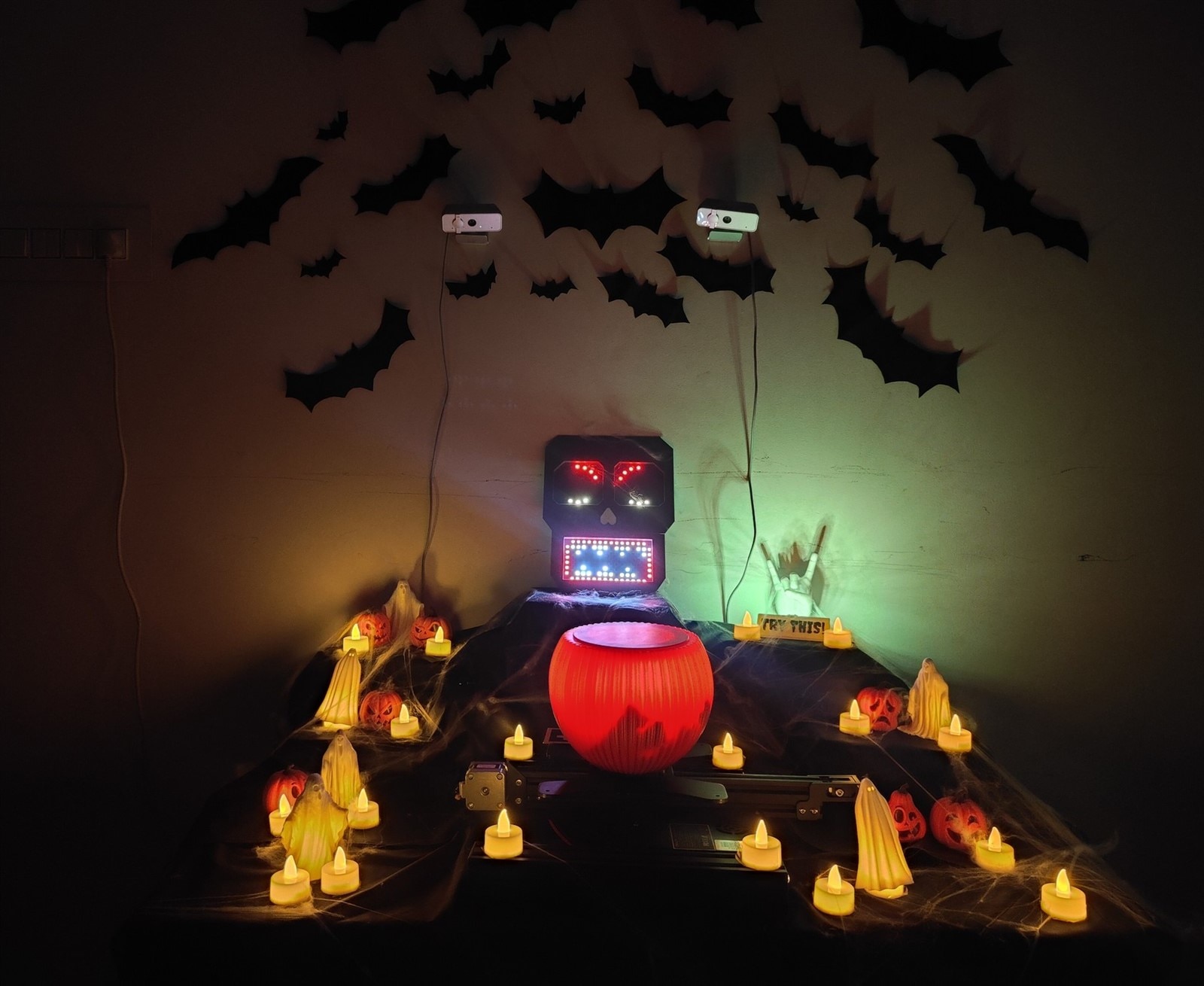
The table, ready for trick-or-treaters. The two webcams hide among the bats.
My first idea was a sweets bowl that roars if you take more than your share. A load cell under the bowl would weigh what was taken, and a camera would count the kids. Then I found that last year's winner had a similar idea, with a load cell and a water spray. So this time the creature snatches the bowl away instead.
2 How to play
- Walk up. The creature is asleep, its eyes shut and its mouth snoring.
- Bring a hand over the table. It wakes up and its eyes follow your hand. A ghostly tone follows it too: higher hand, higher note. The closer you get to the bowl, the louder it gets, until it swells into a chord.
- Reach for a sweet. The creature snatches the bowl to the far end of the rail and snarls at you. Chase it and the bowl runs again. Sometimes it fakes: the bowl stops in the middle and darts back. If that fooled you, it often laughs at you.
- Cast the spell. Next to the bowl stands a hand making the horns sign. It glows yellow, with a "TRY THIS!" sign in front of it. Copy it: index and little finger up, middle and ring fingers folded. Hold it for a third of a second.
- The creature gives up. It bursts into blue tears, the hand glows green to tell you the spell worked, and the bowl slides slowly to the middle and waits.
- Take a sweet. While your horns are up, it stays under the spell. Drop them and you have 10 seconds. A music box plays the last few, slowing down like it's running out of spring. Then the creature is back on guard, and only a fresh horns sign stops it again.
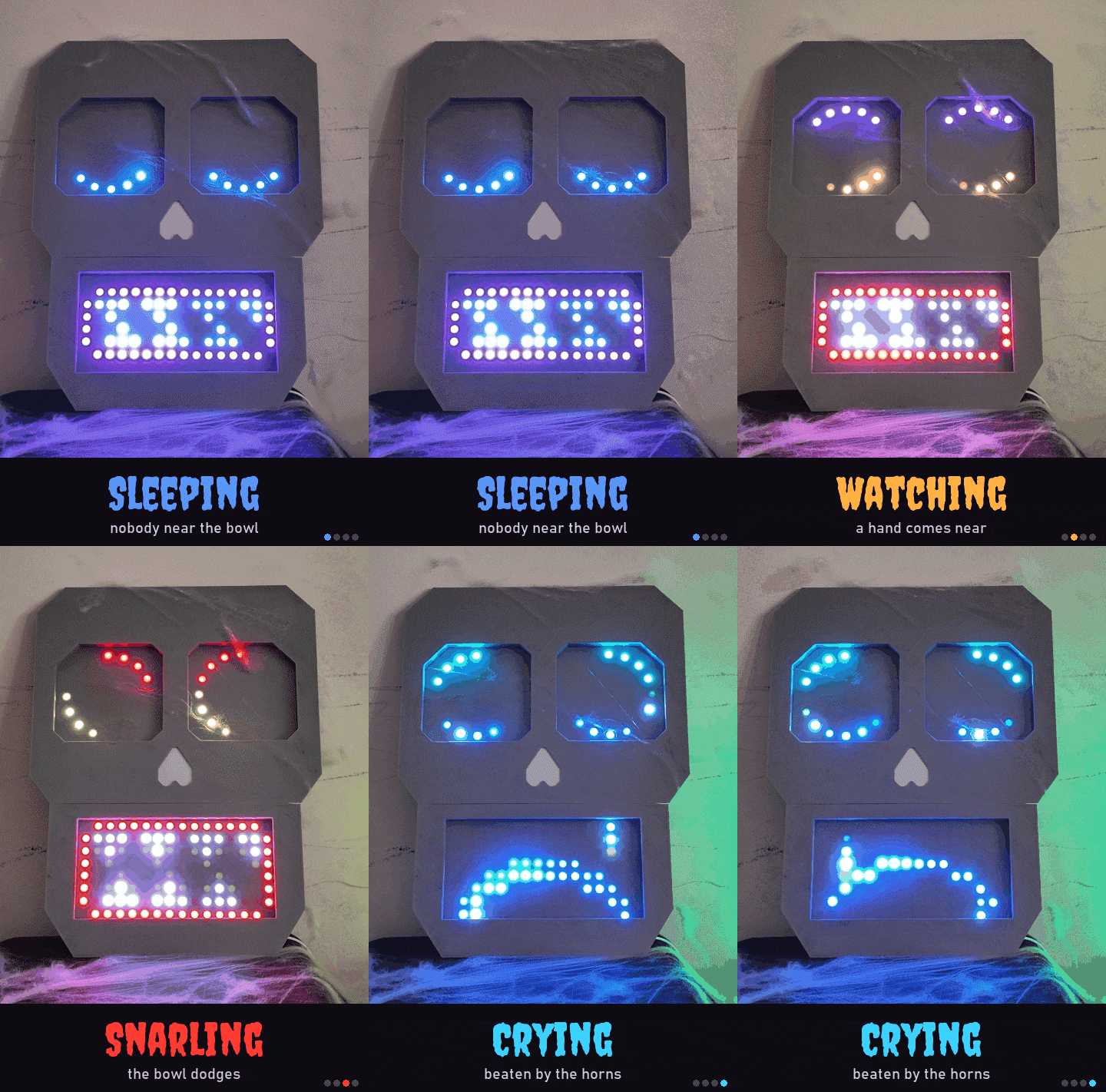
Asleep, watching, snarling and crying.
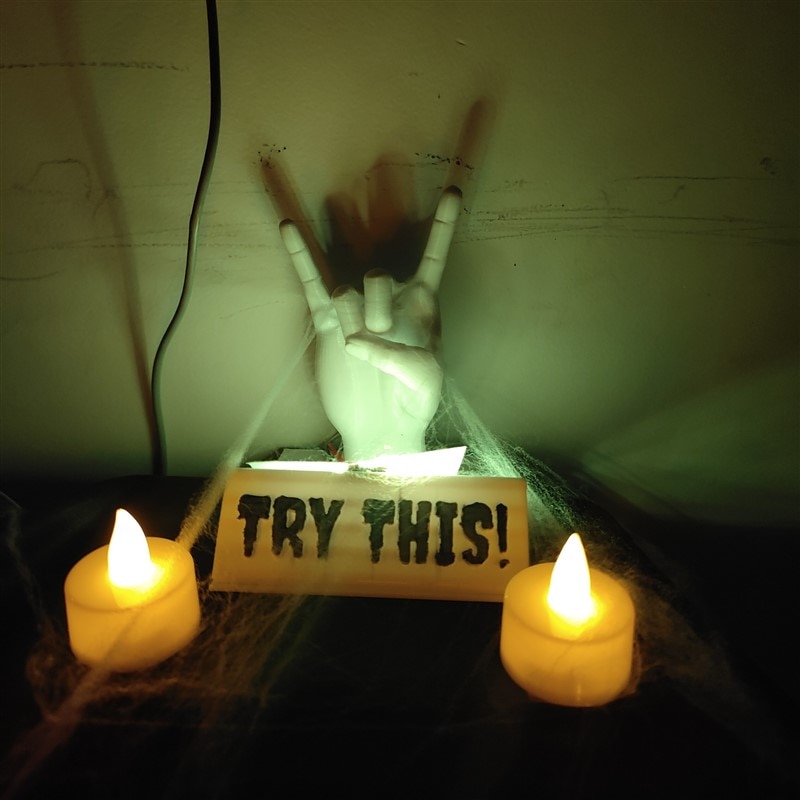
Copy this hand to cast the spell.
3 How it's built
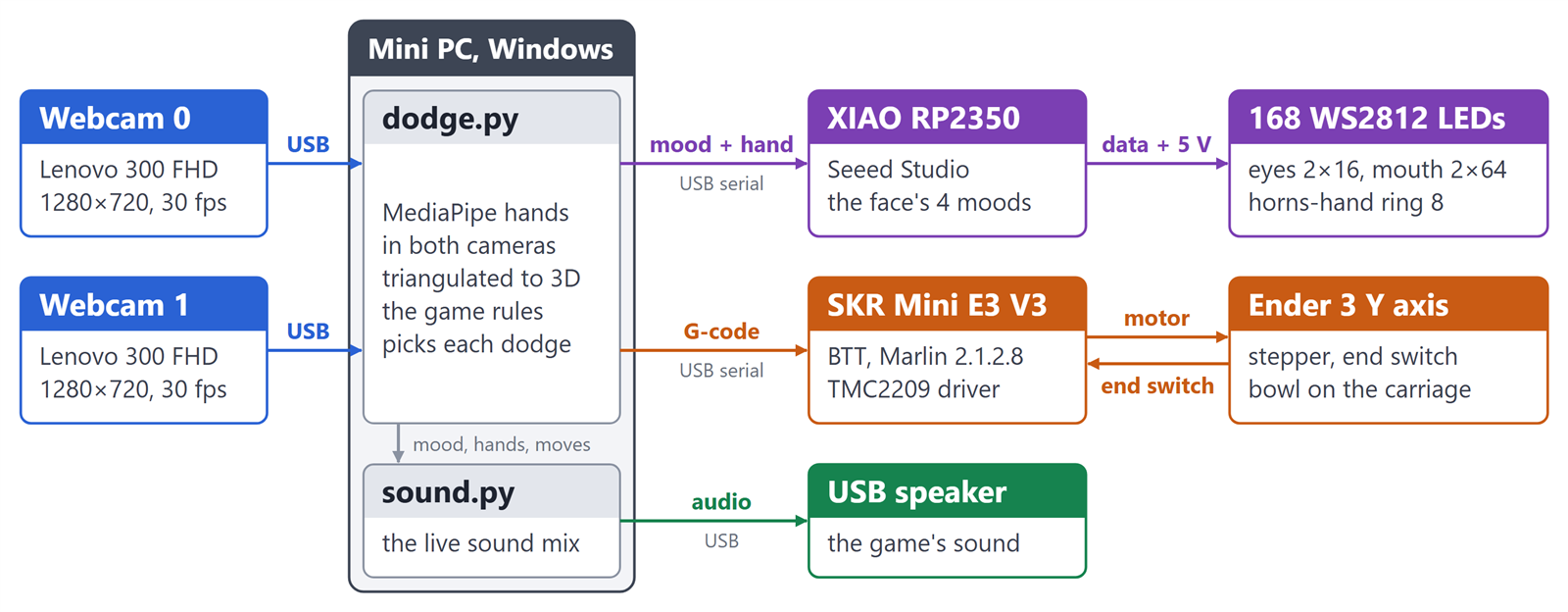
How the parts talk to each other.
It all runs from one Python script on the mini PC. Both cameras send 30 pictures a second. The script keeps the newest from each, finds the hands in 3D, and decides what the bowl, the face and the sound should do.
Everything plugs into the mini PC over USB:
- the two cameras,
- the printer board, which gets plain G-code,
- the face, which gets one short line of text at a time,
- the speaker.
3.1 The eyes: two webcams
To see a hand coming, my first plan was an 8 x 8 time-of-flight distance sensor, but it was out of stock everywhere in India. So I used webcams with Google's MediaPipe. One camera overhead can't tell how high a hand is, so I put two on the wall instead, which is also easier to mount.
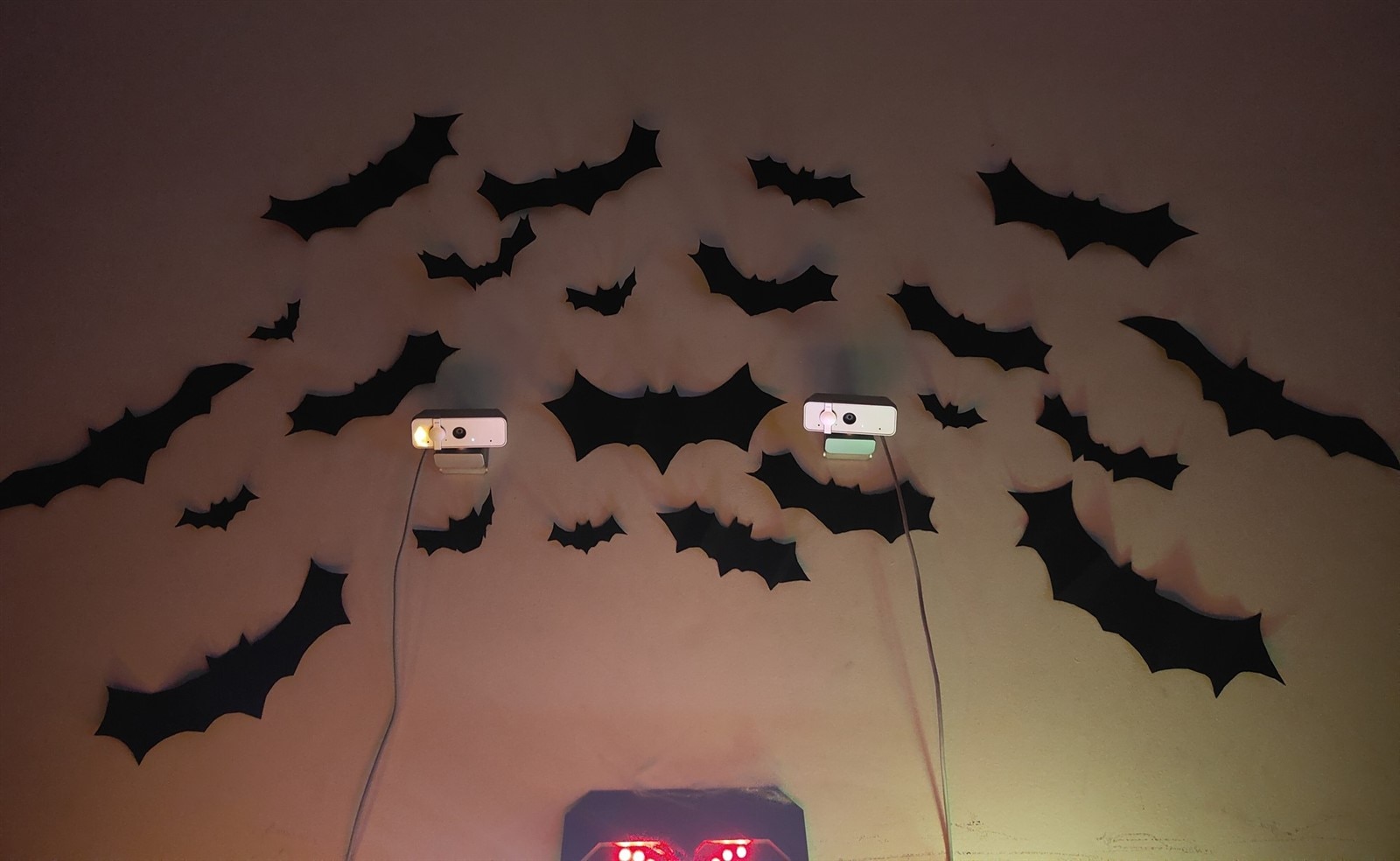
Two webcams high on the wall see each hand from two angles.
- Calibration. A printed chessboard, held up to both cameras at many angles, tells OpenCV each camera's lens and where the two cameras sit, to under half a pixel. One photo of the board lying flat marks the table.
- The hand in 3D. In each picture, MediaPipe finds 21 points on every hand. Each point is seen from two angles: draw a line from each camera through it, and where the lines meet is the point in 3D, in millimetres.
- The bowl. A printed marker on the slider's base shows the cameras where the rail is, and a card lid with a second marker, laid on the rim once, shows where the opening is. Whenever the bowl stops, the cameras check the marker. If it's more than 6 mm from where the motor thinks, the motor has slipped, and the bowl re-homes.
- The horns. MediaPipe doesn't know the horns hand signal, so I use a simple finger rule: a finger is straight when its tip is much further from the wrist than its middle joint. Index and little finger straight, middle and ring folded, held for 0.3 s, and the spell works.
What the game sees: the hand in both cameras, the bowl's rim, and the table from above.
3.2 The slider: my old printer's Y axis
The haunted, spell-guarded sweets bowl is an 80 rupee flower pot. To make it move, I used the Y axis of my Ender 3 printer, with its BTT SKR Mini E3 V3 board, TMC2209 drivers and Marlin.
- Mounting. The heat bed is off, so the carriage is lighter. The bowl is cable-tied to the carriage plate through four holes in its base, with cardboard shims to level it.
- Top speed. Found by trial and error, going up in small steps until the motor slipped. Without the heat bed it ran clean to 1050 mm a second, but with the bowl on it lost steps at 800. So the game runs at 700, which moves the bowl 18 cm in under half a second.
- The dodge. When a hand comes within 25 cm of the bowl, above the rim, the bowl jumps to the end of the rail furthest from the hand. But that is easy to predict, so now 3 dodges in 10 are fakes: it darts to the middle and straight back, to break the pattern.
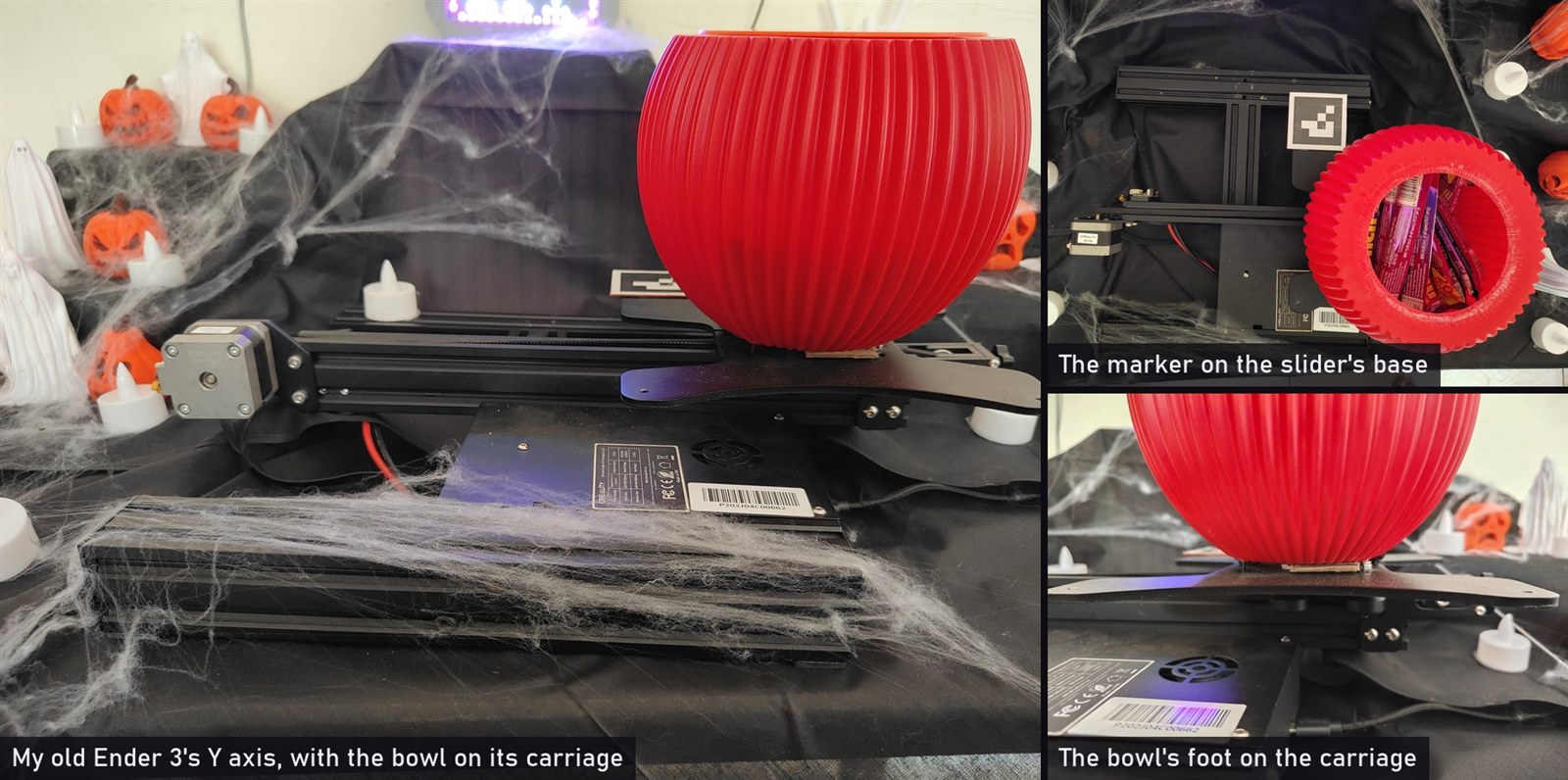
My old Ender 3's Y axis, with the bowl cable-tied to the carriage.
3.3 The guarding creature
The creature is a skull printed in silver PLA, with a thin layer of the same plastic over the LEDs to diffuse them.
- The eyes. Two 16-LED WS2812 rings. They follow your hand, and close when it falls asleep with nobody near.
- The mouth. Two 8 x 8 WS2812 matrix boards side by side make a 16 x 8 mouth.
- The moods. Asleep, with its eyes shut and a blue glow. Watching, with clenched teeth. Snarling, with a snapping jaw and red angry brows. And crying blue tears when it loses.
- The brain. A Seeed XIAO RP2350 drives all the LEDs on one data chain. The mini PC tells it the mood over USB, one short line at a time.
- Power. The LEDs run from USB. The USB hub has its own power supply, so they don't draw from the PC's port, and the face dims itself if it would ever draw more than 1 A.
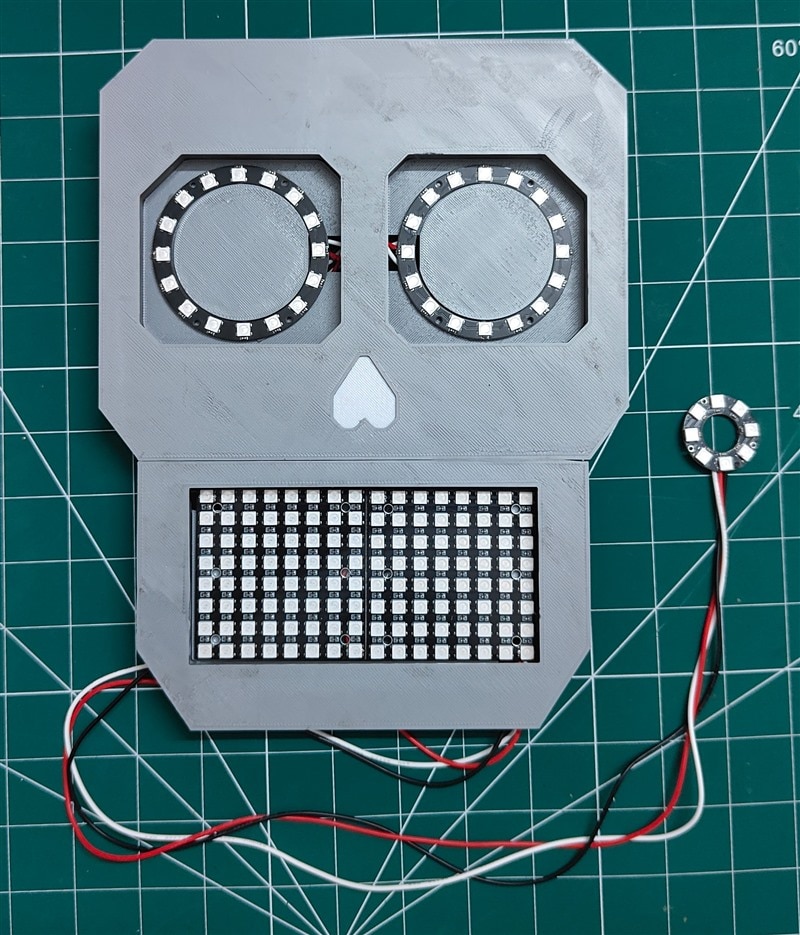
Inside the face.
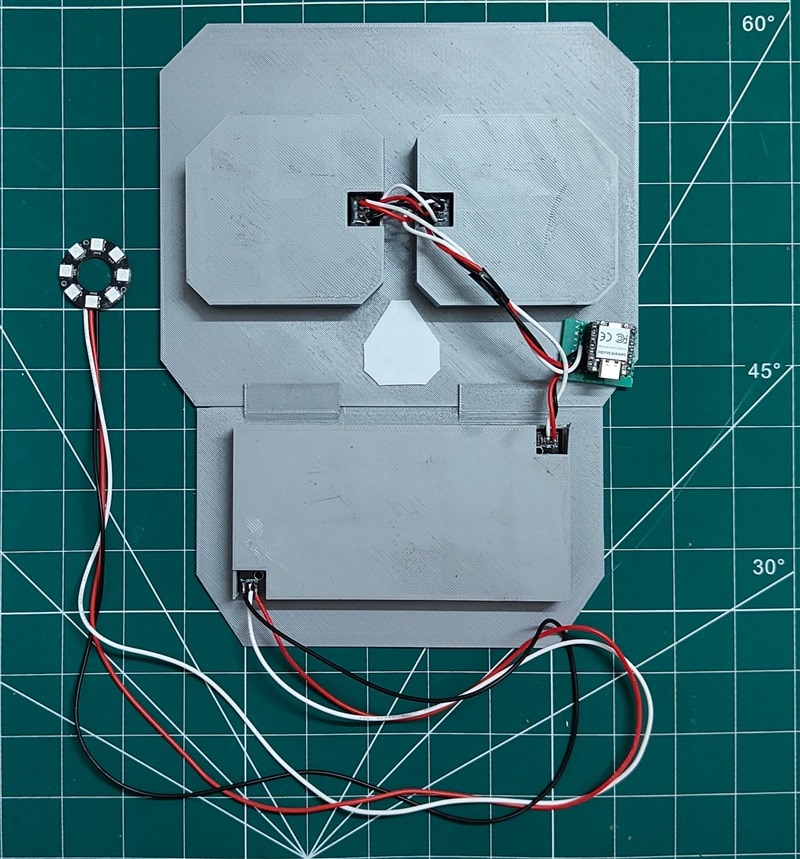
The back of the face.
3.4 The spell hand
Next to the bowl stands a printed hand making the horns sign, with a "TRY THIS!" sign in front of it. An 8-LED ring under the hand, on the same chain as the face, tells you what to do:
- Off while the creature sleeps.
- A slow yellow breath while it watches: a hint to try the sign.
- Yellow and red flashes while it snarls, to pull your eyes to it.
- Green when your spell works.
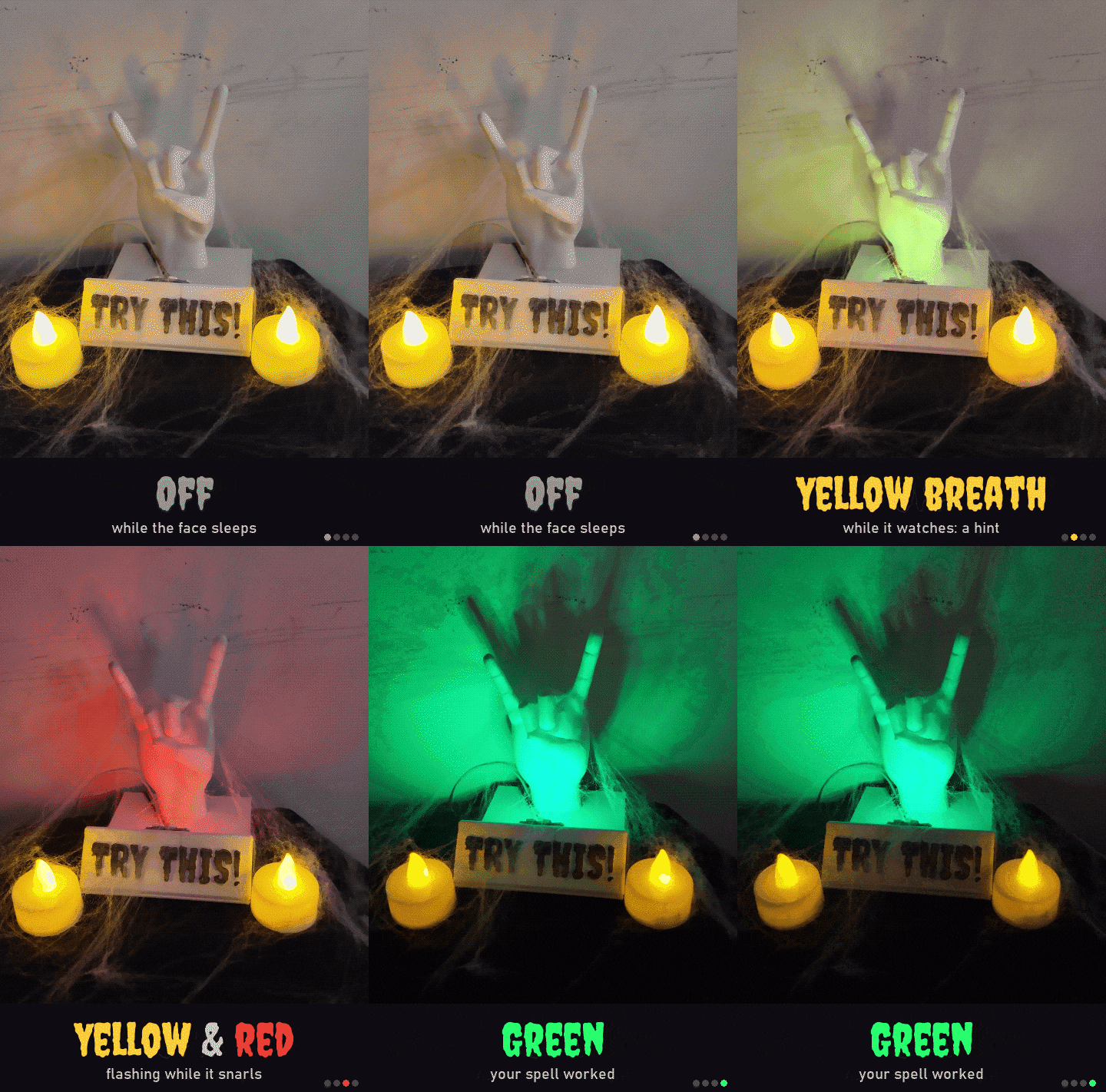
The ring's four signals.
3.5 The sound
A speaker plays a live mix driven by the game: 165 sounds cut from 81 recordings on Freesound, plus a tone made live.
- The hand tone. A ghostly theremin. Your hand's height sets the note on a dark scale, and as your hand comes closer, more layers swell into a chord.
- The creature. It snores in time with its mouth, growls on every dodge, laughs when a fake fools you, and sobs when it loses.
- The bowl. Every move gets a whoosh, fitted to the slider's own speed.
- The countdown. Kids have 10 s to take a sweet, and a music box warns them before the game starts again.
- The night. Wind and night sounds play quietly in the background.
Sound on: the hand tone, the night, the creature and the bowl.
3.6 How fast is it?
- From a camera picture to the move command: 40 to 107 ms.
- From the move command to the bowl stopping 18 cm away: 0.44 s, measured. The move itself takes 0.36 s at 700 mm a second; the other 80 ms is the USB round trip and Marlin holding back the first move.
Real speed and 8x slower, taking turns.
4 My nephew vs. the creature
The creature was built to beat grown-ups. But my six-year-old nephew, my first real tester, beats it easily.
- Too small to see. On his very first go, the cameras didn't even see his small arms, and the bowl never moved. I moved the cameras lower and closer, and that made them much better at spotting his hands.
- A hand in the bowl. A hand in the bowl makes it freeze, because ramming a bowl into a child's hand is not a good idea. He turned my safety feature into a cheat. So the bowl got a lid, to keep hands from going straight in.
- Lid one was a twist-lock design from MakerWorld, with its ring glued to the bowl. It lasted about two minutes. He simply ripped it off, glued ring and all.
- Lid two was going to lock into the bowl itself, which meant cutting the bowl. My measurements were wrong, it didn't fit, and it never even reached my nephew.
- Lid three is the simplest, and the best. A plain lid with nothing to grab, so your fingers slide off it. And if you do get a grip, its long inset means you have to pull it straight up, which is harder than it sounds.
- A hand in the way. The bowl won't move if a hand is in its path, so he held one hand low to pin it and lifted the lid with the other. Now, when a hand pins the bowl, the creature snarls and rattles it: a 25 mm hop and straight back, again and again, so you can't get a hold on the lid. A 12 mm hop was easy to beat. The bigger one helps, but it still isn't fast enough.
- Pressing down. The one cheat the creature can't beat. My nephew just presses down on the bowl. The motor slips, and the bowl has to re-home, slowly, which gives him plenty of time to open the lid and grab a sweet. With this setup I can't stop it. All I can do is pray the other kids don't find it too.
The right way, then my nephew's three cheats.
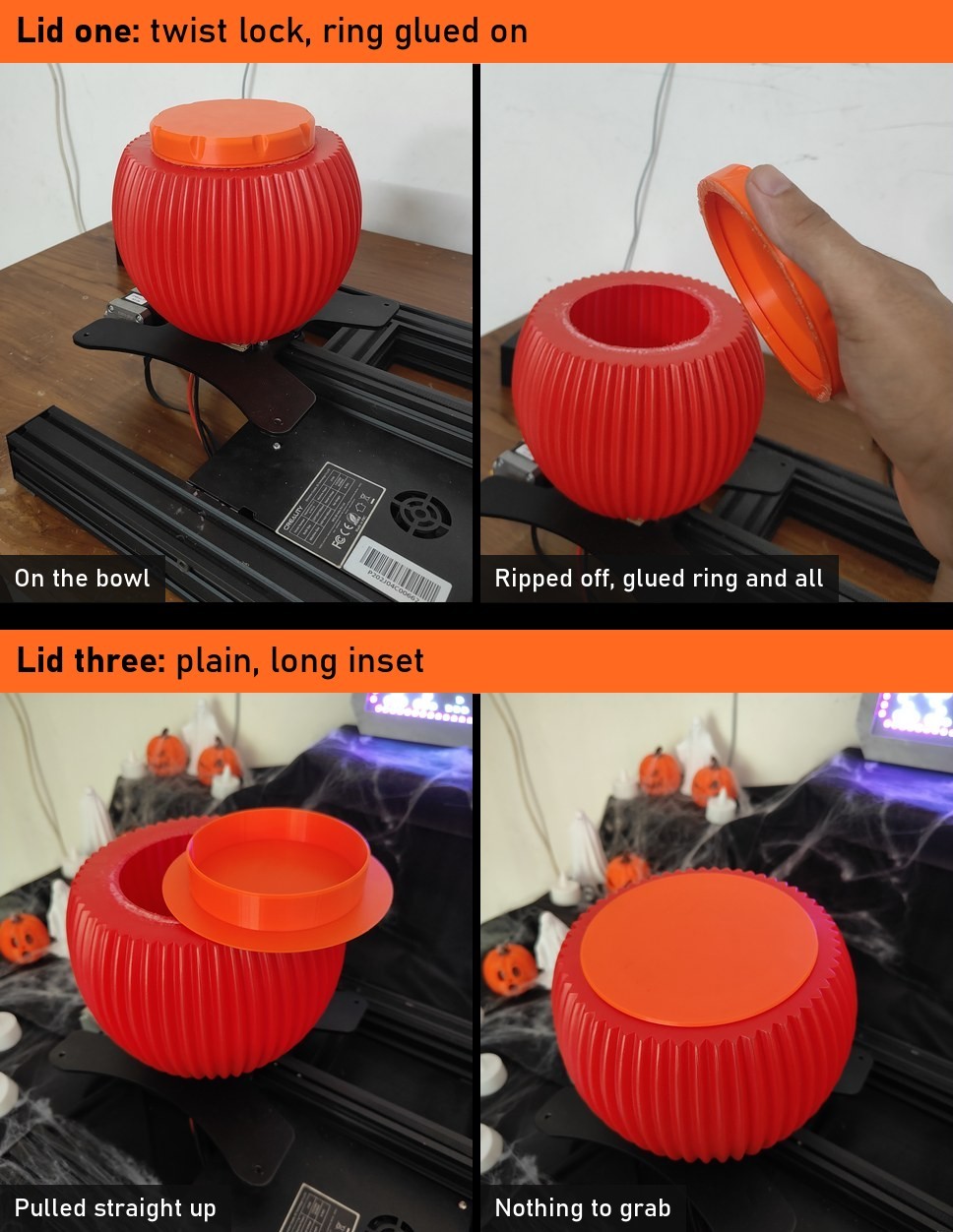
Lid one, ripped off. Lid three, nothing to grab.
5 Build your own
Everything is in my GitHub repo: https://github.com/rahuljeyaraj/spellbound-sweets. Each script explains itself at the top of the file.
5.1 Parts
| Part | Qty | Notes |
|---|---|---|
| Creality Ender 3 with BTT SKR Mini E3 V3 (TMC2209), Marlin 2.1.2.8 | 1 | only the Y axis is used |
| Lenovo 300 FHD Webcam | 2 | run at 1280 x 720, 30 fps |
| PC | 1 | any PC that runs Python |
| Seeed Studio XIAO RP2350 | 1 | drives the LEDs |
| WS2812 ring, 16 LEDs | 2 | the eyes |
| CJMCU 8 x 8 WS2812 board | 2 | the mouth |
| WS2812 ring, 8 LEDs | 1 | under the horns hand |
| Speaker | 1 | |
| Plastic flower pot, rim about 145 mm across | 1 | the bowl |
| Printed skull face, plain lid, horns hand, "TRY THIS!" sign and base plate | 1 each | all my own designs, in the repo's print folder, except the horns hand: that one is on MakerWorld (credited in the repo's README) |
| Table decoration | bats cut from black chart paper, black cloth, LED tea lights, 3D printed pumpkins and ghosts |
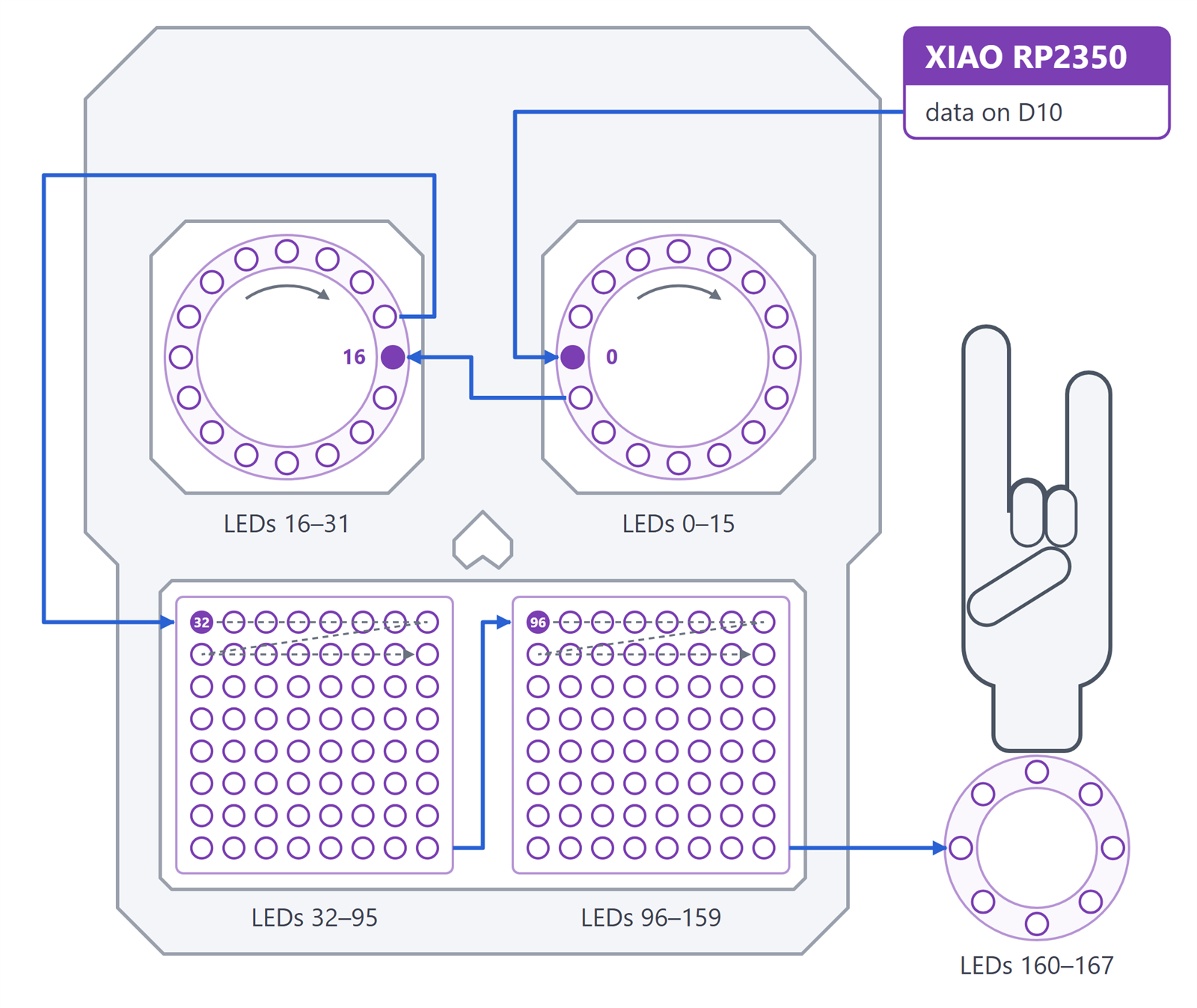
One data chain, 168 LEDs.
5.2 Steps
-
Get the code. Install uv and clone the repo. Every script runs the same way, and the first run installs everything it needs:
uv run python scripts/<name>.py -
Set up the axis. Take the heat bed off and fix the bowl to the carriage. Plug the SKR into the PC. Find your own speed limit with the y_speed script: it homes before every step and stops at the first slip.
-
Mount the cameras. Put two webcams high up and well apart, each seeing the whole bowl and about 30 cm past the table edge where hands come in. Give each its own USB port: mine would not run together on one hub. Aim them with the view script.
-
Calibrate the cameras. Print the chessboard and glue it to card. Take 15 to 25 pairs, then one photo of the board flat on the table. Aim for under 0.5 px. The last line shows your hands in 3D.
uv run python scripts/make_board.py uv run python scripts/stereo_calibrate.py uv run python scripts/hand3d.py -
Find the bowl. Print the markers and stick the 50 mm one on the slider's base. Then print the lid card, lay it on the rim, and give the rim calibration your rim's radius in mm (mine is 72.5).
uv run python scripts/make_marker.py
uv run python scripts/bowl_calibrate.py --port COM9
uv run python scripts/make_marker.py --lid 145
uv run python scripts/rim_calibrate.py --radius 72.5
The chessboard (at 4x speed), then the rail and the rim. -
Wire and flash the face. One WS2812 chain in this order: right eye, left eye, left mouth board, right mouth board, horns ring, with the data straight from the XIAO's D10 pin. Give each ring and board its own 5 V and GND pair from the XIAO's 5V and GND pins, and plug the XIAO into a USB hub with its own power supply. Flash the leds folder from PlatformIO. Until it hears from the PC, the face loops its moods as a test.
-
Make the sounds. Download the recordings, cut them into takes, then try them with the pad, where the mouse is the hand:
uv run python scripts/make_sounds.py --fetch uv run python scripts/make_sounds.py uv run python scripts/sound.py --pad -
Play. Use your printer's port. With --calibrate the game measures the rail before it starts, and it does it again by itself whenever the printer gets pushed sideways. Keys: q quits, h re-homes, d turns dodging on and off.
uv run python scripts/dodge.py --port COM9 --calibrate -
Dress the table. Bats, the horns hand on its ring, the "TRY THIS!" sign (in the print folder), pumpkins, ghosts, tea lights, and the room lights low.
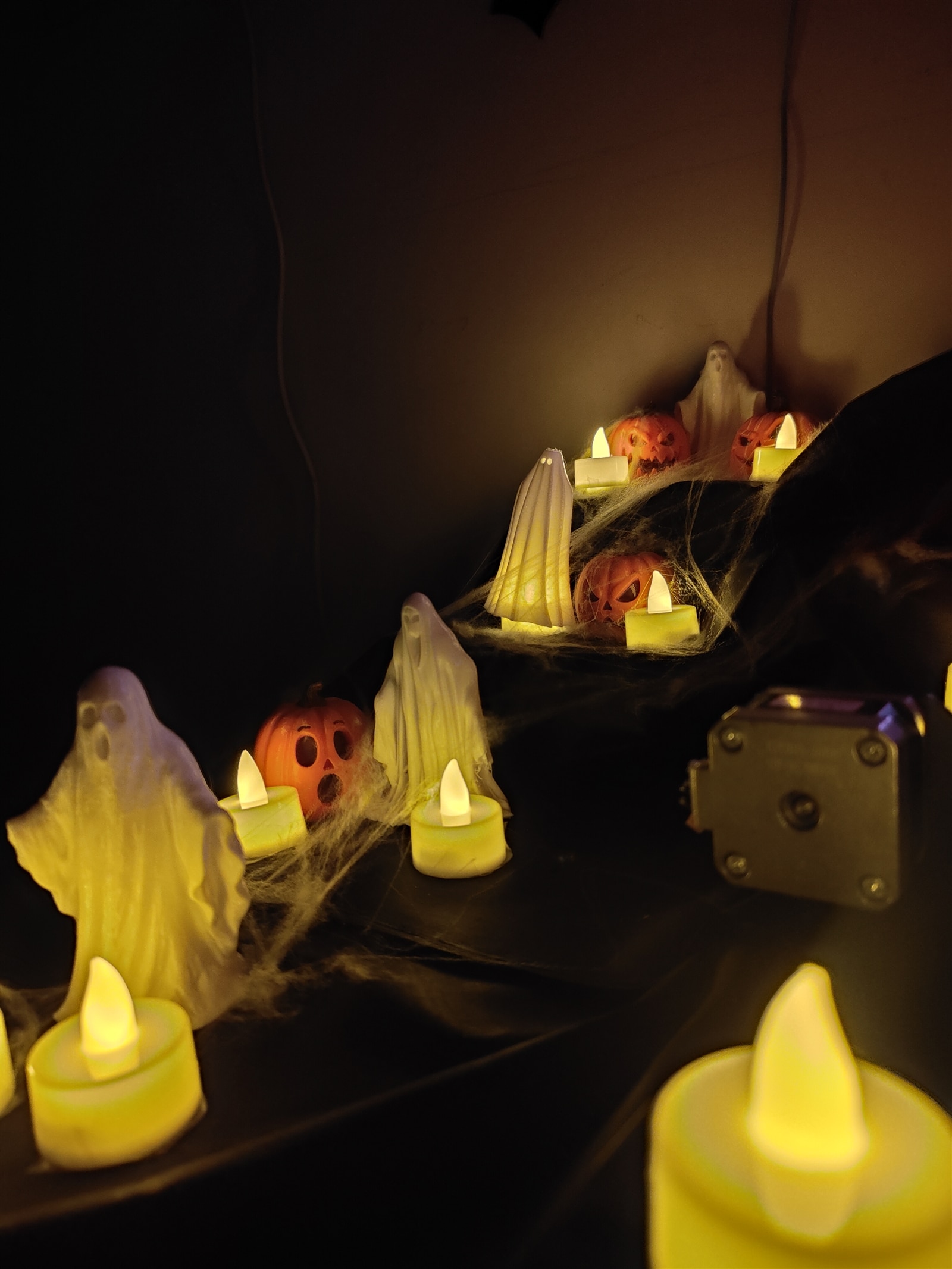
Printed pumpkins and ghosts (designers credited in the repo's README).
The creature still loses to a child who presses down, and to a grown-up who is quick with the lid. Come and try to take a sweet. Bring your horns.
Happy Halloween!
References
GitHub repo: https://github.com/rahuljeyaraj/spellbound-sweets
- scripts: the Python side: the game, calibration, the hand tracker, the sound and the axis speed tests
- leds: the face firmware for the XIAO RP2350 (PlatformIO)
- face: a browser preview of the face, with the mouse as the hand
- sounds: the list of every recording used, and a listening page
- print: my 3D printed parts: the skull face, the lid, the sign and the base plate
The credits are listed in the README.