


When computer vision first came out, I did what any normal person would do and made a life-sized judgmental Santa. It was programmed to judge whoever/whatever it saw and determine if they were naughty or nice, ideally with playful and thematic dialogue. It was fun, but where is the zazz? Fast forward 2 years, and this iteration of Santa can properly take action. If Santa deems someone nice, a robot arm reaches into a candy bowl and throws candy at them. If they're naughty, a nerf gun fires up and unloads on them. Tis the season for nerf and chaos!
Supplies
- Raspberry Pi 3 Model B x1
- Webcam, Logitech® HD Pro x1
- Ultrasonic Sensor - HC-SR04 (Generic) x1
- Seeed Studio SO-ARM100 x1
- Strong servo x2
- Nerf gun x1
- Usb speaker x1
Step 1: The Setup

This runs on a Raspberry pi, and the audio plays through a usb speaker. It uses a webcam for the computer vision, where we just take and process a frame at the correct time. We use an ultrasonic sensor to determine if someone has walked in front to begin with, so we're not just looking for someone at all times. As we'll get to, this uses a paid api so even though it doesn't cost a lot, it makes that much more sense (and cents) to not just have it running nonstop.
Step 2: Adding the Nerf Gun

Sometimes the simplest solutions are the best ones. I found a nerf gun that could be powered on and then run just by pulling the trigger, as opposed to all the ones that need pulled back after firing each time. The first setup I tried involved threading a string around its activation trigger and its firing trigger, which actually would've worked in full if not for the fact that I somehow broke the nerf gun in the process. So, I instead got 2 fairly strong servos and just glued them right onto the nerf gun. It worked absolutely perfectly. I was extra careful about programming how much to move them, where I did little iterations until it worked just right, so as to avoid damaging the nerf gun, but I found the sweet spot and we were ready to rock. It's a goofy project, so a slightly goofy setup just feels right. And, to that end, you'll notice from the close-up that the element that helped correctly seat the nerf gun on the stand were a couple of drum sticks. If it works, it works.
Step 3: Candy Throwing Robot
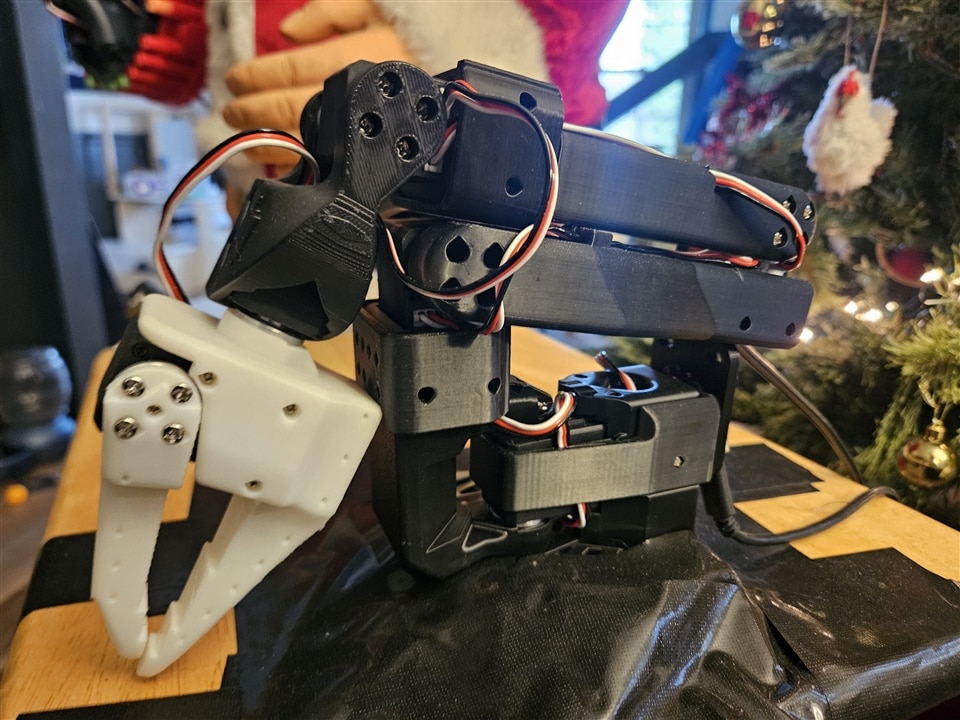
I had recently made a candy throwing robot and had intended to use it for Halloween (for obvious reasons). I instead ended up making an absolutely massive box fort, as one does. So, I realized that this was the perfect element for completing Judgmental Santa, where he would have something to do when he judged someone nice.
The robot arm is an SO-ARM100 I got from SEEED. It's meant to be used by having a leader arm that you move around, where the follower arm copies its movements. Instead, I have it programmed to go through a set of motions that have it reach into a candy bowl, wind back, and move forward quickly as it opens its hands such that it throws the candy. The arm was having a lot of issues by this point (seemingly from wear and tear) so I ended up making its path a little easier so it wouldn't have to work as hard against gravity, which didn't throw the candy quite as well but it got the job done.
One nice thing of this as well is that the setup for the robot arm called for the use of the little table that it is, indeed, duct taped to. This way it has a place to be and there's a place for the bowl of candy, but it also acted as an intuitive place to keep the ultrasonic sensor. Having it positioned on or around Santa was distracting.
Step 4: Code
The code is included, so here's a bit more on how it works. After the ultrasonic sensor detects someone, we pass a frame from the webcam to the OpenAI vision api along with an extensive and clear prompt. At the end of it, we make it very clear how to end its response, such that we can expect either the word "nice" or "naughty". We take that and run the relevant flow. If it's the nice flow, we have the lerobot process that runs it through its sequence of movements to throw the candy. If it's the naughty flow, we move the servo to activate the nerf gun, then the servo to fire, wait a moment, then move them back to their initial positions. This of course occurs after Santa has shared his thoughts out loud, where he is specifically told to comment on what he sees such that it's clear that he "sees" whoever and whatever he's looking at.
import time
from openai import OpenAI
import base64
import cv2
import os
import sys
import json
from pathlib import Path
import pigpio  # Use pigpio instead of RPi.GPIO for servo control
from playsound import playsound
from lerobot.common.robot_devices.motors.feetech import FeetechMotorsBus, TorqueMode
from lerobot.common.robot_devices.motors.configs import FeetechMotorsBusConfig
import RPi.GPIO as GPIO

# Force stdout to be unbuffered so we can see logs in real-time
sys.stdout = os.fdopen(sys.stdout.fileno(), 'w', buffering=1)
sys.stderr = os.fdopen(sys.stderr.fileno(), 'w', buffering=1)

print("=" * 60)
print("JUDGMENTAL SANTA STARTING UP")
print("=" * 60)

# API key - Replace with your OpenAI API key or use environment variable
api_key = os.getenv("OPENAI_API_KEY", "your-openai-api-key-here")
if api_key == "your-openai-api-key-here":
    print("ERROR: Please set your OpenAI API key!")
    print("Either set OPENAI_API_KEY environment variable or hardcode it in the script")
    sys.exit(1)

print(f"Using API key: {api_key[:10]}...")

client = OpenAI(api_key=api_key)
print("✓ OpenAI client initialized")

# Configuration for candy throwing robot
ROBOT_SEQUENCE = "throw_candy_at_kids"
ROBOT_SPEED = "slow"  # very_slow, slow, medium, fast
ROBOT_PORT = "/dev/ttyACM0"
SEQUENCE_FOLDER = "/home/donuts/lerobot/sequences"  # Path to your robot sequences

# Ultrasonic sensor pins (avoid pin 10 and 18 - used for servos)
TRIG_PIN = 23
ECHO_PIN = 24

# Detection settings
DETECTION_DISTANCE_FEET = 10
DETECTION_DISTANCE_CM = DETECTION_DISTANCE_FEET * 30.48  # Convert to cm

# Robot configuration
MOTORS_CONFIG = {
    "shoulder_pan": [1, "sts3215"],
    "shoulder_lift": [2, "sts3215"],
    "elbow_flex": [3, "sts3215"],
    "wrist_flex": [4, "sts3215"],
    "wrist_roll": [5, "sts3215"],
    "gripper": [6, "sts3215"],
}

# Function to setup GPIO for ultrasonic sensor
def setup_gpio():
    """Setup GPIO pins for ultrasonic sensor"""
    GPIO.setwarnings(False)
    GPIO.setmode(GPIO.BCM)
    GPIO.setup(TRIG_PIN, GPIO.OUT)
    GPIO.setup(ECHO_PIN, GPIO.IN)
    print(f"✓ GPIO setup complete - Ultrasonic sensor on pins {TRIG_PIN}/{ECHO_PIN}")

# Function to measure distance using ultrasonic sensor
def measure_distance():
    """Measure distance using ultrasonic sensor"""
    try:
        # Send trigger pulse
        GPIO.output(TRIG_PIN, True)
        time.sleep(0.00001)  # 10 microseconds
        GPIO.output(TRIG_PIN, False)

        # Measure echo time
        start_time = time.time()
        pulse_start = start_time
        while GPIO.input(ECHO_PIN) == 0:
            pulse_start = time.time()
            if pulse_start - start_time > 0.1:  # Timeout after 100ms
                return float('inf')

        pulse_end = pulse_start
        while GPIO.input(ECHO_PIN) == 1:
            pulse_end = time.time()
            if pulse_end - pulse_start > 0.1:  # Timeout after 100ms
                return float('inf')

        # Calculate distance
        pulse_duration = pulse_end - pulse_start
        distance_cm = pulse_duration * 17150  # Speed of sound calculation

        return distance_cm

    except Exception as e:
        print(f"⚠️ Distance measurement error: {e}")
        return float('inf')

# Function to capture image from webcam
def capture_image(image_path='captured_image.jpg'):
    print("Initializing webcam...")
    cap = cv2.VideoCapture(0)
    if not cap.isOpened():
        print("Cannot open webcam.")
        return False

    # Set camera properties for better image quality
    cap.set(cv2.CAP_PROP_FRAME_WIDTH, 1280)
    cap.set(cv2.CAP_PROP_FRAME_HEIGHT, 720)
    cap.set(cv2.CAP_PROP_AUTOFOCUS, 1)
    cap.set(cv2.CAP_PROP_AUTO_EXPOSURE, 1)

    print("Warming up camera (10 seconds)...")
    time.sleep(3)  # Initial warmup

    # Discard first few frames to let camera adjust to lighting
    for i in range(10):
        cap.read()
        time.sleep(0.3)

    print("Camera warmed up. Capturing image...")

    # Capture multiple frames and use the last one (best exposure)
    for i in range(5):
        ret, frame = cap.read()
        time.sleep(0.2)

    if not ret:
        print("Can't receive frame. Exiting...")
        cap.release()
        return False

    # Save in the judgmental_santa directory so you can view it
    script_dir = os.path.dirname(os.path.abspath(__file__))
    full_image_path = os.path.join(script_dir, image_path)

    cv2.imwrite(full_image_path, frame)
    cap.release()
    print(f"Image captured and saved as {full_image_path}")
    return True

# Function to encode image to base64
def encode_image(image_path):
    print(f"Encoding image {image_path} to base64...")
    with open(image_path, "rb") as image_file:
        return base64.b64encode(image_file.read()).decode('utf-8')

# Function to extract judgment from OpenAI's response
def extract_judgment(text):
    if "Santa Deems You... Naughty" in text:
        return "Naughty"
    elif "Santa Deems You... Nice" in text:
        return "Nice"
    else:
        return "Unknown"

# Function to generate and play audio from text
def play_audio(text):
    print("Generating speech from text...")
    script_dir = os.path.dirname(os.path.abspath(__file__))
    audio_file_path = os.path.join(script_dir, 'audio', 'output.mp3')
    os.makedirs(os.path.dirname(audio_file_path), exist_ok=True)

    response = client.audio.speech.create(
        model="tts-1",
        voice="onyx",
        input=text
    )

    response.stream_to_file(str(audio_file_path))
    print(f"Audio generated and saved as {audio_file_path}")

    # Try multiple audio playback methods
    print("Attempting to play audio...")
    sys.stdout.flush()

    # Prefer ALSA via mpg123 with explicit device to work under systemd
    try:
        import subprocess
        env = os.environ.copy()
        env["MPG123_OUTPUT_MODULE"] = "alsa"
        # Try USB audio first (card 4, device 0), then onboard headphones (card 0)
        candidates = [
            ("/usr/bin/mpg123", ["-q", "-a", "plughw:4,0"]),
            ("/usr/bin/mpg123", ["-q", "-a", "hw:4,0"]),
            ("/usr/bin/mpg123", ["-q", "-a", "plughw:0,0"]),
            ("/usr/bin/mpg123", ["-q", "-a", "hw:0,0"]),
            ("/usr/bin/mpg123", ["-q"]),
            ("mpg123", ["-q", "-a", "plughw:4,0"]),
            ("mpg123", ["-q", "-a", "plughw:0,0"]),
            ("mpg123", ["-q"]),
        ]
        for exe, args in candidates:
            try:
                result = subprocess.run([exe, *args, str(audio_file_path)],
                                        env=env,
                                        capture_output=True,
                                        check=True)
                print(f"✓ Audio played with {exe} {' '.join(args)}")
                return
            except Exception as inner_e:
                last_err = inner_e
        print(f"mpg123 attempts failed: {last_err}")
    except Exception as e:
        print(f"mpg123 block failed: {e}")

    # Fallback: aplay via ALSA direct
    try:
        import subprocess
        for dev in ["plughw:4,0", "plughw:0,0"]:
            try:
                result = subprocess.run(["/usr/bin/aplay", "-q", "-D", dev, str(audio_file_path)],
                                        capture_output=True,
                                        check=True)
                print(f"✓ Audio played with aplay (ALSA) on {dev}")
                return
            except Exception as inner_e:
                last_err2 = inner_e
        print(f"aplay attempts failed: {last_err2}")
    except Exception as e:
        print(f"aplay block failed: {e}")

    # Method: playsound as last resort
    try:
        playsound(str(audio_file_path))
        print(f"✓ Audio played with playsound")
        return
    except Exception as e:
        print(f"playsound failed: {e}")

    # Method: omxplayer (legacy)
    try:
        import subprocess
        result = subprocess.run(["/usr/bin/omxplayer", "-o", "local", str(audio_file_path)],
                                capture_output=True,
                                check=True)
        print(f"✓ Audio played with omxplayer")
        return
    except Exception as e:
        print(f"omxplayer failed: {e}")

    print("⚠ Warning: Audio file saved but could not play.")
    print("Audio is saved at: " + str(audio_file_path))

# Function to setup servos with pigpio library
def setup_servo(pi, pin):
    print(f"Setting up servo on pin {pin}...")
    pi.set_mode(pin, pigpio.OUTPUT)
    pi.set_PWM_frequency(pin, 50)  # 50 Hz for servo control
    return pin

# Function to move the servo to a specific angle (0-180 degrees)
def move_servo(pi, pin, angle):
    print(f"Moving servo on pin {pin} to {angle} degrees...")
    pulse_width = int((angle / 180.0) * 2000 + 500)  # Map angle to pulse width
    pi.set_servo_pulsewidth(pin, pulse_width)
    time.sleep(0.5)  # Allow servo time to move

# Function to stop the servo
def stop_servo(pi, pin):
    print(f"Stopping servo on pin {pin}...")
    pi.set_servo_pulsewidth(pin, 0)  # Stop sending pulses to the servo

# Function to handle the "Naughty" judgment with servo movements
def youre_naughty():
    print("Executing 'you're naughty' action...")
    pi = pigpio.pi()
    if not pi.connected:
        print("Failed to connect to pigpio daemon.")
        print("Make sure pigpio daemon is running: sudo pigpiod")
        return

    # Setup servos on pins 10 and 18
    servo_pin_10 = setup_servo(pi, 10)  # Servo on pin 10
    servo_pin_18 = setup_servo(pi, 18)  # Servo on pin 18

    try:
        print("Moving servos...")
        # Move servo on pin 10
        move_servo(pi, servo_pin_10, 90)  # Move to 90 degrees
        move_servo(pi, servo_pin_10, 100)  # Move to 100 degrees

        # Move servo on pin 18
        move_servo(pi, servo_pin_18, 100)  # Move to 100 degrees
        move_servo(pi, servo_pin_18, 110)  # Move to 110 degrees

        # Pause for a while to observe the movements
        time.sleep(2)

        # Move servos back to initial positions
        move_servo(pi, servo_pin_18, 100)  # Back to 100 degrees
        move_servo(pi, servo_pin_10, 90)   # Back to 90 degrees

    finally:
        # Stop servos and cleanup
        stop_servo(pi, servo_pin_10)
        stop_servo(pi, servo_pin_18)
        pi.stop()
        print("Servos stopped")

# Function to throw candy using LeRobot arm
def youre_nice():
    print("Executing 'you're nice' action - throwing candy!")

    try:
        # Load the sequence file
        file_path = Path(SEQUENCE_FOLDER) / f"{ROBOT_SEQUENCE}.json"
        if not file_path.exists():
            print(f"❌ Sequence file not found: {file_path}")
            print("Skipping candy throw - sequence file missing")
            return

        with open(file_path, "r") as f:
            data = json.load(f)
        sequence = data["sequence"]

        # Connect to motors
        config = FeetechMotorsBusConfig(port=ROBOT_PORT, motors=MOTORS_CONFIG)
        motor_bus = FeetechMotorsBus(config)
        motor_bus.connect()
        print("✓ Connected to robot motors")

        # Remove all limits
        print("🔓 Removing all limits...")
        for motor_name in MOTORS_CONFIG.keys():
            try:
                motor_bus.write("Min_Angle_Limit", 0, motor_name)
                motor_bus.write("Max_Angle_Limit", 4095, motor_name)
            except Exception as e:
                print(f"⚠️ {motor_name}: {e}")

        # Set speed
        speed_settings = {
            "very_slow": {"acceleration": 50, "max_accel": 50},
            "slow": {"acceleration": 100, "max_accel": 100},
            "medium": {"acceleration": 150, "max_accel": 150},
            "fast": {"acceleration": 254, "max_accel": 254},
        }
        settings = speed_settings.get(ROBOT_SPEED, speed_settings["slow"])

        print(f"⚙️ Setting speed to {ROBOT_SPEED} with LOCKED torque...")
        for motor_name in MOTORS_CONFIG.keys():
            try:
                motor_bus.write("Mode", 0, motor_name)  # Position Control
                motor_bus.write("P_Coefficient", 32, motor_name)  # Higher P for stronger hold
                motor_bus.write("I_Coefficient", 0, motor_name)
                motor_bus.write("D_Coefficient", 64, motor_name)  # Higher D for stability
                motor_bus.write("Lock", 1, motor_name)  # LOCK=1 to hold position against gravity
                motor_bus.write("Torque_Limit", 1023, motor_name)  # Maximum torque
                motor_bus.write("Maximum_Acceleration", settings["max_accel"], motor_name)
                motor_bus.write("Acceleration", settings["acceleration"], motor_name)
            except Exception as e:
                print(f"⚠️ {motor_name}: {e}")

        # Enable torque
        motor_bus.write("Torque_Enable", TorqueMode.ENABLED.value)
        print("⚡ Torque ON - throwing candy!")

        # Execute the sequence
        print(f"🍬 Throwing candy with sequence: {ROBOT_SEQUENCE}")
        for i, step in enumerate(sequence):
            pos = step["positions"]
            duration = step["duration"]
            position_num = step["position"]
            pos_str = " | ".join([f"{motor}:{position:4d}" for motor, position in pos.items()])

            if position_num == 1:
                print(f"Position {position_num}: {pos_str} (moving to start)")
                for motor_name, position in pos.items():
                    if motor_name in MOTORS_CONFIG:
                        motor_bus.write("Goal_Position", int(position), motor_name)
                time.sleep(1.5)
            else:
                if duration == 0:
                    print(f"Position {position_num}: {pos_str} (SUPER FAST)")
                    for motor_name, position in pos.items():
                        if motor_name in MOTORS_CONFIG:
                            motor_bus.write("Goal_Time", 200, motor_name)
                            motor_bus.write("Goal_Position", int(position), motor_name)
                    time.sleep(0.4)
                else:
                    print(f"Position {position_num}: {pos_str} (SMOOTH ~{duration}s)")
                    for motor_name, position in pos.items():
                        if motor_name in MOTORS_CONFIG:
                            motor_bus.write("Goal_Position", int(position), motor_name)
                    time.sleep(0.8)

        print("✓ Candy thrown successfully!")

        # Disable torque
        motor_bus.write("Torque_Enable", TorqueMode.DISABLED.value)
        motor_bus.disconnect()
        print("✓ Robot disconnected")

    except Exception as e:
        print(f"❌ Error throwing candy: {e}")
        import traceback
        traceback.print_exc()
        print("Continuing without candy throw...")

# Main program to capture image, analyze it, and trigger actions based on judgment
def main():
    print("\n" + "=" * 60)
    print("ENTERING MAIN LOOP")
    print("=" * 60)
    sys.stdout.flush()

    # Setup GPIO for ultrasonic sensor
    setup_gpio()

    print(f"\n🎅 JUDGMENTAL SANTA ACTIVE 🎅")
    print(f"Detection range: {DETECTION_DISTANCE_FEET} feet")
    print(f"Watching for visitors...")
    print("Press Ctrl+C to stop\n")

    last_detection_time = 0
    cooldown_period = 60  # seconds between detections

    try:
        while True:
            distance_cm = measure_distance()
            current_time = time.time()

            if distance_cm <= DETECTION_DISTANCE_CM:
                if current_time - last_detection_time > cooldown_period:
                    print(f"🚨 Person detected at {distance_cm:.1f}cm!")
                    last_detection_time = current_time

                    print("\n" + "-" * 60)
                    print("Starting judgment process...")
                    print("-" * 60)
                    sys.stdout.flush()

                    # Capture image from webcam
                    script_dir = os.path.dirname(os.path.abspath(__file__))
                    image_path = os.path.join(script_dir, 'captured_image.jpg')

                    if not capture_image(image_path):
                        print("Image capture failed. Continuing to next cycle.")
                        continue

                    # Encode the image to base64
                    base64_image = encode_image(image_path)

                    # Prepare messages for OpenAI API (Santa Judgment)
                    system_prompt = """
                    You are Judgmental Santa. Analyze the image provided and determine whether the person is Naughty or Nice based on the following rules:
                    - If the person is a child, they are always Nice.
                    - If the person is an adult, there is a 70% chance they are Naughty and a 30% chance they are Nice.

                    Your response should:
                    - Sound like Santa Claus.
                    - Reference specific aspects of the image that led to your determination.
                    - Reveal the judgment at the very end in the format: "Santa Deems You... Nice" or "Santa Deems You... Naughty".
                    """

                    user_prompt = "Please analyze the following image and determine if the person is Naughty or Nice. Respond with funny reasoning on why they are naughty or nice. Be concise. Only 1-2 sentences before your judgment."

                    # Send request to OpenAI API
                    try:
                        print("Sending request to OpenAI API...")
                        response = client.chat.completions.create(
                            model="gpt-4o",  # Updated to current vision model
                            messages=[
                                {"role": "system", "content": system_prompt},
                                {
                                    "role": "user",
                                    "content": [
                                        {"type": "text", "text": user_prompt},
                                        {
                                            "type": "image_url",
                                            "image_url": {
                                                "url": f"data:image/jpeg;base64,{base64_image}"
                                            }
                                        }
                                    ]
                                }
                            ],
                            max_tokens=300,
                        )
                    except Exception as e:
                        error_message = str(e)
                        print(f"An error occurred: {e}")

                        # Check for quota exceeded error
                        if "429" in error_message and "quota" in error_message.lower():
                            print("\n" + "=" * 60)
                            print("🎅 Santa exceeded his quota and needs a nap! 😴")
                            print("=" * 60)
                            GPIO.cleanup()
                            sys.exit(0)

                        print("Continuing to next cycle.")
                        continue

                    # Extract the judgment and process the result
                    assistant_message = response.choices[0].message.content
                    print("OpenAI response received:")
                    print(assistant_message)

                    # Extract judgment (Naughty or Nice)
                    judgment = extract_judgment(assistant_message)
                    print(f"Judgment extracted: {judgment}")

                    # Play the audio response
                    play_audio(assistant_message)

                    # Trigger action based on judgment
                    if judgment == "Naughty":
                        youre_naughty()
                    elif judgment == "Nice":
                        youre_nice()
                    else:
                        print("Unknown judgment - no action taken.")

            time.sleep(0.1)  # Check 10 times per second

    except KeyboardInterrupt:
        print("\n\nShutting down Judgmental Santa...")
        GPIO.cleanup()
        sys.exit(0)
    except Exception as e:
        print(f"\n\nFATAL ERROR: {e}")
        import traceback
        traceback.print_exc()
        GPIO.cleanup()
        sys.exit(1)

# Run the main function
if __name__ == "__main__":
    try:
        print("Starting Judgmental Santa...")
        sys.stdout.flush()
        main()
    except KeyboardInterrupt:
        print("\n\nShutting down Judgmental Santa...")
        GPIO.cleanup()
        sys.exit(0)
    except Exception as e:
        print(f"\n\nFATAL ERROR: {e}")
        import traceback
        traceback.print_exc()
        GPIO.cleanup()
        sys.exit(1)
Step 5: The Result

Combine a goofy AI vision flow, a nerf gun, and a robot arm and it turns out you do indeed get good Christmas-y fun. Getting this version together was particularly motivated by a big family reunion we had this year, and having Judgmental Santa join the festivities was really enjoyable.
Hope you enjoyed this crazy creation. Merry Christmas.


