


INTRO This project , named Sharky the Chase Tank, complements the RC Hammering Rubber Duck in the Tub entry, autonomously hunt down that nefarious hammering duck. Sharks eat ducks.
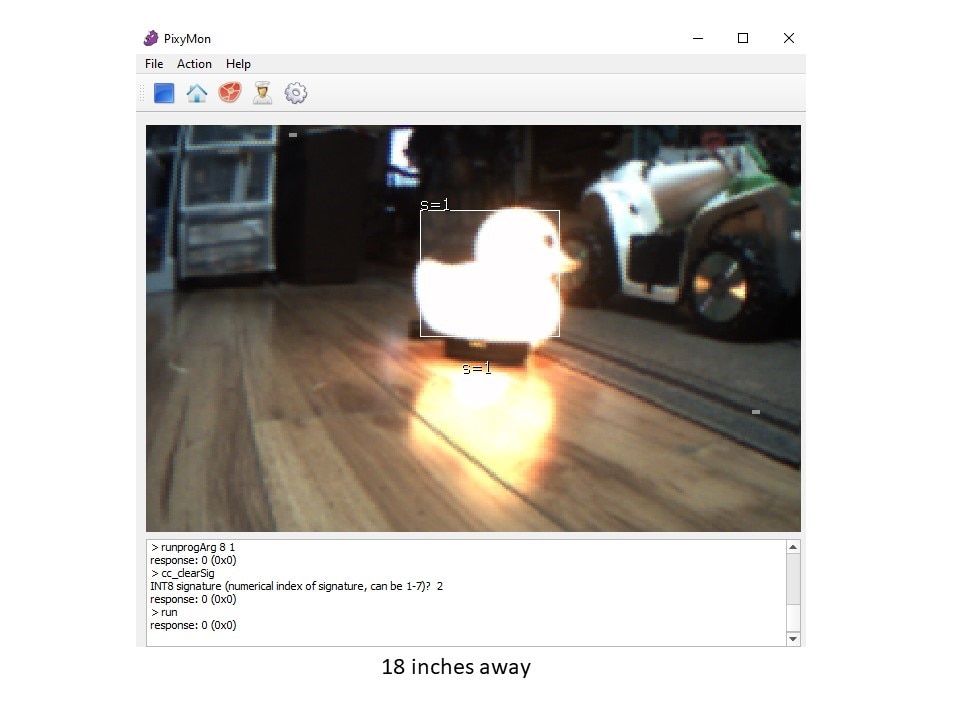
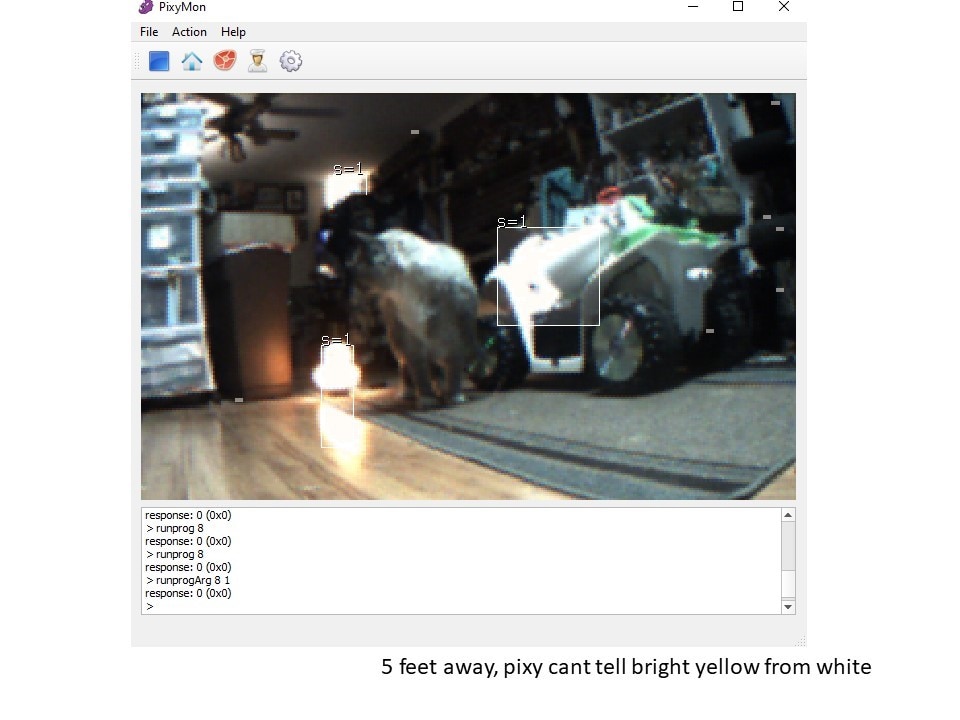
This project is a great example of persistence and lessons learned to build a better project. In testing, the PixyCam is an older object detect design using blob color detection for object detection. It doesnt work well in this practical robot application as the colors arent sensitive enough to differentiate dissimilar objects and it cant tell a Duck from a lamp. The learning from this project will be used to create the next generation of Sharky the Super Chase Tank !
I failed the PixyCam during troubleshooting and testing. Rather than replace the PixyCam, I want to make a generational platform change and upgrade to OpenCV for real object detection for the Chase Tank steering. That tho will be another project later.
The Chase Tank uses a model tank chassis, each tread has an independant DC motor. Ping Sensors and a PixyCam are used for object detection. PixyCam is using its tilt and pan accessory to do quick area searchs. There is an onboard DVM to keep an eye on the battery volts.
Introducing Sharky the Chase Tank operating modes:
- object detected 6 inches in front of either treads by ping sensor - lite the red LED & disable tank tread motion until the object
- Search mode - search for the rubber duck by panning the camera. If no Duck is seen, rotate the tank and try panning the camera again. White LED lit while searching
- Duck is seen by pixycam (SIGNATURE=1 Block 0 Pixels>20 ). Move towards target Duck, gating PWM H bridge for both left and right side threads at 80% duty FWD. Using the delta position on either side of center as seen by the camera to steer the tank's right hand side tread , in graduated speed increments plus or minus from the 80% PWM duty. --- the green LED is lit when operating in this mode. This mode is mutually exclusive with Search Mode.
Challenges : I was my own worst enemy,
- PixyCam gets very hot in a couple spots. The PixyCam pan/tilt failed tilt servo seems to mechanically failed causing a locked armature condition. PixyCam let out smoke, but seems to continue to function with the tilt servo disconnected. I disabled code that use the tilt motion.
- The 7.4 V Lipo was puffy, so grabbed another Lipo battery to use. Opps, grabbed a 11.1V Lipo and plugged it in. The PixyCam upper Volt limit is 10V. Another big oooopps. Im thinking that 11.1 V Lipo was also bad, so did no real damage.
- I wanted to use an Arduino UNO R4 as the main controller. The Arduino PixyCam library is incompatible with UNO R4, decided to use an Arduino Nano R3.
Sharky the Tank was working with PixyCam, but wasnt working correctly. I added diagnostic LEDs for the operating modes to help troubleshoot. The PING sensor code was interfereing with the SPI library so I added a second Arduino Nano dedicated for the ping sensors.
- The Arduino Nano SPI connector is backwards from the Arduino Uno. Opps , In spite of checking, I plugged it in wrong, and his is likely when PixyCam got damaged.
Operational videos
photos:


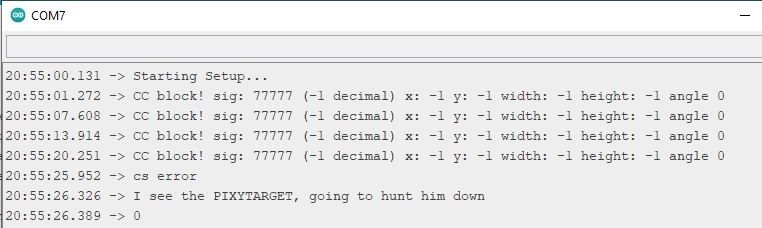
bad PixyCam data with 5V from Arduino SPI connector and the 7.4V power feed after failure
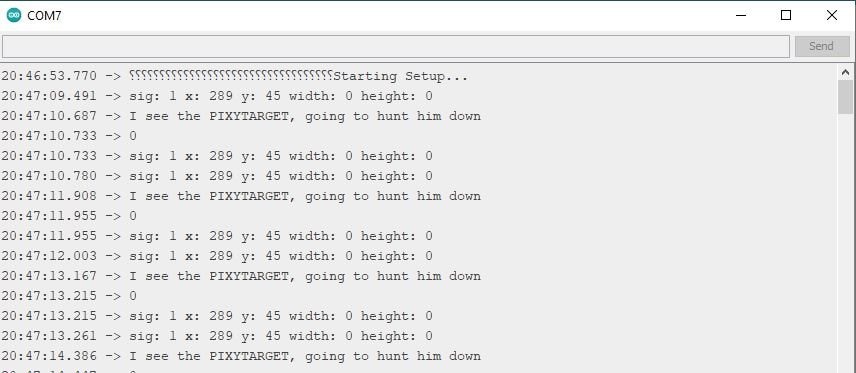
bad PixyCam data with 5V from Arduino SPI connector only after failure
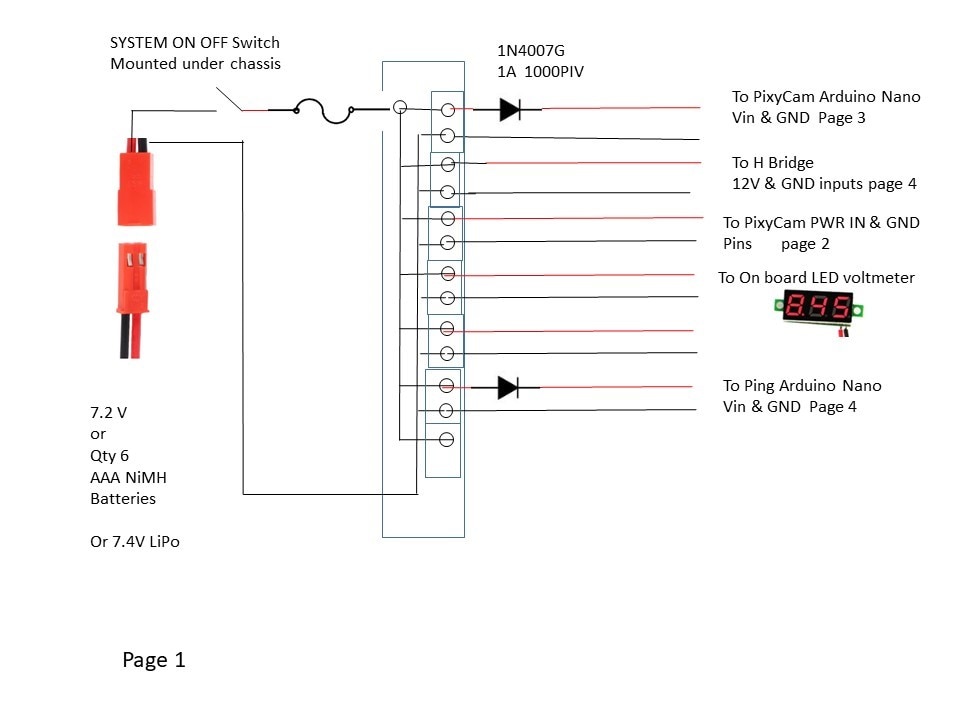
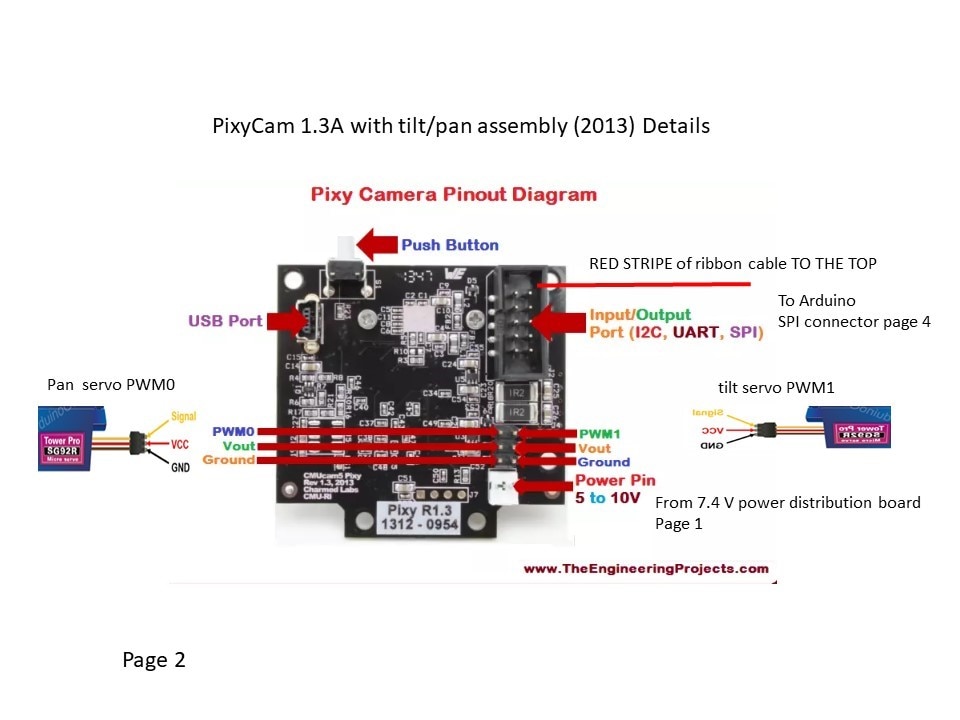
wiring schematics
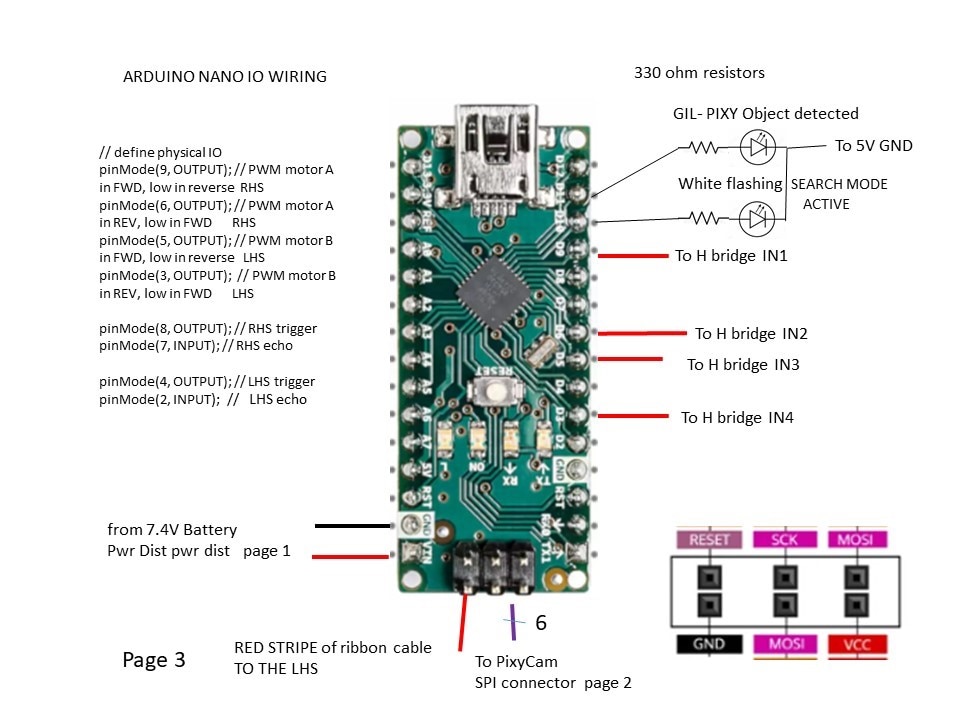
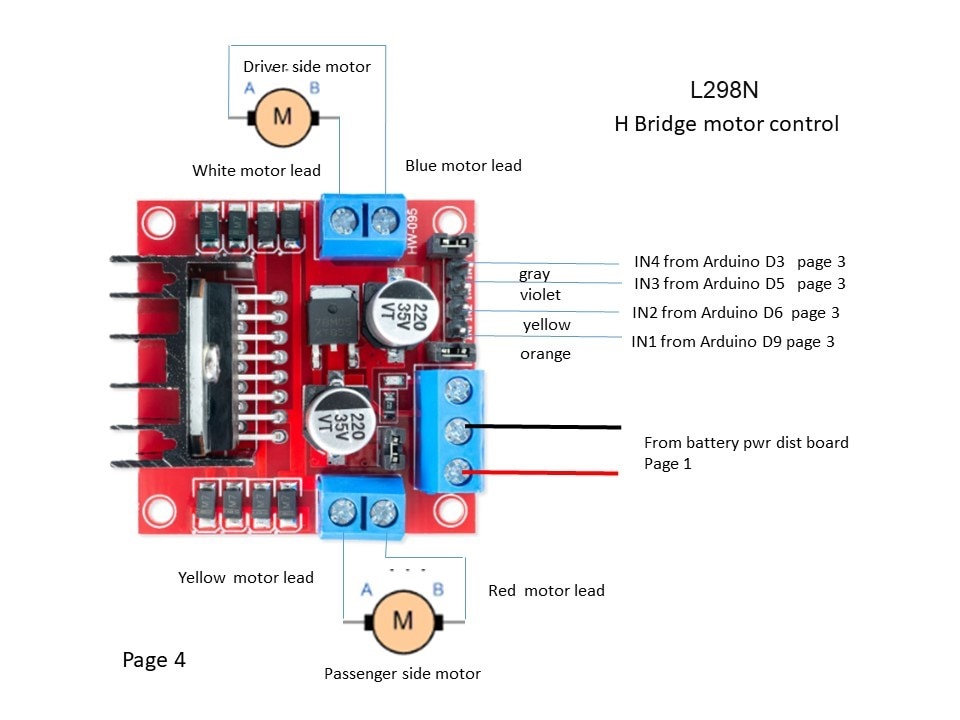
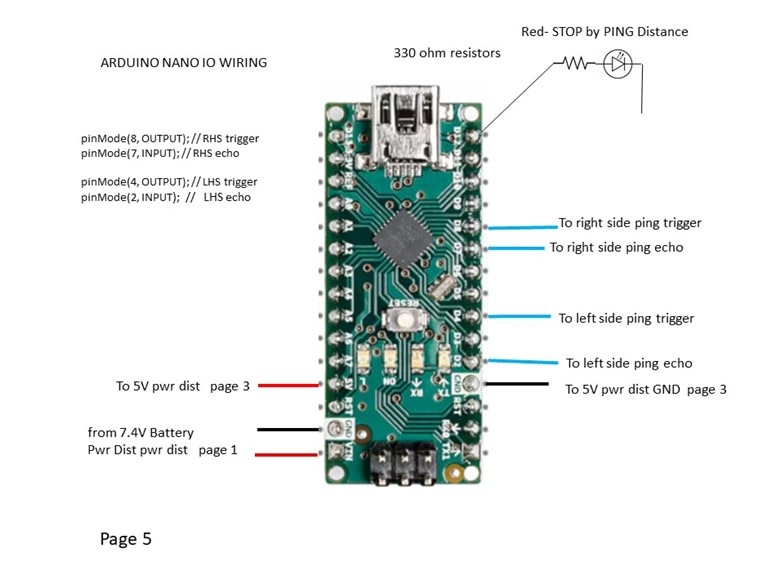
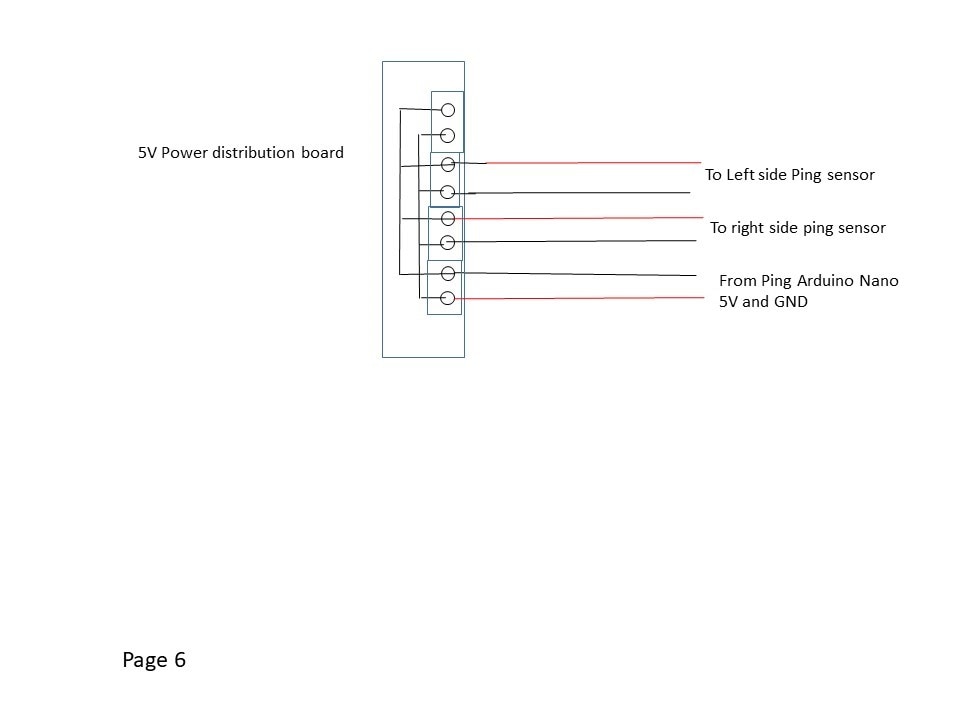

code from PixyCam Arduino
//Ver3ChaseTank_PixyCam_Nano.ino is adapted from
//GiraffeHunterRev2_LessSearchMoreSnapshots.ino
// add in turning speed based on the size of detected object
//
// This version removes the PING sensor function and replaces with a discrete input to STOP
// gating the H bridge. It is not failsafe, with a TRUE input on D12 meaning to STOP gating.
//
//begin license header
//
// This file is part of Pixy CMUcam5 or "Pixy" for short
//
// All Pixy source code is provided under the terms of the
// GNU General Public License v2 (http://www.gnu.org/licenses/gpl-2.0.html).
// Those wishing to use Pixy source code, software and/or
// technologies under different licensing terms should contact us at
// cmucam@cs.cmu.edu. Such licensing terms are available for
// all portions of the Pixy codebase presented here.
//
// end license header
//
// This sketch is a good place to start if you're just getting started with
// Pixy and Arduino.  This program simply prints the detected object blocks
// (including color codes) through the serial console.  It uses the Arduino's
// ICSP port.  For more information go here:
//
// http://cmucam.org/projects/cmucam5/wiki/Hooking_up_Pixy_to_a_Microcontroller_(like_an_Arduino)
//
// It prints the detected blocks once per second because printing all of the
// blocks for all 50 frames per second would overwhelm the Arduino's serial port.
//
// Pixy commands listed here for my convenience
//
// getBlocks() accepts an optional number argument (uint16_t) that indicates the maximum number of blocks you want getBlocks() to return.
// pixy.blocks[i].signature The signature number of the detected object (1-7 for normal signatures)
// pixy.blocks[i].x The x location of the center of the detected object (0 to 319)
// pixy.blocks[i].y The y location of the center of the detected object (0 to 199)
// pixy.blocks[i].width The width of the detected object (1 to 320)
// pixy.blocks[i].height The height of the detected object (1 to 200)
// pixy.blocks[i].angle The angle of the object detected object if the detected object is a color code.
// pixy.blocks[i].print() A member function that prints the detected object information to the serial port
// int8_t setServos(uint16_t s0, uint16_t s1)
// This method sets the pan/tilt servos that are plugged into Pixy's two servo ports. The two arguments s0 and s1 can range from 0 to 1000.
// int8_t setBrightness(uint8_t brightness)
// This method sets the brightness (exposure) of Pixy's camera. The brightness argument can range between 0 and 255 with 255 being the brightest setting.
// int8_t setLED(uint8_t r, uint8_t g, uint8_t b)
// This method sets the RGB LED on front of Pixy. The r, g and b arguments can range between 0 and 255.
//
//  http://www.cmucam.org/projects/cmucam5/wiki/Porting_Guide
//The serial protocol
//The protocol is data-efficient binary.
//The objects in each frame are sorted by size, with the largest objects sent first.
//You can configure the maximum number of objects sent per image frame ("Max blocks" parameter).
//SPI and I2C operate in "slave mode" and rely on polling to receive updates.
//When there are no detected objects (no data) Pixy sends zeros if the interface is SPI or I2C (since Pixy is a slave, it has to send something).
//Each object is sent in an "object block" (see below).
//All values in the object block are 16-bit words, sent least-signifcant byte first (little endian). So, for example, when sending the sync word 0xaa55, Pixy sends 0x55 (first byte) then 0xaa (second byte).


// My Ping Code: apply a short 10uS
//pulse to the trigger input to start the ranging, and then the module will send out
//an 8 cycle burst of ultrasound at 40 kHz and raise its echo. The Echo is a
//distance object that is pulse width and the range in proportion .You can
//calculate the range through the time interval between sending trigger signal and
//receiving echo signal. Formula: uS / 58 = centimeters or uS / 148 =inch; or: the
//range = high level time * velocity (340M/S) / 2; we suggest to use over 60ms
//measurement cycle, in order to prevent trigger signal to the echo signal.


#include <SPI.h>
#include <Pixy.h>

// This is the main Pixy object
Pixy pixy;
uint16_t blocks;
//  These are the variable declarations in one place to make things easier for me
int FWD=LOW;  // direction bit for running forward
int REV=LOW;  // direction bit for running reverse
int STOP=HIGH; // the stop zone int turn_left= LOW;
int turn_right = LOW;
int turn_left = LOW;

//  These are the variable declarations in one place to make things easier for me
int SPD=230; // speed ref forward 255 is 100% PWM
int SPDREV=150; // speed ref in reverse 255 is 100% PWM
int TurnSpdOffset=100; // turn spd reference - plus or minus from main spd ref
int blobwidth = 0;
int blobheight = 0;
int blob_x = 160;
int blob_y = 100;

int blob_height=5;  // new in this rev
int blob_width=5;   // new in this rev
unsigned int blob_area=25; // new in this rev
int TurnSpdByDist=10; // new in this rev

////for pivots during Search mode
int ServoHoldTime=500; //settle time between servo position changes
int PixyTarget=LOW;
int MinimumImageWidth=5; //image width in pixels to recognize the target
int LHSPivotTime=100; // 47ms is calc'd default time for tank tread pivot routine
int RHSPivotTime=110; // 55 ms is calc'd default time for RHS tank tread pivot routine
int PivotDelay=45; // calc VAR for pivot time

int PING_STOP=LOW; // PING_STOP is HIGH if the PING Arduino detects an object within 5 inches of a tank tread

void setup()
{
 Serial.begin(9600);
 Serial.print("Starting Setup...\n");

  pixy.init();

// define physical IO
pinMode(9, OUTPUT); // PWM motor A in FWD, low in reverse  RHS
pinMode(6, OUTPUT); // PWM motor A in REV, low in FWD      RHS
pinMode(5, OUTPUT); // PWM motor B in FWD, low in reverse   LHS
pinMode(3, OUTPUT);  // PWM motor B in REV, low in FWD      LHS

pinMode(10, OUTPUT); // SEARCH MODE - flashing WHITE LED SEARCH MODE ACTIVE
pinMode(11, OUTPUT); // Green LED - Pixy Object SIG 1 detected
pinMode(12, INPUT); // STOP from PING distance Arduino Nano D12 output Red LED - stopped by PING

delay (1000); // wait for Pixy to boot
}


void StopTreads() ///zero tank speed if it goes to Search mode
{
      analogWrite(9,0);   // PWM motor A in FWD, low in reverse  RHS
      analogWrite(6,0);     // PWM motor A in REV, low in FWD      RHS

      analogWrite(5,0);     // PWM motor B in FWD, low in reverse   LHS
      analogWrite(3,0);   // PWM motor B in REV, low in FWD      LHS
  //    Serial.println ("Stopped tank when in Search mode");
}

void SearchMode()
{
 digitalWrite(10,HIGH); //turn on SEARCHMODE white flashing LED
 digitalWrite(11,LOW); //turn off SEE BLOCKS SIGNaTURE 1 LED
 pixy.setServos(500,550);  //center pixycam for a staring place
 delay(ServoHoldTime);
// Serial.println ("search mode is executing");

for (int i=0; i<4; i++)
  {
  /// LHS
      if (PixyTarget==LOW)
        {
        pixy.setServos((500+(i*150)),550);  //500+167= 667  mid
        delay(ServoHoldTime);
        for (int j=0; ((j<5) && (PixyTarget==LOW)); j++)  //add for this revision , 5 snapshots per search position
            {
              blocks = pixy.getBlocks(10);
             // delay (10);   // max frame rate = 50 make sure to keep the speed limit
          //  if ((pixy.blocks[0].signature==1)&& (pixy.blocks[0].width>MinimumImageWidth)&&(PixyTarget==LOW)&&(blocks!=0))
          if ((pixy.blocks[0].signature==1))
              {
                PixyTarget = HIGH;
                PivotDelay=(LHSPivotTime*i);
                PivotLeft();
    //            Serial.println ("tilt = 500 ,see Giraffe i=");
    //            Serial.println (i);
    //            Serial.println ("PivotDelay= ");
    //            Serial.println (PivotDelay);
                pixy.setServos(500,550);
                delay(30);
               }
               delay (30);
            }
        }
  delay(30);//for next frame

 ///// RHS
if (PixyTarget==LOW)   // didnt see a target to the left
{
        pixy.setServos((500-(i*150)),550);  //  mid
        delay(ServoHoldTime);
         for (int j=0; ((j<5) && (PixyTarget==LOW)); j++)  //add for this revision , 5 snapshots per search position
          {
            blocks = pixy.getBlocks(10);
            //delay(10);
            //  if ((pixy.blocks[0].signature==1)&& (pixy.blocks[0].width>MinimumImageWidth)&&(PixyTarget==LOW)&&(blocks!=0))
if ((pixy.blocks[0].signature==1))
              {
              PixyTarget = HIGH;
              PivotDelay=(RHSPivotTime*i);
              PivotRight();   // to attempt to center the tank directly in line with the target
  //          Serial.println ("see target, RHS looking level");
  //                  Serial.println ("i = ");
  //                  Serial.println (i);
  //                  Serial.println ("PivotDelay= ");
  //                  Serial.println (PivotDelay);
              pixy.setServos(500,550);
              delay(30);
              }
          delay(30);//for next frame
          }
     }
  }
//Serial.println ("exiting Search mode");

if (PixyTarget==LOW) //meaning it went thru the Search and didnt find anything
{ Pivot180(); } //will do a slow spin for 1/2 seconds

PixyTarget = LOW;

digitalWrite(10,LOW); //turn off SEARCHMODE white flashing LED

}


void PivotLeft() ///turn CCW facing tank rear
{
       analogWrite(9,200);   // PWM motor A in FWD, low in reverse  RHS
      analogWrite(6,0);     // PWM motor A in REV, low in FWD      RHS

      analogWrite(5,0);     // PWM motor B in FWD, low in reverse   LHS
      analogWrite(3,200);   // PWM motor B in REV, low in FWD      LHS
      delay(PivotDelay); // pivottime is determined by the angle when the PixyTarget is seen
//Serial.println ("pivotted to Left");
// then stop the pivot

       analogWrite(9,0);   //RHS // PWM motor A in FWD, low in reverse  RHS
      analogWrite(6,0);    //RHS

      analogWrite(5,0);     //LHS
      analogWrite(3,0);
}

void PivotRight()
{
     analogWrite(9,0);   //RHS
     analogWrite(6, 200);    //RHS

      analogWrite(5,200);     //LHS
      analogWrite(3, 0);                       //LHS
 //  Serial.println("pivoted to the right");
   delay(PivotDelay);   // pivottime is determined by the angle when the PixyTarget is seen
///after completion,stop the pivot
       analogWrite(9,0);   //RHS
      analogWrite(6,0);    //RHS

      analogWrite(5,0);     //LHS
      analogWrite(3,0);
}

void Pivot180()
{
     analogWrite(9,0);   //RHS
     analogWrite(6,150);    //RHS

      analogWrite(5,150);     //LHS
      analogWrite(3, 0);                       //LHS
      delay(500);   // didnt see anything spin a bit CW

      analogWrite(9,0);   //RHS
      analogWrite(6,0);    //RHS

      analogWrite(5,0);     //LHS
      analogWrite(3,0);
}


void loop()
{
// assumptions: The desired object will always be the largest therefore the first object in blocks
// in this version signature 1 is the only one in use.

/////////////////// now check if there is an object /////////////////
//Max blocks: This parameter sets maximum total number of blocks (objects) Pixy will report per frame.
//For example, if you set this parameter to 2, Pixy will report a maximum of 2 objects (the 2 largest objects) regardless of which signature the blocks belong to,
//and all other detected objects will not be reported.
//
//Max blocks per signature: This parameter sets the maximum number of blocks (objects) Pixy will report per signature, per frame.
//For example, if you set this parameter to 2, Pixy will report a maximum of 2 objects for each signature,
//and all other detected objects with that signature will not be reported.
//
//Min block area: sets the minimum area of reported blocks.
//If a detected block has a smaller area, it will not be reported. For this purpose, area of a block is calculated as width * height.

// We only want to look at blocks with signature 1
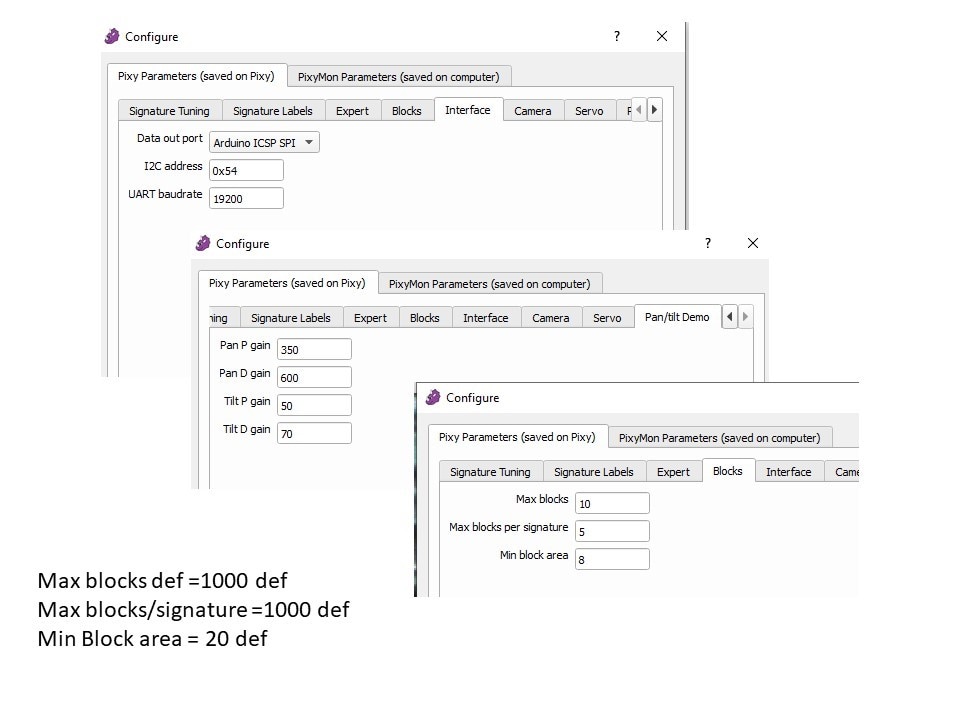
// setting PixyMon MAX blocks = 10
// setting PixyMon MAX Blocks per signature =5
// setting PixyMon MIN block area =8


//  CODE done this way insists the Duck has to be THE biggest object
// a better solution is to loop thru blocks to find the 1st one with signature=1
// use the data from that block # to drive the H bridge

 blocks = pixy.getBlocks(10);
// delay(10);
 pixy.blocks[0].print();
 // if ((pixy.blocks[0].signature!=1)||(blocks==0)||(pixy.blocks[0].width<7) )  //checking for signature 1 only works if there is a signature 2
  if ((pixy.blocks[0].signature!=1)||(blocks==0))  //checking for signature 1 only works if there is a signature 2

   {
     digitalWrite(11,LOW);  //turn off green LED if no signature 1 target is obtained
     StopTreads();  //zero tank motors if running
     SearchMode();
   }
   // delay (30); //give a chance for Pixy frames to update, insert rest of program here

//  if ((pixy.blocks[0].signature==1)&& (pixy.blocks[0].width>6))  // just added this line
  if ((pixy.blocks[0].signature==1))
  {
      digitalWrite(11,HIGH); //turn on green LED that valid signature target is obtained
      Serial.println ("I see the PIXYTARGET, going to hunt him down");
      Serial.println (blocks);
      pixy.blocks[0].print();

      blob_x = pixy.blocks[0].x ; // The x location of the center of the detected object (0 to 319)
  //    blob_y = pixy.blocks[0].y ; // The height of the detected object (1 to 200)
      blob_width = pixy.blocks[0].width ;  // new in this rev, The width of the detected object (1 to 320)

  ////// *** turn speed by blob width ****

      if (blob_width < 20 )   // 20 X 20 about 4.5 feet from camera,  at 7 feet: width is 10 pixels height = 20
      {
      TurnSpdByDist = 10;
      }
      else if (blob_width < 40) // 30 X 30
      {
        TurnSpdByDist = 20;
      }
      else if (blob_width < 60 ) // 60 X 60
      {
      TurnSpdByDist = 30;
      }
      else if (blob_area < 80) // 80 X 80
      { TurnSpdByDist = 60; }
      else
      { TurnSpdByDist = 110; } // close
  //    Serial.print("blob width= ");
  //  Serial.print(blob_width);
   // Serial.print("\n");
   //   delay(1000);


      if (blob_x < 145)
          {turn_left = HIGH; }
          else
          {turn_left = LOW; }

       if (blob_x >= 175)
          {turn_right = HIGH; }
          else
          {turn_right = LOW; }

    }
    else
     { digitalWrite(11,LOW); } //turn off green LED if no signature 1 target is obtained


  PING_STOP=digitalRead(12);

    if (PING_STOP==HIGH)
          { SPD=0 ;
          TurnSpdOffset = 0;
          //digitalWrite(12, HIGH); //turn on red ping LED
          }
      else
        { SPD=220 ;
        TurnSpdOffset = TurnSpdByDist;
        //digitalWrite(12, LOW); //turn off stopped by red ping LED
        }


///////////////////// H bridge control//////////////////////////////////////////////////
  if (turn_right==HIGH) //// ha ha I caught using == and not = before downloading
   { analogWrite(9, (SPD-TurnSpdOffset));   //RHS
      analogWrite(6, 0);      //RHS
      analogWrite(5, (SPD));     //LHS
      analogWrite(3, 0);                       //LHS
   }

    if (turn_left ==HIGH)//// ha ha I caught using == and not = before dopwnloading
   { analogWrite(9, (SPD));  // The frequency of the PWM signal is approximately 490 Hz.the duty cycle: between 0 (always off) and 255 (always on).
      analogWrite(6, 0);
      analogWrite(5, (SPD-TurnSpdOffset));
      analogWrite(3, 0);
   }

     if ((turn_left ==LOW) && (turn_right==LOW))       //// ha ha I caught using == and not = before dopwnloading
   { analogWrite(9, (SPD));
      analogWrite(6, 0);
      analogWrite(5, (SPD));
      analogWrite(3, 0);
   }

// delay(1);

 }


