


Two years ago, I won Christmas holiday special Project14 and as part of reward I won Farnell sponsored shopping cart of my choice. One of the parts was interesting CO2 sensor evaluation kit. It was unused for quite for quite a long time, but I made something to test it.
CO2
Just for context, people breathe oxygen from air and produce CO2 as an output. In closed room occupied by people, oxygen continuously exhausts and CO2 concentration grows. When oxygen runs out and CO2 levels grows, person can feel unwell or tired. It is important to exchange air by opening window or alternatively using some HVAC systems.
As a sensor I used PAS CO2 sensor from Infineon. For making evaluation of sleepiness more engaging, Infineon bundled vitamin C candy with sensor.
Sensor is interesting because it uses light and MEMS microphone internally to detect CO2 concentration. It sounds like black magic to me, but Infineon bundled it into nice sensor with simple I2C interface. If you are interested in more details, feel free to read Wikipedia page explaining underlaying methodology.
Project
This project contains smart panel which shows CO2 level and can be used for example, to indicate when to open window.
See it in the action
After powerup, it took about minute to make measurement which is limitation of sensor, then it shows status on bar as well as textual details on matrix display. it also sends data to Arduino Cloud for making easy historical and remote visualizations.
Mechanical build
For making it more interesting I took cardboard from some electronics components, printed two A4 sized pages with panel labels and glued all parts onto panel. The panel drawing is available in English and Czech (my native language) translations and at the end of article it is also downloadable in Corel Draw format in case you want to modify it.
EN: https://misaz.cz/Public/files/e14-co2/layout_en.pdf
CZ: https://misaz.cz/Public/files/e14-co2/layout_cz.pdf
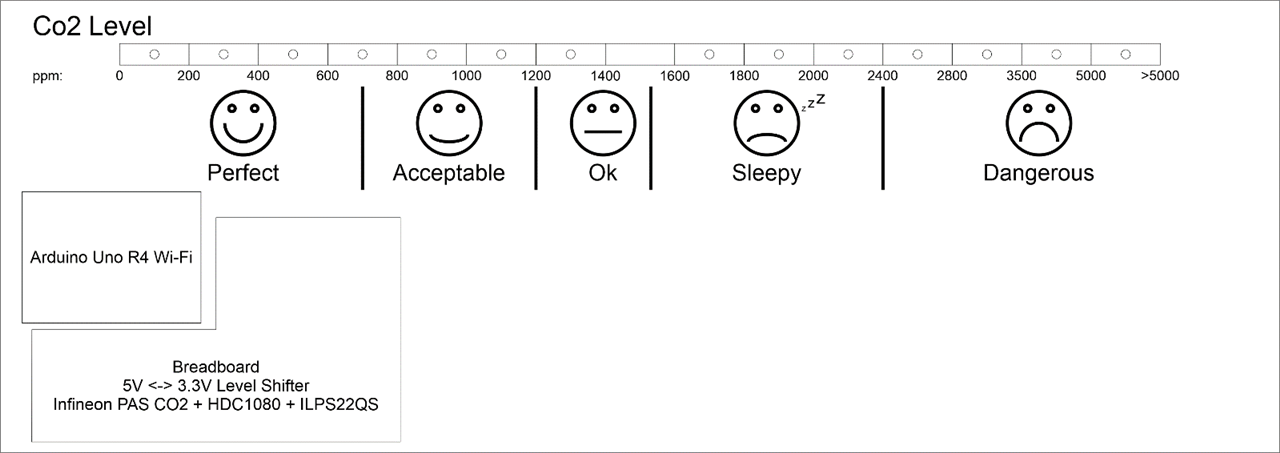
Printed layout is glued to cardboard. Breadboards and Arduino are attached by double sided sticky tape:

Electronics
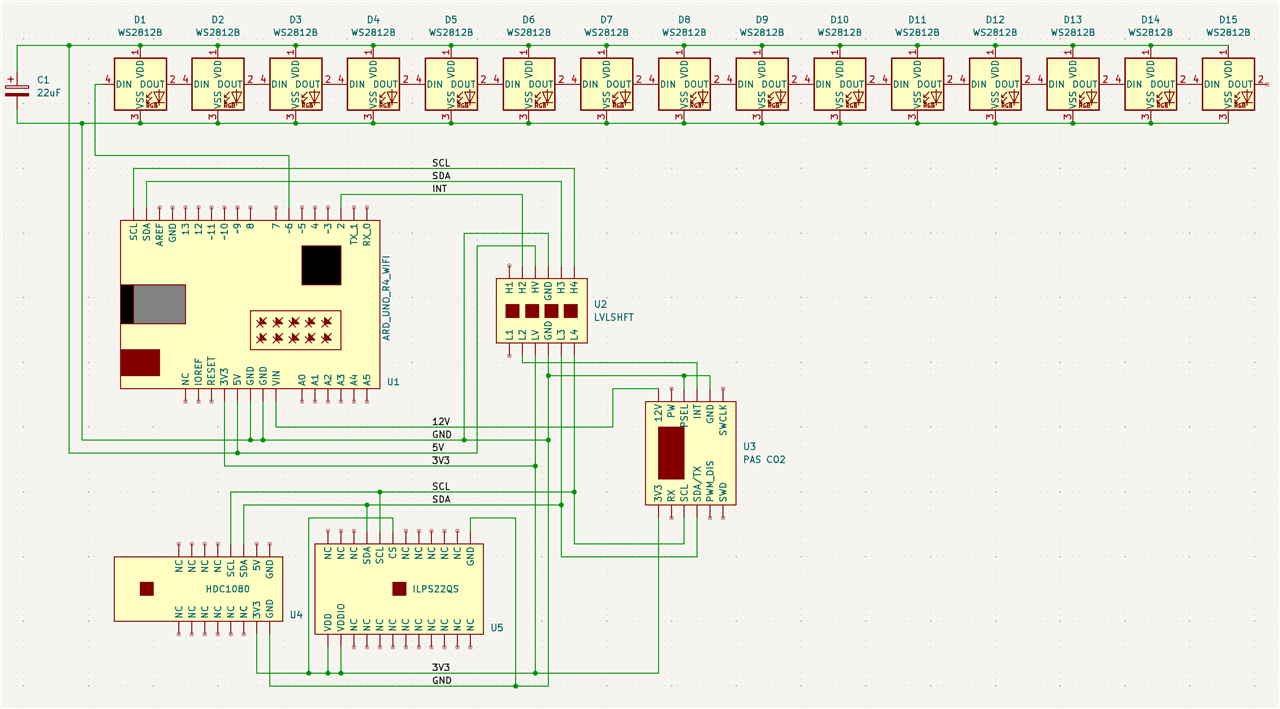
As mentioned at beginning, I mostly use it for evaluation Infineon PAS CO2 sensor. Except this sensor there is Arduino Uno R4 Wi-Fi for controlling whole thing, WS2812B RGB Led Strip, ILPS22QS pressure sensor because CO2 sensor needs it for compensation, and finally HDC1080 temperature sensor because pressure sensor needs it for compensation :D . Finally, there is level shifter because sensors are 3.3V while Arduino is 5V and there is 12V supply which is required by PAS CO2 sensor. Arduino actually must be powered from it. USB power is not enough (CO2 sensor will miss 12V voltage if Arduino is powered only from USB).
Hardware is conceptually connected as follows:

In reality it looks like:
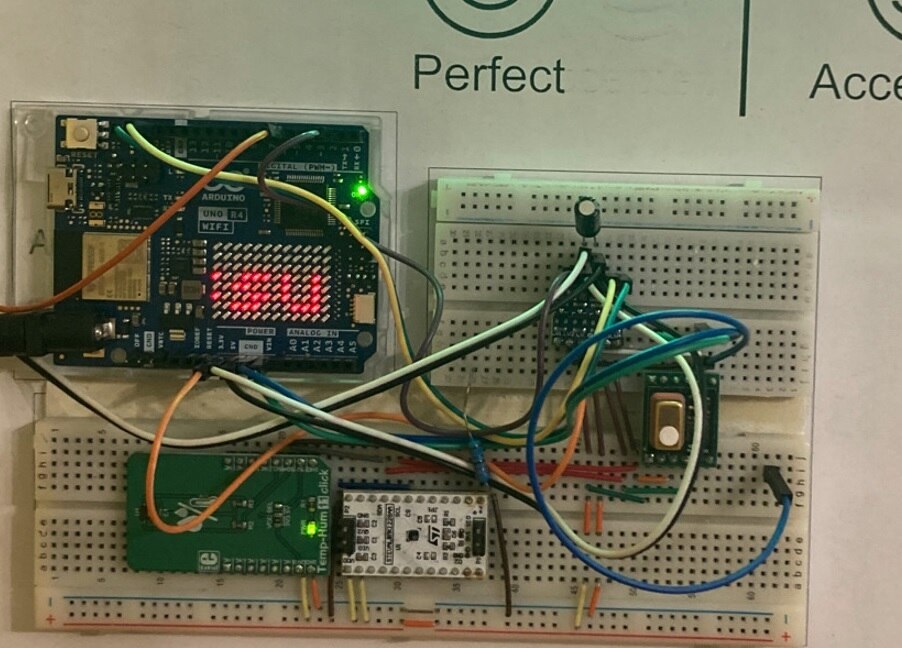
And if you want to make it yourself, here is full schematics (you can download it in PDF at the end of this article):
Firmware
Since I used Arduino, I reused ecosystem a lot. I used available libraries, except for pressure sensor which is used for compensations. There is no library available, so I write my own simple driver, see init_pressure and measure_pressure functions, in sketch. For other sensors (including main CO2 sensor), I used existing libraries: XENSIV PAS CO2, Adafruit HDC1000 Library, FastLED, ArduinoGraphics, ArduinoIoTCloud.
Since Arduino ecosystem is quite great, firmware itself is pretty simple despite it combines many parts (4 sensors, cloud connectivity, matrix display, led strip). It is about 430 lines long.
The most lines of code come from error handling. Firmware is failure resilient and can recover from any sensor failure.
Feel free to download it at the end of the article, and modify it for your needs. For example, you can modify it to use different pressure/temperature/humidity sensor for compensation pretty easily by replacing content of relevant functions.
Cloud dashboard
For preserving some longer sequence of data, I implemented communication with Arduino Cloud. You can setup various dashboard with live data and/or historical plots as you need. It is designed to fit Arduino Cloud free tier. You need to edit content of following macros in sketch to make it working: WIFI_SSID, WIFI_PASS, ARDUINO_CLOUD_DEVICE_ID, ARDUINO_CLOUD_DEVICE_SECRET_KEY. Last two you can obtain on Arduino Cloud portal.
When configured, device send following 8 variables to cloud. You can use them in dashboard.
- co2 (data type int): Measured CO2 in ppm units.
- pressure (data type float): Measured pressure in hPa units.
- temperature (data type float): Measured temperature in °C units.
- humidity (data type float): Measured humidity in % units.
- is_co2_ok (data type bool): true if PAS CO2 sensor is OK, false if it fails for some reason.
- is_pressure_ok (data type bool): true if ILPS22QS pressure sensor is OK, false if it fails for some reason.
- is_temperature_ok (data type bool): true if HDC1080 sensor provide valid temperature, otherwise false.
- is_humidity_ok (data type bool): since temperature and humidity are measured by the same sensor, value is always the same as is_temperature_ok.
You can make dashboard like this:

Results
I used it long term, sensor is really nice. Response is quite direct. In tests, over time CO2 concentration grown slowly and after opening window, sensor detected drop immediately in first consecutive measurement cycle (which happens once per 30 sec).
I picked levels from some health safety website. They differ slightly, so I pick some reasonable levels based on various guidance. However, even in "sleepy" range I mostly did not notice it and actually start noticing some sleepiness at the end of the range, nearly around level which health website considered "dangerous". So, I think it is bit shifted, but likely every human can feel it differently. Definitely open window and breathe fresh air sometimes
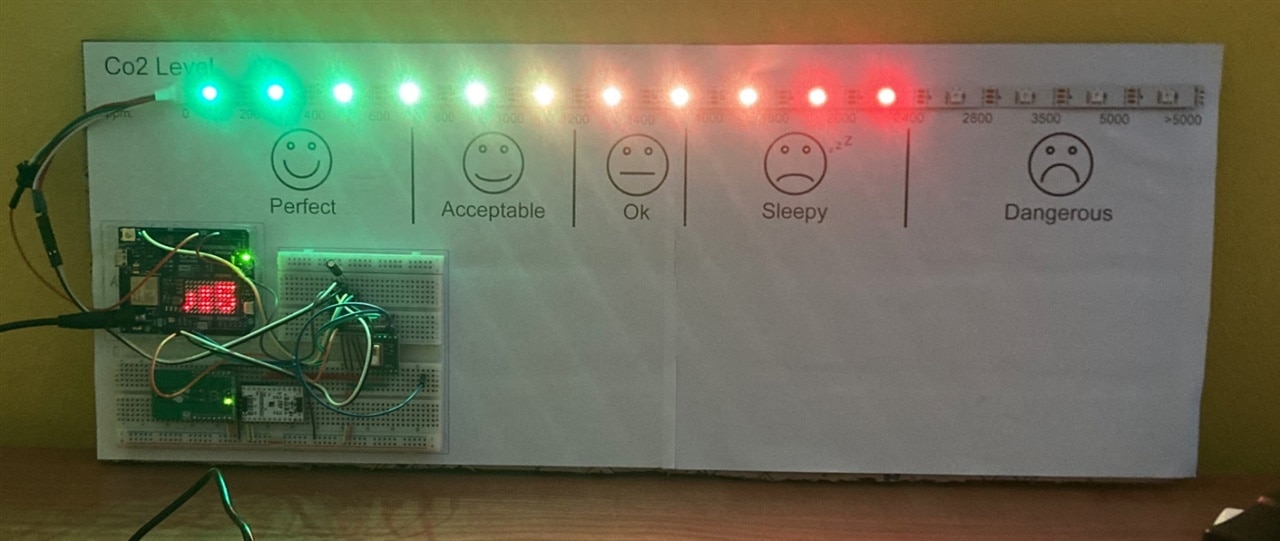
I run it in night as well. However, I disconnected LED bar for night runs :) In night I obviously did not follow it much, but at morning I had history of data available in Arduino Cloud dashboard.
Conclusion
For me this project served two purposes: learn fundamentals of CO2 sensor and try Arduino Cloud. Both work nicely and seamlessly. As part of this I turn it into slightly fun form factor. I hope you enjoy it. If you want to make your own or experiment with sensor, you can use resources bellow:
BOM
Bill of Materials
| Product Name | Manufacturer | Quantity | Buy Kit |
|---|---|---|---|
| Arduino UNO R4 Wi-Fi | ARDUINO | 1 | Buy Now |
| Infineon PAS CO2 Sensor | INFINEON | 1 | Buy Now |
| ST ILPS22QS Pressure sensor | STMICROELECTRONICS | 1 | Buy Now |
| MikroE Temp&Hum 11 Click Board | MIKROELEKTRONIKA | 1 | Buy Now |
| WS2812B LED Strip 30 LEDs/m | 1 | Buy Now | |
| Set of Jumper Wires M-M | MULTICOMP | 1 | Buy Now |
| Set of Breadboard Wires | MULTICOMP | 1 | Buy Now |
| Breadboard 30 rows | CYTRON | 1 | Buy Now |
| Breadboard 63 rows | MIKROELEKTRONIKA | 1 | Buy Now |
| 22uF +-20% electrolytic THT capacitor | KEMET | 1 | Buy Now |
| 12V DC Power Supply | PRO ELEC | 1 | Buy Now |
-

me_Cris
-
Cancel
-
Vote Up
0
Vote Down
-
-
Sign in to reply
-
More
-
Cancel
Comment-

me_Cris
-
Cancel
-
Vote Up
0
Vote Down
-
-
Sign in to reply
-
More
-
Cancel
Children