


Finishing the P.U.L.S.E. ECG System
Portable Unit for Live Signal Electrocardiography
A bit of history
Ever since I started getting into electronics, I have had this idea of building my own ECG device. Something that could actually show heart signals in real time instead of just reading about them.
Like most projects, it started simple. I picked up an AD8232 module, wired it up, and after some trial and error, I managed to get a signal. Seeing that first noisy waveform was honestly a pretty big moment.
But that’s pretty much where it stopped.
The project “worked”, but only in the loosest sense:
- It needed to be connected to a computer
- There was no proper visualization
- No analysis, no storage, no real usability
It was more of a proof of concept than an actual device. I told myself I’d come back to it later… and like a lot of projects, it just sat there half-finished.
When I saw the Spring Clean competition, it felt like the perfect excuse to finally do something about it.
Preparing the revival
Coming back to the project after a while, I had to figure out what was actually there and what I had just imagined I’d done.
The core idea was still solid:
- Capture ECG signals
- Visualize them
- Eventually, do something useful with the data
But in reality, what I had was:
- A working but messy analog setup
- Raw signal output
- No structure at all
No interface, no proper processing, no documentation. Definitely not something someone else could build.
So instead of “fixing” it, the goal became to actually finish it properly.
Restarting the build
I decided to keep the original concept, but rebuild it in a cleaner and more usable way.
The first major change was adding an ADC. Instead of relying on rough readings, I used an ADS1115 to get a stable, high-resolution signal.
From there, the system started to take shape:
- ECG module → ADC
- ADC → Raspberry Pi Zero
- Raspberry Pi → processing + interface
Using a Raspberry Pi made a big difference compared to the original setup. It meant I could handle acquisition, processing, and display all in one place.

A small step into PCB design
Originally, everything was wired together with jumper wires, which worked… until it didn’t.
Connections would come loose, noise would creep in, and troubleshooting became harder than it should have been.
So I decided to take a step I had been putting off: putting part of the design onto a PCB.
Nothing too complex, but enough to:
- Keep the analog signal path clean
- Reduce wiring errors
- Make the setup more reliable
Even just that small step made the system feel much more “real” compared to the original prototype.
Building the software side
This is where the project really changed from something experimental into something usable.
Instead of printing values or plotting offline, I built a live interface using Flask.
At first, it was just a simple graph. Then it slowly grew into:
- A real-time ECG display
- BPM calculation
- Signal quality indicators
I also added a mobile-friendly version, which turned out to be surprisingly useful. Being able to open the ECG on a phone made the whole system feel portable, even though it’s running on a Pi.
For plotting, I used Matplotlib, which was more than enough for rendering the waveform clearly.
Adding analysis (the part I avoided at first)
In the original version, I completely avoided signal analysis because it felt complicated.
Coming back to it, I realized that without it, the project wasn’t really complete.
So I started simple:
- Detect peaks (QRS complexes)
- Calculate BPM from RR intervals
Then gradually added more logic on top of that.
The system can now flag:
- Bradycardia (low heart rate)
- Tachycardia (elevated heart rate)
- Ventricular tachycardia–like patterns (very high sustained rate)
- Irregular rhythm patterns (inconsistent RR intervals)
- Premature beats (early or delayed intervals)
- Possible pauses / asystole-like gaps (no detected beats for a threshold time)
- Low amplitude signals (poor electrode contact)
- Baseline wander (movement or poor grounding)
- High-frequency noise / signal instability
It also keeps track of:
- Continuous BPM trends
- Signal quality metrics
- Event markers for reports
It’s important to say that this is heuristic detection, not medical-grade diagnosis — but it finally gives meaning to the signal instead of just displaying it.
Reports and making it useful
At some point, I thought: if I’m collecting data, I might as well make it usable.
So I added a reporting system using ReportLab.
Now the system can:
- Generate a PDF summary
- Export ECG data (CSV + JSON)
- Include flagged events and explanations
- Bundle everything into a single downloadable ZIP
This was one of those features that started as “just for fun” but ended up making the project feel much more complete.

Powering the system
One thing the original version completely lacked was portability.
To fix that, I powered the system using an Adafruit PowerBoost 1000 paired with a 2000mAh LiPo battery.
This setup:
- Boosts the battery voltage to a stable 5V
- Allows the Raspberry Pi and peripherals to run reliably
- Adds built-in charging over USB
In practice, this means the entire system can run:
- Without being plugged into the wall
- As a fully portable unit
- For extended sessions, depending on load
This was a small addition, but it made a big difference in turning the project into something that actually feels like a device instead of a bench setup.
Making it an actual project (not just something on my desk)
One thing the original version completely lacked was structure.
Everything was local, undocumented, and basically impossible for anyone else to reproduce.
So I took the time to:
- Organize the code
- Write proper documentation
- Add wiring diagrams and datasheets
- Clean up the whole repository
The result is the full P.U.L.S.E. project:
 https://github.com/wernerhzigby/P.U.L.S.E.-project.git
It’s now something that someone else could actually build, which definitely wasn’t the case before.
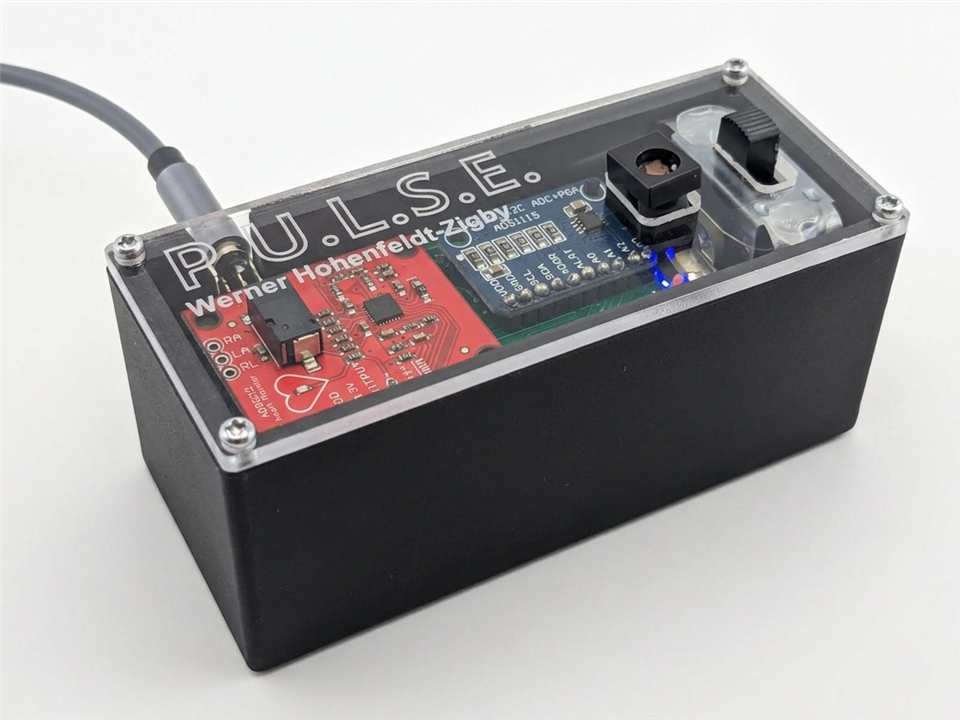
Assembly
Putting everything together this time was much smoother than the first attempt.
The system consists of:
- ECG sensor
- ADC module
- Raspberry Pi
- Supporting wiring / PCB
- Battery + power system
Compared to the original version:
- Fewer loose wires
- More stable connections
- Much easier to debug
It still took some trial and error (especially with signal noise), but overall it felt like assembling a system instead of experimenting.
Powering it up
The first proper test was opening the web interface and seeing if everything worked together.
And this time, it actually did.
- The ECG signal shows up in real time
- BPM updates correctly
- Detection flags appear when expected
- The interface works on both desktop and mobile
- Reports generate without issues
It’s a pretty big difference compared to the original version, where just getting a readable signal was already a challenge.
Conclusion
Looking back, the hardest part of this project wasn’t the hardware or the code — it was finishing it.
The original version already had the core idea working, but it was missing everything around it:
- Structure
- usability
- completeness
By coming back to it and pushing it further, it turned into something that actually feels like a finished system.
Not perfect, but complete.
And honestly, that’s something I probably wouldn’t have done without the push from this competition.
What I learned
- A working prototype is not the same as a finished project
- Even a simple PCB can make a huge difference
- Power design matters more than expected
- Documentation matters more than you think
- Going back to old projects is worth it


