element14 Community
element14 Community
    Register Log In
  • Site
  • Search
  • Log In Register
  • Community Hub
    Community Hub
    • What's New on element14
    • Feedback and Support
    • Benefits of Membership
    • Personal Blogs
    • Members Area
    • Achievement Levels
  • Learn
    Learn
    • Ask an Expert
    • eBooks
    • element14 presents
    • Learning Center
    • Tech Spotlight
    • STEM Academy
    • Webinars, Training and Events
    • Learning Groups
  • Technologies
    Technologies
    • 3D Printing
    • FPGA
    • Industrial Automation
    • Internet of Things
    • Power & Energy
    • Sensors
    • Technology Groups
  • Challenges & Projects
    Challenges & Projects
    • Design Challenges
    • element14 presents Projects
    • Project14
    • Arduino Projects
    • Raspberry Pi Projects
    • Project Groups
  • Products
    Products
    • Arduino
    • Avnet & Tria Boards Community
    • Dev Tools
    • Manufacturers
    • Multicomp Pro
    • Product Groups
    • Raspberry Pi
    • RoadTests & Reviews
  • About Us
  • Store
    Store
    • Visit Your Store
    • Choose another store...
      • Europe
      •  Austria (German)
      •  Belgium (Dutch, French)
      •  Bulgaria (Bulgarian)
      •  Czech Republic (Czech)
      •  Denmark (Danish)
      •  Estonia (Estonian)
      •  Finland (Finnish)
      •  France (French)
      •  Germany (German)
      •  Hungary (Hungarian)
      •  Ireland
      •  Israel
      •  Italy (Italian)
      •  Latvia (Latvian)
      •  
      •  Lithuania (Lithuanian)
      •  Netherlands (Dutch)
      •  Norway (Norwegian)
      •  Poland (Polish)
      •  Portugal (Portuguese)
      •  Romania (Romanian)
      •  Russia (Russian)
      •  Slovakia (Slovak)
      •  Slovenia (Slovenian)
      •  Spain (Spanish)
      •  Sweden (Swedish)
      •  Switzerland(German, French)
      •  Turkey (Turkish)
      •  United Kingdom
      • Asia Pacific
      •  Australia
      •  China
      •  Hong Kong
      •  India
      • Japan
      •  Korea (Korean)
      •  Malaysia
      •  New Zealand
      •  Philippines
      •  Singapore
      •  Taiwan
      •  Thailand (Thai)
      • Vietnam
      • Americas
      •  Brazil (Portuguese)
      •  Canada
      •  Mexico (Spanish)
      •  United States
      Can't find the country/region you're looking for? Visit our export site or find a local distributor.
  • Translate
  • Profile
  • Settings
Project14
  • Challenges & Projects
  • More
Project14
Blog PYNQ-Z2 Getting Started - I2C Trace Analyzer
  • Blog
  • Forum
  • Documents
  • Theme Suggestions
  • Polls
  • Members
  • More
  • Cancel
  • New
Join Project14 to participate - click to join for free!
  • Share
  • More
  • Cancel
Group Actions
  • Group RSS
  • More
  • Cancel
Engagement
  • Author Author: ralphjy
  • Date Created: 7 May 2020 7:13 PM Date Created
  • Views 1914 views
  • Likes 9 likes
  • Comments 2 comments
  • pynq-z2
  • pynq workshop
  • pynqstarter
Related
Recommended

PYNQ-Z2 Getting Started - I2C Trace Analyzer

ralphjy
ralphjy
7 May 2020
image

PYNQ-Z2: Embedded Vision Workshop Series with Adam Taylor


Getting Started | Getting Up and Running  | Unlocking Your Inner PYNQ Hero  | Project14 | PYNQ Workshop image


Session 1 of the workshop covered two overlays that are included in the standard PYNQ image - the Base overlay and the Logictools overlay.


The base overlay provides the ability to work with all of the hardware interfaces on the PYNQ board, including the HDMI, Audio, Pmod, RPI and Shield Connector.

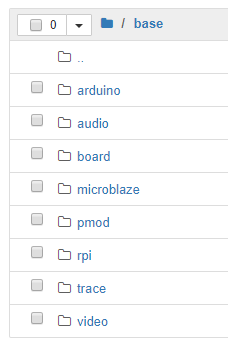
Here are the directories of the different example categories included:
image

The example notebook used in the lab is the board_btns_leds.ipynb.

image


The logictools overlay consists of programmable hardware blocks to connect to external digital logic circuits.  It includes the following functions:

  • Pattern Generator
  • FSM Generator
  • Boolean Generator
  • Trace Analyzer


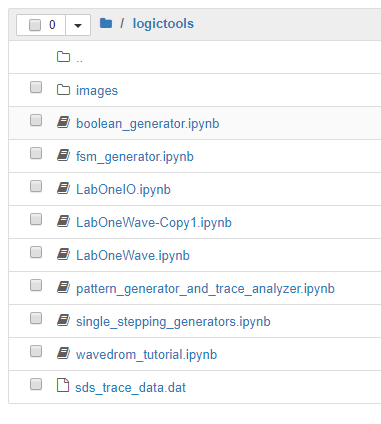
Here are the logictools notebooks.  The ones with the "LabOne" prefix were ones created for use in the lab.
image

The first lab walked through using the base overlay to interact with the buttons and LEDs and using the logictools overlay to produce patterns on GPIO pins and then to feedback and capture those patterns on other GPIO pins.


The lab was relatively straightforward except that I had some issues when I tried to save time by cutting and pasting code from the lab instructions.  There are a few places where there are "smart quotes" in the text which will cause syntax errors and I needed to fix those.


First homework assignment is to utilize the logictools overlay with other stimulus and display patterns.


I2C Trace Analyzer

I thought that it would be useful to generate and capture an I2C transaction.


I couldn't think of a simple way to generate the initiator code using the logictools pattern generators, so I opted to just use one of the included hardware libraries.


There is an example of an I2C trace analyzer but it uses a PMOD_TMP2 temperature sensor and I don't have one of those.
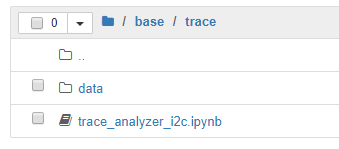
image

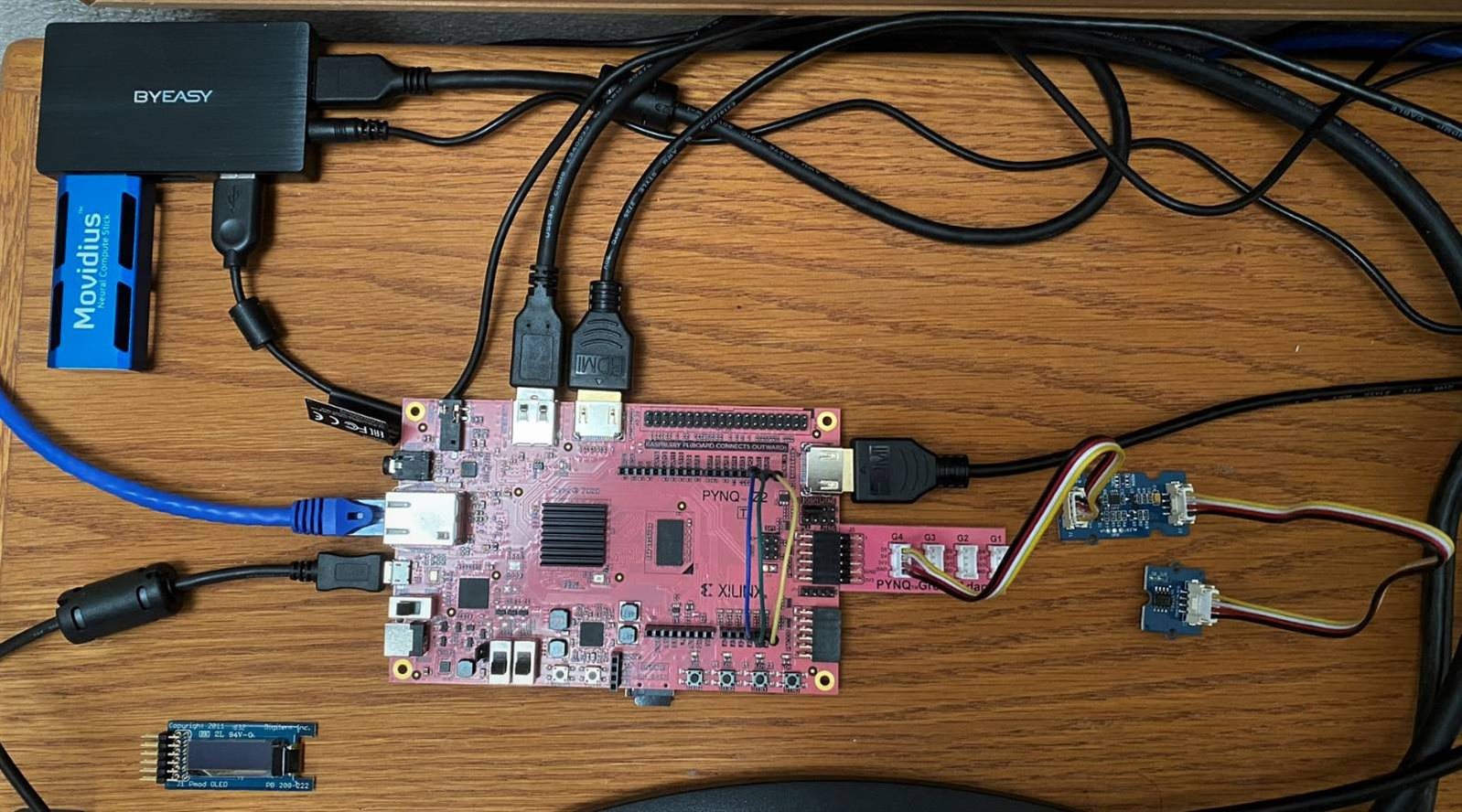
I do have a Grove analog Temperature Sensor 1.2 which interfaces with a Grove I2C ADC.  I also have a Pynq Grove adapter board.  A picture of my setup with the ADC and tmp sensor attached to the Grove adapter on the PMODA port.
image


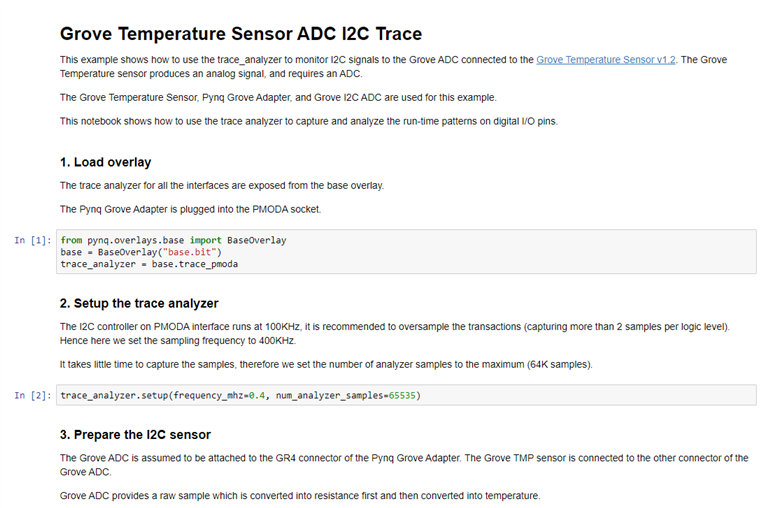
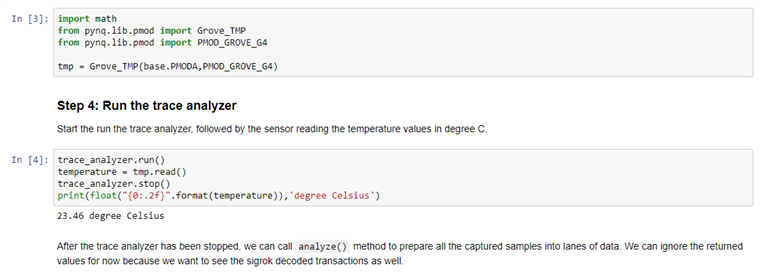
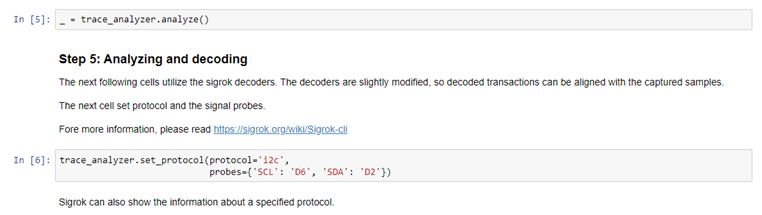
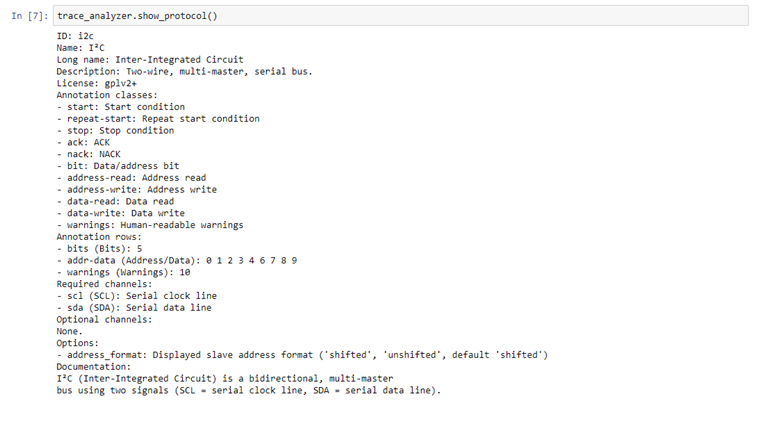
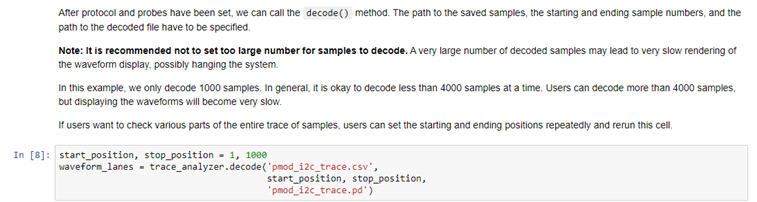
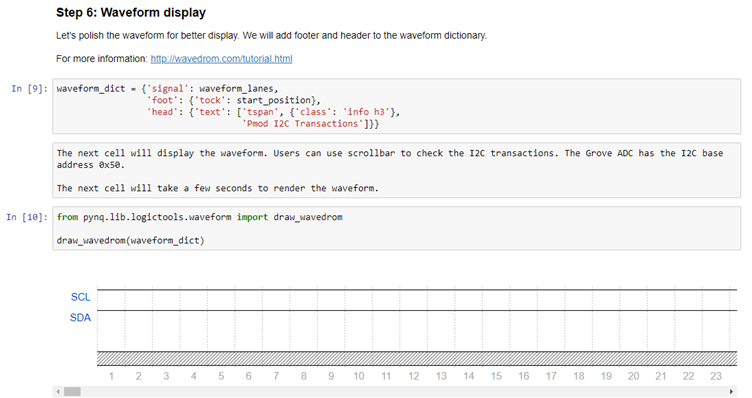
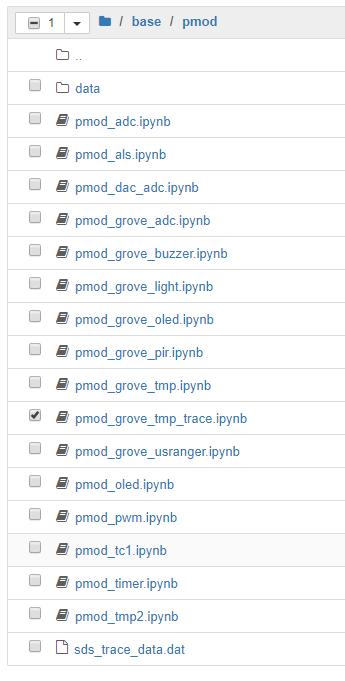
The PYNQ image includes a lot of libraries for different PMOD and Grove sensors and displays.  I decided to modify the one that matches my sensor and add the I2C Trace Analyzer.  The new notebook is shown below pmod_grove_tmp_trace.ipynb.
image

image

image

image

image

image

image

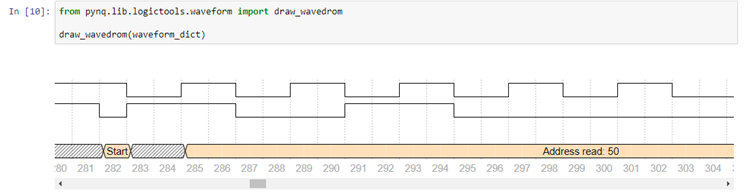
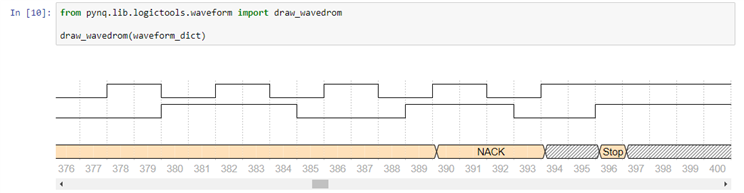
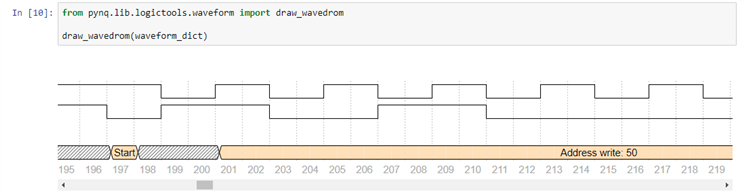
Display shifted to start of I2C transaction:
image

The start of the data read:

image

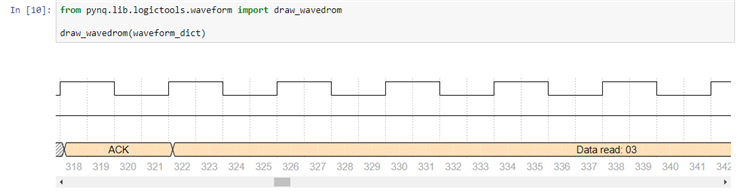
The initial read data byte:

image

The end of the transaction:

image

This data can also be printed as text:
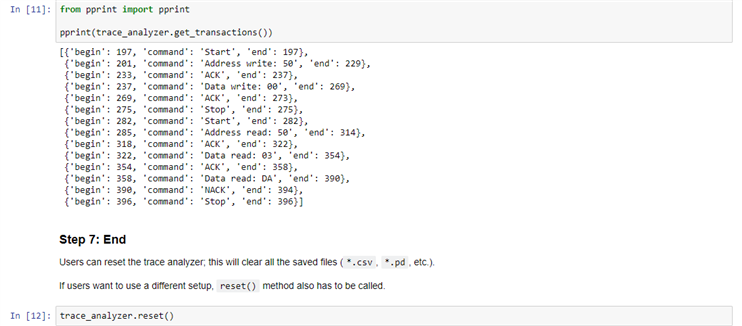
image


Lots of stuff to play with.  The trace analyzer will be very useful for developing new applications.

  • Sign in to reply

Top Comments

  • Fred27
    Fred27 over 5 years ago +1
    I was just about to look at generating and analyzing I2C and hadn't noticed that it anyway existed in the examples! I'd only got as far as wondering if it was possible to make SDA switch from an output…
  • ralphjy
    ralphjy over 5 years ago in reply to Fred27

    I haven’t gotten around to looking under the hood but it seems that the pattern generator API is somewhat limited.  I’ll be interested to see what you discover.  I really like that the trace analyzer is protocol aware.

    • Cancel
    • Vote Up 0 Vote Down
    • Sign in to reply
    • More
    • Cancel
  • Fred27
    Fred27 over 5 years ago

    I was just about to look at generating and analyzing I2C and hadn't noticed that it anyway existed in the examples!


    I'd only got as far as wondering if it was possible to make SDA switch from an output to an input for the device's reply. I'm currently reading this on my phone so I'll have to dig more into the examples later and see if I can make a worthwhile extension on top of it.

    • Cancel
    • Vote Up +1 Vote Down
    • Sign in to reply
    • More
    • Cancel
element14 Community

element14 is the first online community specifically for engineers. Connect with your peers and get expert answers to your questions.

  • Members
  • Learn
  • Technologies
  • Challenges & Projects
  • Products
  • Store
  • About Us
  • Feedback & Support
  • FAQs
  • Terms of Use
  • Privacy Policy
  • Legal and Copyright Notices
  • Sitemap
  • Cookies

An Avnet Company © 2025 Premier Farnell Limited. All Rights Reserved.

Premier Farnell Ltd, registered in England and Wales (no 00876412), registered office: Farnell House, Forge Lane, Leeds LS12 2NE.

ICP 备案号 10220084.

Follow element14

  • X
  • Facebook
  • linkedin
  • YouTube