element14 Community
element14 Community
    Register Log In
  • Site
  • Search
  • Log In Register
  • Community Hub
    Community Hub
    • What's New on element14
    • Feedback and Support
    • Benefits of Membership
    • Personal Blogs
    • Members Area
    • Achievement Levels
  • Learn
    Learn
    • Ask an Expert
    • eBooks
    • element14 presents
    • Learning Center
    • Tech Spotlight
    • STEM Academy
    • Webinars, Training and Events
    • Learning Groups
  • Technologies
    Technologies
    • 3D Printing
    • FPGA
    • Industrial Automation
    • Internet of Things
    • Power & Energy
    • Sensors
    • Technology Groups
  • Challenges & Projects
    Challenges & Projects
    • Design Challenges
    • element14 presents Projects
    • Project14
    • Arduino Projects
    • Raspberry Pi Projects
    • Project Groups
  • Products
    Products
    • Arduino
    • Avnet & Tria Boards Community
    • Dev Tools
    • Manufacturers
    • Multicomp Pro
    • Product Groups
    • Raspberry Pi
    • RoadTests & Reviews
  • About Us
  • Store
    Store
    • Visit Your Store
    • Choose another store...
      • Europe
      •  Austria (German)
      •  Belgium (Dutch, French)
      •  Bulgaria (Bulgarian)
      •  Czech Republic (Czech)
      •  Denmark (Danish)
      •  Estonia (Estonian)
      •  Finland (Finnish)
      •  France (French)
      •  Germany (German)
      •  Hungary (Hungarian)
      •  Ireland
      •  Israel
      •  Italy (Italian)
      •  Latvia (Latvian)
      •  
      •  Lithuania (Lithuanian)
      •  Netherlands (Dutch)
      •  Norway (Norwegian)
      •  Poland (Polish)
      •  Portugal (Portuguese)
      •  Romania (Romanian)
      •  Russia (Russian)
      •  Slovakia (Slovak)
      •  Slovenia (Slovenian)
      •  Spain (Spanish)
      •  Sweden (Swedish)
      •  Switzerland(German, French)
      •  Turkey (Turkish)
      •  United Kingdom
      • Asia Pacific
      •  Australia
      •  China
      •  Hong Kong
      •  India
      •  Korea (Korean)
      •  Malaysia
      •  New Zealand
      •  Philippines
      •  Singapore
      •  Taiwan
      •  Thailand (Thai)
      • Americas
      •  Brazil (Portuguese)
      •  Canada
      •  Mexico (Spanish)
      •  United States
      Can't find the country/region you're looking for? Visit our export site or find a local distributor.
  • Translate
  • Profile
  • Settings
microbit
  • Learn
  • Learning Center
  • STEM Academy
  • microbit
  • More
  • Cancel
microbit
micro:bit Blog micro:bit experiments - Polygons!
  • Blog
  • Forum
  • Documents
  • Events
  • Polls
  • Files
  • Members
  • Mentions
  • Sub-Groups
  • Tags
  • More
  • Cancel
  • New
Join microbit to participate - click to join for free!
  • Share
  • More
  • Cancel
Group Actions
  • Group RSS
  • More
  • Cancel
Engagement
  • Author Author: shabaz
  • Date Created: 6 Jun 2016 3:57 PM Date Created
  • Views 1608 views
  • Likes 7 likes
  • Comments 4 comments
  • micro:bit
  • stem
  • bbc micro:bit
  • microbit
  • microbit computer
  • bbc microbit
Related
Recommended

micro:bit experiments - Polygons!

shabaz
shabaz
6 Jun 2016

Introduction

The BBC micro:bit is a compact microcontroller board populated with sensors and wireless connectivity. It also has several programming languages (graphical and text based) and is super-easy to use. No software or account is needed; just traverse to the BBC micro:bit website and begin coding. I tried out the website for a while at the weekend to check it out, and this blog post provides a quick summary of an initial experiment.


Note: jlucas is running a series of micro:bit projects currently, I had not realized. This post isn't to detract from that, this project is more "experimental" status (i.e. it has not been tested for real!) and requires some circuitry too.


The programs can be immediately simulated (for most of the programming languages on offer) and when you're ready you can download the program and drag-and-drop it using Windows Explorer onto the USB-connected micro:bit which will look like a USB memory stick to the PC.


Although micro:bits are not available just yet (they are pre-orderable now), I thought it would be interesting to do some simulation experiments. In theory it should work on the real hardware too.


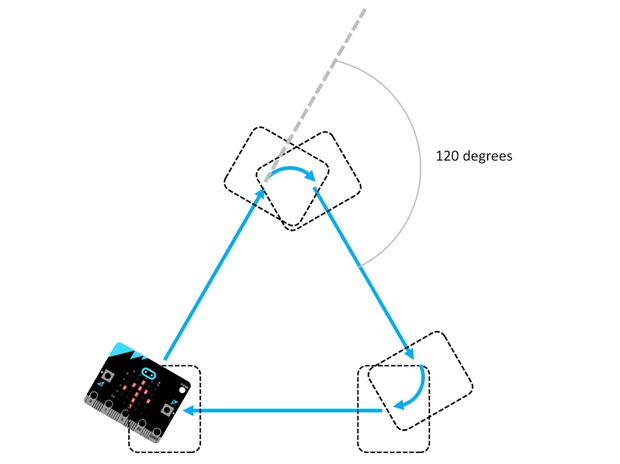
Here is an attempt at turning the micro:bit into a turtle, to draw shapes such as triangles or stars.
image


What does it do?

It draws shapes. To do this, a motor (and driver circuit) and wheels are connected to the micro:bit. There is an on-board electronic compass which is used to determine which direction the micro:bit is pointing. When button A is pressed it will power the motor for a fixed period of time and draw a straight like as the micro:bit moves. Then it will sit and wait until the user manually rotates the assembly by a certain number of degrees. As soon as this occurs the motor will be powered on again and the second line will be drawn. This process is repeated until the shape is complete.

During the process the micro:bit 5x5 array LED display is used to provide some basic prompting to the user.


What is needed?

Nothing is needed to test it out. Just a browser! The attached file (unzip it first, the required file has a .jsz suffix) can be imported or dragged into the BBC micro:bit website view in order to try it out. There is a rotational control in the browser that simulates the orientation of the micro:bit.

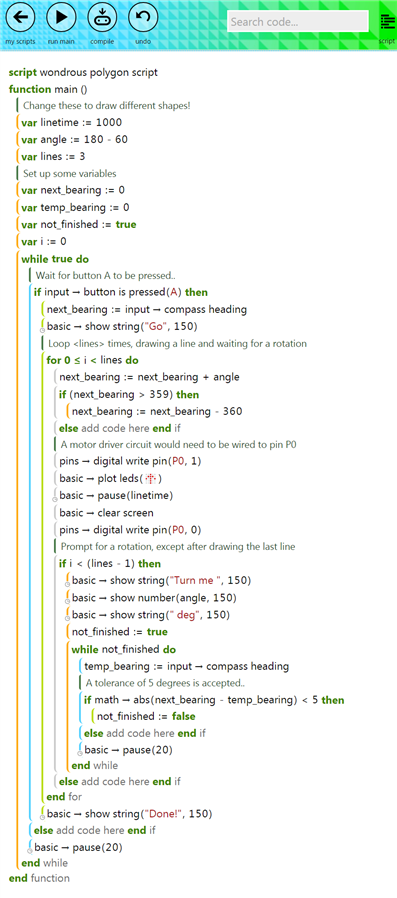
If you wish to type it yourself, the code is shown in the screenshot further below.

It could be downloaded to a real micro:bit or simulated and an arrow will be drawn on the LED array to simulate the motor motion.

To try it out for real, a motor driver circuit needs to be connected to P0 on the micro:bit. A very low power motor could be attached using a single transistor circuit.


Summary

It was fun and very easy to write this program using Microsoft's TouchDevelop programming language. Although final accuracy of the shape will depend on the quality of the wheels, grip and mechanical construction (and sometimes, it is more fun experimenting to try to improve things anyway) it can be seen that having easy-to-use built-in sensors, display and wireless connectivity (which wasn't explored in this post) will make the micro:bit very useful for projects.


Script: If it renders poorly, click to enlarge.
image

Attachments:
wondrous-polygon-script.zip
  • Sign in to reply

Top Comments

  • jlucas
    jlucas over 9 years ago +3
    Looks great Shabaz. Our 'Ten Projects' series is definitely intended to encourage more conversations and experiments, so please keep sharing anything you're working on!
  • balearicdynamics
    balearicdynamics over 9 years ago +2
    Nice Shabaz! Did you was able to put your hands on one of these? I am already waiting my RoadTest device Enrico
  • shabaz
    shabaz over 9 years ago in reply to balearicdynamics +1
    Hi Enrico, Thanks! Not yet (I have pre-ordered one but it is from a reseller so will be after you get yours) but I love the browser based environment and the simulator. When simulators are this good, I…
  • shabaz
    shabaz over 9 years ago in reply to balearicdynamics

    Hi Enrico,


    Thanks! Not yet (I have pre-ordered one but it is from a reseller so will be after you get yours) but I love the browser based environment and the simulator.

    When simulators are this good, I think it really becomes fun to develop and quickly test out code.

    I am looking forward to reading your review when you receive it!

    • Cancel
    • Vote Up +1 Vote Down
    • Sign in to reply
    • More
    • Cancel
  • shabaz
    shabaz over 9 years ago in reply to jlucas

    Hi John,


    Thanks! Looking forward to following all of your series!

    • Cancel
    • Vote Up 0 Vote Down
    • Sign in to reply
    • More
    • Cancel
  • jlucas
    jlucas over 9 years ago

    Looks great Shabaz. Our 'Ten Projects' series is definitely intended to encourage more conversations and experiments, so please keep sharing anything you're working on! image

    • Cancel
    • Vote Up +3 Vote Down
    • Sign in to reply
    • More
    • Cancel
  • balearicdynamics
    balearicdynamics over 9 years ago

    Nice Shabaz! Did you was able to put your hands on one of these? I am already waiting my RoadTest device image


    Enrico

    • Cancel
    • Vote Up +2 Vote Down
    • Sign in to reply
    • More
    • Cancel
element14 Community

element14 is the first online community specifically for engineers. Connect with your peers and get expert answers to your questions.

  • Members
  • Learn
  • Technologies
  • Challenges & Projects
  • Products
  • Store
  • About Us
  • Feedback & Support
  • FAQs
  • Terms of Use
  • Privacy Policy
  • Legal and Copyright Notices
  • Sitemap
  • Cookies

An Avnet Company © 2025 Premier Farnell Limited. All Rights Reserved.

Premier Farnell Ltd, registered in England and Wales (no 00876412), registered office: Farnell House, Forge Lane, Leeds LS12 2NE.

ICP 备案号 10220084.

Follow element14

  • X
  • Facebook
  • linkedin
  • YouTube