element14 Community
element14 Community
    Register Log In
  • Site
  • Search
  • Log In Register
  • Community Hub
    Community Hub
    • What's New on element14
    • Feedback and Support
    • Benefits of Membership
    • Personal Blogs
    • Members Area
    • Achievement Levels
  • Learn
    Learn
    • Ask an Expert
    • eBooks
    • element14 presents
    • Learning Center
    • Tech Spotlight
    • STEM Academy
    • Webinars, Training and Events
    • Learning Groups
  • Technologies
    Technologies
    • 3D Printing
    • FPGA
    • Industrial Automation
    • Internet of Things
    • Power & Energy
    • Sensors
    • Technology Groups
  • Challenges & Projects
    Challenges & Projects
    • Design Challenges
    • element14 presents Projects
    • Project14
    • Arduino Projects
    • Raspberry Pi Projects
    • Project Groups
  • Products
    Products
    • Arduino
    • Avnet & Tria Boards Community
    • Dev Tools
    • Manufacturers
    • Multicomp Pro
    • Product Groups
    • Raspberry Pi
    • RoadTests & Reviews
  • About Us
  • Store
    Store
    • Visit Your Store
    • Choose another store...
      • Europe
      •  Austria (German)
      •  Belgium (Dutch, French)
      •  Bulgaria (Bulgarian)
      •  Czech Republic (Czech)
      •  Denmark (Danish)
      •  Estonia (Estonian)
      •  Finland (Finnish)
      •  France (French)
      •  Germany (German)
      •  Hungary (Hungarian)
      •  Ireland
      •  Israel
      •  Italy (Italian)
      •  Latvia (Latvian)
      •  
      •  Lithuania (Lithuanian)
      •  Netherlands (Dutch)
      •  Norway (Norwegian)
      •  Poland (Polish)
      •  Portugal (Portuguese)
      •  Romania (Romanian)
      •  Russia (Russian)
      •  Slovakia (Slovak)
      •  Slovenia (Slovenian)
      •  Spain (Spanish)
      •  Sweden (Swedish)
      •  Switzerland(German, French)
      •  Turkey (Turkish)
      •  United Kingdom
      • Asia Pacific
      •  Australia
      •  China
      •  Hong Kong
      •  India
      • Japan
      •  Korea (Korean)
      •  Malaysia
      •  New Zealand
      •  Philippines
      •  Singapore
      •  Taiwan
      •  Thailand (Thai)
      • Vietnam
      • Americas
      •  Brazil (Portuguese)
      •  Canada
      •  Mexico (Spanish)
      •  United States
      Can't find the country/region you're looking for? Visit our export site or find a local distributor.
  • Translate
  • Profile
  • Settings
Community Hub
Community Hub
Member Blogs Post Holiday Gift Guide for Engineers
  • Blog
  • Forum
  • Documents
  • Quiz
  • Events
  • Leaderboard
  • Polls
  • Files
  • Members
  • Mentions
  • Sub-Groups
  • Tags
  • More
  • Cancel
  • New
Join Community Hub to participate - click to join for free!
  • Share
  • More
  • Cancel
Group Actions
  • Group RSS
  • More
  • Cancel
Engagement
  • Author Author: Catwell
  • Date Created: 30 Dec 2020 7:39 PM Date Created
  • Views 1717 views
  • Likes 8 likes
  • Comments 5 comments
  • test
  • holiday
  • gift guide
  • cabeatwell
  • learning
  • ideas
  • december
  • tools
  • 2020
  • workbench
Related
Recommended

Post Holiday Gift Guide for Engineers

Catwell
Catwell
30 Dec 2020

I’m writing this beginning paragraph last. Is this a wish-list for the engineers who have everything, or just for myself. Nevertheless, maybe you didn’t get what you wanted – or needed this year. Maybe you didn’t get that special person what they wanted. Now is the time to spurge. Ring out 2020 with some last-minute ideas specially tailored to the engineers in your life, whether professional or student.


Additions to their workbench

image

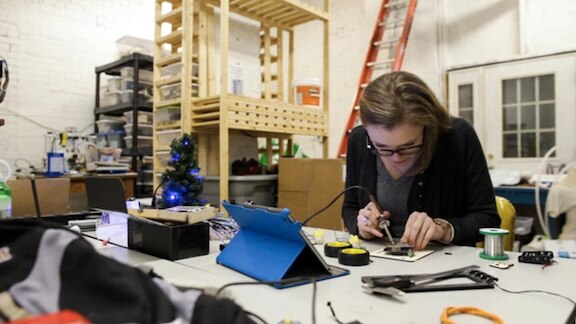
Small purchases can make a big difference in a project. From handy tools to tech upgrades, what could the engineer in your life be missing for their next project? A new Pi could jumpstart ideas, or a full set of basic tools could make everything a little easier. The Raspberry Pi 400 is the latest and fastest to date and an easy base for many a new device. A 3D printer or 3D printer pen is both fun and allows you to print small parts at a moment’s notice. Are you just looking for the basics? An assorted tool kit could be everything they need.


Perhaps just get one of everything on the element14 Holiday wish-list 2020 is a better place to start. Pay close attention to the table-top tools. Soldering stations, o-scope, heat gun, hand-tools are a must.


One extra, but completely essential, part of any workbench is an anti-static mat. Get a roll here.


Personal touches to add to the home office

 

image


It could be anything from a new pen (that isn’t just a pen) to puzzle games for idle hands. Many of us are still working from home for the foreseeable future, so a few personal touches to the desk space could be just what’s needed. Get them something to keep the hands busy while they think, like these Constantin brainteasers. Are they looking for upgraded tools for the desk? How about a 5-in-1 pen that also serves as a tablet/phone stylus, ruler, level, and screwdriver. And for the most important part of any desk setup, a mug warmer to keep the coffee hot while they work.


New gadgets for the IoT-integrated home

 

image


Know someone that loves to toy with connecting everything in their home? It’s convenient, it can be a fun project if they want to make some slight alterations, and there are tons of options. The Google Home suite of devices can be set up to enable voice control for everything from volume and lights to thermostats and alarms. Or, to add some smarts to your other devices like coffee makers, lamps, and TVs, smart outlets allow that with a simple setup. Beyond the home, gift someone an upgrade to their smart wearables with the Garmin Forerunner, build to prioritize health-training while handling all your scheduling and notifications.


A compact field bag for on-the-go engineers

 

image

Bag for tools are essential. If you’re buying for someone who does a lot of fieldwork or is otherwise on the go, a case designed to neatly pack everything they need could be just the ticket. For instance, this durable carry-all for a laptop and all the necessary gear, or this canvas option with multiple color choices. Looking for another add-on for an engineer out in the field? Try a portable power cell to keep all those devices charged.


Books on historic innovations
 

image

For the engineer who loves to read in their downtime, how about some nonfiction on some of history’s most impressive structures and innovations. Bridges: A History of the World’s Most Spectacular Spans details technological advances and structural daring, complete with photographs and illustrations. The Design of Everyday Things takes that appreciative eye to everyday objects, and highlights excellence of design as the key to keeping a competitive edge. Introduction to Flight is the highly readable intro guide to aeronautical and aerospace engineering, for anyone with an interest in flight.


Channel scientific prowess into a DIY beer brewing kit

 

image


Want to take that impulse to create and put it to work on something a little more fun to drink? Why not grab them a build your own beer starter kit? The Brooklyn Brewery has several options to choose from, all with every material needed to start from scratch. The basic build-your-own starter set for an IPA is available for $85.


Let them fly a little higher with their own drone

 

image


Why? Video shots from the sky are fun to look at. Many of the items on the list are both useful and fun to experiment with, and drones are no exception. Able to be adapted to many uses, a DIY drone kit is a project that keeps on giving. Lower-end models won’t break the bank either, starting at around $50, though your options go as high as thousands. For a starter drone, you can pick up the HolyStone HS110D. If you’re looking for something a little more advanced, with more bells and whistles, look for the DJI Spark or another in the DJI line.


Have a story tip? Message me at: http://twitter.com/Cabe_Atwell

  • Sign in to reply

Top Comments

  • beacon_dave
    beacon_dave over 5 years ago +1
    Another one for the home office perhaps is the pen display. https://www.wacom.com/en-us/products/pen-displays/wacom-one If you are used to sketching ideas to your colleagues using pen and paper then the…
  • dougw
    dougw over 5 years ago in reply to beacon_dave +1
    This is a great idea. I would mostly use it for sketching ideas live in element14 blogs, but it doesn't add quite enough value to justify forking out the cash to buy it for this one application.
  • Catwell
    Catwell over 5 years ago in reply to beacon_dave +1
    Oh, a Wacom tablet. I always wanted one. Right now, I draw cartoons/images by hand and then scan them/process in photoshop. Like my latest caption contest... Comic Strip Caption Contest - #3 - Holiday…
  • beacon_dave
    beacon_dave over 5 years ago in reply to Catwell +1
    That one linked to is a combined tablet and display. I've had an Intuos 2 mouse/pen tablet for years but never mastered sketching with the pen whilst looking at a separate display. The pen display has…
  • Catwell
    Catwell over 5 years ago in reply to beacon_dave +1
    So many choices, it's hard to choose. Price vs DPI is the main issue I'm facing.
  • Catwell
    Catwell over 5 years ago in reply to beacon_dave

    So many choices, it's hard to choose.

    Price vs DPI is the main issue I'm facing.    

    • Cancel
    • Vote Up +1 Vote Down
    • Sign in to reply
    • More
    • Cancel
  • beacon_dave
    beacon_dave over 5 years ago in reply to Catwell

    That one linked to is a combined tablet and display.


    I've had an Intuos 2 mouse/pen tablet for years but never mastered sketching with the pen whilst looking at a separate display. The pen display has the tablet and screen combined into one so it's more like writing on a pad of paper where you can look at the tip of the pen as you sketch as opposed to relying on proprioception and your tablet not sliding around.


    Wacom have had their Cintiq tablet display for years, but even more expensive. This pen display seems a nice compromise for those wanting to add to an existing desktop or laptop type workstation set-up.


    One advantage of the digital ink applications is that you can avoid having the problem of running off the edge of the paper, as you can just keep going in any direction you want and then re-centre the sketch once you've finished it.


    Lenovo had a half-way house with their Yoga Book 'real pen' tablet device, which allowed you to use a ballpoint pen on a pad of paper and it recorded the strokes digitally, so you got both the hardcopy on paper and a digital facsimile. However as with smart tablet devices there is always the problem of built-in obsolescence.


    There have been other attempts at digital notepads in the past, but a number of them either tie you to cloud services or a mobile app.

    • Cancel
    • Vote Up +1 Vote Down
    • Sign in to reply
    • More
    • Cancel
  • Catwell
    Catwell over 5 years ago in reply to beacon_dave

    Oh, a Wacom tablet. I always wanted one.

    Right now, I draw cartoons/images by hand and then scan them/process in photoshop. Like my latest caption contest... Comic Strip Caption Contest - #3 - Holiday Card for You All


    I wonder what it's like going straight digital first.


    But, they are so expensive!

    C

    • Cancel
    • Vote Up +1 Vote Down
    • Sign in to reply
    • More
    • Cancel
  • dougw
    dougw over 5 years ago in reply to beacon_dave

    This is a great idea. I would mostly use it for sketching ideas live in element14 blogs, but it doesn't add quite enough value to justify forking out the cash to buy it for this one application.

    • Cancel
    • Vote Up +1 Vote Down
    • Sign in to reply
    • More
    • Cancel
  • beacon_dave
    beacon_dave over 5 years ago

    Another one for the home office perhaps is the pen display.

    https://www.wacom.com/en-us/products/pen-displays/wacom-one


    If you are used to sketching ideas to your colleagues using pen and paper then the transition to online digital whiteboards for home-working may be something of a shock as your artwork now resembles that of a 5-year old with crayons... The pen display in theory keeps the feel of pen and paper but opens up the advantages of digital ink. It also doubles up as an additional HDMI display.

    • Cancel
    • Vote Up +1 Vote Down
    • Sign in to reply
    • More
    • Cancel
element14 Community

element14 is the first online community specifically for engineers. Connect with your peers and get expert answers to your questions.

  • Members
  • Learn
  • Technologies
  • Challenges & Projects
  • Products
  • Store
  • About Us
  • Feedback & Support
  • FAQs
  • Terms of Use
  • Privacy Policy
  • Legal and Copyright Notices
  • Sitemap
  • Cookies

An Avnet Company © 2026 Premier Farnell Limited. All Rights Reserved.

Premier Farnell Ltd, registered in England and Wales (no 00876412), registered office: Farnell House, Forge Lane, Leeds LS12 2NE.

ICP 备案号 10220084.

Follow element14

  • X
  • Facebook
  • linkedin
  • YouTube