element14 Community
element14 Community
    Register Log In
  • Site
  • Search
  • Log In Register
  • Community Hub
    Community Hub
    • What's New on element14
    • Feedback and Support
    • Benefits of Membership
    • Personal Blogs
    • Members Area
    • Achievement Levels
  • Learn
    Learn
    • Ask an Expert
    • eBooks
    • element14 presents
    • Learning Center
    • Tech Spotlight
    • STEM Academy
    • Webinars, Training and Events
    • Learning Groups
  • Technologies
    Technologies
    • 3D Printing
    • FPGA
    • Industrial Automation
    • Internet of Things
    • Power & Energy
    • Sensors
    • Technology Groups
  • Challenges & Projects
    Challenges & Projects
    • Design Challenges
    • element14 presents Projects
    • Project14
    • Arduino Projects
    • Raspberry Pi Projects
    • Project Groups
  • Products
    Products
    • Arduino
    • Avnet & Tria Boards Community
    • Dev Tools
    • Manufacturers
    • Multicomp Pro
    • Product Groups
    • Raspberry Pi
    • RoadTests & Reviews
  • About Us
    About the element14 Community
  • Store
    Store
    • Visit Your Store
    • Choose another store...
      • Europe
      •  Austria (German)
      •  Belgium (Dutch, French)
      •  Bulgaria (Bulgarian)
      •  Czech Republic (Czech)
      •  Denmark (Danish)
      •  Estonia (Estonian)
      •  Finland (Finnish)
      •  France (French)
      •  Germany (German)
      •  Hungary (Hungarian)
      •  Ireland
      •  Israel
      •  Italy (Italian)
      •  Latvia (Latvian)
      •  
      •  Lithuania (Lithuanian)
      •  Netherlands (Dutch)
      •  Norway (Norwegian)
      •  Poland (Polish)
      •  Portugal (Portuguese)
      •  Romania (Romanian)
      •  Russia (Russian)
      •  Slovakia (Slovak)
      •  Slovenia (Slovenian)
      •  Spain (Spanish)
      •  Sweden (Swedish)
      •  Switzerland(German, French)
      •  Turkey (Turkish)
      •  United Kingdom
      • Asia Pacific
      •  Australia
      •  China
      •  Hong Kong
      •  India
      •  Japan
      •  Korea (Korean)
      •  Malaysia
      •  New Zealand
      •  Philippines
      •  Singapore
      •  Taiwan
      •  Thailand (Thai)
      •  Vietnam
      • Americas
      •  Brazil (Portuguese)
      •  Canada
      •  Mexico (Spanish)
      •  United States
      Can't find the country/region you're looking for? Visit our export site or find a local distributor.
  • Translate
  • Profile
  • Settings
Community Hub
Community Hub
Member's Forum Set your Processors to ANALYSE for the COVID-19 virus with Folding@Home or Rosetta@Home
  • Blog
  • Forum
  • Documents
  • Quiz
  • Events
  • Leaderboard
  • Polls
  • Files
  • Members
  • Mentions
  • Sub-Groups
  • Tags
  • More
  • Cancel
  • New
Join Community Hub to participate - click to join for free!
Actions
  • Share
  • More
  • Cancel
Forum Thread Details
  • Replies 125 replies
  • Subscribers 647 subscribers
  • Views 5109 views
  • Users 0 members are here
  • raspberry pi covid-19
  • folding at home on raspberrypi
  • folding@home
  • raspberry pi coronavirus
  • raspberry pi
  • covid-19
  • rosetta at home
  • foldingathome
  • rosetta@home
  • coronavirus
  • corona virus
  • cvid-health
Related

Set your Processors to ANALYSE for the COVID-19 virus with Folding@Home or Rosetta@Home

cstanton
cstanton over 6 years ago

The Folding@Home distributed grid computing project has set its sights on analysing the Coronavirus.


Whether you have a powerful CPU or GPU up for the task, you should be able to contribute to dissecting the proteins involved and contribute a bit of your electricity bill and processing power to calculating the means necessary to analyse the proteins.


Download the client and set it up however you want to (whether you want it to pause when your processor gets too busy, too hot, or just when idle while you have the computer on).


You can find more detailed information here and here. There's a Windows client attached to this post.


Current Corona specific projects (you don't need to do anything to get them, the software will do it for you):


14530/14531 Coronavirus SARS-CoV-2 (COVID-19 causing virus) protease - potential drug target

14328 - Coronavirus SARS-CoV-2 (COVID-19 causing virus) protease - potential drug target

11741: Coronavirus SARS-CoV-2 (COVID-19 causing virus) receptor binding domain in complex with human receptor ACE2.

11746: Coronavirus SARS-CoV-2 (COVID-19 causing virus) receptor binding domain in complex with human receptor ACE2 (alternative structure to 11741).

11742: Coronavirus SARS-CoV-2 (COVID-19 causing virus) protease in complex with an inhibitor.

11743: Coronavirus SARS-CoV-2 (COVID-19 causing virus) protease – potential drug target.

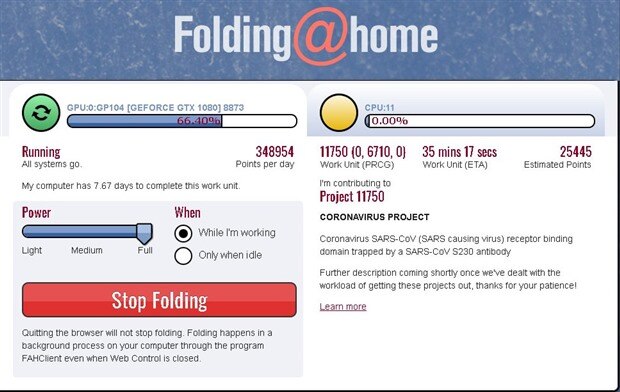
11744: Coronavirus SARS-CoV (SARS causing virus) receptor binding domain trapped by a SARS-CoV S230 antibody.

11745: Coronavirus SARS-CoV (SARS causing virus) receptor binding domain mutated to the SARS-CoV-2 (COVID-19 causing virus) trapped by a SARS-CoV S230 antibody.


All these are under the default "any" selection in settings. We don't currently have a coronavirus specific selection, so all related projects will be grouped up and sent under the ANY setting to your PC as needed!
image

You can download and install it for Windows, Mac and Linux.


Join the element14 Community Folding@Home team - the Team Number is 240845

You should be able to request a passkey if you want to setup your own username, though it may take a while before you receive it via email.


When the APIs are back up we should be able to see aggregated team stats, but at least for now lets get processing!


Great work by those who have contributed so far!

 

image


Edit:

If you're not receiving work units, it's because the Folding@Home servers are currently overloaded with requests - you will receive work units once they've upgraded the server's capacity!


You can see how the increase in workload has amassed here.


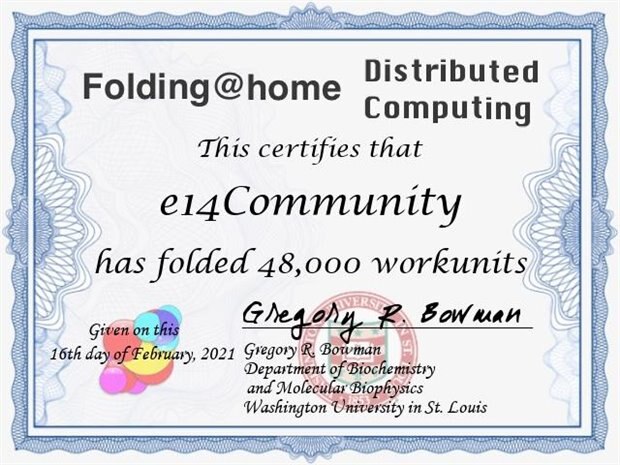
Edit: Now with STATS
 

image


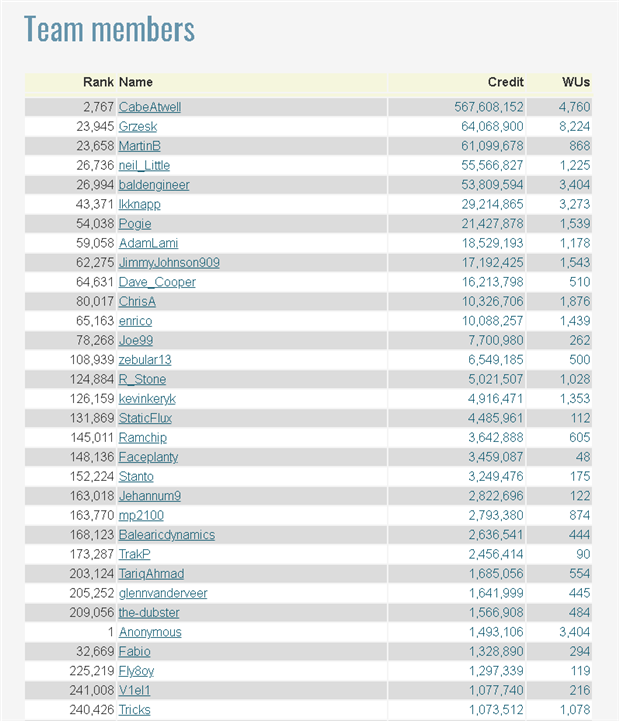
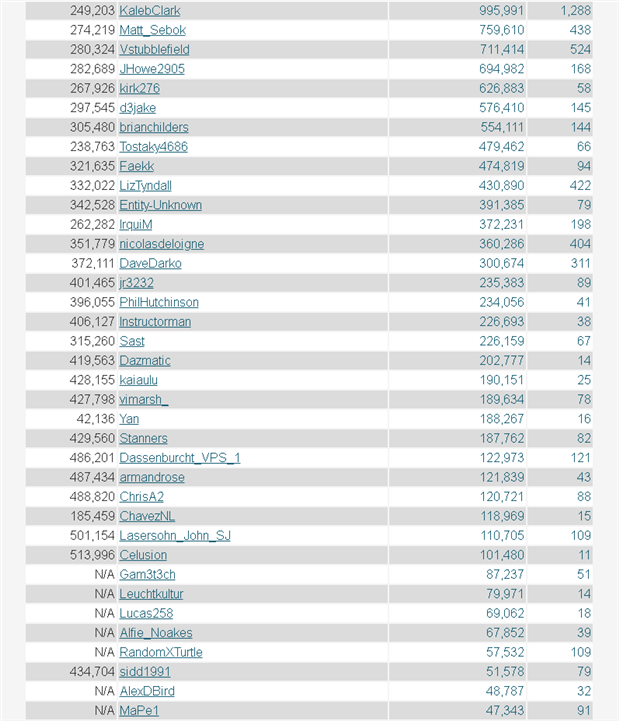
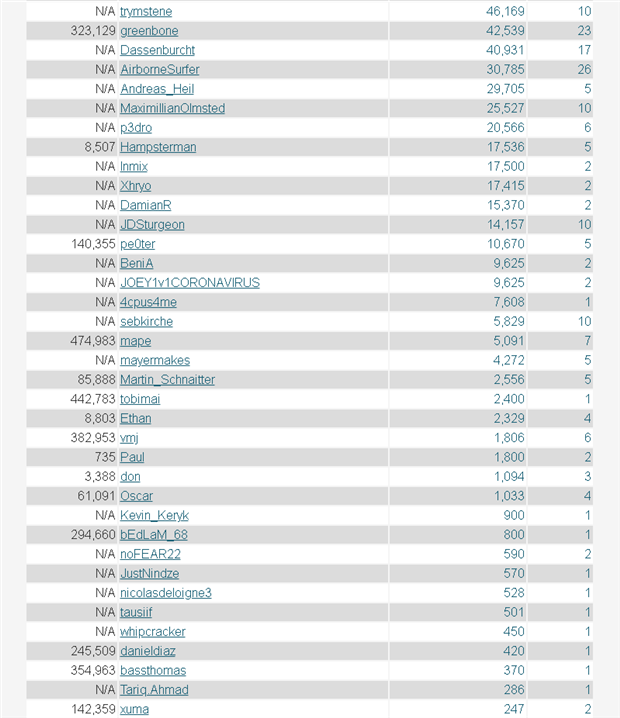
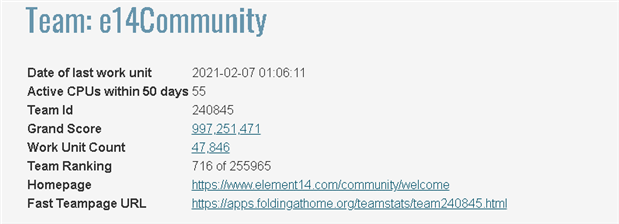
We can view the element14 Community team stats here or here


Here's a snapshot of them as of 7th February 01:47 GMT
image

image

image

image

image


Update: Rosetta@Home Now has ARM 64-bit Support

Those of you who own an ARM based single board computer, such as a Raspberry Pi 3 or Raspberry Pi 4 should now be happy to know that Rosetta@Home can let you process coronavirus proteins to support the effort using a 64-bit operating system. Any ARM based processor that has 2gByte of RAM and supports 64-bit should work, so long as you're running a kernel/operating system that supports and identifies as 64bit. To get this working on Raspbian you have to do a bit of configuration altering (thanks to Rosetta@home on Raspbian Pi 4 ).


To get this working, you need to have a 64-bit operating system. You can either use something like Ubuntu Server 64bit for the Raspberry Pi 3 and 4 here. Or you can do the following to allow it under Raspbian:


$ sudo vim /boot/config.txt


Add the following line to the end of the file:


arm_64bit=1


You should then be able to run the following command:


$ uname -a


Which the response should be something like:

Linux raspberrypi 4.19.113-v8+ #1300 SMP PREEMPT Thu Mar 26 17:04:40 GMT 2020 aarch64 GNU/Linux


You'll need to register for an account on BOINC/Rosetta@Home here, and make sure you join the element14 Community team. Join 'E14community' after you've created an account, teamid 19110.


You can install BOINC on Ubuntu and Raspbian by executing:


$ sudo apt-get install boinc-client boinctui boinc-manager


Now, if you're using Raspbian you need to do the following:


$ sudo vim /etc/boinc-client/cc_config.xml


And add the following lines before the last </cc_config> tag:


<options>

<alt_platform>aarch64-unknown-linux-gnu</alt_platform>

</options>

You can add more than one alt_platform line here, it's possible that your Raspbian might identify better as one of the following:


  • aarch64-unknown-linux-gnueabihf
  • arm-unknown-linux-gnueabihf
  • aarch64-unknown-linux-gnu


Save the file, and reboot your Raspberry Pi. If you're using Ubuntu Server 64bit you do not need to do the above steps aside from the sudo apt-get install.


Picking up Work Units


If you're setting this up over SSH (like I am) , or bring up a terminal in the desktop, type in:


$ boinctui


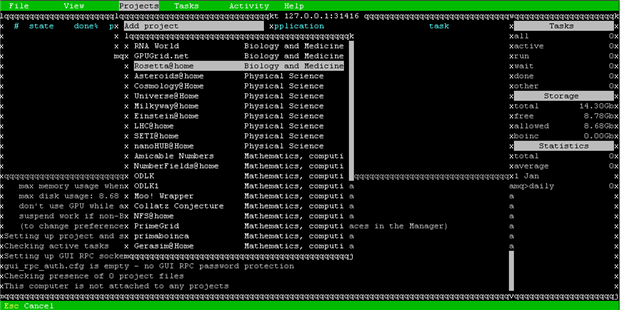
Then hit 'enter' at the first prompt. Then press F9


Using your arrow keys on the keyboard, navigate to the menu 'Projects' and hit enter on 'Add Project' and choose 'Rosetta@Home'
 

image

Choose 'existing user' because you'll have already setup an account and joined a team. Then type in your username and password.


Once you've typed in your username and password, the software will run a benchmark
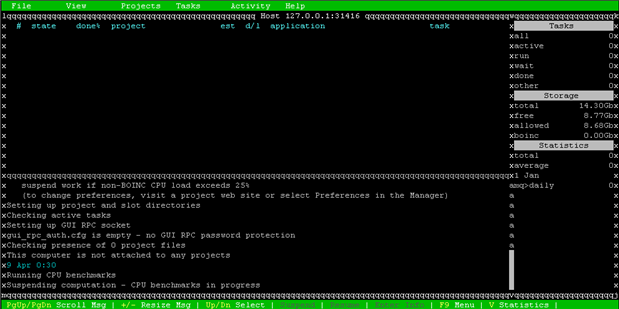
 

image


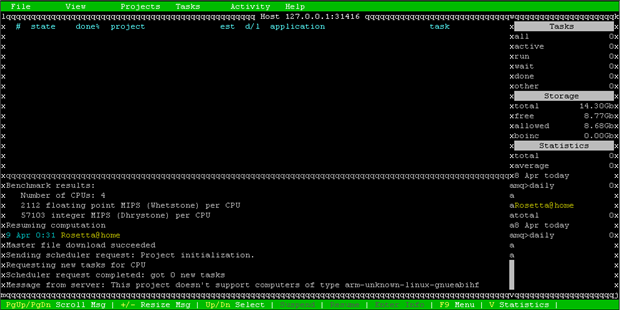
However you may not be able to run the Rosetta@Home COVID-19 work units in Raspbian because something in the setup of BOINC has gone awry or you haven't enabled arm_64bit=1 in config.txt and you'll get an error message like this:
image

"This project doesn't support computers of type arm-unknown-linux-gnueabihf". I encountered this problem and I had to do the following. Though I did have a better experience using BOINC Manager from the GUI rather than going for boinctui straight away. If you find that no matter what you do, BOINC still throws 'arm-unknown-linux-gnueabihf' then try running:


$ sudo apt-get purge --auto-remove boinc-client boinctui boinc-manager

Then say 'yes' to the prompt that appears, and then run:


$ sudo apt-get install boinc-client boinc-manager boinctui boinc-client-opencl libgl1-mesa-glx


Then instead of using boinctui, follow the steps using BOINC Manager which you'll find under 'System Tools' in the Raspbian desktop.
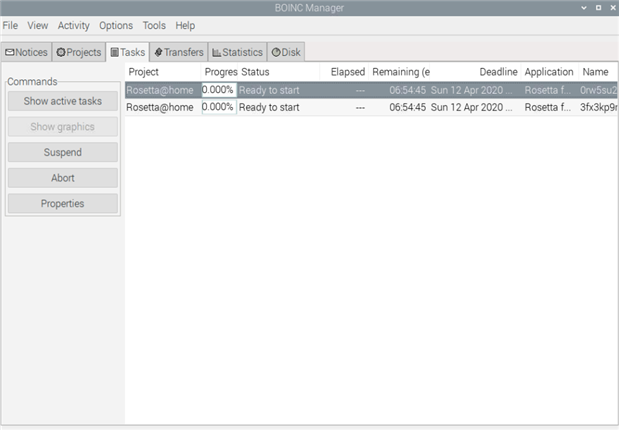
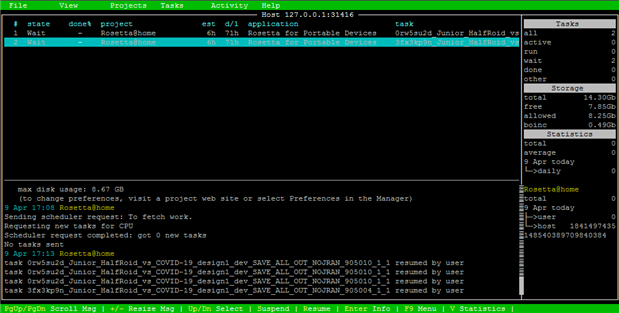
 

image


image


Then you can use either the GUI or Terminal version image


There are also stats for this team here and here ! Looks like it's only me so far image
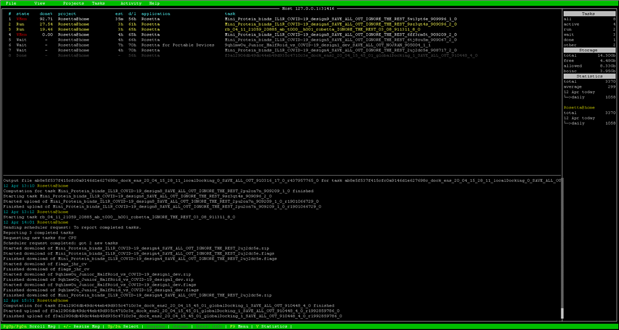
 

image


We've just passed the 900,000 unit milestone on Rosetta@Home! Great work !
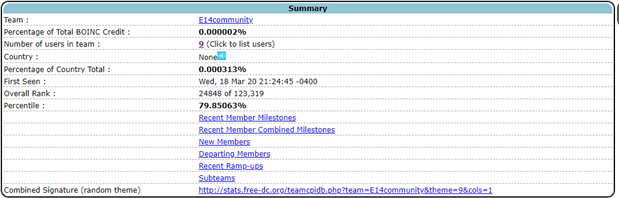
 

image


image


Remember: every contribution helps!


Message was edited by: Christopher Stanton- Updated Stats

Attachments:
fah-installer_7.5.1_x86.exe.zip
  • Sign in to reply
  • Cancel
  • grzesk
    grzesk over 5 years ago

    Hello Great Folding team!!

    We reached 1000 000 000 points.

    Congratulations!!!

    image

    • Cancel
    • Vote Up +3 Vote Down
    • Sign in to reply
    • Cancel
  • grzesk
    grzesk over 5 years ago

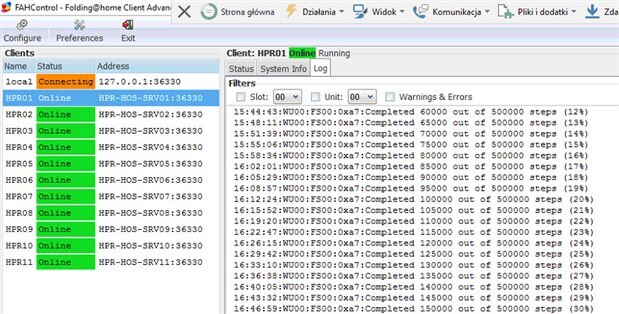
    If you have to control more than one computer/server, and Your HW is in same LAN, You can easy configure one console for all.

    You just need to add firewall rule (if active)  on every HW  to port 36330

    image

    • Cancel
    • Vote Up +2 Vote Down
    • Sign in to reply
    • Cancel
  • baldengineer
    baldengineer over 5 years ago

    https://www.networkworld.com/article/3587388/foldinghome-exascale-supercomputer-finds-potential-targets-for-covid-19-cur…


    Looks like we helped!

    In a newly published paper, the Folding@home team said it was able to simulate an "unprecedented" 0.1 seconds of the viral proteome. They captured dramatic opening of the spike complex, as well as shape-shifting in other proteins that revealed more than 50 "cryptic" pockets that expand targeting options for the design of antivirals.

    • Cancel
    • Vote Up +4 Vote Down
    • Sign in to reply
    • Cancel
  • glennvanderveer
    glennvanderveer over 5 years ago in reply to rstone

    I had to move, so I haven't found the box of Pi's yet, along with a whole bunch of things that are still hidden...

    • Cancel
    • Vote Up +1 Vote Down
    • Sign in to reply
    • Cancel
  • mp2100
    mp2100 over 5 years ago in reply to rstone

    I have one older windows laptop still going.  I had 3 going for a while, when this started, but in the heat of the summer, my home office was too warm.  Maybe when the weather cools off, I will fire up another one.

    • Cancel
    • Vote Up +1 Vote Down
    • Sign in to reply
    • Cancel
  • cstanton
    cstanton over 5 years ago in reply to gam3t3ch

    I haven't stopped my Pi from doing it. However I needed to stop my desktop computers from doing so because of the electricity use.

    • Cancel
    • Vote Up +2 Vote Down
    • Sign in to reply
    • Cancel
  • gam3t3ch
    gam3t3ch over 5 years ago in reply to rstone

    I know there is a few still doing this, I  have a few machines still going on it.  I moved my office around so my pi stack isn't running at the moment on it but will be again shortly.

    • Cancel
    • Vote Up +2 Vote Down
    • Sign in to reply
    • Cancel
  • rstone
    rstone over 5 years ago

    So, is anybody still doing this? My MacBook Pro is still going, but I had to retire the old Win7 laptop I had running, It just couldn't keep up.


    Rick

    • Cancel
    • Vote Up +2 Vote Down
    • Sign in to reply
    • Cancel
  • gam3t3ch
    gam3t3ch over 6 years ago in reply to cstanton

    I have been playing with zswap seems to be helping my units out with better performance ill update on it soon once I see more results.

    • Cancel
    • Vote Up +1 Vote Down
    • Sign in to reply
    • Cancel
  • gam3t3ch
    gam3t3ch over 6 years ago in reply to cstanton

    the memory to the gpu if only using boinctui should be set to 8 not 16, when running on buster lite.

    • Cancel
    • Vote Up +1 Vote Down
    • Sign in to reply
    • Cancel
>
element14 Community

element14 is the first online community specifically for engineers. Connect with your peers and get expert answers to your questions.

  • Members
  • Learn
  • Technologies
  • Challenges & Projects
  • Products
  • Store
  • About Us
  • Feedback & Support
  • FAQs
  • Terms of Use
  • Privacy Policy
  • Legal and Copyright Notices
  • Sitemap
  • Cookies

An Avnet Company © 2026 Premier Farnell Limited. All Rights Reserved.

Premier Farnell Ltd, registered in England and Wales (no 00876412), registered office: Farnell House, Forge Lane, Leeds LS12 2NE.

Follow element14

  • X
  • Facebook
  • linkedin
  • YouTube