element14 Community
element14 Community
    Register Log In
  • Site
  • Search
  • Log In Register
  • Community Hub
    Community Hub
    • What's New on element14
    • Feedback and Support
    • Benefits of Membership
    • Personal Blogs
    • Members Area
    • Achievement Levels
  • Learn
    Learn
    • Ask an Expert
    • eBooks
    • element14 presents
    • Learning Center
    • Tech Spotlight
    • STEM Academy
    • Webinars, Training and Events
    • Learning Groups
  • Technologies
    Technologies
    • 3D Printing
    • FPGA
    • Industrial Automation
    • Internet of Things
    • Power & Energy
    • Sensors
    • Technology Groups
  • Challenges & Projects
    Challenges & Projects
    • Design Challenges
    • element14 presents Projects
    • Project14
    • Arduino Projects
    • Raspberry Pi Projects
    • Project Groups
  • Products
    Products
    • Arduino
    • Avnet & Tria Boards Community
    • Dev Tools
    • Manufacturers
    • Multicomp Pro
    • Product Groups
    • Raspberry Pi
    • RoadTests & Reviews
  • About Us
  • Store
    Store
    • Visit Your Store
    • Choose another store...
      • Europe
      •  Austria (German)
      •  Belgium (Dutch, French)
      •  Bulgaria (Bulgarian)
      •  Czech Republic (Czech)
      •  Denmark (Danish)
      •  Estonia (Estonian)
      •  Finland (Finnish)
      •  France (French)
      •  Germany (German)
      •  Hungary (Hungarian)
      •  Ireland
      •  Israel
      •  Italy (Italian)
      •  Latvia (Latvian)
      •  
      •  Lithuania (Lithuanian)
      •  Netherlands (Dutch)
      •  Norway (Norwegian)
      •  Poland (Polish)
      •  Portugal (Portuguese)
      •  Romania (Romanian)
      •  Russia (Russian)
      •  Slovakia (Slovak)
      •  Slovenia (Slovenian)
      •  Spain (Spanish)
      •  Sweden (Swedish)
      •  Switzerland(German, French)
      •  Turkey (Turkish)
      •  United Kingdom
      • Asia Pacific
      •  Australia
      •  China
      •  Hong Kong
      •  India
      • Japan
      •  Korea (Korean)
      •  Malaysia
      •  New Zealand
      •  Philippines
      •  Singapore
      •  Taiwan
      •  Thailand (Thai)
      • Vietnam
      • Americas
      •  Brazil (Portuguese)
      •  Canada
      •  Mexico (Spanish)
      •  United States
      Can't find the country/region you're looking for? Visit our export site or find a local distributor.
  • Translate
  • Profile
  • Settings
Community Hub
Community Hub
Member's Forum Solder Reflow Oven Build
  • Blog
  • Forum
  • Documents
  • Quiz
  • Events
  • Leaderboard
  • Polls
  • Files
  • Members
  • Mentions
  • Sub-Groups
  • Tags
  • More
  • Cancel
  • New
Join Community Hub to participate - click to join for free!
Actions
  • Share
  • More
  • Cancel
Forum Thread Details
  • Replies 5 replies
  • Subscribers 573 subscribers
  • Views 1425 views
  • Users 0 members are here
  • reflow
  • solder
  • msp430
  • oven
Related

Solder Reflow Oven Build

joe
joe over 11 years ago

I was watching the episode of Ben Heck's show here on element14 where he build a solder reflow oven out of a toaster oven and I thought this might make a nice project.  If you'd like to check out Ben's build, you can check out the link below:

Episode 116: Ben's Home-Brew Solder Reflow Oven 2.0 Episode


I have started work on this project and will post additional details if I make any progress.  To get going, I have chosen the MSP430G2955 to be the controller and will be interfacing it with the EA DOGS102-6 102x64 dot matrix display. 

  • Sign in to reply
  • Cancel

Top Replies

  • joe
    joe over 4 years ago +2
    Wow! It's been 7 years since I posted here? It might be time to finish this project!!!
  • joe
    joe over 11 years ago +1
    For the breakout board, the MAX31855 requires a Type K thermocouple. Here's a description from the manufacturer on the thermocouple that I am using: CHROMEGA -ALOMEGA (ANSI Symbol K) The CHROMEGA -ALOMEGA…
  • joe
    joe over 11 years ago +1
    I have added in some fault detection code. This code will first check to see if any fault exits. If none exist, the program will proceed on to the previously discussed temperature measurement. If one does…
  • joe
    joe over 11 years ago

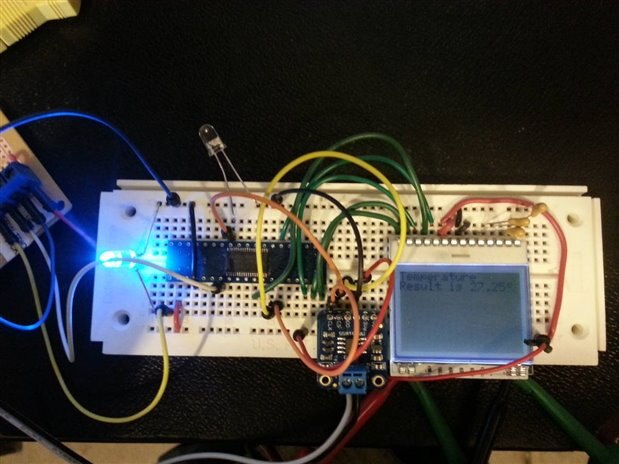
    Here's a picture of what I have wired up so far.  The MSP430G2955 is a 38 pin TSSOP package device and is attached to an adapter board for easier prototyping.  I also used the Thermocouple Amplifier MAX31855 breakout board from adafruit, to let it do the math calculations for me.  When connected to a Type-K thermocouple, it provides the temperature result to an accuracy of 0.25 degrees Celsius and sends the data out by SPI so that it can be read in by the microcontroller.  I'll include more details in the future about the data format and the code I used to parse out the temperature result.


    Type K Thermocouple: Thermocouple

    adafruit Breakout Board:Thermocouple Amplifier MAX31855 breakout board (MAX6675 upgrade) [v2.0] ID: 269 - $14.95 : Adafruit Industries, Unique &…

    MAX31855 Datasheet: http://datasheets.maximintegrated.com/en/ds/MAX31855.pdf

    image image

    • Cancel
    • Vote Up 0 Vote Down
    • Sign in to reply
    • Cancel
  • joe
    joe over 11 years ago

    For the breakout board, the MAX31855 requires a Type K thermocouple. 

    Here's a description from the manufacturer on the thermocouple that I am using:

    CHROMEGARegistered-ALOMEGARegistered (ANSI Symbol K) The CHROMEGARegistered-ALOMEGARegistered “K” curve thermocouple with a positive CHROMEGARegistered wire and a negative ALOMEGARegistered wire is recommended for use in clean oxidizing atmospheres, The operating range for this alloy is 2300°F for the largest wire sizes. Smaller wire sizes should operate in correspondingly lower temperatures.


    I chose a 20 gauge wire, so the max temperature will be considerably less than specified above.  The max range that I would expect to measure would be less than 350°C


    MAX31855 data packet is 32 bits in which the thermocouple temperature is reported in bits 18:31.  Bits 0:17 contain some fault checking capabilities and the internal chip reference temperature.  I have parsed out the packet to only obtain the thermocouple temperature.  The 14 bit binary number is converted to a Celsius result by assuming each bit is equal to 0.25°C.  For example, a result of 0000 0000 0000 10 is equal to 0.50°C.  Since the last two bits contain the decimal portion of the temperature result, it was a simple process of just shifting the bits two places to the right, and then the whole number portion of the results can be outputted as an integer.  Then I could look at the last two bits separately to determine the fractional portion.

    • Cancel
    • Vote Up +1 Vote Down
    • Sign in to reply
    • Cancel
  • joe
    joe over 11 years ago

    At first glance, it appeared that measuring a negative temperature would be a bit more difficult because of the way in which the MAX31855 handled these values.  Basically, the chip works backwards for negative, so a temperature of -0.25°C would be represented as 1111 1111 1111 11 and a temperature of -0.50°C would be represented as 1111 1111 1111 10 and so on.  Since this is basically the opposite of the positive temperatures, I found that if I just XOR'ed the result with 1111 1111 1111 11 (0x3FFF)and added 1, I could use the same method as I used for the positive results.  Here's a piece of my test code used to obtain positive or negative temperatures in Celsius:


       extern uint8_t volatile temp[4];  \\ temp[0] contains the top 8 bits and temp[1] contains the bottom 6 bits plus two unused bits which will be shifted out

       uint16_t volatile temp_result;


    // Move the binary temperature result into temp_result using only the lower 14 bits


      temp_result = temp[0];


      temp_result = temp_result << 8;


      temp_result |= temp[1];


      temp_result = temp_result >> 2;


    // The if statement checks the 14th bit.  Assuming there is no fault condition, this bit will be 1 if the result is negative.

       if ( (temp_result & 0x2000) == 0){

           sprintf(buffer, "Result is: \n%d.%d%cC",temp_result >> 2, (temp_result & 0x03) * 25, 0x7F);


           Dogs102x6_stringDraw(1, 0, buffer, DOGS102x6_DRAW_NORMAL);

    }

       else{

      temp_result = (temp_result ^ 0x3FFF) + 1;

           sprintf(buffer, "Result is: \n-%d.%d%cC",temp_result >> 2, (temp_result & 0x03) * 25, 0x7F);

           Dogs102x6_stringDraw(1, 0, buffer, DOGS102x6_DRAW_NORMAL);    

    }


    Additional code would need to be added to check for faults prior to making the temperature measurement. 

    • Cancel
    • Vote Up 0 Vote Down
    • Sign in to reply
    • Cancel
  • joe
    joe over 11 years ago

    I have added in some fault detection code.  This code will first check to see if any fault exits. If none exist, the program will proceed on to the previously discussed temperature measurement. If one does exist, the program checks which fault(s) are currently being reported by the MAX31855:


            /* Check Fault condition bit D16 (BIT0 of temp[1]). If 1, a fault exists
             and don't proceed with the temperature measurement. Instead determine which fault(s)
             exist and display the result to the screen.
             OC = Open Circuit
             SCG = Short Circuited to Ground
             SCV = Short Circuited to Vcc
             It is possible to have more than one fault at the same time.
             */
            if ( (temp[1] & 0x01) == 1){

             switch (temp[3] & 0x07) {
             case 0x01:
                    sprintf(buffer, "OC Fault");
              break;
             case 0x02:
                    sprintf(buffer, "SCG Fault");
              break;
             case 0x03:
                    sprintf(buffer, "OC/SCG Fault");
              break;
             case 0x04:
                    sprintf(buffer, "SCV Fault");
              break;
             case 0x05:
                    sprintf(buffer, "OC/SCV Fault");
              break;
             default:
                    sprintf(buffer, "Other Fault");
              break;

             }
                Dogs102x6_stringDraw(1, 0, buffer, DOGS102x6_DRAW_NORMAL);
            }
            else{

                 //  Continue to temperature measurement

       }

    • Cancel
    • Vote Up +1 Vote Down
    • Sign in to reply
    • Cancel
  • joe
    joe over 4 years ago

    Wow!  It's been 7 years since I posted here?  It might be time to finish this project!!!

    • Cancel
    • Vote Up +2 Vote Down
    • Sign in to reply
    • Cancel
element14 Community

element14 is the first online community specifically for engineers. Connect with your peers and get expert answers to your questions.

  • Members
  • Learn
  • Technologies
  • Challenges & Projects
  • Products
  • Store
  • About Us
  • Feedback & Support
  • FAQs
  • Terms of Use
  • Privacy Policy
  • Legal and Copyright Notices
  • Sitemap
  • Cookies

An Avnet Company © 2026 Premier Farnell Limited. All Rights Reserved.

Premier Farnell Ltd, registered in England and Wales (no 00876412), registered office: Farnell House, Forge Lane, Leeds LS12 2NE.

ICP 备案号 10220084.

Follow element14

  • X
  • Facebook
  • linkedin
  • YouTube