Hi...!
Now, I am using Arduino nano and facing with a problem. When I run a program, the Arduino nano stop working after 19 second and it rework after 5 second. So, please share me how to solve this problem. Thank you.
Hi...!
Now, I am using Arduino nano and facing with a problem. When I run a program, the Arduino nano stop working after 19 second and it rework after 5 second. So, please share me how to solve this problem. Thank you.
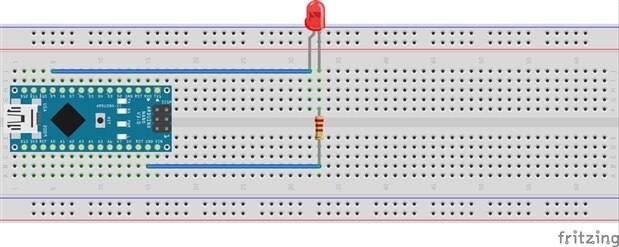
Honestly, I am at beginner level. So I tested with two simple LED codes.
The first one is
class Flasher
{
int ledPin;
long OnTime;
long OffTime;
int ledState;
unsigned long previousMillis;
public:
Flasher(int pin, long on, long off)
{
ledPin = pin;
pinMode(ledPin,OUTPUT);
OnTime = on;
OffTime = off;
ledState = LOW;
previousMillis = 0;
}
void Update()
{
unsigned long currentMillis = millis();
if((ledState == HIGH) && (currentMillis-previousMillis>=OnTime))
{
ledState = LOW;
previousMillis = currentMillis;
digitalWrite(ledPin,ledState);
}
else if ((ledState == LOW) && (currentMillis-previousMillis>=OffTime))
{
ledState = HIGH;
previousMillis = currentMillis;
digitalWrite(ledPin,ledState);
}
} };
Flasher led1(9,100,150);
void setup()
{
}
void loop()
{
led1.Update();
}
And the second is
void setup()
{
pinMode(9,OUTPUT);
}
void loop()
{
digitalWrite(9,HIGH);
}
Thank you for your help.
I have a feeling it's a problem with the board, or maybe a problem with the power source.
The blink example should run as long as it's plugged in.
If you have a second board, try using that to see if all is fine there.
Or, try powering the board using something else - maybe a cell phone charger if you have one.
-Nico
I have a feeling it's a problem with the board, or maybe a problem with the power source.
The blink example should run as long as it's plugged in.
If you have a second board, try using that to see if all is fine there.
Or, try powering the board using something else - maybe a cell phone charger if you have one.
-Nico