Hi...!
Now, I am using Arduino nano and facing with a problem. When I run a program, the Arduino nano stop working after 19 second and it rework after 5 second. So, please share me how to solve this problem. Thank you.
Hi...!
Now, I am using Arduino nano and facing with a problem. When I run a program, the Arduino nano stop working after 19 second and it rework after 5 second. So, please share me how to solve this problem. Thank you.
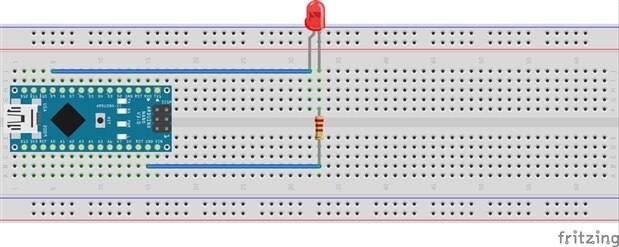
Honestly, I am at beginner level. So I tested with two simple LED codes.
The first one is
class Flasher
{
int ledPin;
long OnTime;
long OffTime;
int ledState;
unsigned long previousMillis;
public:
Flasher(int pin, long on, long off)
{
ledPin = pin;
pinMode(ledPin,OUTPUT);
OnTime = on;
OffTime = off;
ledState = LOW;
previousMillis = 0;
}
void Update()
{
unsigned long currentMillis = millis();
if((ledState == HIGH) && (currentMillis-previousMillis>=OnTime))
{
ledState = LOW;
previousMillis = currentMillis;
digitalWrite(ledPin,ledState);
}
else if ((ledState == LOW) && (currentMillis-previousMillis>=OffTime))
{
ledState = HIGH;
previousMillis = currentMillis;
digitalWrite(ledPin,ledState);
}
} };
Flasher led1(9,100,150);
void setup()
{
}
void loop()
{
led1.Update();
}
And the second is
void setup()
{
pinMode(9,OUTPUT);
}
void loop()
{
digitalWrite(9,HIGH);
}
Thank you for your help.
ps, interesting way of blinking the LED. Doesn't block the main thread that way 
For testing, maybe try the more basic form of Blink?
(From Arduino IDE - File - Examples - Basic - Blink)
// the setup function runs once when you press reset or power the board
void setup() {
// initialize digital pin 13 as an output.
pinMode(13, OUTPUT);
}
// the loop function runs over and over again forever
void loop() {
digitalWrite(13, HIGH); // turn the LED on (HIGH is the voltage level)
delay(1000); // wait for a second
digitalWrite(13, LOW); // turn the LED off by making the voltage LOW
delay(1000); // wait for a second
}
-Nico
ps, interesting way of blinking the LED. Doesn't block the main thread that way 
For testing, maybe try the more basic form of Blink?
(From Arduino IDE - File - Examples - Basic - Blink)
// the setup function runs once when you press reset or power the board
void setup() {
// initialize digital pin 13 as an output.
pinMode(13, OUTPUT);
}
// the loop function runs over and over again forever
void loop() {
digitalWrite(13, HIGH); // turn the LED on (HIGH is the voltage level)
delay(1000); // wait for a second
digitalWrite(13, LOW); // turn the LED off by making the voltage LOW
delay(1000); // wait for a second
}
-Nico