element14 Community
element14 Community
    Register Log In
  • Site
  • Search
  • Log In Register
  • Community Hub
    Community Hub
    • What's New on element14
    • Feedback and Support
    • Benefits of Membership
    • Personal Blogs
    • Members Area
    • Achievement Levels
  • Learn
    Learn
    • Ask an Expert
    • eBooks
    • element14 presents
    • Learning Center
    • Tech Spotlight
    • STEM Academy
    • Webinars, Training and Events
    • Learning Groups
  • Technologies
    Technologies
    • 3D Printing
    • FPGA
    • Industrial Automation
    • Internet of Things
    • Power & Energy
    • Sensors
    • Technology Groups
  • Challenges & Projects
    Challenges & Projects
    • Design Challenges
    • element14 presents Projects
    • Project14
    • Arduino Projects
    • Raspberry Pi Projects
    • Project Groups
  • Products
    Products
    • Arduino
    • Avnet & Tria Boards Community
    • Dev Tools
    • Manufacturers
    • Multicomp Pro
    • Product Groups
    • Raspberry Pi
    • RoadTests & Reviews
  • About Us
    About the element14 Community
  • Store
    Store
    • Visit Your Store
    • Choose another store...
      • Europe
      •  Austria (German)
      •  Belgium (Dutch, French)
      •  Bulgaria (Bulgarian)
      •  Czech Republic (Czech)
      •  Denmark (Danish)
      •  Estonia (Estonian)
      •  Finland (Finnish)
      •  France (French)
      •  Germany (German)
      •  Hungary (Hungarian)
      •  Ireland
      •  Israel
      •  Italy (Italian)
      •  Latvia (Latvian)
      •  
      •  Lithuania (Lithuanian)
      •  Netherlands (Dutch)
      •  Norway (Norwegian)
      •  Poland (Polish)
      •  Portugal (Portuguese)
      •  Romania (Romanian)
      •  Russia (Russian)
      •  Slovakia (Slovak)
      •  Slovenia (Slovenian)
      •  Spain (Spanish)
      •  Sweden (Swedish)
      •  Switzerland(German, French)
      •  Turkey (Turkish)
      •  United Kingdom
      • Asia Pacific
      •  Australia
      •  China
      •  Hong Kong
      •  India
      •  Japan
      •  Korea (Korean)
      •  Malaysia
      •  New Zealand
      •  Philippines
      •  Singapore
      •  Taiwan
      •  Thailand (Thai)
      •  Vietnam
      • Americas
      •  Brazil (Portuguese)
      •  Canada
      •  Mexico (Spanish)
      •  United States
      Can't find the country/region you're looking for? Visit our export site or find a local distributor.
  • Translate
  • Profile
  • Settings
Community Hub
Community Hub
Member's Forum Flashing Led's
  • Blog
  • Forum
  • Documents
  • Quiz
  • Events
  • Leaderboard
  • Polls
  • Files
  • Members
  • Mentions
  • Sub-Groups
  • Tags
  • More
  • Cancel
  • New
Join Community Hub to participate - click to join for free!
Actions
  • Share
  • More
  • Cancel
Forum Thread Details
  • State Suggested Answer
  • Replies 53 replies
  • Answers 23 answers
  • Subscribers 634 subscribers
  • Views 6648 views
  • Users 0 members are here
  • blink led
Related

Flashing Led's

commanderkelly
commanderkelly over 7 years ago

Hello, I am new to this site and loving it. I did a bit of Electronics in 1995 where I made a flashing led circuit with 2 led's and it was cool. My other hobby is model trains and I would like to put 2 small led's in buffer stops and make them flash and run it off a DC train controller. Does anyone have a simple circuit that would do the job for this? I am basically a noob at electronics but I can follow a simple circuit.


Thank you.


Gary.

  • Sign in to reply
  • Cancel
  • 14rhb
    0 14rhb over 6 years ago in reply to SGarciaV

    I too have a fond liking for the 555 having used it for many projects through the 80's/90's. It was amazing what projects that IC could be used for and indeed people wrote whole books on the subject.


    However I will often now undertake such projects using a PIC microcontroller that operates on its own internal clock. Some of these 8-bit MCU have very small footprints. The timing is extremely accurate (for LED flashing anyway), they can be reconfigured easily and have almost no other components. I used a very small Surface Mount Technology device (SMT) on this quick project ledog - Light Emitting Dog

    • Cancel
    • Vote Up +3 Vote Down
    • Sign in to reply
    • Verify Answer
    • Cancel
  • 14rhb
    0 14rhb over 6 years ago in reply to commanderkelly

    Hi commanderkelly


    Sorry to hear you were unwell - hopefully you are OK now.


    Thank you for keeping us informed of your project progress. It is always nice to know someone's goals are progressing and it sounds like yours are with extra LEDs around the model. You've got some great replies already and I'm so pleased to see your Arduino progress. Personally I too like the Arduino as you can very easily and accurately adjust the timings. In time you may also like to add a switch input - perhaps a microswitch that the train brushes against or better still a non-contact sensor....we can discuss that when you are ready. You would then be able to modify your Arduino code to perform an action based on that switch or to undertake an action (the buffer LEDs toggling) for a certain amount of time before turning off again.


    I see you have suggestion of using the 555 timer IC - always a staple device for such projects in the past and I think most of us have a fond spot for it. However it cannot be configured quite as easily - great if you are happy with the exact blink times and the 50:50 split between two LED but less so when the timing division is asymmetrical or hard to set. Setting up switches would then be more complex as well....not  extremely, but just a bit awkward IMO.

    • Cancel
    • Vote Up +2 Vote Down
    • Sign in to reply
    • Verify Answer
    • Reject Answer
    • Cancel
  • commanderkelly
    0 commanderkelly over 6 years ago in reply to fmilburn

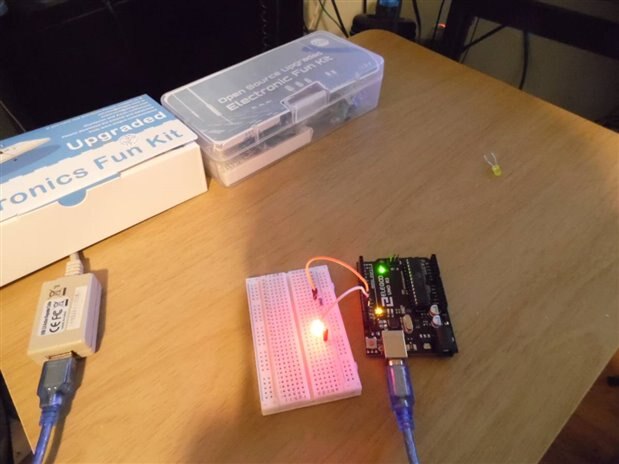
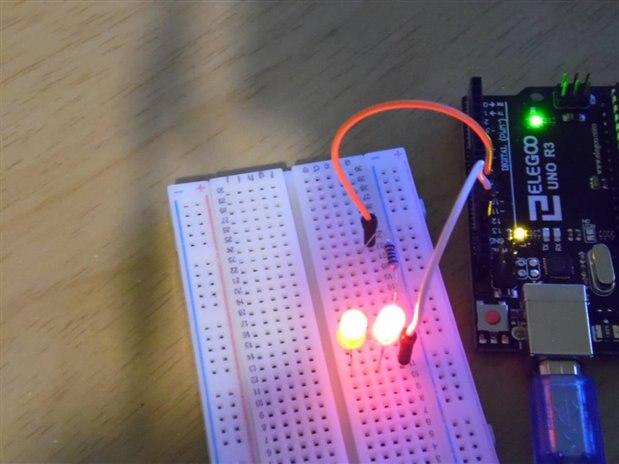
    The Arduino UNO did it for me, just what I want. 1. tryed with 1 Led flashing2. added another led where both was flassing at same time. I want to Thank everyone who as helped me with this project really nice people, I am sure I will play with this to make them flash at different times.imageimage

    • Cancel
    • Vote Up +4 Vote Down
    • Sign in to reply
    • Verify Answer
    • Reject Answer
    • Cancel
  • fmilburn
    0 fmilburn over 6 years ago in reply to commanderkelly

    PS:  it should be much easier with an Arduino than all the mucking about we did above :-)

    • Cancel
    • Vote Up +3 Vote Down
    • Sign in to reply
    • Verify Answer
    • Cancel
  • fmilburn
    0 fmilburn over 6 years ago in reply to commanderkelly

    Hi Gary,


    If you are OK with them flashing at the same rate and more or less synchronized then it is fairly straightforward  with an Arduino and will work just as Shabaz has described.  The circuit will be simple. There can be 10 output pins connected to the LEDs with current controlling resistors of say 330 ohms.  There could be 10 input pins for switching the behavior of the LEDs.  When a switch signals the start a timer can be used to determine how long the blinking occurs.  It is an interesting project.  Once you get things working as Shabaz describes then report back if it is not clear on how to proceed.

    • Cancel
    • Vote Up +3 Vote Down
    • Sign in to reply
    • Verify Answer
    • Reject Answer
    • Cancel
  • commanderkelly
    0 commanderkelly over 6 years ago in reply to SGarciaV

    Hello and thank you, I have the Uno board and downloaded the softwear to windows. I'll check them videos out thank you.


    Gary.

    • Cancel
    • Vote Up +2 Vote Down
    • Sign in to reply
    • Verify Answer
    • Cancel
  • commanderkelly
    0 commanderkelly over 6 years ago in reply to shabaz

    Hello and thank you I just want them to flash at the smae rate so for now this will do, thanks for your help.


    Gary

    • Cancel
    • Vote Up +2 Vote Down
    • Sign in to reply
    • Verify Answer
    • Reject Answer
    • Cancel
  • SGarciaV
    0 SGarciaV over 6 years ago

    Hi Gary. I see that you've gotten lots of great responses. Personally, I am partial to the 555 :-D


    I recently built a circuit similar to the one described in the following video:


    https://youtu.be/gYnd_nMi39g


    As for the Arduino, once you have the board you need to install the Arduino IDE. You can get that at the following link:


    https://www.arduino.cc/en/main/software


    Two important settings of the IDE that *must* be correct are the serial port designation and the board type. There are lots of Arduino models, such as Uno, Nano, Mega, Leonardo and many more from other vendors. To get started, I would purchase one that is compatible with either the Uno or Nano.


    If the Arduino IDE is open, close it. Connect the Arduino to the PC via the provided USB cable. Note that the Uno uses a different cable than the Nano (for example).


    Once the Arduino is connected to the PC, the OS should recognize it and assign a serial port to it. Note that my experience and comments are in regard to a Windows installation.


    Now launch the Arduino IDE. Locate the settings for the port and select the port that was assigned to the Arduino that you connected. Also select the correct board.


    Go to the File menu option and open the Blink example. This is a really simple program, which in the Arduino world programs are called sketches, that blinks the internal LED. Once the program is open, click on the button to compile and download the sketch to the Arduino. If you get an error, check that the Arduino is connected and also check that you selected the correct serial port and board.


    Search E14 and Youtube, there are lots of tutorials to get you started. Here is one possible video:


    https://youtu.be/kLd_JyvKV4Y


    Sorry, at 37 minutes, I don't have time to watch it to comment on the video. Also search for Jeremy Blum's Arduino videos. Hopefully this info will be helpful to you. Good luck on your projects and welcome to Element 14, where everyone knows Ohm's Law! ;-)

    • Cancel
    • Vote Up +1 Vote Down
    • Sign in to reply
    • Verify Answer
    • Reject Answer
    • Cancel
  • shabaz
    0 shabaz over 6 years ago in reply to commanderkelly

    Hi Gary,


    It can do that, there's an example for a single LED here:

    https://www.arduino.cc/en/tutorial/blink


    Once you've tried that, then you'll have confirmed the software and hardware is functioning, and then you can extend it to more LEDs to achieve your aim. Extending to flash two LEDs alternatively is easy by slightly modifying this code.

    However, it wasn't clear what behaviour you were looking for. If it is to flash all LEDs identically or flash all LEDs in alternate pairs, then the code doesn't need to change further, you can connect many LEDs to the same connections on the Arduino, although you'll need to use some small additional circuit to provide the current for all the LEDs. Is this what you're aiming to do?

    Otherwise, if your aim is to make them flash at different rates, or alternately, or under control of individual switches or sensors, then that will need more code changes.

    The easiest way is to start with the blink example mentioned, and then try a few more examples, to get familiar with the capabilities of the Arduino. Then you'll feel confident to want to do more complex behaviour for the LEDs (e.g. controlled by switches as mentioned).


    The tutorials here: https://www.arduino.cc/en/Tutorial/BuiltInExamples   will give you a feel for the capabilities of the Arduino (not all need to be tried, just a few that interest you).

    • Cancel
    • Vote Up +4 Vote Down
    • Sign in to reply
    • Verify Answer
    • Reject Answer
    • Cancel
  • commanderkelly
    0 commanderkelly over 6 years ago

    I have not been well for a bit but have not forgot about this project. I have now got one of them Ardunio Uno and was thinking of powering the flashing leds with it in the buffer stops. Now as I said before I am a noob at all this and I have no clue how to use an Arduino, Can anyone help me out here. I would like to power say like 10 flashing leds on differant buffer stops around the train track. Would this be possible on 1 Arduino and does anyone have a circuit that would help me do this.


    Thank you Gary.

    • Cancel
    • Vote Up +2 Vote Down
    • Sign in to reply
    • Verify Answer
    • Cancel
<>
element14 Community

element14 is the first online community specifically for engineers. Connect with your peers and get expert answers to your questions.

  • Members
  • Learn
  • Technologies
  • Challenges & Projects
  • Products
  • Store
  • About Us
  • Feedback & Support
  • FAQs
  • Terms of Use
  • Privacy Policy
  • Legal and Copyright Notices
  • Sitemap
  • Cookies

An Avnet Company © 2026 Premier Farnell Limited. All Rights Reserved.

Premier Farnell Ltd, registered in England and Wales (no 00876412), registered office: Farnell House, Forge Lane, Leeds LS12 2NE.

Follow element14

  • X
  • Facebook
  • linkedin
  • YouTube