element14 Community
element14 Community
    Register Log In
  • Site
  • Search
  • Log In Register
  • Community Hub
    Community Hub
    • What's New on element14
    • Feedback and Support
    • Benefits of Membership
    • Personal Blogs
    • Members Area
    • Achievement Levels
  • Learn
    Learn
    • Ask an Expert
    • eBooks
    • element14 presents
    • Learning Center
    • Tech Spotlight
    • STEM Academy
    • Webinars, Training and Events
    • Learning Groups
  • Technologies
    Technologies
    • 3D Printing
    • FPGA
    • Industrial Automation
    • Internet of Things
    • Power & Energy
    • Sensors
    • Technology Groups
  • Challenges & Projects
    Challenges & Projects
    • Design Challenges
    • element14 presents Projects
    • Project14
    • Arduino Projects
    • Raspberry Pi Projects
    • Project Groups
  • Products
    Products
    • Arduino
    • Avnet & Tria Boards Community
    • Dev Tools
    • Manufacturers
    • Multicomp Pro
    • Product Groups
    • Raspberry Pi
    • RoadTests & Reviews
  • About Us
  • Store
    Store
    • Visit Your Store
    • Choose another store...
      • Europe
      •  Austria (German)
      •  Belgium (Dutch, French)
      •  Bulgaria (Bulgarian)
      •  Czech Republic (Czech)
      •  Denmark (Danish)
      •  Estonia (Estonian)
      •  Finland (Finnish)
      •  France (French)
      •  Germany (German)
      •  Hungary (Hungarian)
      •  Ireland
      •  Israel
      •  Italy (Italian)
      •  Latvia (Latvian)
      •  
      •  Lithuania (Lithuanian)
      •  Netherlands (Dutch)
      •  Norway (Norwegian)
      •  Poland (Polish)
      •  Portugal (Portuguese)
      •  Romania (Romanian)
      •  Russia (Russian)
      •  Slovakia (Slovak)
      •  Slovenia (Slovenian)
      •  Spain (Spanish)
      •  Sweden (Swedish)
      •  Switzerland(German, French)
      •  Turkey (Turkish)
      •  United Kingdom
      • Asia Pacific
      •  Australia
      •  China
      •  Hong Kong
      •  India
      • Japan
      •  Korea (Korean)
      •  Malaysia
      •  New Zealand
      •  Philippines
      •  Singapore
      •  Taiwan
      •  Thailand (Thai)
      • Vietnam
      • Americas
      •  Brazil (Portuguese)
      •  Canada
      •  Mexico (Spanish)
      •  United States
      Can't find the country/region you're looking for? Visit our export site or find a local distributor.
  • Translate
  • Profile
  • Settings
Community Hub
Community Hub
Member's Forum Documentation of projects
  • Blog
  • Forum
  • Documents
  • Quiz
  • Events
  • Leaderboard
  • Polls
  • Files
  • Members
  • Mentions
  • Sub-Groups
  • Tags
  • More
  • Cancel
  • New
Join Community Hub to participate - click to join for free!
Actions
  • Share
  • More
  • Cancel
Forum Thread Details
  • State Suggested Answer
  • Replies 10 replies
  • Answers 10 answers
  • Subscribers 566 subscribers
  • Views 2925 views
  • Users 0 members are here
  • documentation
  • schematics
  • docs
  • learning
Related

Documentation of projects

brianchilders
brianchilders over 6 years ago

    What are some tools that you use to document projects?


For example, when I look at projects online, they often have a BOM (Bill of Materials) as well as pictures of the project.


But when it comes to documenting the actual schematics, this is an area where I see less of.  I understand that there may be varying levels of experience, but as I share my ideas here, I would like for others to easily build or reproduce what I've done.


In addition to technical schematics, is there a program that makes a "pretty picture" e.g. how parts might be laid out on a breadboard?


Thanks for your help!


-brian

  • Sign in to reply
  • Cancel

Top Replies

  • shabaz
    shabaz over 6 years ago +10 suggested
    Hi Brian, There's a few breadboard diagramming applications, I believe Fritzing will do it. For stripboard layouts (i.e. similar-ish to breadboard) I've use Lochmaster once, it is not free software, but…
  • jw0752
    jw0752 over 6 years ago +10 suggested
    Hi Brian, In addition to what I may place in a blog on a project I always make an owners / service manual to go along with each project. I find that even simple projects have a way of becoming difficult…
  • ralphjy
    ralphjy over 6 years ago +8 suggested
    There is a free open-source program called Fritzing https://fritzing.org/home/ that will allow you to create a graphical breadboard image that corresponds to a schematic.
Parents
  • shabaz
    0 shabaz over 6 years ago

    Hi Brian,


    There's a few breadboard diagramming applications, I believe Fritzing will do it. For stripboard layouts (i.e. similar-ish to breadboard) I've use Lochmaster once, it is not free software, but as long as you're ok not saving your project, then you can use the free demo version and click the Print Screen button to copy the output to your clipboard, and then paste into MS Paint etc., to save it. It is ok-ish. I just used the free version, to me it wasn't worth the asking price because I rarely draw such diagrams (there's huge scope for errors if people rely on bradboard layouts alone, without knowing IC pin numbers etc., so at some point if they can, then they may as well start examining real schematics. But the schematic may not be enough, since interpreting a schematic is likely not possible for projects intended for children or beginners in electronics.


    PowerPoint is an option too. This diagram was done with it (showing connections between dev-boards for example):

    image

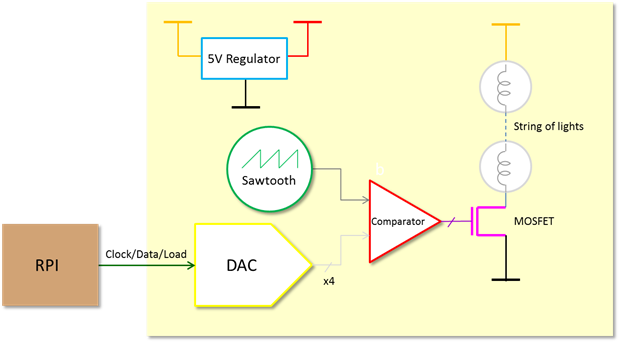
    I like using PowerPoint, but I appreciate it is an acquired taste. it is useful for block diagrams too, to help explain the circuit before showing the schematic.

    image

    If you're not into PP, then Visio is an alternative.


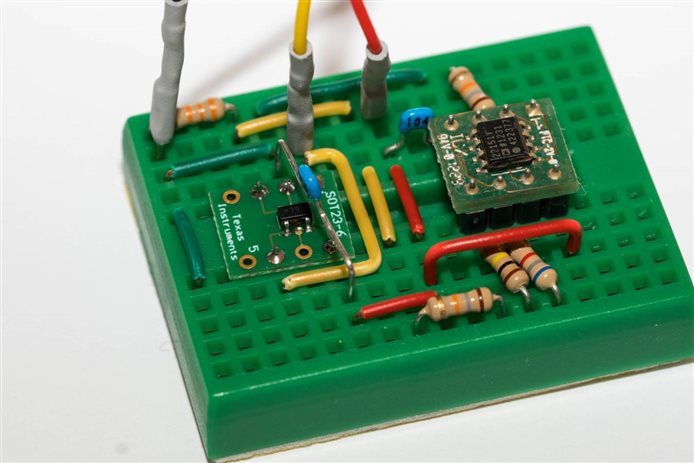
    Generally I'll just use a conventional schematic too (using EAGLE in my case, but there's plenty of options), and then try to have a detailed photo of the PCB or breadboard too.

    image


    EDIT: One more thing, personally I feel high-res helps for everything : ) That block diagram above was drawn six years ago, but since I'd saved it in a high-res, it still looks readable without needing to zoom in heavily, on the more modern super-high-res monitors, despite having drawn the diagram on probably a 1024x768 screen 6 years ago. Just personal taste has changed since then though.. now I'll often use a white background for such things, and thicker lines and a larger font. Not everyone likes large file sizes perhaps, but I have to make a compromise somewhere, and if I have to make that choice then it will be on the side of readability.

    It is really sad seeing valuable books and documents with diagrams that are low-res and unreadable, or hard to follow monochrome photos using halftone dots. I know that was the technology limit with printing at the time, but it is still sad, especially when it is an interesting piece of work and you know it would have been exciting to see the photo in slightly higher-res.

    • Cancel
    • Vote Up +10 Vote Down
    • Sign in to reply
    • Verify Answer
    • Reject Answer
    • Cancel
Reply
  • shabaz
    0 shabaz over 6 years ago

    Hi Brian,


    There's a few breadboard diagramming applications, I believe Fritzing will do it. For stripboard layouts (i.e. similar-ish to breadboard) I've use Lochmaster once, it is not free software, but as long as you're ok not saving your project, then you can use the free demo version and click the Print Screen button to copy the output to your clipboard, and then paste into MS Paint etc., to save it. It is ok-ish. I just used the free version, to me it wasn't worth the asking price because I rarely draw such diagrams (there's huge scope for errors if people rely on bradboard layouts alone, without knowing IC pin numbers etc., so at some point if they can, then they may as well start examining real schematics. But the schematic may not be enough, since interpreting a schematic is likely not possible for projects intended for children or beginners in electronics.


    PowerPoint is an option too. This diagram was done with it (showing connections between dev-boards for example):

    image

    I like using PowerPoint, but I appreciate it is an acquired taste. it is useful for block diagrams too, to help explain the circuit before showing the schematic.

    image

    If you're not into PP, then Visio is an alternative.


    Generally I'll just use a conventional schematic too (using EAGLE in my case, but there's plenty of options), and then try to have a detailed photo of the PCB or breadboard too.

    image


    EDIT: One more thing, personally I feel high-res helps for everything : ) That block diagram above was drawn six years ago, but since I'd saved it in a high-res, it still looks readable without needing to zoom in heavily, on the more modern super-high-res monitors, despite having drawn the diagram on probably a 1024x768 screen 6 years ago. Just personal taste has changed since then though.. now I'll often use a white background for such things, and thicker lines and a larger font. Not everyone likes large file sizes perhaps, but I have to make a compromise somewhere, and if I have to make that choice then it will be on the side of readability.

    It is really sad seeing valuable books and documents with diagrams that are low-res and unreadable, or hard to follow monochrome photos using halftone dots. I know that was the technology limit with printing at the time, but it is still sad, especially when it is an interesting piece of work and you know it would have been exciting to see the photo in slightly higher-res.

    • Cancel
    • Vote Up +10 Vote Down
    • Sign in to reply
    • Verify Answer
    • Reject Answer
    • Cancel
Children
No Data
element14 Community

element14 is the first online community specifically for engineers. Connect with your peers and get expert answers to your questions.

  • Members
  • Learn
  • Technologies
  • Challenges & Projects
  • Products
  • Store
  • About Us
  • Feedback & Support
  • FAQs
  • Terms of Use
  • Privacy Policy
  • Legal and Copyright Notices
  • Sitemap
  • Cookies

An Avnet Company © 2025 Premier Farnell Limited. All Rights Reserved.

Premier Farnell Ltd, registered in England and Wales (no 00876412), registered office: Farnell House, Forge Lane, Leeds LS12 2NE.

ICP 备案号 10220084.

Follow element14

  • X
  • Facebook
  • linkedin
  • YouTube