element14 Community
element14 Community
    Register Log In
  • Site
  • Search
  • Log In Register
  • Community Hub
    Community Hub
    • What's New on element14
    • Feedback and Support
    • Benefits of Membership
    • Personal Blogs
    • Members Area
    • Achievement Levels
  • Learn
    Learn
    • Ask an Expert
    • eBooks
    • element14 presents
    • Learning Center
    • Tech Spotlight
    • STEM Academy
    • Webinars, Training and Events
    • Learning Groups
  • Technologies
    Technologies
    • 3D Printing
    • FPGA
    • Industrial Automation
    • Internet of Things
    • Power & Energy
    • Sensors
    • Technology Groups
  • Challenges & Projects
    Challenges & Projects
    • Design Challenges
    • element14 presents Projects
    • Project14
    • Arduino Projects
    • Raspberry Pi Projects
    • Project Groups
  • Products
    Products
    • Arduino
    • Avnet & Tria Boards Community
    • Dev Tools
    • Manufacturers
    • Multicomp Pro
    • Product Groups
    • Raspberry Pi
    • RoadTests & Reviews
  • About Us
  • Store
    Store
    • Visit Your Store
    • Choose another store...
      • Europe
      •  Austria (German)
      •  Belgium (Dutch, French)
      •  Bulgaria (Bulgarian)
      •  Czech Republic (Czech)
      •  Denmark (Danish)
      •  Estonia (Estonian)
      •  Finland (Finnish)
      •  France (French)
      •  Germany (German)
      •  Hungary (Hungarian)
      •  Ireland
      •  Israel
      •  Italy (Italian)
      •  Latvia (Latvian)
      •  
      •  Lithuania (Lithuanian)
      •  Netherlands (Dutch)
      •  Norway (Norwegian)
      •  Poland (Polish)
      •  Portugal (Portuguese)
      •  Romania (Romanian)
      •  Russia (Russian)
      •  Slovakia (Slovak)
      •  Slovenia (Slovenian)
      •  Spain (Spanish)
      •  Sweden (Swedish)
      •  Switzerland(German, French)
      •  Turkey (Turkish)
      •  United Kingdom
      • Asia Pacific
      •  Australia
      •  China
      •  Hong Kong
      •  India
      • Japan
      •  Korea (Korean)
      •  Malaysia
      •  New Zealand
      •  Philippines
      •  Singapore
      •  Taiwan
      •  Thailand (Thai)
      • Vietnam
      • Americas
      •  Brazil (Portuguese)
      •  Canada
      •  Mexico (Spanish)
      •  United States
      Can't find the country/region you're looking for? Visit our export site or find a local distributor.
  • Translate
  • Profile
  • Settings
Community Hub
Community Hub
Member's Forum Documentation of projects
  • Blog
  • Forum
  • Documents
  • Quiz
  • Events
  • Leaderboard
  • Polls
  • Files
  • Members
  • Mentions
  • Sub-Groups
  • Tags
  • More
  • Cancel
  • New
Join Community Hub to participate - click to join for free!
Actions
  • Share
  • More
  • Cancel
Forum Thread Details
  • State Suggested Answer
  • Replies 10 replies
  • Answers 10 answers
  • Subscribers 566 subscribers
  • Views 2915 views
  • Users 0 members are here
  • documentation
  • schematics
  • docs
  • learning
Related

Documentation of projects

brianchilders
brianchilders over 6 years ago

    What are some tools that you use to document projects?


For example, when I look at projects online, they often have a BOM (Bill of Materials) as well as pictures of the project.


But when it comes to documenting the actual schematics, this is an area where I see less of.  I understand that there may be varying levels of experience, but as I share my ideas here, I would like for others to easily build or reproduce what I've done.


In addition to technical schematics, is there a program that makes a "pretty picture" e.g. how parts might be laid out on a breadboard?


Thanks for your help!


-brian

  • Sign in to reply
  • Cancel

Top Replies

  • shabaz
    shabaz over 6 years ago +10 suggested
    Hi Brian, There's a few breadboard diagramming applications, I believe Fritzing will do it. For stripboard layouts (i.e. similar-ish to breadboard) I've use Lochmaster once, it is not free software, but…
  • jw0752
    jw0752 over 6 years ago +10 suggested
    Hi Brian, In addition to what I may place in a blog on a project I always make an owners / service manual to go along with each project. I find that even simple projects have a way of becoming difficult…
  • ralphjy
    ralphjy over 6 years ago +8 suggested
    There is a free open-source program called Fritzing https://fritzing.org/home/ that will allow you to create a graphical breadboard image that corresponds to a schematic.
  • ralphjy
    0 ralphjy over 6 years ago

    There is a free open-source program called Fritzing https://fritzing.org/home/ that will allow you to create a graphical breadboard image that corresponds to a schematic. 

    • Cancel
    • Vote Up +8 Vote Down
    • Sign in to reply
    • Verify Answer
    • Reject Answer
    • Cancel
  • shabaz
    0 shabaz over 6 years ago

    Hi Brian,


    There's a few breadboard diagramming applications, I believe Fritzing will do it. For stripboard layouts (i.e. similar-ish to breadboard) I've use Lochmaster once, it is not free software, but as long as you're ok not saving your project, then you can use the free demo version and click the Print Screen button to copy the output to your clipboard, and then paste into MS Paint etc., to save it. It is ok-ish. I just used the free version, to me it wasn't worth the asking price because I rarely draw such diagrams (there's huge scope for errors if people rely on bradboard layouts alone, without knowing IC pin numbers etc., so at some point if they can, then they may as well start examining real schematics. But the schematic may not be enough, since interpreting a schematic is likely not possible for projects intended for children or beginners in electronics.


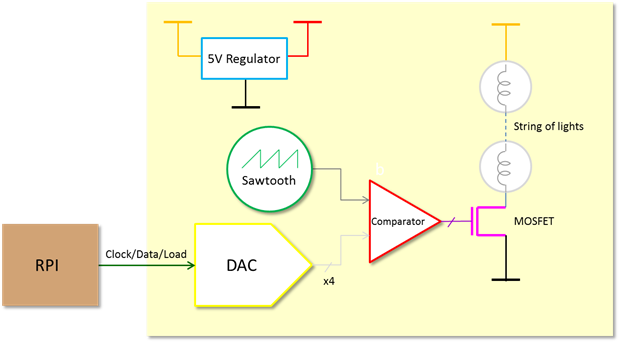
    PowerPoint is an option too. This diagram was done with it (showing connections between dev-boards for example):

    image

    I like using PowerPoint, but I appreciate it is an acquired taste. it is useful for block diagrams too, to help explain the circuit before showing the schematic.

    image

    If you're not into PP, then Visio is an alternative.


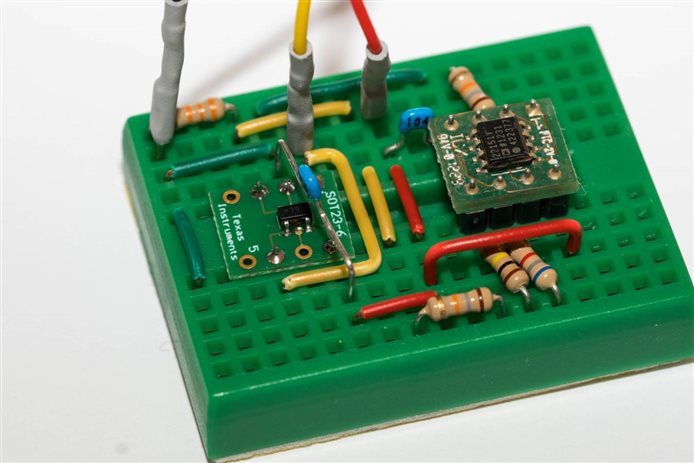
    Generally I'll just use a conventional schematic too (using EAGLE in my case, but there's plenty of options), and then try to have a detailed photo of the PCB or breadboard too.

    image


    EDIT: One more thing, personally I feel high-res helps for everything : ) That block diagram above was drawn six years ago, but since I'd saved it in a high-res, it still looks readable without needing to zoom in heavily, on the more modern super-high-res monitors, despite having drawn the diagram on probably a 1024x768 screen 6 years ago. Just personal taste has changed since then though.. now I'll often use a white background for such things, and thicker lines and a larger font. Not everyone likes large file sizes perhaps, but I have to make a compromise somewhere, and if I have to make that choice then it will be on the side of readability.

    It is really sad seeing valuable books and documents with diagrams that are low-res and unreadable, or hard to follow monochrome photos using halftone dots. I know that was the technology limit with printing at the time, but it is still sad, especially when it is an interesting piece of work and you know it would have been exciting to see the photo in slightly higher-res.

    • Cancel
    • Vote Up +10 Vote Down
    • Sign in to reply
    • Verify Answer
    • Reject Answer
    • Cancel
  • jw0752
    0 jw0752 over 6 years ago

    Hi Brian,


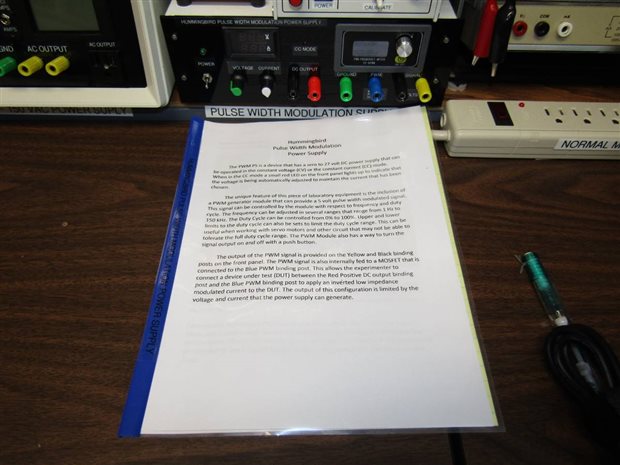
    In addition to what I may place in a blog on a project I always make an owners / service manual to go along with each project. I find that even simple projects have a way of becoming difficult to understand if they have been sitting on the shelf for a couple years. The manual provides a progression of schematic revisions and notes on experiments that were necessary to complete the design. I also photograph the project as it is being built and include a gallery of photos in the manual. I have found that I always remember and need pictures that I did not take so don't hesitate to take more than you may need. The manuals are produced in report form as well as being stored on my shop data base. Here is an example of a build and the manual for it. As you can see they are very simple but very helpful should I ever need to service it.


    image


    I really liked your question as the answers from the other members will provide some good ideas and resources for everyone.


    John

    • Cancel
    • Vote Up +10 Vote Down
    • Sign in to reply
    • Verify Answer
    • Reject Answer
    • Cancel
  • fmilburn
    0 fmilburn over 6 years ago

    Hi Brian,


    This is a great topic that should get more attention.  The projects posted on element14 I enjoy most are also good educational sources - often for the author and the reader.  This means the project objectives, design basis, design calculations, appropriate links, and technical underpinnings are usually laid out and described with a "what would I do different next time" at the end.  Documenting the basis of design decision does not get done often enough in my opinion.  A schematic for hardware and code if software is involved are minimal requirements.  Assembly instructions may be necessary for some projects and a user manual as John describes is a great idea.


    Frank

    • Cancel
    • Vote Up +6 Vote Down
    • Sign in to reply
    • Verify Answer
    • Reject Answer
    • Cancel
  • Jan Cumps
    0 Jan Cumps over 6 years ago

    To document concepts and prototypes, I use paper and pencils.

    I then use a scanner, or phone with Office Lens application, to add it to my documentation.

    A photo doesn’t give a clear picture but using Lens turns it into a clear readable image.

    Example:

    image


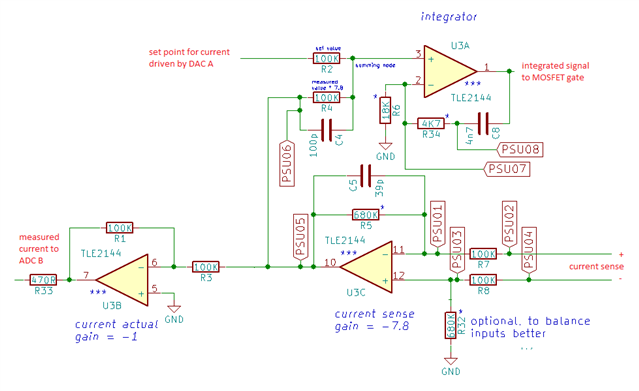
    For more permanent exercises, I use KiCad. I put comments on the schematic. When I want to document a selected part of the design, I printscreen the KiCad schematic, paste it in Paint, and erase the components and connections that aren’t relevant.

    Example:

    image

    • Cancel
    • Vote Up +7 Vote Down
    • Sign in to reply
    • Verify Answer
    • Reject Answer
    • Cancel
  • Andrew J
    0 Andrew J over 6 years ago

    I have captured design notes, Spice models, schematics, calculations, testing data, drill patterns and case layouts.  Basically, anything I think I might need to minimise errors or understand what was done when/if I come back to it later.  Also, in case others are interested.  Makes me sound experienced, but this is just over two or three projects so far.


    I use Kicad for the schematics - its easy to pick up and feature packed.  You could create the breadboard (actually PCB laid out in BB dimensions) and use the 3D view feature to see the part layouts.  Most, but unfortunately not all parts have a 3D model and you can screen capture the image on different rotations and viewpoints.  Not ideal of course as hookup wire won’t be there so until it was tried I don’t know how well it might work in practice.  I suppose one question worth asking is does it matter if the layout matches what would be done on a breadboard even if the base looks like a PCB?? Other tools I use are Excel for BOMs and calculations, and Omnigraffle (MacOS version of Visio) for layout planning and drill patterns.


    If you are doing it for others’ use, I always think it worth documenting your thinking as well, particularly if you go down a dead-end or change your mind on something.  The trials and tribulations are as interesting and insightful as providing a fully working, tested solution.


    Good question.

    • Cancel
    • Vote Up +6 Vote Down
    • Sign in to reply
    • Verify Answer
    • Reject Answer
    • Cancel
  • Sean_Miller
    0 Sean_Miller over 6 years ago

    My modus operandi:

    • Autodesk Fusion 360 files to gift any 3D printed parts
    • Autodesk Fusion 360 generated 2D Design Files for cut and assembled parts
    • Autodesk Eagle for Electrical Schematics.
    • Code Headers to describe any pin connections when I'm not providing a custom daughter board with wire-to-board connectors
    • Github to store it all including code
    • element14 to bind it altogether for the hookup guide/build log with photos and BOMs


    See ya',

    Sean

    • Cancel
    • Vote Up +7 Vote Down
    • Sign in to reply
    • Verify Answer
    • Reject Answer
    • Cancel
  • three-phase
    0 three-phase over 6 years ago

    My methods mirror much of what has already been said in the other posts.


    I use KiCad for schematics and PCB layouts. For more electrical biased drawings I use a normal CAD package, TurboCAD, Visio and SmartDraw have all been used over the years.


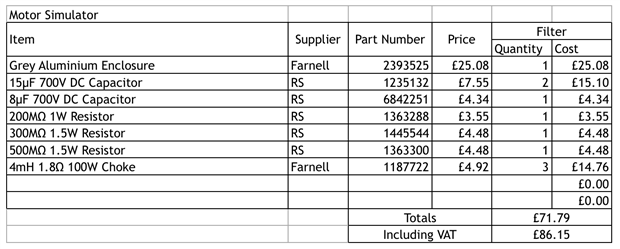
    Calculations are generally done in Excel. MathCAD is used for more complex calculations. All the test results for my insulation tester reviews are in Excel and then plotted using the graphing function as required. I also find Excel good for BOMs, but sometimes I use Word for this.


    image


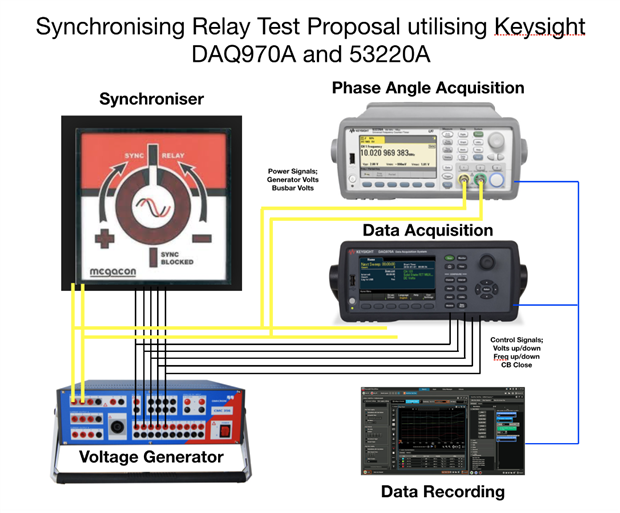
    Having seen what shabaz has created in Power Point, I too have started to use that to produce basic layouts.


    image


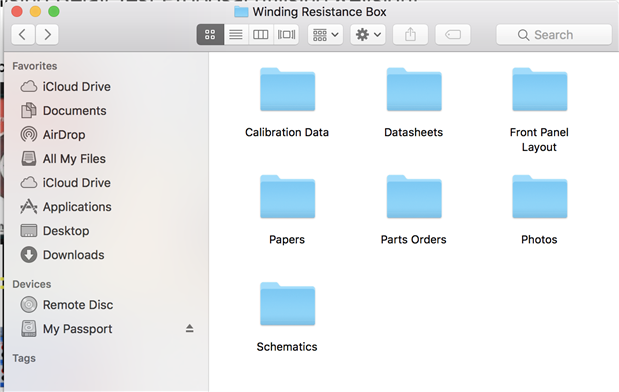
    I will either store the project as separate files in one folder on the computer, or if need be I will pull everything into a Word document, to create a more formal manual for it. I then usually index this and create as a PDF as I refer to read documents in a PDF viewer instead of Word.


    Along with all of the files I have created, I will store manufacturer's data sheets, parts orders, emails and subject information in the same folder, so I try and end up with everything for the project in one location.


    image


    Kind regards.

    • Cancel
    • Vote Up +6 Vote Down
    • Sign in to reply
    • Verify Answer
    • Reject Answer
    • Cancel
  • DAB
    0 DAB over 6 years ago

    I always document projects with a paper notebook.

    I can write, draw and make notes at will while I am going through the development process.

    In the end, your documentation is more essential than your initial build. Capturing the decision process is essential to understanding how to do a better project the next build.


    DAB

    • Cancel
    • Vote Up +6 Vote Down
    • Sign in to reply
    • Verify Answer
    • Reject Answer
    • Cancel
  • colporteur
    0 colporteur over 6 years ago

    My go tools tools are Gimp and Inkscape. Both icons are in my favourites on Ubuntu 18.04.


    GNU Image Manipulation Program (GIMP) is a cross-platform image editor available for GNU/Linux, OS X, Windows and more operating systems. Whether you are a graphic designer, photographer, illustrator, or scientist, GIMP provides you with sophisticated tools to get your job done.


    Inkscape is professional quality vector graphics software which runs on Windows, Mac OS X and GNU/Linux. It is used by design professionals and hobbyists worldwide, for creating a wide variety of graphics such as illustrations, icons, logos, diagrams, maps and web graphics.


    Sean

    • Cancel
    • Vote Up +2 Vote Down
    • Sign in to reply
    • Verify Answer
    • Reject Answer
    • Cancel
element14 Community

element14 is the first online community specifically for engineers. Connect with your peers and get expert answers to your questions.

  • Members
  • Learn
  • Technologies
  • Challenges & Projects
  • Products
  • Store
  • About Us
  • Feedback & Support
  • FAQs
  • Terms of Use
  • Privacy Policy
  • Legal and Copyright Notices
  • Sitemap
  • Cookies

An Avnet Company © 2025 Premier Farnell Limited. All Rights Reserved.

Premier Farnell Ltd, registered in England and Wales (no 00876412), registered office: Farnell House, Forge Lane, Leeds LS12 2NE.

ICP 备案号 10220084.

Follow element14

  • X
  • Facebook
  • linkedin
  • YouTube