


Hi all !
Welcome to day 3 .
Disclaimer: This is my experience with it. Yours could be different.
Today wasn't much done, but I did try 2 things and discover another one. We're going from Zoom meetings and GPIO touchscreen .
Web Camera
Today I had a meting of the local computer club. We're preparing for the Raspberry PI JAM next April 17th.
The camera that I used was a Logitech C920 Pro. Raspberry PI OS detected it without any problems.
pi@raspberrypi:~ $ lsusb
Bus 002 Device 001: ID 1d6b:0003 Linux Foundation 3.0 root hub
Bus 001 Device 007: ID 04d9:0007 Holtek Semiconductor, Inc.
Bus 001 Device 006: ID 093a:2510 Pixart Imaging, Inc. Optical Mouse
Bus 001 Device 005: ID 046d:085b Logitech, Inc.
Bus 001 Device 004: ID 0a12:0001 Cambridge Silicon Radio, Ltd Bluetooth Dongle (HCI mode)
Bus 001 Device 002: ID 2109:3431 VIA Labs, Inc. Hub
Bus 001 Device 001: ID 1d6b:0002 Linux Foundation 2.0 root hub
The meting was held in Zoom and, since there's no application for Raspberry PI, I used the Browser.
Firefox ESR 78.9.0esr is to forget. It does load the page and enters the meeting, but the camera is a no go. It just stays green and yes, all the permissions are given.
Permissions in Firefox
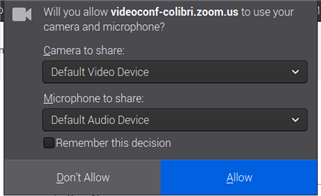
On the other hand, with Chromium the camera worked fine and almost everything went smooth. It even asked me to install an APP through the APP store, but I just went with the browser version.

I did had trouble with the bluetooth audio, a lot of stuttering. It was impractical. Don't know if because I was also casting Netflix (kids...).
Edit: The audio stopped doing that when I focus the meeting TAB on Chromium. If I was on another TAB browsing or in another program (like in Firefox writing this) the audio stutter and the camera freezes. The audio was not doing that always, but the camera was frozen until I got back to the TAB. Weird...
Maybe Firefox is just to low of a version.
I will try other browsers based on Firefox that people say work well on Raspberry PI, like the Pale Moon. More on that another day.
With Chromium, I was unable to write this post. The Element14 site just don't work well.
GPIO
Today I used the GPIO of the Raspberry PI 400 for the first time. My intention was/is to add a SPI Touchscreen (compatible with Waveshare) to have some sort of system information, like temperature, CPU speed, etc...
I've purchased from The PiHut (no affiliation whatsoever) a GPIO Header Expansion for Raspberry Pi 400 to use .
I did manage to have the X on the screen, but that's not my intention.I want to have both "screens", the Xorg going out through HDMI, but have a framebuffer like /dev/fb1 on the touchscreen so I can use Python and pygame like functions to output to that screen. Don't know if is possible.

I really is easy to add a SPI touchscreen, now that everything is made with the overlays.
Since my touchscreen is compatible with the ones from Waveshare, I cloned their repository
git clone https://github.com/swkim01/waveshare-dtoverlays.git
and copied the necessary overlay to /boot/overlays
cd waveshare-dtoverlays/
cp waveshare35*.dtbo /boot/overlays/
and just add the following line to /boot/config.txt
dtoverlay=waveshare35b,speed=24000000
Reboot and the touchscreen is present. You can check it by viewing how many framebuffers you have:
root@raspberrypi:~# ls /dev/fb*
/dev/fb0  /dev/fb1
root@raspberrypi:~#
Using fbi (a Linux framebuffer image viewer) I can see a image on the touchscreen, but my monitor image (on the HDMI output) just goes dark...
I did later tried a small Python script to display a text on the touchscreen, but it just appeared on my desktop on a small window... Need to dig a bit more.
Tomorrow will be another day. Next week will try the VPN and 3D design. Maybe a game or two. 
Top Comments