element14 Community
element14 Community
    Register Log In
  • Site
  • Search
  • Log In Register
  • Community Hub
    Community Hub
    • What's New on element14
    • Feedback and Support
    • Benefits of Membership
    • Personal Blogs
    • Members Area
    • Achievement Levels
  • Learn
    Learn
    • Ask an Expert
    • eBooks
    • element14 presents
    • Learning Center
    • Tech Spotlight
    • STEM Academy
    • Webinars, Training and Events
    • Learning Groups
  • Technologies
    Technologies
    • 3D Printing
    • FPGA
    • Industrial Automation
    • Internet of Things
    • Power & Energy
    • Sensors
    • Technology Groups
  • Challenges & Projects
    Challenges & Projects
    • Design Challenges
    • element14 presents Projects
    • Project14
    • Arduino Projects
    • Raspberry Pi Projects
    • Project Groups
  • Products
    Products
    • Arduino
    • Avnet & Tria Boards Community
    • Dev Tools
    • Manufacturers
    • Multicomp Pro
    • Product Groups
    • Raspberry Pi
    • RoadTests & Reviews
  • About Us
  • Store
    Store
    • Visit Your Store
    • Choose another store...
      • Europe
      •  Austria (German)
      •  Belgium (Dutch, French)
      •  Bulgaria (Bulgarian)
      •  Czech Republic (Czech)
      •  Denmark (Danish)
      •  Estonia (Estonian)
      •  Finland (Finnish)
      •  France (French)
      •  Germany (German)
      •  Hungary (Hungarian)
      •  Ireland
      •  Israel
      •  Italy (Italian)
      •  Latvia (Latvian)
      •  
      •  Lithuania (Lithuanian)
      •  Netherlands (Dutch)
      •  Norway (Norwegian)
      •  Poland (Polish)
      •  Portugal (Portuguese)
      •  Romania (Romanian)
      •  Russia (Russian)
      •  Slovakia (Slovak)
      •  Slovenia (Slovenian)
      •  Spain (Spanish)
      •  Sweden (Swedish)
      •  Switzerland(German, French)
      •  Turkey (Turkish)
      •  United Kingdom
      • Asia Pacific
      •  Australia
      •  China
      •  Hong Kong
      •  India
      • Japan
      •  Korea (Korean)
      •  Malaysia
      •  New Zealand
      •  Philippines
      •  Singapore
      •  Taiwan
      •  Thailand (Thai)
      • Vietnam
      • Americas
      •  Brazil (Portuguese)
      •  Canada
      •  Mexico (Spanish)
      •  United States
      Can't find the country/region you're looking for? Visit our export site or find a local distributor.
  • Translate
  • Profile
  • Settings
Personal Blogs
  • Community Hub
  • More
Personal Blogs
Legacy Personal Blogs ImageCraft JumpStart Microbox Education Kit - Part 2: Stepping Through an Example - what do I learn?
  • Blog
  • Documents
  • Mentions
  • Sub-Groups
  • Tags
  • More
  • Cancel
  • New
  • Share
  • More
  • Cancel
Group Actions
  • Group RSS
  • More
  • Cancel
Engagement
  • Author Author: Jan Cumps
  • Date Created: 31 Oct 2015 9:20 AM Date Created
  • Views 2964 views
  • Likes 3 likes
  • Comments 23 comments
  • educational
  • firmware
  • imagecraft
  • embedded
  • arm_cortex
  • stm32
  • stmicro
  • kit
  • nucleo
Related
Recommended

ImageCraft JumpStart Microbox Education Kit - Part 2: Stepping Through an Example - what do I learn?

Jan Cumps
Jan Cumps
31 Oct 2015

The ImageCraft JumpStart Microbox Education Kit is a set of hardware and software tools to teach C and Cortex-M embedded programming.

In essence, it's an Arduino compatible shield, an STMicro Nucleo dev board, a C book, an IDE, a compiler and libraries.


In this blog series I'm trying to find out if it's more then just an existing 3rd party dev board paired with a shield. And if (and how) this kit can turn you into an embedded programmer.


In part 1, I checked the out-of-box experience.

This time I'm going to review one of the example projects, and check if I learn something about embedded development.

I'll use the real time clock example, because the source for the RTC driver is available, and it uses I2C.


I'm going to use 2 methods to check the learning path: Can I step through the example in the debugger to see what's happening, and I'll use the Hardware Guide to step through a tutorial.


The Hardware Guide


The tutorial for the MicroBox Education Kit projects is called the Hardware Overview.


It's a rich document with info on basics of the ARM microcontroller like clocks, memory and GIO. It also has a section for all the hardware available on the educational shield.

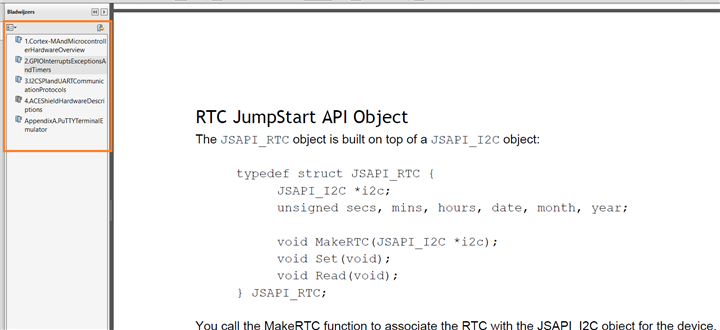
I would like to see a better index though. I had a hard time navigating to the chapter for the real time clock, and had to use the scroll wheel to go to the correct chapter.
 

image


If you do not know up front where the chapter is in the pdf, you'll have to scroll page by page through a 100 page document untill you are at the desired location. There's no overview at the beginning of the document either that explains what's in the manual or on what page/section to find it.

So I spent time browsing through the full PDF first to find out what's covered and where it is. Search works - but then you have to know up front what you're looking for, and it takes a fair bit of pushing next before you reach the RTC chapter.


The hardware guide asks you to review info in a document called <Examples and Tutorials>. I couldn't find that document so I put this on hold and tried method 2: stepping through an example


Stepping through an Example Project


The second way to learn something is by taking an existing example, and step through it. I'll do this with the RTC example.

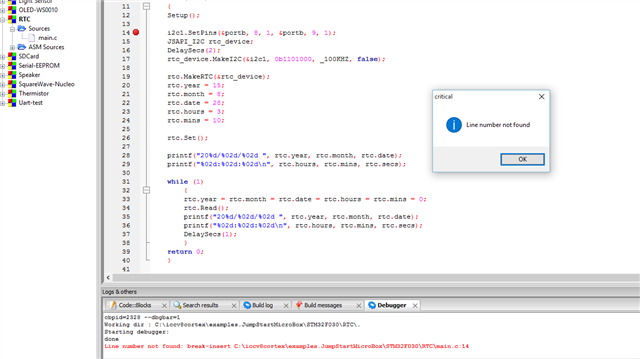
I ran into an issue with the newest IDE install that I received earlier this week. When I set a breakpoint, things go wrong.


image


I get messages like Line Number not found, and removing breakpoints doesn't work. They reappear randomly while debugging or after restarting the IDE.

Line number not found: break-insert C:\iccv8cortex\examples.JumpStartMicroBox\STM32F030\RTC\main.c:14

Cannot open file: C:\Work\V8\examples.JumpStartMicroBox\STM32F030\RTC\main.c

I don't have a c:\work folder on my pc. Needs to be looked at


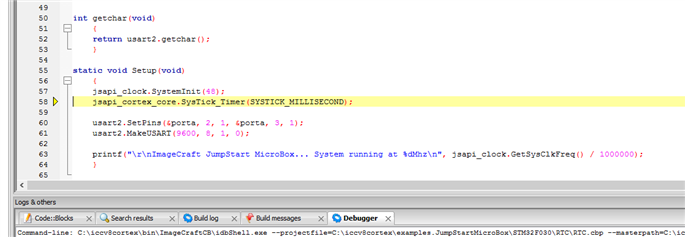
Debugging works after that, but there's not much to learn. The example uses an abstraction layer, and you can't step into that code.

You see that the program calls a function clock.SystemInit() , but there's nothing more that you can learn than that the proprietary library has a function with that declaration.

You don't see what's happening with the controller. You don't learn something generic about embedded.
 

image


It's a difficult call for me. All works out of the box, IDE and compiler are fast. The examples work.

But I haven't found a compelling educational path yet. And the experience with the latest IDE/tool chain download is rough.

I'm in two minds on this kit at the moment. I'll put it to rest for a day and review it with a clear and fresh mind soon...


Related posts
ImageCraft JumpStart Microbox Education Kit - Part 1: Preview
ImageCraft JumpStart Microbox Education Kit - Part 2: Stepping Through an Example - what do I learn?
ImageCraft JumpStart Microbox Education Kit - Part 3a: The Education Shield - LED matrix and I/O expander
  • Sign in to reply

Top Comments

  • richardman
    richardman over 10 years ago +1
    Jan, sorry for the debugger issue - it sounds like the debug info is stale: the installer should have removed the object and debug files so that it will do a Build before debugging and syncing the source…
  • Jan Cumps
    Jan Cumps over 10 years ago in reply to richardman +1
    Richard, thanks for the reply. I will try the rebuild the projects and report back (I did that for the OLED and RTC projects that were giving the error and it didn't help this morning, but I'll retry once…
  • Jan Cumps
    Jan Cumps over 10 years ago in reply to richardman +1
    Richard Man wrote: ..l There is no point in using the blog for this process. Once we clear the issues, you can report back. Thanks That's not how a review works. i will not continue this exercise…
Parents
  • richardman
    richardman over 10 years ago

    Jan, sorry for the debugger issue - it sounds like the debug info is stale: the installer should have removed the object and debug files so that it will do a Build before debugging and syncing the source code with the debug info file, but that does not appear to be the case. I will look into it. You should be able to do a Project->Rebuild and get everything syncs up.


    re: low level details of I2C etc.: indeed, that's the whole purpose of the JumpStart API - to abstract away (some of) the low level details. Lets take I2c as an example. The actual I2C protocol is relatively simple, if you know how to toggle a square wave, that's the clock (SCL). Toggling another line and you have data (SDA). Do it with the right timing and sequence and there's your I2C. The problem is that with the complex 32-bit Cortex-M devices, it's no longer trivial to toggle a GPIO pin. You have to enable power to the correct bus, for a particular pin, set its mode to output, set open drain or push-pull (for I2C, it should be open drain), set the output speed, set the optional pull-up or pull-down resistor, and all that before you have to figure out how to generate the correct timing.


    Or you can use the built-in I2C subsystem. Great! Except that to use the vendor library, you have to initialize a created structure with fields correspond to the IO register bits. So you end up having to look into the manual for details. Note that they don't bring enlightenment on how the I2C works or anything, it's simply a particular vendor's implementation of the I2C. For example, on the STM32F030, you can set up the subsystem to do "autoend". Wonderful, so you look at STM32F401, and behold, it has a completely different I2C implementation. There is no autoend, but arguably it's a more flexible implementation. So writing I2C on these two chips require completely different sequences of instructions. And these are from the same chip vendor, imagine you then move on to NXP LPC series. Writing I2C on top of them is basically making sure that you fully understand the manuals.


    As I noted in one of my responses to the "Preview" article - our primary target audience is in fact professional engineers. Bit-banging I2C is no fun and it's not a whole lot of fun either to fight with the MCU's I2C subsystem. What they want and need are working I2C code so that they can work on their applications at hand. I2C, or any other low level protocols are for solving application programming and should not be the problem by themselves.


    Again, JumpStart API does not preclude you from bit banging I2C or use the vendor supplied library. However, if your goal is to write a program to talk to an I2C device in as short a time as possible, JumpStart API is the solution.


    Take another example: system clock set up. On every STM32F device's reference manual, there is a "clock tree" diagram. It's non-trivial to see which clock to use, and with all the prescalars and dividers, it's hard to find all the parameters to the PLL variables (some STM32F devices have 2 PLL "variables" and some have as many as 4). Indeed, ST's CubeMX is a valuable tool to see which path a clock may take and to calculate the correct values for PLLQ, PLLN, and so on.


    Well, with our next release of the compiler, to be available by end of Nov 6, 2015, JumpStart API also supports the STM32F4xx series and adds a new clock call:

        _Bool JSAPI_CLOCK::SetSystemClock(unsigned hsi_mhz, unsigned hse_mhz, _Bool hse_bypass, unsigned pll_mhz, unsigned flash_ws);


    You specify the HSI frequency, the optional HSE frequency, if you use an external OsC, and the desired PLL speed (plus a couple other parameters), and the function does all the calculations for you. Does it do everything you possibly want to do with the clock setup? Just like the I2C API, the answer is no. However, for most people, they just want to write "jsapi_clock.SetSystemClock(16, 0, false, 84, 5);" and have their F401 buzzing at 84 Mhz.


    The question is: what would you rather do? Spend times just to get the basic structure going, which is completely useless if you move on to a different chip, even from the same silicon vendor, or spend time writing your application? Again, if the answer is latter, then JumpStart API is for you.

    • Cancel
    • Vote Up +1 Vote Down
    • Sign in to reply
    • More
    • Cancel
  • shabaz
    shabaz over 10 years ago in reply to richardman

    Richard Man wrote:


    The question is: what would you rather do? Spend times just to get the basic structure going, which is completely useless if you move on to a different chip, even from the same silicon vendor, or spend time writing your application? Again, if the answer is latter, then JumpStart API is for you.


    Are those the only two choices? What about Energia, mbed, which make getting going with ARM microcontrollers extremely simple for beginners and hobbyists.

    For commercial customers, there are cool tools like TI's PinMux to help set the registers,

    and a wealth of peripheral driver code, all with source code.

    Even with jumpstart, if you move to different silicon, you'll still need to spend time ensuring

    the new microcontroller can support certain functions on certain pins, so you still need to

    go through the microcontroller documentation.

    With the same vendor usually the peripherals can be fairly similar, so it doesn't take

    ages making the necessary tweaks if the manufacturer has not supplied driver code (which is unlikely) - and one gets to learn about the peripherals at the

    same time, meaning one can make better use of them.


    Jumpstart may be a great product, but it is unfair to imply there are only two choices here

    when there is plenty of code from manufacturers to make life easier - no need to work

    just from the datasheet to get the basic structure going as you say.


    Is source code available for Jumpstart? I'm still not clear.

    • Cancel
    • Vote Up +1 Vote Down
    • Sign in to reply
    • More
    • Cancel
  • richardman
    richardman over 10 years ago in reply to shabaz

    Also need to emphasize again that our primary focus are professional engineers who want to get into Cortex-M development. mbed is not a serious solution, definitely not for production deployment. For the past few years, you are primarily down to 2 main choices - there are a few other choices of course, but almost certainly a majority of any commercial Cortex-M development have been done with these two groups:

    1. GCC/Eclipse
    2. IAR/Keil


    Each has strengths and weaknesses, but clearly between "GCC - even if it's not free!" and "IAR/Keil even at $7000+ is quite OK", there is a market niche there. This is where we come in. We offer easy-to-use professional tools at reasonable / affordable prices, and we back them up with unparalleled support. The JumpStart API is an icing on the cake, so to speak.

    • Cancel
    • Vote Up 0 Vote Down
    • Sign in to reply
    • More
    • Cancel
  • shabaz
    shabaz over 10 years ago in reply to richardman

    I thought the review was about the "non-commercial, educational license" offering, in which case it is fair to compare with mbed.


    However, in my comment I specifically separated energia and mbed from commercial customers, who as mentioned can still use supplied source code from the manufacturer or the tools or autogenerated code, and therefore do not need to delve into the microcontroller manual intensively except for general pin information or to understand what the peripheral modules can do.


    But I take your point, this is only examining the jumpstart API specifically which may not be the core part of the offering.

    • Cancel
    • Vote Up 0 Vote Down
    • Sign in to reply
    • More
    • Cancel
  • richardman
    richardman over 10 years ago in reply to shabaz

    Aside from pricing, and the differences aren't that big (NC license is $99, and commercial licenses start at $249- the MicroBox is an all-in-one special deal), there is no substantial difference between the STD and NC license. So anyone, including an hobbyist, can start with the $99 license or the MicroBox kit, develop a widget and decide to go commercial with it, without then breaking the bank.


    The MicroBox is particular attractive for (US/Canada based) educational institutions whereas they can purchase the entire kit from us, without getting hardware from one place, then software from another, and then having to integrate them together and having to write their own examples. I understand that the "teaching kit" may not be popular in Europe, but it is a big market in US/Canada, and from what I understand, Korea and Japan as well. Indeed, we will be releasing internationalized versions of the IDE within the next 2 months, to satisfy the Asian markets.

    • Cancel
    • Vote Up 0 Vote Down
    • Sign in to reply
    • More
    • Cancel
  • shabaz
    shabaz over 10 years ago in reply to richardman

    Hi Richard,


    I'm looking for the benefits for a hobbyist or a beginner or students (non-commercial use license) compared to the other options such as a dev board and a free IDE such as Energia, mbed or a free C compiler.


    Hopefully they will become clear as the review unfolds. But certainly other options are very compelling too (e.g. a development board and a free IDE and compiler). The institution at which I studied used an off-the-shelf development board from a microcontroller manufacturer, and it worked well enough for us to get jobs in engineering.

    • Cancel
    • Vote Up +1 Vote Down
    • Sign in to reply
    • More
    • Cancel
  • richardman
    richardman over 10 years ago in reply to shabaz

    Hi Shabaz, it really comes down to how comfortable and how much time a particular department or school wants to devote time in setting things up. "Before us", obviously institutions have been doing fine teaching embedded system courses too. What we offer for them is the complete package aspect: hardware, software, C ebook, example programs - everything. $100 kit is in line of prices I see institutions charge students for these types of courses. In US/Canada, usually a faculty member asks a lab TA to work with the IT department to set up the hardware and software. They want to be able to use the same materials years after years, and having a commercial vendor to support them is important. For example, a lot of schools still use the CPU12 boards. For them, they would get a board from company X, the BDM pod from company Y, and then sometimes use our compiler, or use assembler (GCC for HC12 really isn't a good option), or some "good deals" from expensive compiler companies. With JumpStart MicroBox, places like that can transition to 32-bit MCU easily. If your school has the right resource already, then our product may be not for you, but if you consider all the time and resource to manage different vendors or getting stuff from open source sources, it may still be worth it.

    • Cancel
    • Vote Up 0 Vote Down
    • Sign in to reply
    • More
    • Cancel
Comment
  • richardman
    richardman over 10 years ago in reply to shabaz

    Hi Shabaz, it really comes down to how comfortable and how much time a particular department or school wants to devote time in setting things up. "Before us", obviously institutions have been doing fine teaching embedded system courses too. What we offer for them is the complete package aspect: hardware, software, C ebook, example programs - everything. $100 kit is in line of prices I see institutions charge students for these types of courses. In US/Canada, usually a faculty member asks a lab TA to work with the IT department to set up the hardware and software. They want to be able to use the same materials years after years, and having a commercial vendor to support them is important. For example, a lot of schools still use the CPU12 boards. For them, they would get a board from company X, the BDM pod from company Y, and then sometimes use our compiler, or use assembler (GCC for HC12 really isn't a good option), or some "good deals" from expensive compiler companies. With JumpStart MicroBox, places like that can transition to 32-bit MCU easily. If your school has the right resource already, then our product may be not for you, but if you consider all the time and resource to manage different vendors or getting stuff from open source sources, it may still be worth it.

    • Cancel
    • Vote Up 0 Vote Down
    • Sign in to reply
    • More
    • Cancel
Children
  • richardman
    richardman over 10 years ago in reply to richardman

    I should add that for a hobbyist wanting to learn things by themselves, then similar reasoning applies. Of course, there are reasons to just get a $10 or even below dev board and download GCC/Energia/mbed/CoCox and have a go. Certainly the price is right. OTOH, what I mentioned previously still apply. Everything is there in our kits, and there is starting with a simplified environment but then having to move to a more powerful environment/language later on. You can use our tools first just toggling an LED, or to commercial widgets.


    BTW, I can disclose that more kits are forthcoming, for the "Internet of Things" thing. So the MicroBox is just one step toward that direction.

    • Cancel
    • Vote Up 0 Vote Down
    • Sign in to reply
    • More
    • Cancel
  • shabaz
    shabaz over 10 years ago in reply to richardman

    Well, let's see how the review goes. It still seems excessive to me to spend $99 when one could purchase a dev-board for a fraction of that cost and rely on online resources (there is a C course on this site for free) - or even purchase a book for that price.

    • Cancel
    • Vote Up 0 Vote Down
    • Sign in to reply
    • More
    • Cancel
  • richardman
    richardman over 10 years ago in reply to shabaz

    BTW, are you aware that it also comes with the ACE (Arduino Compatible Education) Shield? It has a 8x8 LED matrix, a 2-line graphic/text OLED, a RTC, a SD-card, audio op-amp, thermistor and light light sensor. As for prices, yes, some hobbyists will find it too high a price. We do not aim to compete with the lowest price possible. Good luck.

    • Cancel
    • Vote Up 0 Vote Down
    • Sign in to reply
    • More
    • Cancel
  • shabaz
    shabaz over 10 years ago in reply to richardman

    Hi Richard, yes, I'm aware.


    I hope you compete on value - but at $99 minus the cost of a good dev-board (some of which do have on-board input and output devices like LCD displays and buttons), there are some _excellent_ books on programming and free tools that are not as hard to get into as it is implied. And some great online resources for free.


    I'm looking forward to seeing the review - that may clear things up for me regarding value.

    • Cancel
    • Vote Up 0 Vote Down
    • Sign in to reply
    • More
    • Cancel
element14 Community

element14 is the first online community specifically for engineers. Connect with your peers and get expert answers to your questions.

  • Members
  • Learn
  • Technologies
  • Challenges & Projects
  • Products
  • Store
  • About Us
  • Feedback & Support
  • FAQs
  • Terms of Use
  • Privacy Policy
  • Legal and Copyright Notices
  • Sitemap
  • Cookies

An Avnet Company © 2026 Premier Farnell Limited. All Rights Reserved.

Premier Farnell Ltd, registered in England and Wales (no 00876412), registered office: Farnell House, Forge Lane, Leeds LS12 2NE.

ICP 备案号 10220084.

Follow element14

  • X
  • Facebook
  • linkedin
  • YouTube