element14 Community
element14 Community
    Register Log In
  • Site
  • Search
  • Log In Register
  • Community Hub
    Community Hub
    • What's New on element14
    • Feedback and Support
    • Benefits of Membership
    • Personal Blogs
    • Members Area
    • Achievement Levels
  • Learn
    Learn
    • Ask an Expert
    • eBooks
    • element14 presents
    • Learning Center
    • Tech Spotlight
    • STEM Academy
    • Webinars, Training and Events
    • Learning Groups
  • Technologies
    Technologies
    • 3D Printing
    • FPGA
    • Industrial Automation
    • Internet of Things
    • Power & Energy
    • Sensors
    • Technology Groups
  • Challenges & Projects
    Challenges & Projects
    • Design Challenges
    • element14 presents Projects
    • Project14
    • Arduino Projects
    • Raspberry Pi Projects
    • Project Groups
  • Products
    Products
    • Arduino
    • Avnet & Tria Boards Community
    • Dev Tools
    • Manufacturers
    • Multicomp Pro
    • Product Groups
    • Raspberry Pi
    • RoadTests & Reviews
  • About Us
  • Store
    Store
    • Visit Your Store
    • Choose another store...
      • Europe
      •  Austria (German)
      •  Belgium (Dutch, French)
      •  Bulgaria (Bulgarian)
      •  Czech Republic (Czech)
      •  Denmark (Danish)
      •  Estonia (Estonian)
      •  Finland (Finnish)
      •  France (French)
      •  Germany (German)
      •  Hungary (Hungarian)
      •  Ireland
      •  Israel
      •  Italy (Italian)
      •  Latvia (Latvian)
      •  
      •  Lithuania (Lithuanian)
      •  Netherlands (Dutch)
      •  Norway (Norwegian)
      •  Poland (Polish)
      •  Portugal (Portuguese)
      •  Romania (Romanian)
      •  Russia (Russian)
      •  Slovakia (Slovak)
      •  Slovenia (Slovenian)
      •  Spain (Spanish)
      •  Sweden (Swedish)
      •  Switzerland(German, French)
      •  Turkey (Turkish)
      •  United Kingdom
      • Asia Pacific
      •  Australia
      •  China
      •  Hong Kong
      •  India
      • Japan
      •  Korea (Korean)
      •  Malaysia
      •  New Zealand
      •  Philippines
      •  Singapore
      •  Taiwan
      •  Thailand (Thai)
      • Vietnam
      • Americas
      •  Brazil (Portuguese)
      •  Canada
      •  Mexico (Spanish)
      •  United States
      Can't find the country/region you're looking for? Visit our export site or find a local distributor.
  • Translate
  • Profile
  • Settings
Personal Blogs
  • Community Hub
  • More
Personal Blogs
Legacy Personal Blogs Internet of Things made simple – Example of Web page controlled relay
  • Blog
  • Documents
  • Mentions
  • Sub-Groups
  • Tags
  • More
  • Cancel
  • New
  • Share
  • More
  • Cancel
Group Actions
  • Group RSS
  • More
  • Cancel
Engagement
  • Author Author: benmatrix
  • Date Created: 17 Oct 2014 3:47 PM Date Created
  • Views 727 views
  • Likes 1 like
  • Comments 2 comments
  • android
  • webserver
  • flowcode
  • html
  • iot
  • automation
  • relay
Related
Recommended

Internet of Things made simple – Example of Web page controlled relay

benmatrix
benmatrix
17 Oct 2014

Today we will demonstrate how quickly and simply an example application of an IoT device can be implemented with Flowcode.


The example task is to be able to turn on or off any device via relay contacts controlled by a microcontroller connected via the internet. The interface will be a simple web page.
 

final_project.png


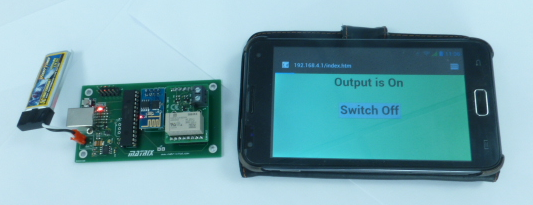
Pictured above is the final project as a stand-alone battery powered WiFi access point and web server. The IoT device has its latching relay output controlled from the web browser of a mobile phone. The on-board LED also indicates the status of the relay, shown here as on.


For the initial prototype we have chosen to construct this from Matrix TSL E-blocks due to their simple plug and play approach to fast prototyping and project construction.


e-blocks.png


Here we have used the EB006 multi-programmer board with a PIC16F1937 microcontroller, a WLAN board and a Sensor Motherboard and Relay fitted. Additional boards, such as LCD and LED are also included at the prototype stage such that we can output diagnostic and status information.


The software development is entirely using Flowcode and the included components that greatly simplify the code required. In this example we are using the ESP8226 WLAN component.


This component first requires some properties setting, as shown in the following Flowcode IDE screen shot.


properties.png

This enables us to quickly setup a web server of two HTML pages, the contents of those pages are as follows, and will be explained later.


Here is the index.htm page:


<html><head><title>IoT Remote Control</title>

<style>

.On {

font-family: Arial;

font-size: 72px;

font-weight: bold;

background-color: lightgreen;

text-align:center;

}

.Off {

font-family: Arial;

font-size: 72px;

font-weight: bold;

background-color: red;

text-align:center;

}

</style></head>

<body class=’%2′>Output is %2<p><form action=’process.htm’

method=’get’><input type=’submit’ value=’Switch %3′>

<input type=’hidden’  name=’s’ value=’%1′></form>

</body></html>


Here is the process.htm page:


<html><head><title>IoT Remote Control</title>

<style>

.run {

font-family: Arial;

font-size: 72px;

font-weight: bold;

background-color: yellow;

text-align:center;

}

</style><script>

function reFresh()

{

location.href=’index.htm’

}

window.setInterval(‘reFresh()’,1000);

</script></head>

<body class=’run’>

Processing …

</body></html>


Our Flowcode flowchart program now simply needs to include code to initialise and setup the server. Here is the start-up code:

startup.png

In order to process incoming browser requests and reply with the relevant page, all we need to do is to add a program loop that makes a call to CheckForPageRequests. This component macro does all the processing required for us.


check_requests.png


The return value will be non-zero if a page request has been processed.


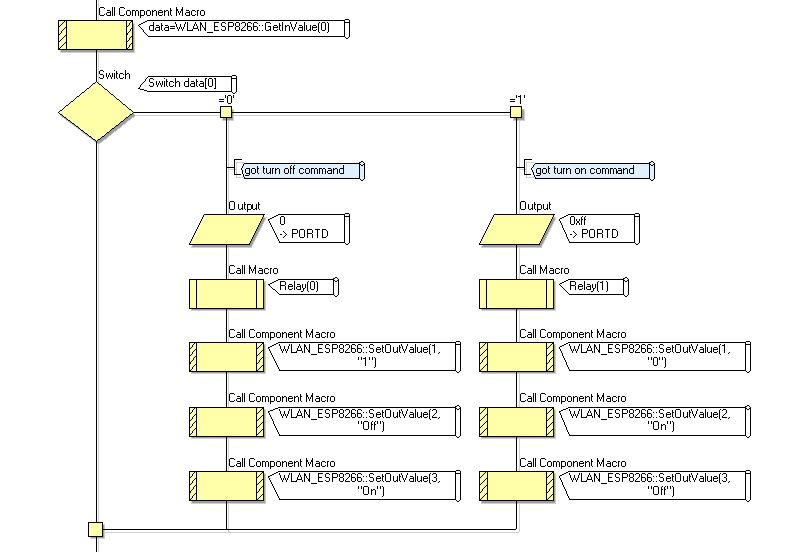
On our index.htm page we have a button, when this is pressed extra parameters are included in the GET request from the browser due to the FORM action. So our next code task is to find out if there were any parameters to the request. This is done by the GetInValue macro.
 

response.png


The index.htm page has one of two possible buttons, “Switch On” or “Switch Off”, our Switch On button sends a value of “1” and our Switch Off button sends a value of “0”, so we can simply test for either of these two values and switch our relay on or off.


We also dynamically change the “out” values for our web page so that if the relay is currently on, then our next status web page should indicate that the relay is on and also provide a “Switch Off” button.


This is done with the SetOutValue macro. You will notice that in our index.htm HTML page we have three unusual text items: %1, %2 and %3. When the page is returned from the Flowcode server component these text items are substituted with the values that have been loaded via the SetOutValue macro. So a call to SetOutValue(3,”Off”) will cause the “%3” text string to be changed to “Off”, hence changing our button to “Switch Off”.


And that’s the project done and working. Just connect to the WiFi access point with a browser!


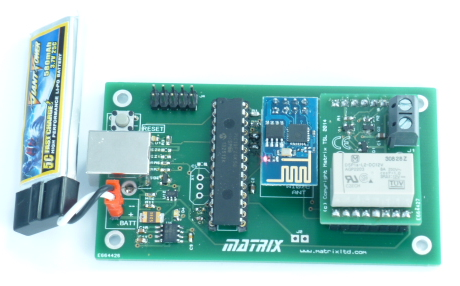
Here’s a sneak peek of our possible future Matrix TSL IoT board, complete with WiFi and sensor module socket containing a latching relay module …
 

IoT.png

  • Sign in to reply

Top Comments

  • benmatrix
    benmatrix over 11 years ago in reply to DAB +1
    Hello DAB, Thanks for your questions. The Flowcode program actually generates C in the background so the code is very efficient, you can even see/edit the C code side by side with the Flowchart so you…
  • benmatrix
    benmatrix over 11 years ago in reply to DAB

    Hello DAB,


    Thanks for your questions.


    The Flowcode program actually generates C in the background so the code is very efficient, you can even see/edit the C code side by side with the Flowchart so you can see the code as it is created and manipulated.


    We have optimised the HTML code by storing this away in the programs ROM memory however a way of streaming off a larger data source like an SD card would be a very good improvement which is on our to do list. An FTP server would also then make a great addition allowing you to control the files on the SD card.


    More IoT blogs coming soon...

    • Cancel
    • Vote Up +1 Vote Down
    • Sign in to reply
    • More
    • Cancel
  • DAB
    DAB over 11 years ago

    Very interesting syntax for the Flow Code.


    I see the general idea and structure.

    Have you looked at the efficiency of the compiler turning these pictures into finished code?

    I am curious how well the pieces come together.

    Are there options to maximize speed or memory usage?


    DAB

    • Cancel
    • Vote Up 0 Vote Down
    • Sign in to reply
    • More
    • Cancel
element14 Community

element14 is the first online community specifically for engineers. Connect with your peers and get expert answers to your questions.

  • Members
  • Learn
  • Technologies
  • Challenges & Projects
  • Products
  • Store
  • About Us
  • Feedback & Support
  • FAQs
  • Terms of Use
  • Privacy Policy
  • Legal and Copyright Notices
  • Sitemap
  • Cookies

An Avnet Company © 2025 Premier Farnell Limited. All Rights Reserved.

Premier Farnell Ltd, registered in England and Wales (no 00876412), registered office: Farnell House, Forge Lane, Leeds LS12 2NE.

ICP 备案号 10220084.

Follow element14

  • X
  • Facebook
  • linkedin
  • YouTube