element14 Community
element14 Community
    Register Log In
  • Site
  • Search
  • Log In Register
  • Community Hub
    Community Hub
    • What's New on element14
    • Feedback and Support
    • Benefits of Membership
    • Personal Blogs
    • Members Area
    • Achievement Levels
  • Learn
    Learn
    • Ask an Expert
    • eBooks
    • element14 presents
    • Learning Center
    • Tech Spotlight
    • STEM Academy
    • Webinars, Training and Events
    • Learning Groups
  • Technologies
    Technologies
    • 3D Printing
    • FPGA
    • Industrial Automation
    • Internet of Things
    • Power & Energy
    • Sensors
    • Technology Groups
  • Challenges & Projects
    Challenges & Projects
    • Design Challenges
    • element14 presents Projects
    • Project14
    • Arduino Projects
    • Raspberry Pi Projects
    • Project Groups
  • Products
    Products
    • Arduino
    • Avnet & Tria Boards Community
    • Dev Tools
    • Manufacturers
    • Multicomp Pro
    • Product Groups
    • Raspberry Pi
    • RoadTests & Reviews
  • About Us
  • Store
    Store
    • Visit Your Store
    • Choose another store...
      • Europe
      •  Austria (German)
      •  Belgium (Dutch, French)
      •  Bulgaria (Bulgarian)
      •  Czech Republic (Czech)
      •  Denmark (Danish)
      •  Estonia (Estonian)
      •  Finland (Finnish)
      •  France (French)
      •  Germany (German)
      •  Hungary (Hungarian)
      •  Ireland
      •  Israel
      •  Italy (Italian)
      •  Latvia (Latvian)
      •  
      •  Lithuania (Lithuanian)
      •  Netherlands (Dutch)
      •  Norway (Norwegian)
      •  Poland (Polish)
      •  Portugal (Portuguese)
      •  Romania (Romanian)
      •  Russia (Russian)
      •  Slovakia (Slovak)
      •  Slovenia (Slovenian)
      •  Spain (Spanish)
      •  Sweden (Swedish)
      •  Switzerland(German, French)
      •  Turkey (Turkish)
      •  United Kingdom
      • Asia Pacific
      •  Australia
      •  China
      •  Hong Kong
      •  India
      • Japan
      •  Korea (Korean)
      •  Malaysia
      •  New Zealand
      •  Philippines
      •  Singapore
      •  Taiwan
      •  Thailand (Thai)
      • Vietnam
      • Americas
      •  Brazil (Portuguese)
      •  Canada
      •  Mexico (Spanish)
      •  United States
      Can't find the country/region you're looking for? Visit our export site or find a local distributor.
  • Translate
  • Profile
  • Settings
Personal Blogs
  • Community Hub
  • More
Personal Blogs
Legacy Personal Blogs LoRa Rewards : Unbagging
  • Blog
  • Documents
  • Mentions
  • Sub-Groups
  • Tags
  • More
  • Cancel
  • New
  • Share
  • More
  • Cancel
Group Actions
  • Group RSS
  • More
  • Cancel
Engagement
  • Author Author: dubbie
  • Date Created: 24 Jul 2020 2:12 PM Date Created
  • Views 1947 views
  • Likes 6 likes
  • Comments 11 comments
  • unbagging
  • nano 33 iot
Related
Recommended

LoRa Rewards : Unbagging

dubbie
dubbie
24 Jul 2020

Recently, or was it some time ago now - time passes so quickly - I was pleased to be gifted a couple of Arduino MKR LoRa boards for asking a question during the recent LoRa Meets Arduino Webinar (https://event.on24.com/eventRegistration/console/EventConsoleApollo.jsp?&eventid=2350848&sessionid=1&username=&partnerre… ). Usually it seems around the home, I get told off for asking questions, so it was nice to be encouraged to ask questions. Today the bag containing thee items arrived. Hooray!


You don't have permission to edit metadata of this video.
Edit media
x
image
Upload Preview
image


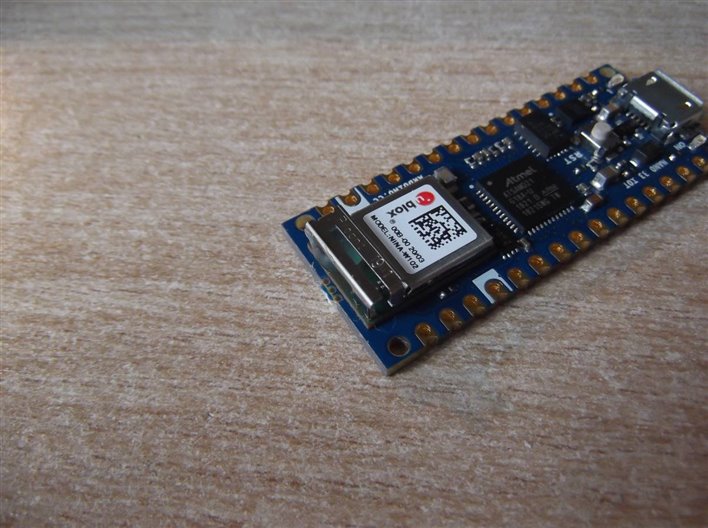
As well as the two MKR 1310 boards there was a bonus Arduino 33 IoT board, not sure what that was for, maybe for just being me! but it was still very welcome. I will have to have a play with that 33 IoT board a bit later. It does have a strange clip thing at the end, near the WiFi chip. I'm not sure what it is. Does anyone know? It seems to have a blob of epoxy inside it, maybe it is some sort of aerial or similar. I looked on the Arduino website but could not find anything describing what this clip was for. I'm sure I'll find out eventually.
 

image


It was amusing to see my name printed twice on the envelope containing these boards:


Dubbie Dubbie

Dubbie Dubbie


I liked it so much I might use it myself. A bit like New York, so good they named it twice.


Anyway, thanks Element14 for all these goodies and I now have several new areas that I will need to look into and learn about. For example, do I need a LoRa Gateway to use these two MKR 1310 LoRa boards to talk to each other, or can they talk directly point-to-point?


Dubbie Dubbie

Dubbie Dubbie

  • Sign in to reply

Top Comments

  • jc2048
    jc2048 over 5 years ago +3
    The MKR WIFI 1010 has a similar module. That came with a card warning that the aerial is fragile, so it does look like the blob is for some extra mechanical support.
  • dubbie
    dubbie over 5 years ago in reply to dougw +3
    Douglas, Thanks for the advice, comment and link. I followed the link to your previous Blog about LoRa - which I do vaguely remember reading but I knew less then than I do now and wasn't that interested…
  • Jan Cumps
    Jan Cumps over 5 years ago in reply to dubbie +3
    I do it by aiming with the naked eye. Then try to move them in all horizontal directions softly. If it doesn't go anywhere, I push the upper side down. Firm but not hard. It's less scary than it looks…
Parents
  • dougw
    dougw over 5 years ago

    They can talk directly to each other, point-to-point.

    You do not need a gateway. Here is an example....

    LoRa GeLo MKR - Long Range Geo-Locator MKR 1300

    • Cancel
    • Vote Up +2 Vote Down
    • Sign in to reply
    • More
    • Cancel
  • dubbie
    dubbie over 5 years ago in reply to dougw

    Douglas,


    Thanks for the advice, comment and link. I followed the link to your previous Blog about LoRa - which I do vaguely remember reading but I knew less then than I do now and wasn't that interested in wireless stuff, plus I had not been using Element14 long, so I didn't absorb or remember much of it - but I think I will have to have another look when I connect up the MKR 1310s.


    One problem I have had has been getting the small plug thing on an aerial to connect to the socket thing on the PCB. They are so small and do not seem to want to connect together. Is there some technique to getting them connected as I have been reluctant to try brute force.


    Dubbie Dubbie Dubbie

    Dubbie

    • Cancel
    • Vote Up +3 Vote Down
    • Sign in to reply
    • More
    • Cancel
  • dougw
    dougw over 5 years ago in reply to dubbie

    Those UFL connectors are tricky. I wasn't sure how to connect them either. You can see from this picture they just seem to be a push on connector.

    They are pretty delicate and can be bent enough to make it hard to snap them together. Might be worth a magnifier inspection with a loupe prior to insertion.

    One of the connectors I had took enough force that it could easily mangle the connector if it wasn't lined up properly.

    image

    • Cancel
    • Vote Up +2 Vote Down
    • Sign in to reply
    • More
    • Cancel
  • dubbie
    dubbie over 5 years ago in reply to dougw

    Douglas,


    I was rather hoping that someone might have some special trick way of mating these connectors. The idea of using a eye loupe is good thought - I will try that.


    Dubbie Dubbie Dubbie Dubbie

    • Cancel
    • Vote Up +2 Vote Down
    • Sign in to reply
    • More
    • Cancel
Comment
  • dubbie
    dubbie over 5 years ago in reply to dougw

    Douglas,


    I was rather hoping that someone might have some special trick way of mating these connectors. The idea of using a eye loupe is good thought - I will try that.


    Dubbie Dubbie Dubbie Dubbie

    • Cancel
    • Vote Up +2 Vote Down
    • Sign in to reply
    • More
    • Cancel
Children
  • Jan Cumps
    Jan Cumps over 5 years ago in reply to dubbie

    I do it by aiming with the naked eye. Then try to move them in all horizontal directions softly.


    If it doesn't go anywhere, I push the upper side down. Firm but not hard.

    It's less scary than it looks, if you "think with the connector".


    But never ever brute force on these.

    • Cancel
    • Vote Up +3 Vote Down
    • Sign in to reply
    • More
    • Cancel
  • dubbie
    dubbie over 5 years ago in reply to Jan Cumps

    Jan,


    I will have to give this a go. Do they unplug easily?


    Dubbie

    • Cancel
    • Vote Up +1 Vote Down
    • Sign in to reply
    • More
    • Cancel
  • Jan Cumps
    Jan Cumps over 5 years ago in reply to dubbie

    I unplug them by putting my thumb fingernail under the rim of the top connector. Then push it up.

    It needs a little persuation, not a lot.

    Don't yank the thin coax cable to get the connector off.


    There's a limit to how many times you can use these. For the ones I have, the supplier specifies 15 connections.

    • Cancel
    • Vote Up +2 Vote Down
    • Sign in to reply
    • More
    • Cancel
  • cstanton
    cstanton over 5 years ago in reply to dubbie

    They're pretty resilient. I've detached and attached these frequently for pci-e wifi adapters inside laptops. Wouldn't want to do it too frequently though because the spring in them can get tired.

    • Cancel
    • Vote Up +2 Vote Down
    • Sign in to reply
    • More
    • Cancel
element14 Community

element14 is the first online community specifically for engineers. Connect with your peers and get expert answers to your questions.

  • Members
  • Learn
  • Technologies
  • Challenges & Projects
  • Products
  • Store
  • About Us
  • Feedback & Support
  • FAQs
  • Terms of Use
  • Privacy Policy
  • Legal and Copyright Notices
  • Sitemap
  • Cookies

An Avnet Company © 2026 Premier Farnell Limited. All Rights Reserved.

Premier Farnell Ltd, registered in England and Wales (no 00876412), registered office: Farnell House, Forge Lane, Leeds LS12 2NE.

ICP 备案号 10220084.

Follow element14

  • X
  • Facebook
  • linkedin
  • YouTube