element14 Community
element14 Community
    Register Log In
  • Site
  • Search
  • Log In Register
  • Community Hub
    Community Hub
    • What's New on element14
    • Feedback and Support
    • Benefits of Membership
    • Personal Blogs
    • Members Area
    • Achievement Levels
  • Learn
    Learn
    • Ask an Expert
    • eBooks
    • element14 presents
    • Learning Center
    • Tech Spotlight
    • STEM Academy
    • Webinars, Training and Events
    • Learning Groups
  • Technologies
    Technologies
    • 3D Printing
    • FPGA
    • Industrial Automation
    • Internet of Things
    • Power & Energy
    • Sensors
    • Technology Groups
  • Challenges & Projects
    Challenges & Projects
    • Design Challenges
    • element14 presents Projects
    • Project14
    • Arduino Projects
    • Raspberry Pi Projects
    • Project Groups
  • Products
    Products
    • Arduino
    • Avnet & Tria Boards Community
    • Dev Tools
    • Manufacturers
    • Multicomp Pro
    • Product Groups
    • Raspberry Pi
    • RoadTests & Reviews
  • About Us
    About the element14 Community
  • Store
    Store
    • Visit Your Store
    • Choose another store...
      • Europe
      •  Austria (German)
      •  Belgium (Dutch, French)
      •  Bulgaria (Bulgarian)
      •  Czech Republic (Czech)
      •  Denmark (Danish)
      •  Estonia (Estonian)
      •  Finland (Finnish)
      •  France (French)
      •  Germany (German)
      •  Hungary (Hungarian)
      •  Ireland
      •  Israel
      •  Italy (Italian)
      •  Latvia (Latvian)
      •  
      •  Lithuania (Lithuanian)
      •  Netherlands (Dutch)
      •  Norway (Norwegian)
      •  Poland (Polish)
      •  Portugal (Portuguese)
      •  Romania (Romanian)
      •  Russia (Russian)
      •  Slovakia (Slovak)
      •  Slovenia (Slovenian)
      •  Spain (Spanish)
      •  Sweden (Swedish)
      •  Switzerland(German, French)
      •  Turkey (Turkish)
      •  United Kingdom
      • Asia Pacific
      •  Australia
      •  China
      •  Hong Kong
      •  India
      •  Japan
      •  Korea (Korean)
      •  Malaysia
      •  New Zealand
      •  Philippines
      •  Singapore
      •  Taiwan
      •  Thailand (Thai)
      •  Vietnam
      • Americas
      •  Brazil (Portuguese)
      •  Canada
      •  Mexico (Spanish)
      •  United States
      Can't find the country/region you're looking for? Visit our export site or find a local distributor.
  • Translate
  • Profile
  • Settings
Personal Blogs
  • Community Hub
  • More
Personal Blogs
Legacy Personal Blogs Pynq OCR frustration
  • Blog
  • Documents
  • Mentions
  • Sub-Groups
  • Tags
  • More
  • Cancel
  • New
  • Share
  • More
  • Cancel
Group Actions
  • Group RSS
  • More
  • Cancel
Engagement
  • Author Author: Fred27
  • Date Created: 26 Jun 2020 5:42 PM Date Created
  • Views 4142 views
  • Likes 6 likes
  • Comments 20 comments
  • opencv
  • ocr
  • pynq
  • pynqhero
Related
Recommended

Pynq OCR frustration

Fred27
Fred27
26 Jun 2020

I've been spending a while on what I think is going to be my Pynq embedded vision project. I say I think it will be because I'm having a frustratingly difficult time of it. it's not the FPGA stuff. That's difficult but I'm getting used to that. It's not the Pynq/Pythn side of things. It's image processing.


A friend of mine races kayaks and apparently the monitoring of kayaks crossing the finish like is manual and fraught with error. There are lots of "recounts" and nobody trusts the results at all. I decided to identify the numbers on the kayaks as they cross the finish line, so I started digging into OCR (Optical Character Recognition).


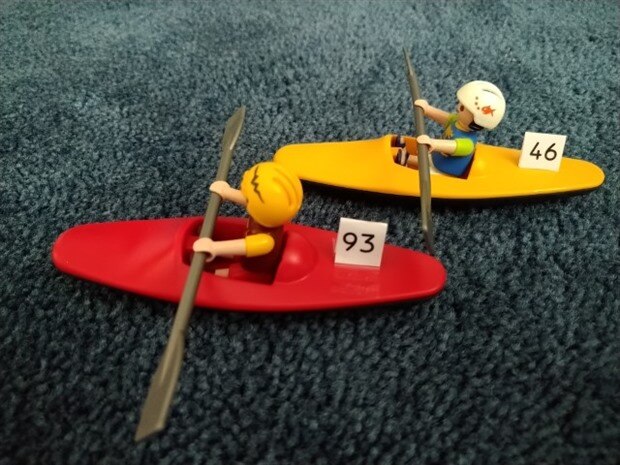
As nobody is racing kayaks at the moment I decided to make use of the slightly odd blue carpet that was fitted when we bought the house and fake it a bit. I have some video, but to start with I decided to use this image. I made the numbers reasonably easy to read and even used an OCR-B font. OCR-A will probably look reasonably familiar but is a bit too strange to convince anyone to use for racing!image
image

All image processing of this type like nice clean data to work with and so I grayscaled the data, used a threshold so I was just looking at black and white and applied a Gaussian blur to smooth any noise. All fairly standard stuff.


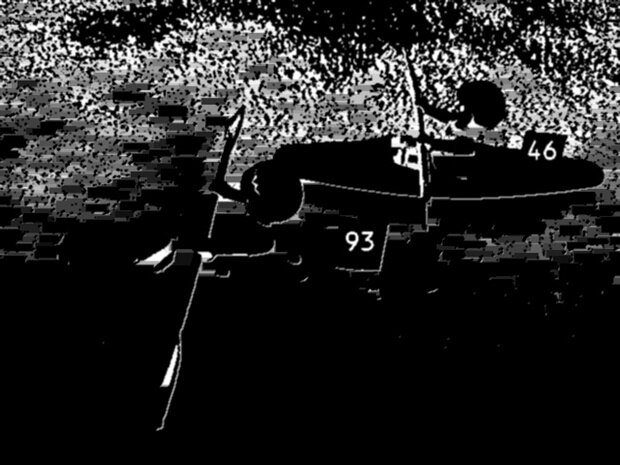
I also found that a "tophat" morphological operator removes the large elements, leaving just the smaller detail that we're interested in. So far so good. Here's a sample of the Python in my notebook:

import cv2


image = cv2.imread("kayak_ocr_b.jpg")

gray = cv2.cvtColor(image, cv2.COLOR_BGR2GRAY)

gray = cv2.threshold(gray, 100, 255, cv2.THRESH_BINARY_INV)[1]

gray = cv2.GaussianBlur(gray,(3,3),0)

cv2.imwrite("gray_ocr_b.jpg",gray)


# apply a tophat (whitehat) morphological operator to find smaller light regions against a dark background


rectKernel = cv2.getStructuringElement(cv2.MORPH_RECT, (18, 6))


tophat = cv2.morphologyEx(gray, cv2.MORPH_TOPHAT, rectKernel)

cv2.imwrite("tophat_ocr_b.jpg",tophat)

This is what my image now looks like. This should be a little easier for image processing.
image


Tesseract OCR

image

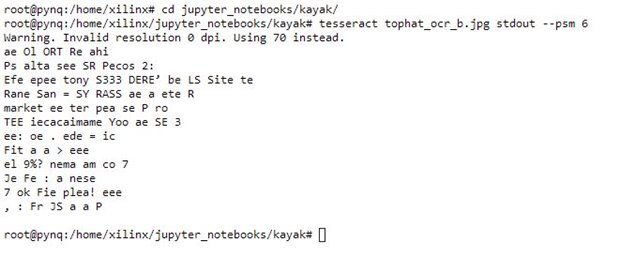
If you Google OpenCV OCR to tend to find that you're led towards Tesseract and (for Python) PyTesseract. You simple point Tesseract at your image and tell it where to put the text output. There are of course a few options, which I tweaked to tell it that I was looking for separate pieces fo text rather than a whole page. The output was pretty awful and also took about 10 seconds on the Pynq Z2. I managed to get something if I gave it the cleanest screenshot of some on-screen text but it was still pretty bad.


i decided that considering how slow it was, it wasn't worth pursuing much further. Time to look at a different approach.


Matching

It seems that rather than going for all-out OCR it is possible to pattern match to find the shapes of the digits I need. If it's possible to find eyes and faces and other such variable objects it shouldn't be too hard with 10 fairly well-defined digits. I have got control of the font after all.


I found this interesting tutorial on scanning for credit card numbers. It seemed to be fairly similar to what I needed and it wasn't too difficult to adapt it to look for some separate blocks of digits rather than the 4 sets of four used by credit cards. I even managed to get it to work a bit when I had used an image program to clearly paste some OCR-A numbers over the ones in the photograph. It wasn't unbearably slow either.


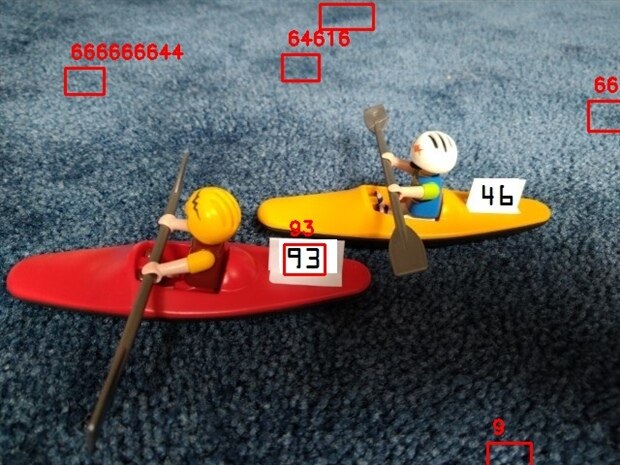
However, as soon as I switched to something even slightly realistic - using OCR B instead of OCR A or printing the numbers on paper where they may be ever so slightly angled, it all fell apart. I've spent days trying to tweak it to get something to work. I could even get ludicrous results like this cropping up - from an earlier attempt when using copy and pasted OCR A.
image

Rant almost over

Sorry this has been a bit of a rant rather than a helpful blog post, but I believe it can sometimes be as important to document failure as success. If anyone does have some tips on OCR then feel free to post below. I'm really enjoying a lot about Pynq, but right now image processing it not part of that! image

  • Sign in to reply

Top Comments

  • Fred27
    Fred27 over 6 years ago in reply to beacon_dave +3
    To be honest, right now I'm thinking of changing the project completely. I'm enjoying the FPGA side of things, but not really the OpenCV bit. Plus, this project was in danger of just being a Python project…
  • Fred27
    Fred27 over 6 years ago in reply to dubbie +3
    A bar code is a good idea, but requires a bigger change to the race organisation. I've now decided on a different project for the Pynq that is a bit more FPGA and less (but still some) OpenCV. Thanks everyone…
  • Jan Cumps
    Jan Cumps over 6 years ago +2
    balearicdynamics , any advise? You have experience with visual pattern recognition ...
Parents
  • genebren
    genebren over 6 years ago

    You really look like you are getting close.  OCR is tough, due to size and angle.  I would be tempted to use a 'sharpen' filter across the image to drive the numbers to black and white (not as munch gray).


    image

    I just ImageJ to analysis the image.  I constructed a rectange around the '46' in the image and then produced a histogram of the region.  The upper/left window is the result.  The image appears to have fifteen small peaks with the majority of the region being black.  After I ran 'sharpen' across the the image, I ran another histogram on the same region.  The lower/left window is that result.  The majority of the region is now either black or white, with little gray in between.  This might produce a better image for the OCR to be run on.


    Good luck!

    • Cancel
    • Vote Up +1 Vote Down
    • Sign in to reply
    • More
    • Cancel
  • Fred27
    Fred27 over 6 years ago in reply to genebren

    Maybe the gaussian blur isn't helpful - although I also tried it without. Or maybe it should be before the threshold operation.

    • Cancel
    • Vote Up +1 Vote Down
    • Sign in to reply
    • More
    • Cancel
  • beacon_dave
    beacon_dave over 6 years ago in reply to Fred27

    There is an image over at the Wikimedia site showing a number of filters being used in an ANPR / ALPR application:

    https://upload.wikimedia.org/wikipedia/commons/1/1a/LPR_Process.JPG

    Some 'magic sauce' not revealed however...

    • Cancel
    • Vote Up +2 Vote Down
    • Sign in to reply
    • More
    • Cancel
Comment
  • beacon_dave
    beacon_dave over 6 years ago in reply to Fred27

    There is an image over at the Wikimedia site showing a number of filters being used in an ANPR / ALPR application:

    https://upload.wikimedia.org/wikipedia/commons/1/1a/LPR_Process.JPG

    Some 'magic sauce' not revealed however...

    • Cancel
    • Vote Up +2 Vote Down
    • Sign in to reply
    • More
    • Cancel
Children
No Data
element14 Community

element14 is the first online community specifically for engineers. Connect with your peers and get expert answers to your questions.

  • Members
  • Learn
  • Technologies
  • Challenges & Projects
  • Products
  • Store
  • About Us
  • Feedback & Support
  • FAQs
  • Terms of Use
  • Privacy Policy
  • Legal and Copyright Notices
  • Sitemap
  • Cookies

An Avnet Company © 2026 Premier Farnell Limited. All Rights Reserved.

Premier Farnell Ltd, registered in England and Wales (no 00876412), registered office: Farnell House, Forge Lane, Leeds LS12 2NE.

Follow element14

  • X
  • Facebook
  • linkedin
  • YouTube