


In the last post, I have mentioned the sensor board I built on Arduino. I was testing the system using the serial port and before adding many sensors, I wanted to make the board work independently. Therefore I connect MSP432 and Arduino using the serial port and send the data over WiFi module. I am using TI-RTOS on MSP432 so I add the UART driver to the previous WiFi code. The echoFxn basically echoes the serial data over WiFi. The data is read and assigned to Mymessage variable. Then task sleeps a second.
Void echoFxn(UArg arg0, UArg arg1)
{
    char input;
    UART_Handle uart;
    UART_Params uartParams;
    const char echoPrompt[] = "\fEchoing characters:\r\n";


    /* Create a UART with data processing off. */
    UART_Params_init(&uartParams);
    uartParams.writeDataMode = UART_DATA_BINARY;
    uartParams.readDataMode = UART_DATA_BINARY;
    uartParams.readReturnMode = UART_RETURN_FULL;
    uartParams.readEcho = UART_ECHO_OFF;
    uartParams.baudRate = 9600;
    uart = UART_open(Board_UART0, &uartParams);


    if (uart == NULL) {
        System_abort("Error opening the UART");
    }


    UART_write(uart, echoPrompt, sizeof(echoPrompt));


    /* Loop forever echoing */
    while (1) {
        UART_read(uart, &input, 10);
        Mymessage =  &input;
        //UART_write(uart, &input, 10);
        //UART_write(uart, "\n\r", 10);
        Task_sleep(10);
    }
}
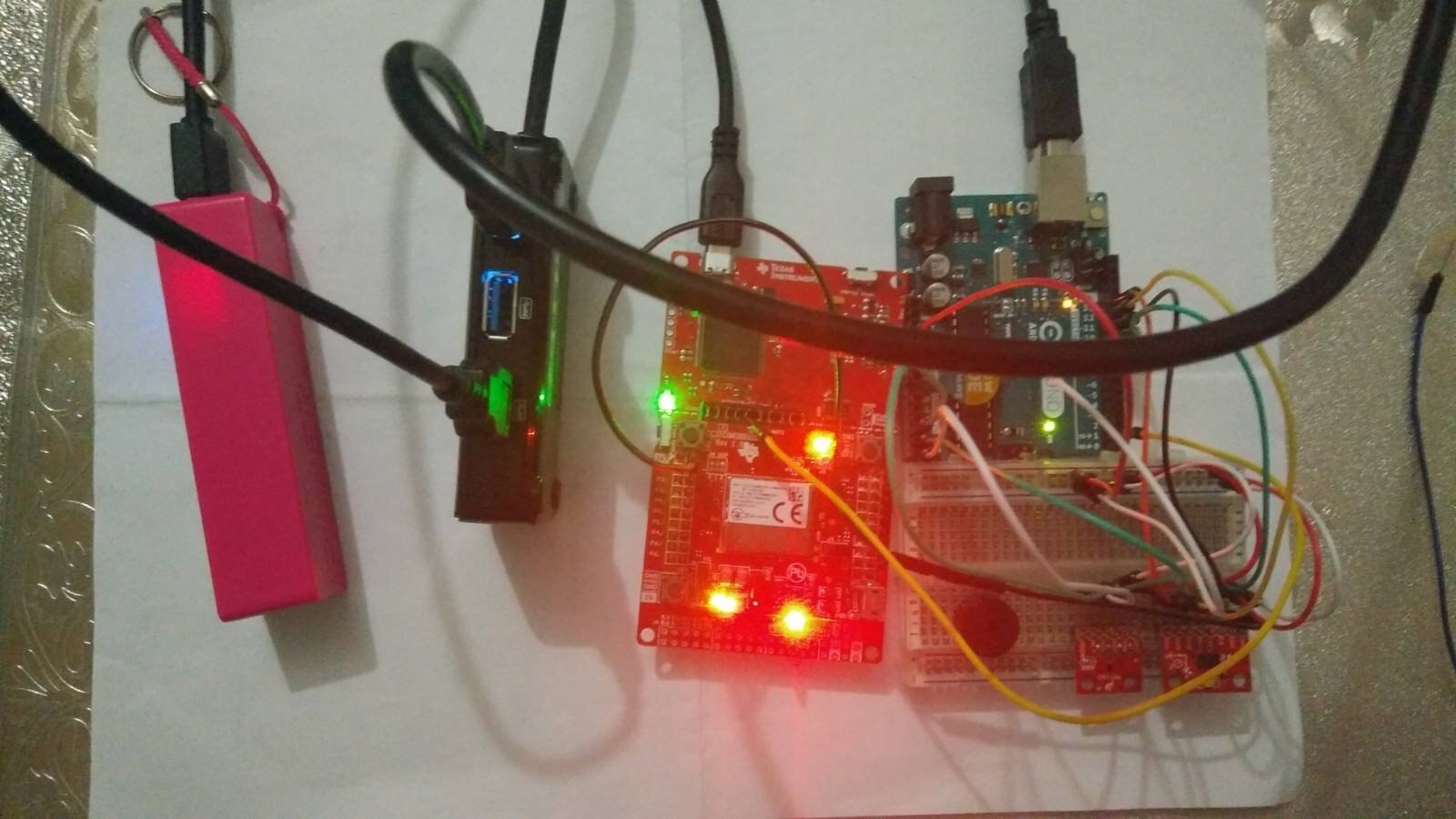
The image below shows how the system can work independently from the computer. The purple box is power bank and distributes power to MSP432 and Arduino via black USB multiport. The image is not clear but this is not final I will try to embed these inside the helmet.
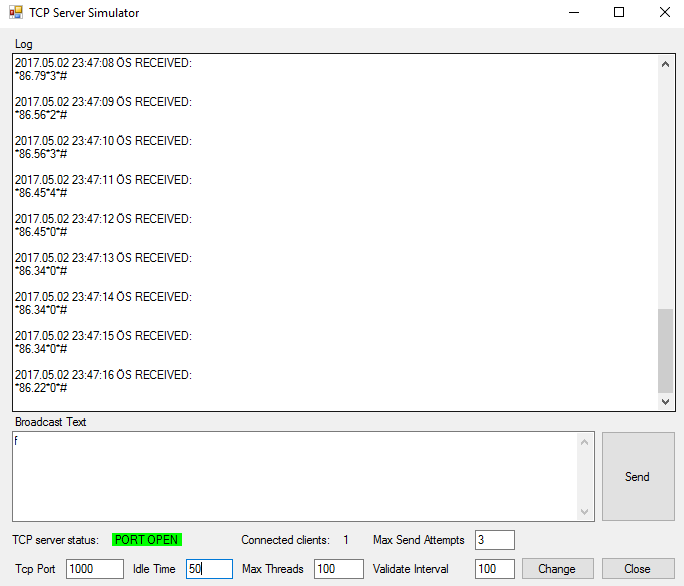
The following C# program gathers the data. It is not my code any TCP application will work for this application. I have my own code but it won't show the raw data. It will show only warnings and general info.
I have ordered an MSP430 for NFC communication. It will control the gate and send data to the computer via serial port. All the information will be seen on C# program. Next, I will work on RSSI strength to track the user and combine that information with the accelerometer.
You can see all the links related to this project in the first blog: Safe & Sound Wearables - Trackable Safety Helmet for Miners #1: Introduction to Project
/*
 * Copyright (c) 2015-2016, Texas Instruments Incorporated
 * All rights reserved.
 *
 * Redistribution and use in source and binary forms, with or without
 * modification, are permitted provided that the following conditions
 * are met:
 *
 * *  Redistributions of source code must retain the above copyright
 *    notice, this list of conditions and the following disclaimer.
 *
 * *  Redistributions in binary form must reproduce the above copyright
 *    notice, this list of conditions and the following disclaimer in the
 *    documentation and/or other materials provided with the distribution.
 *
 * *  Neither the name of Texas Instruments Incorporated nor the names of
 *    its contributors may be used to endorse or promote products derived
 *    from this software without specific prior written permission.
 *
 * THIS SOFTWARE IS PROVIDED BY THE COPYRIGHT HOLDERS AND CONTRIBUTORS "AS IS"
 * AND ANY EXPRESS OR IMPLIED WARRANTIES, INCLUDING, BUT NOT LIMITED TO,
 * THE IMPLIED WARRANTIES OF MERCHANTABILITY AND FITNESS FOR A PARTICULAR
 * PURPOSE ARE DISCLAIMED. IN NO EVENT SHALL THE COPYRIGHT OWNER OR
 * CONTRIBUTORS BE LIABLE FOR ANY DIRECT, INDIRECT, INCIDENTAL, SPECIAL,
 * EXEMPLARY, OR CONSEQUENTIAL DAMAGES (INCLUDING, BUT NOT LIMITED TO,
 * PROCUREMENT OF SUBSTITUTE GOODS OR SERVICES; LOSS OF USE, DATA, OR PROFITS;
 * OR BUSINESS INTERRUPTION) HOWEVER CAUSED AND ON ANY THEORY OF LIABILITY,
 * WHETHER IN CONTRACT, STRICT LIABILITY, OR TORT (INCLUDING NEGLIGENCE OR
 * OTHERWISE) ARISING IN ANY WAY OUT OF THE USE OF THIS SOFTWARE,
 * EVEN IF ADVISED OF THE POSSIBILITY OF SUCH DAMAGE.
 */


/*
 *  ======== tcpEchoCC3X00.c ========
 */


#include <string.h>
#include <stdbool.h>


/* XDCtools Header files */
#include <xdc/std.h>
#include <xdc/runtime/System.h>
#include <xdc/cfg/global.h>


/* BIOS Header files */
#include <ti/sysbios/BIOS.h>
#include <ti/sysbios/knl/Task.h>


/* TI-RTOS Header files */
#include <ti/drivers/GPIO.h>
#include <ti/drivers/UART.h>


/* SimpleLink Wi-Fi Host Driver Header files */
#include <simplelink.h>


/* Example/Board Header file */
#include "Board.h"


/* Local Platform Specific Header file */
#include "sockets.h"


#include <stdint.h>


/* Port number for listening for TCP packets */
#define TCPPORT         1000


#define TASKSTACKSIZE   1024


/* IP addressed of server side socket. Should be in long format,
* E.g: 0xC0A8000A == 192.168.0.10 */
#define IP_ADDR_Server 0xC0A8000A


extern bool smartConfigFlag;
Task_Struct task0Struct;
Char task0Stack[TASKSTACKSIZE];


Task_Struct taskUARTStruct;
Char taskUARTStack[TASKSTACKSIZE];


/* Globals */


void *netIF;


char connected = 0; // re-connect the AP


char *Mymessage = "elemet14";


/*
 *  ======== echoFxn ========
 *  Task for this function is created statically. See the project's .cfg file.
 */
Void echoFxn(UArg arg0, UArg arg1)
{
    char input;
    UART_Handle uart;
    UART_Params uartParams;
    const char echoPrompt[] = "\fEchoing characters:\r\n";


    /* Create a UART with data processing off. */
    UART_Params_init(&uartParams);
    uartParams.writeDataMode = UART_DATA_BINARY;
    uartParams.readDataMode = UART_DATA_BINARY;
    uartParams.readReturnMode = UART_RETURN_FULL;
    uartParams.readEcho = UART_ECHO_OFF;
    uartParams.baudRate = 9600;
    uart = UART_open(Board_UART0, &uartParams);


    if (uart == NULL) {
        System_abort("Error opening the UART");
    }


    UART_write(uart, echoPrompt, sizeof(echoPrompt));


    /* Loop forever echoing */
    while (1) {
        UART_read(uart, &input, 10);
        Mymessage =  &input;
        //UART_write(uart, &input, 10);
        //UART_write(uart, "\n\r", 10);
        Task_sleep(10);
    }
}


/*
 *  ======== gpioButtonFxn ========
 *  Callback function for the GPIO interrupt on Board_BUTTON1.
 */
void gpioButtonFxn(unsigned int index)
{
    /* Begin smart config process */
    smartConfigFlag = true;
}


int socketHandler=-1;
int status;
char recievedBuff[4];


/*
 *  ======== TCPsend Function ========
 *  It creates socket, send message, receive it
 *  then close the socket
 */


void blink()
{
    /* Turn on user LED */
    GPIO_toggle(Board_LED0);
}


Void TCPSetup(char *message)
{


    while(1)
    {
      if(connected != 1)
      {
          // Open WiFi and await a connection
          netIF = socketsStartUp();


          socketHandler = socket(AF_INET, SOCK_STREAM, IPPROTO_TCP);


          /*
           * SL_AF_INET indicates using IPv4
           * SL_SOCK_STREAM indicates using TCP
           * IPPROTO_TCP
           */


          connected = 1;


          if (socketHandler == -1)
          {
             System_printf("Error: socket not created.\n");
             connected = 0;
          }


          SlSockAddrIn_t Addr;  // Socket settings
          Addr.sin_family = SL_AF_INET;
          Addr.sin_port = sl_Htons(TCPPORT);
          Addr.sin_addr.s_addr = sl_Htonl(IP_ADDR_Server);


          status = sl_Connect(socketHandler, ( SlSockAddr_t *) &Addr, sizeof(SlSockAddrIn_t));
      }


      status = sl_Send(socketHandler, Mymessage, 10, 0 );


     // sl_Close(socketHandler);


      Task_sleep(10);


    }
            // Close the network - don't do this if other tasks are using it
            //socketsShutDown(netIF);


}


/*
 *  ======== main ========
 */
int main(void)
{
    /* Construct BIOS objects */
    Task_Params taskParams;


    /* Call board init functions. */
    Board_initGeneral();
    Board_initGPIO();
    Board_initWiFi();
    Board_initUART();


    Task_Params_init(&taskParams);
    taskParams.stackSize = TASKSTACKSIZE;
    taskParams.stack = &task0Stack;
    taskParams.priority = 1;
    Task_construct(&task0Struct, (Task_FuncPtr)TCPSetup, &taskParams, NULL);


    Task_Params_init(&taskParams);
    taskParams.stackSize = TASKSTACKSIZE;
    taskParams.stack = &taskUARTStack;
    taskParams.instance->name = "echo";
    Task_construct(&taskUARTStruct, (Task_FuncPtr)echoFxn, &taskParams, NULL);


    /* Install Button callback */
    GPIO_setCallback(Board_BUTTON1, gpioButtonFxn);


    /* Enable interrupts */
    GPIO_enableInt(Board_BUTTON1);


    /* Turn on user LED */
    GPIO_write(Board_LED0, Board_LED_ON);


    System_printf("Starting the TCP Echo example for the CC3X00 \n"
                  "System provider is set to SysMin. Halt the target to view"
                  " any SysMin content in ROV.\n");


    /* SysMin will only print to the console when you call flush or exit */
    System_flush();


    /* Start BIOS */
    BIOS_start();


    return (0);
}
Top Comments