


This blog will look at the initial concept I have for building the timer.
When built, this timer will form part of the initial tests I do when setting up for protection relay tests to show that the apparatus is performing correctly. Testing the voltage and the current outputs is easy using a digital multimeter. A few measurements are all that is required and recorded on a check sheet that gets submitted with the report on the protection relay tests.
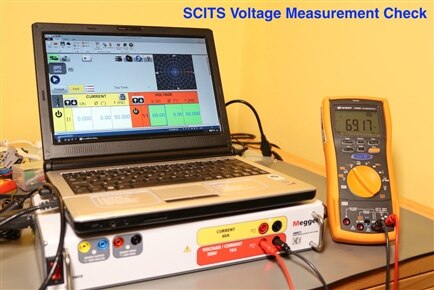

To extend this principle, the timer unit will be utilised to verify the time recording function of the SCITS. This will then show that I have verified operation of the three basic functions of the SCITS, voltage output, current output and timing.
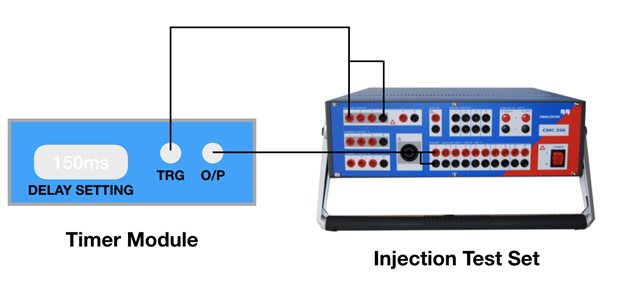
The proposal is relatively simple - The SCITS under test will be set to output a voltage that will trigger the timer module, after a preset delay, the timer module will send a pulsed output that is fed back into the SCITS trip contact circuit. The time recorded by the SCITS should then match the delay setting on the timer module. This idea is depicted below;
As well as being able to produce a delay to verify the operation of the SCITS, the timer module itself will also need to be proven. For this I aim to utilise a Keysight 53220A frequency counter / timer. The setup for this test will be similar, however, I will need the ability to manually trigger the timer module that will also send a start pulse to channel A of the frequency counter / timer, the output of the timer module will then be wired to channel B of the frequency counter / timer which will be set up to record the time interval between the two channels.
I have established the following needs for my SCITS timer module;
- I would like the system to be battery powered
- The input and output pulses will be TTL based as the SCITS can be set up to operate at 5V DC
- Timer resolution can be 1ms to match the timer resolution of the SCITS
- Maximum time delay will be 99s as I time relays up to 60 seconds
- Timer setting will therefore be by 5 BCD thumbwheels
- Connection to the SCITS is via 4mm safety sockets
- Connection to the counter / timer is via BNC
- I will need a manual trigger to verify the timer against my counter / timer
- A reset button is always a good idea
- Both switches will need de-bouncing, either by hardware or software

I haven't totally decided on the battery type yet. If the current draw is low, I may just utilise a 9V PP3 or 4 off AA batteries to a 5V regulator. If I need a larger battery capacity then I may move to a couple of 18650 cells built into the case. I have seen quite a few charger boards around for these cells, which I would hope make my build a little easier. Likewise, I haven't ruled out taking mains into the case yet and building a complete charger for it, or utilising an off the shelf AC to DC converter into a DC jack as per the diagram above. I will probably build up a test circuit first and measure the current drawn with it in operation before I decide on this.
To generate the time delay, I plan on using a PIC (for the first time) which will give me the TTL compatibility, but will need circa 25 I/O to read the thumbwheel switches, receive the trigger, send the output and control the indicators. I have a couple of small PIC chips to start to play with, but will have to select a more appropriate chip at a later date. I will do this when I am ready to order some of the parts.
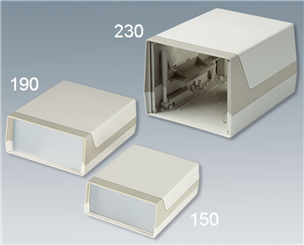
Case wise, I will look to house it in a small desktop instrument case. I am not too concerned about the case size and would prefer something robust as the instrument will travel around with the protection testing kit. Something like the Lux was series from OKW that also has the advantage of a built in battery compartment.
I don't like to order cases until I am well into the build stage, as I have a very easy habit of buying cases that prove to be too small for the project.
Next job will be to produce the schematic, but first, I have an old PIC projects book I am currently back to reading and a PICkit 3, that I purchased some considerable time ago for a project that got shelved. This will hopefully now get some use if I can connect it up and get it working.

I may be gone for some time.............
Top Comments