element14 Community
element14 Community
    Register Log In
  • Site
  • Search
  • Log In Register
  • Community Hub
    Community Hub
    • What's New on element14
    • Feedback and Support
    • Benefits of Membership
    • Personal Blogs
    • Members Area
    • Achievement Levels
  • Learn
    Learn
    • Ask an Expert
    • eBooks
    • element14 presents
    • Learning Center
    • Tech Spotlight
    • STEM Academy
    • Webinars, Training and Events
    • Learning Groups
  • Technologies
    Technologies
    • 3D Printing
    • FPGA
    • Industrial Automation
    • Internet of Things
    • Power & Energy
    • Sensors
    • Technology Groups
  • Challenges & Projects
    Challenges & Projects
    • Design Challenges
    • element14 presents Projects
    • Project14
    • Arduino Projects
    • Raspberry Pi Projects
    • Project Groups
  • Products
    Products
    • Arduino
    • Avnet & Tria Boards Community
    • Dev Tools
    • Manufacturers
    • Multicomp Pro
    • Product Groups
    • Raspberry Pi
    • RoadTests & Reviews
  • About Us
  • Store
    Store
    • Visit Your Store
    • Choose another store...
      • Europe
      •  Austria (German)
      •  Belgium (Dutch, French)
      •  Bulgaria (Bulgarian)
      •  Czech Republic (Czech)
      •  Denmark (Danish)
      •  Estonia (Estonian)
      •  Finland (Finnish)
      •  France (French)
      •  Germany (German)
      •  Hungary (Hungarian)
      •  Ireland
      •  Israel
      •  Italy (Italian)
      •  Latvia (Latvian)
      •  
      •  Lithuania (Lithuanian)
      •  Netherlands (Dutch)
      •  Norway (Norwegian)
      •  Poland (Polish)
      •  Portugal (Portuguese)
      •  Romania (Romanian)
      •  Russia (Russian)
      •  Slovakia (Slovak)
      •  Slovenia (Slovenian)
      •  Spain (Spanish)
      •  Sweden (Swedish)
      •  Switzerland(German, French)
      •  Turkey (Turkish)
      •  United Kingdom
      • Asia Pacific
      •  Australia
      •  China
      •  Hong Kong
      •  India
      • Japan
      •  Korea (Korean)
      •  Malaysia
      •  New Zealand
      •  Philippines
      •  Singapore
      •  Taiwan
      •  Thailand (Thai)
      • Vietnam
      • Americas
      •  Brazil (Portuguese)
      •  Canada
      •  Mexico (Spanish)
      •  United States
      Can't find the country/region you're looking for? Visit our export site or find a local distributor.
  • Translate
  • Profile
  • Settings
Personal Blogs
  • Community Hub
  • More
Personal Blogs
NexGen Flight Simuator NexGen: Landing Gear Subsystem
  • Blog
  • Documents
  • Mentions
  • Sub-Groups
  • Tags
  • More
  • Cancel
  • New
  • Share
  • More
  • Cancel
Group Actions
  • Group RSS
  • More
  • Cancel
Engagement
  • Author Author: phoenixcomm
  • Date Created: 14 Jan 2021 12:35 AM Date Created
  • Views 1126 views
  • Likes 5 likes
  • Comments 5 comments
  • flight simulator
  • nexgen
  • landing gear lever
  • rudder pedals
  • diy aircraft cockpit
  • toe brakes
  • canaerospace
  • c progrmming
  • canbus
  • arduino mega
Related
Recommended

NexGen: Landing Gear Subsystem

phoenixcomm
phoenixcomm
14 Jan 2021

This subsystem is part of the Pilot Controls (node id 100) consisting of the following subsystems. Inter-subsystem is handled by CAN.imageimage

  • Side Stick
  • Throttle
  • Landing Gear Lever lamps and sensors
  • Rudder Pedals with differential braking.

The subsystem consists of the following:

  • Landing Gear Control Lever (CANid: 1175)
  • 3 Red Indicators (CANid: 1400, 1, 2 )
  • 3 Green Indicators (CANid: 1403, 4, 5)
  • WOW, Weight on Wheels, (CANid: 1176)  this sensor, prevents Landing Gear retraction while on the ground. See the movie "No Highway in the Sky" about 1hr in. imageFor WOW to be TRUE all the sensors have to agree. WOW  on the main wheels is responsible for moving the front canard down, until there is weight on the nose wheel at which time the canard goes to 90 degrees to act as a speed brake. as well as enabling nose wheel steering.
  • Gear Down and Locked sensor (CANid: 1406, 07, 08)
  • Gear Up and Locked sensor. (CANid: 1409, 9810, 11 )


Aircraft have 3 wheels Left, Nose, Right. Each pair of Red/Green Indicator  shows the status of each  wheel:

  • RED SOLID, Gear UP, and Locked.
  • RED BLINKING:
    • Landing Gear Lever  UP  selected and gear not up and locked (gear retraction)
    • Landing Gear Lever DOWN selected disagrees with landing gear not down and locked (gear extension)
  • GREEN SOLID, Gear Down, and Locked

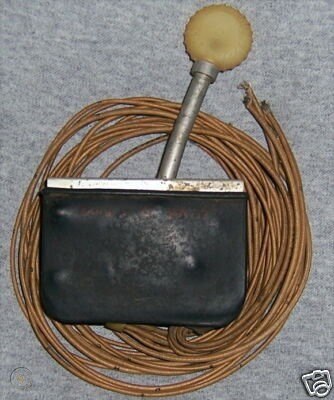
Landing Gear Lever
So to recap that's wires, 13 wires plus grounds. Since I only have two contacts, (UP & DOWN) on the Landing Gear Lever which is not used very much, I can catch them with an interrupt by putting a 2-input Or Gate followed by Schmitt Trigger connected to the Arduino Mega pins 20, 21. using the rising mode. You have to keep in mind that the switch once in the UP or Down position does not move, except in takeoff and landing, therefore the interrupt is detected on the rising edges.

UPDATE 1: To understand the logic behind my RED lamps which can be solid on or blinking at about 1 Hz, I have included a schematic for you to wonder about.

UPDATE 2: I have decided NOT to try and use the timers instead I will just use a lowly NE555. Its output is 1Hz with a 50% duty cycle.

// The Arduino Mega has 6 interrupt pins 2, 3,  18, 19, 20, and 21

Arduino pins and their mnemonic:

20 LGLUP                  attachInterrupt( digitalPinToInterrupt(LGLUP), ISR20, RISING );

21 LGLDOWN          attachInterrupt( digitalPinToInterrupt(LGLDOWN), ISR21, RISING );

int LGLstatus :: = TRUE == 1 == UP; FALSE == 0 == DOWN; LGLstatus is set by ISR20 && ISR21

pins 22, 23, 24 are SOLID  ON

22 BLR

23 BRL

24 BLC

// pins 25, 26, 27  are BLINK Enable

25 BLR_EN

26 BLL_EN

27 BLC_EN

// RED LAMP

28 GRR

29 GRL

30 GRC

// GREEN LAMPS

31 GGR

32 GGL

33 GGC

//CANbus -- SPI interface

50 MISO

51 MOSI

52 SCLK

53 SS

19  CANint.               attachInterrupt( digitalPinToInterrupt(CANint), ISR19, RISING );


OPTIONAL:  I possibly can include  3 analog input to read the Rudder Pedals (one channel) and Right and Left Toe brakes.  These are just potentiometers.


A1 Rudder position

A2 BRPR

A3 BRPL

**Please Note that CANids of 1300 to 1499 are not reserved.

  • Sign in to reply

Top Comments

  • colporteur
    colporteur over 5 years ago +1
    CH are you building an airplane like JOHNNY CASH - ONE PIECE AT A TIME - CADILLAC VIDEO? https://www.youtube.com/watch?v=Hb9F2DT8iEQ
Parents
  • DAB
    DAB over 5 years ago

    You are making good progress.


    DAB

    • Cancel
    • Vote Up 0 Vote Down
    • Sign in to reply
    • More
    • Cancel
Comment
  • DAB
    DAB over 5 years ago

    You are making good progress.


    DAB

    • Cancel
    • Vote Up 0 Vote Down
    • Sign in to reply
    • More
    • Cancel
Children
No Data
element14 Community

element14 is the first online community specifically for engineers. Connect with your peers and get expert answers to your questions.

  • Members
  • Learn
  • Technologies
  • Challenges & Projects
  • Products
  • Store
  • About Us
  • Feedback & Support
  • FAQs
  • Terms of Use
  • Privacy Policy
  • Legal and Copyright Notices
  • Sitemap
  • Cookies

An Avnet Company © 2026 Premier Farnell Limited. All Rights Reserved.

Premier Farnell Ltd, registered in England and Wales (no 00876412), registered office: Farnell House, Forge Lane, Leeds LS12 2NE.

ICP 备案号 10220084.

Follow element14

  • X
  • Facebook
  • linkedin
  • YouTube