element14 Community
element14 Community
    Register Log In
  • Site
  • Search
  • Log In Register
  • Community Hub
    Community Hub
    • What's New on element14
    • Feedback and Support
    • Benefits of Membership
    • Personal Blogs
    • Members Area
    • Achievement Levels
  • Learn
    Learn
    • Ask an Expert
    • eBooks
    • element14 presents
    • Learning Center
    • Tech Spotlight
    • STEM Academy
    • Webinars, Training and Events
    • Learning Groups
  • Technologies
    Technologies
    • 3D Printing
    • FPGA
    • Industrial Automation
    • Internet of Things
    • Power & Energy
    • Sensors
    • Technology Groups
  • Challenges & Projects
    Challenges & Projects
    • Design Challenges
    • element14 presents Projects
    • Project14
    • Arduino Projects
    • Raspberry Pi Projects
    • Project Groups
  • Products
    Products
    • Arduino
    • Avnet & Tria Boards Community
    • Dev Tools
    • Manufacturers
    • Multicomp Pro
    • Product Groups
    • Raspberry Pi
    • RoadTests & Reviews
  • About Us
    About the element14 Community
  • Store
    Store
    • Visit Your Store
    • Choose another store...
      • Europe
      •  Austria (German)
      •  Belgium (Dutch, French)
      •  Bulgaria (Bulgarian)
      •  Czech Republic (Czech)
      •  Denmark (Danish)
      •  Estonia (Estonian)
      •  Finland (Finnish)
      •  France (French)
      •  Germany (German)
      •  Hungary (Hungarian)
      •  Ireland
      •  Israel
      •  Italy (Italian)
      •  Latvia (Latvian)
      •  
      •  Lithuania (Lithuanian)
      •  Netherlands (Dutch)
      •  Norway (Norwegian)
      •  Poland (Polish)
      •  Portugal (Portuguese)
      •  Romania (Romanian)
      •  Russia (Russian)
      •  Slovakia (Slovak)
      •  Slovenia (Slovenian)
      •  Spain (Spanish)
      •  Sweden (Swedish)
      •  Switzerland(German, French)
      •  Turkey (Turkish)
      •  United Kingdom
      • Asia Pacific
      •  Australia
      •  China
      •  Hong Kong
      •  India
      •  Japan
      •  Korea (Korean)
      •  Malaysia
      •  New Zealand
      •  Philippines
      •  Singapore
      •  Taiwan
      •  Thailand (Thai)
      •  Vietnam
      • Americas
      •  Brazil (Portuguese)
      •  Canada
      •  Mexico (Spanish)
      •  United States
      Can't find the country/region you're looking for? Visit our export site or find a local distributor.
  • Translate
  • Profile
  • Settings
Personal Blogs
  • Community Hub
  • More
Personal Blogs
NexGen Flight Simuator NexGen: Software Development: arduino sketch & eclipse on Linux. Part 1
  • Blog
  • Documents
  • Mentions
  • Sub-Groups
  • Tags
  • More
  • Cancel
  • New
  • Share
  • More
  • Cancel
Group Actions
  • Group RSS
  • More
  • Cancel
Engagement
  • Author Author: phoenixcomm
  • Date Created: 21 Aug 2015 9:32 PM Date Created
  • Views 2022 views
  • Likes 3 likes
  • Comments 6 comments
  • software_development
  • eclipse
  • arduino_tutorials
  • avr_plugin
  • arduino
  • linux
Related
Recommended

NexGen: Software Development: arduino sketch & eclipse on Linux. Part 1

phoenixcomm
phoenixcomm
21 Aug 2015

Ok, Hold on buckle in. This post will not be pretty.  THE PROBLEM: Is the Arduino's instance on their IDE and a crippled ANSI C/C++ language called Sketch.  By the time, you have written a couple of what they call a Sketchs. They have really messed with you. As the two functions that basically you use are setup() and loop(). My aim here is not to teach you how to write a nice program in ASNI C/C++.


harrison@Whirlwind ~ $ ls Tools

2wgs

eclipse-avr QnewB
3wgs FileZilla3 Renesas
arduino Git Scintilla
AutoScan-Network-Linux-1.50.sh kompozer wingbody.for
BridgePoint poky-fido-13.0.0 yoxos
ceasiom100-v4.0 qcad qcad-3.9.8-linux-x86_64
eclipse
harrison@Whirlwind ~ $

My Tool Directory

Figure 1

My Goal: Is to show you the light, just to guide you. My "go to" tool for Integrated Software Development Environment is the Eclipse IDE with standard GNU toolchains, running on my LinuxMint 17r2 desktop. I do not work in a M$ environment so I will not distract you with those comments.  I have several specialized versions of Eclipse such as eclipse-avr, which is what I will be talking about. OK, let's get started. Fist we have to download a bunch of stuff. Now I put all my tools in my Tools directory (Figure 1). Use my directory structure it will make you life easier for you, so try it. Note: All downloads are for Linux 64 bit ubuntu distro.


  1. Arduino's IDE
  2. eclipse IDE.
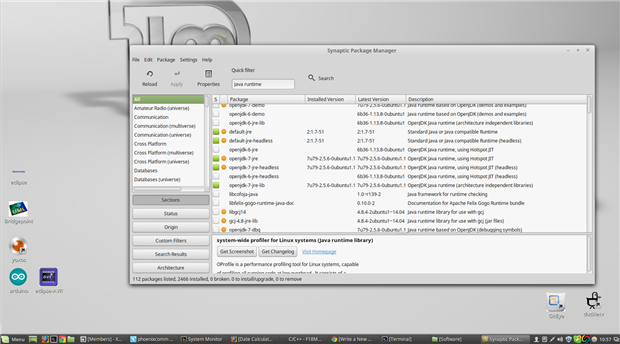
  3. Java Runtime 6 or higher (use your package manager. Synaptic) It comes with the distro.
  4. AVR plugin for eclipse. (Well get this in eclipse itself)
  5. The GNU-AVR toolchain. You will need to execute this command string in your terminal:
    sudo apt-get install gcc-avr binutils-avr gdb-avr avr-libc avrdude
 

image
Screen Shot of Synaptic Package Monitor
Figure 2

OK let's start in your arduino directory and we will install the arduino-1.6.2-linux64.tar.xz as arduino/arduino-1.62.

Now go to your eclipse-avr directory and will install the eclipse-cpp-mars-R-linux-gtk-x86_64.tar.gz as eclipse/eclipse

If you haven't executed the command to get the GNU-AVR toolchain, then do so now.  Now is a good time to check for the JAVA Runtime 6. If you have 7 you don't need 6 (Figure 2).


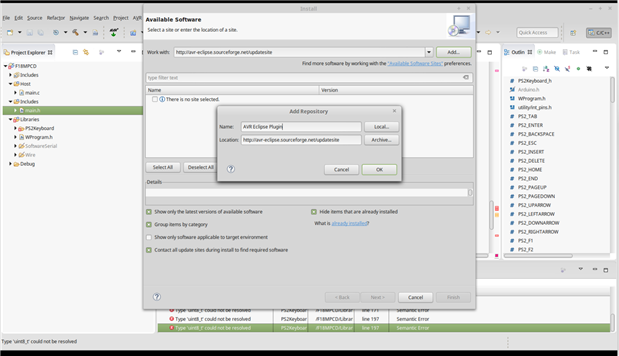
Ok, now we have to launch eclipse, click on the eclipse icon in your Tools/eclipse-avr/eclipse/ directory. It will ask you for you default workspace (say yes), you can always change it. DO NOT CHECK THE BOX "Use this as the default and do not ask again." Now the eclipse IDE will launch.  So let's add the AVR plugin. Go to: Help > Install New Software. A new window called Install will open. Near the top is a drop-down box with "work with:" to it's left. Click the box and type http://avr-eclipse.sourceforge.net/updatesite/ then click add. In the pop-up box that appears type AVR Eclipse Plugin into the "name" box (Figure 3).
image

Screen Shot of eclipse Install/Add Repository

Figure 3


Now Please restart your eclipse IDE File > Restart. When eclipse restarts  your eclipse IDE should now look like this (Figure 4):

 

image

AVR plug-in installed

Figure 4


Keep Tuned In, More To Come
~~ Cris image


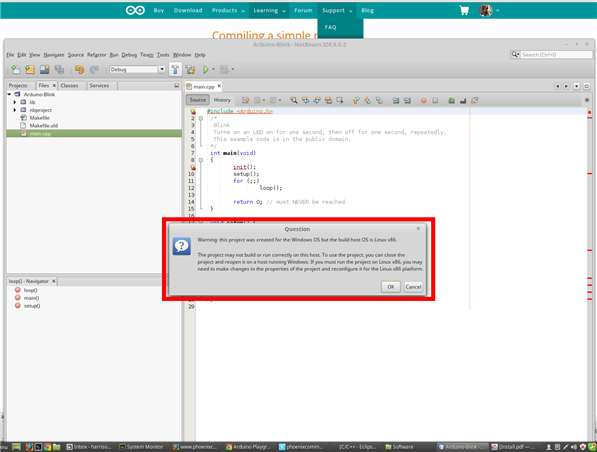
UPDATE 8/23 Blame this on Mario... He though that NetBeans IDE might also work for the AVR programming. Here's what I got after hours of getting it configured. It looks like I will have to put it out of its misery, and remove a really bad tool.  ~~ CAH


image

Utter Failure, What a Joke

Figure 5

  • Sign in to reply
  • DAB
    DAB over 10 years ago

    Looks like you are making good progress.


    DAB

    • Cancel
    • Vote Up 0 Vote Down
    • Sign in to reply
    • More
    • Cancel
<
element14 Community

element14 is the first online community specifically for engineers. Connect with your peers and get expert answers to your questions.

  • Members
  • Learn
  • Technologies
  • Challenges & Projects
  • Products
  • Store
  • About Us
  • Feedback & Support
  • FAQs
  • Terms of Use
  • Privacy Policy
  • Legal and Copyright Notices
  • Sitemap
  • Cookies

An Avnet Company © 2026 Premier Farnell Limited. All Rights Reserved.

Premier Farnell Ltd, registered in England and Wales (no 00876412), registered office: Farnell House, Forge Lane, Leeds LS12 2NE.

Follow element14

  • X
  • Facebook
  • linkedin
  • YouTube