


I recently saw a discussion by Sean Conway about an MP3 Player that he was attempting to control: Looking for member insight into the JR6001 Serial MP3 Custom Programmable Sound Recorder Module .
That inspired me to try out a similar module - the JQ6500 https://www.amazon.com/gp/product/B01N47M1V2/ref=ppx_yo_dt_b_asin_title_o00_s00?ie=UTF8&psc=1 . I'll have to admit that I chose this one because it was available on Amazon Prime and I could get it in a couple of days. These are much cheaper if you source them from China, but I don't have the patience to save a few dollars  . And there is also a contributed Arduino library for the module.
These modules have their sound files loaded into flash over USB and they are configured and controlled via serial UART. There is a built in power amplifier that can drive a speaker directly. The other feature of this particular module is that there are 5 dedicated pins that can be used to select 1 of 5 sound files just by pulling the pin low. Seems like something that would be useful to add sound to projects.


Pin Type | Pin Description |
K1 | Playback of Audio 1 |
K2 | Playback of Audio 2 |
K3 | Playback of Audio 3 |
K4 | Playback of Audio 4 |
K5 | Playback of Audio 5 |
SGND | Ground |
ADKEY | AD port |
BUSY | Play Indicator |
RX | UART serial Data input |
TX | UART serial data output |
GND | Ground |
VCC | 5V power supply |
ADC_R | Headphones/Amplifier(Right Channel) |
ADC_L | Headphones/Amplifier(Left Channel) |
SPK- | Speaker - |
SPK+ | Speaker + |
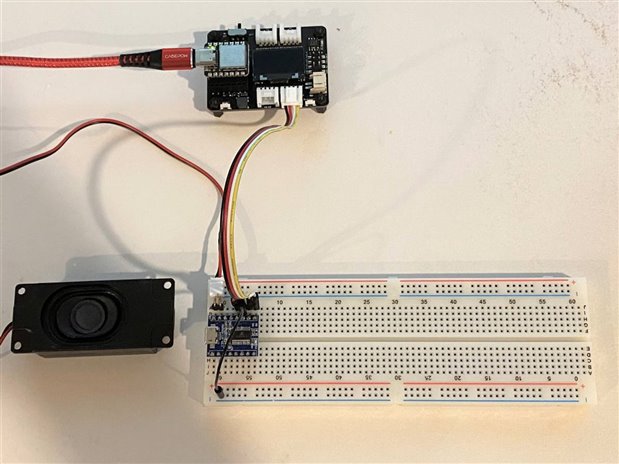
I just received my modules from Amazon today. I've decided that since they are controlled via UART that I would use a Xiao with and expansion board to make the hookup easy. I'll also probably use the display sometime in the future.
Here's a picture of my setup - the JQ6500 is on the breadboard at the bottom:
Electronics from China frequently have issues and these modules were no exception. I connected a module to the USB port and discovered that it was not flashed.
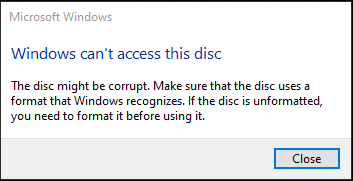
Of course, no mention of this possibility or how to fix it in the documentation. Luckily, this is apparently a common issue and I found a tutorial on how to flash the unit: JQ6500, recover a broken / unreadable module . A little time and a small amount of pain later, I had flashed both of my modules and had access to the file loader over USB.


My first attempt to load MP3 files failed because the module only has 4 MB of flash for storage and most of the MP3 files I have around are larger than that. I downloaded a free "Ukulele" music file from bensound.com and loaded that (about 2 minutes duration - 2 MB).
The module has 5 dedicated pins that allow you to play the first 5 stored tracks just by pulling the pin low or to Ground. I tried grounding the K1 pin and was rewarded with music  .
.
To use the UART control, I'm using an Arduino library by James Sleeman: https://github.com/sleemanj/JQ6500_Serial . I modified the Full Demo example to run on the Xiao. I am using the hardware Serial1 port as the UART to the module.
Xiao_JQ6500_FullDemo.ino
/** Full demo of MP3 Controls, after uploading, open your Serial Monitor and enter commands.
 *
 * Allows you to test all the various controls of the JQ6500 module.
 *
 * @author James Sleeman,  http://sparks.gogo.co.nz/
 * @license MIT License
 * @file
 *
 * Modified by Ralph Yamamoto for Xiao plus expansion board
 *
 */

#include <Arduino.h>
#include <JQ6500_Serial.h>
#include <SPI.h>
#include <Wire.h>
#include <Adafruit_GFX.h>
#include <Adafruit_SSD1306.h>

#define SCREEN_WIDTH 128 // OLED display width, in pixels
#define SCREEN_HEIGHT 64 // OLED display height, in pixels

// Declaration for an SSD1306 display connected to I2C (SDA, SCL pins)
#define OLED_RESET     -1 // Reset pin # (or -1 if sharing Arduino reset pin)
Adafruit_SSD1306 display(SCREEN_WIDTH, SCREEN_HEIGHT, &Wire, OLED_RESET);

// Create the mp3 module object,
//   Use Serial1

JQ6500_Serial mp3(Serial1);

void setup() {
  // put your setup code here, to run once:
  Serial.begin(9600);
  Serial1.begin(9600);

  display.begin(SSD1306_SWITCHCAPVCC, 0x3C);
  display.clearDisplay();
  display.display();

  mp3.reset();
  statusAndHelpOutput();
}

void loop() {

    byte b;
    if(Serial.available())
    {
      b = Serial.read();

      switch(b)
      {
        case 'p': Serial.println("Play");   mp3.play();     return;
        case 'r': Serial.println("Restart"); mp3.restart(); return;
        case ' ': Serial.println("Pause"); mp3.pause();     return;
        case '>': Serial.println("Next");  mp3.next();      return;
        case '<': Serial.println("Prev");  mp3.prev();      return;

        case ']': Serial.println("Next Folder");  mp3.nextFolder(); return;
        case '[': Serial.println("Prev Folder");  mp3.prevFolder(); return;

        case '+': Serial.println("Vol +"); mp3.volumeUp(); return;
        case '-': Serial.println("Vol -"); mp3.volumeDn(); return;
        case 'm': Serial.println("Vol 0"); mp3.setVolume(0); return;

        case 'v':
        {
          char volBuff[10];
          memset(volBuff, 0, sizeof(volBuff));
          Serial.readBytesUntil('\n',volBuff, sizeof(volBuff)-1);
          mp3.setVolume(max(0,min(30, atoi(volBuff))));

          Serial.print("Vol ");
          Serial.println(max(0,min(30, atoi(volBuff))));
        }
        return;

        case 'e':
        {
          do
          {
            while(!Serial.available()); // Wait
            b = Serial.read();
            if(b != ' ') break; // Allow "e N" or "eN" etc...
          } while(1);

          Serial.print("Equalizer ");
          switch(b)
          {
            case 'N': Serial.println("Normal");  mp3.setEqualizer(MP3_EQ_NORMAL);  break;
            case 'P': Serial.println("Pop");     mp3.setEqualizer(MP3_EQ_POP);     break;
            case 'R': Serial.println("Rock");    mp3.setEqualizer(MP3_EQ_ROCK);    break;
            case 'J': Serial.println("Jazz");    mp3.setEqualizer(MP3_EQ_JAZZ);    break;
            case 'C': Serial.println("Classic"); mp3.setEqualizer(MP3_EQ_CLASSIC); break;
            case 'B': Serial.println("Bass");    mp3.setEqualizer(MP3_EQ_BASS);    break;
          }
        }
        return;

        case 'l':
        {
          do
          {
            while(!Serial.available()); // Wait
            b = Serial.read();
            if(b != ' ') break; // Allow "e N" or "eN" etc...
          } while(1);

          Serial.print("Loop ");
          switch(b)
          {
            case 'A': Serial.println("All"); mp3.setLoopMode(MP3_LOOP_ALL);      break;  // Plays the tracks one after another and repeats
            case 'F': Serial.println("Folder"); mp3.setLoopMode(MP3_LOOP_FOLDER);       break; // Loop within folder
            case 'O': Serial.println("One (repeat playing same file)"); mp3.setLoopMode(MP3_LOOP_ONE);       break; // | These seem to do the same, repeat the same track over and over
            case 'R': Serial.println("??? - Don't know what it means exactly, in the datasheet it is \"RAM\""); mp3.setLoopMode(MP3_LOOP_RAM);       break; //-
            case 'N':
            case 'S': Serial.println("None (play file and stop)"); mp3.setLoopMode(MP3_LOOP_ONE_STOP); break;  // Default, plays track and stops
          }
        }
        return;

        case 's':
        {
          do
          {
            while(!Serial.available()); // Wait
            b = Serial.read();
            if(b != ' ') break; // Allow "e N" or "eN" etc...
          } while(1);

          Serial.print("Source ");
          switch(b)
          {
            case 'S': Serial.println("SD Card (if available)."); mp3.setSource(MP3_SRC_SDCARD);      break;
            case 'B': Serial.println("on board memory.");mp3.setSource(MP3_SRC_BUILTIN);   break;
          }
        }
        return;

        case 'f':
        {
          char fnumBuff[10];
          memset(fnumBuff, 0, sizeof(fnumBuff));
          Serial.readBytesUntil('\n',fnumBuff, sizeof(fnumBuff)-1);
          unsigned int fnum = strtoul(fnumBuff, NULL, 10);

          Serial.println();
          Serial.print("Play file #");
          Serial.print(fnum);
          Serial.println(F(" (if it exists)."));
          mp3.playFileByIndexNumber(fnum); // 48 == ord('0')
          return;

        }
        return;

        case 'F':
        {
          char fnumBuff[10];
          memset(fnumBuff, 0, sizeof(fnumBuff));
          Serial.readBytesUntil('/',fnumBuff, sizeof(fnumBuff)-1);
          unsigned int folnum = strtoul(fnumBuff, NULL, 10);

          memset(fnumBuff, 0, sizeof(fnumBuff));
          Serial.readBytesUntil('\n',fnumBuff, sizeof(fnumBuff)-1);
          unsigned int fnum = strtoul(fnumBuff, NULL, 10);

          fnum   = max(1,min(fnum, 999));
          folnum = max(1,min(folnum, 99));

          Serial.print("Play ");
            if(folnum < 10) Serial.print('0');
          Serial.print(folnum);
          Serial.print('/');
            if(fnum < 10) Serial.print("00");
            else if(fnum < 10) Serial.print('0');
          Serial.print(fnum);
          Serial.println(".mp3 (if it exists).");
          mp3.playFileNumberInFolderNumber(folnum, fnum); // 48 == ord('0')
        }
        return;

        case '?': statusAndHelpOutput(); return;

        case 'S': Serial.println("Sleep"); mp3.sleep(); return;
        case 'z': Serial.println("Reset"); mp3.reset(); return;

      }

    }

    static unsigned long m = millis();

    if(millis() > 1000 && m < (millis() - 1000))
    {
      if((mp3.getStatus() == MP3_STATUS_PLAYING))
      {
        Serial.print(F("Playing, Current Position: "));
        Serial.print(mp3.currentFilePositionInSeconds());
        Serial.print(F("s / "));
        Serial.print(mp3.currentFileLengthInSeconds());
        Serial.println('s');
      }
      m = millis();
    }
}

void statusAndHelpOutput()
{
   Serial.println();
   Serial.println(F("JQ6500 MP3 Player Demo"));
   Serial.println(F("~~~~~~~~~~~~~~~~~~~~~~~~~~~~~~~~~~~~~~~~~~~~~~~~~~~~~~~~~~~~~~~~~~~~~~~~~~~~~~~~~~~~~~~~~~~~~~"));

   Serial.print(F("Status           : "));
   switch(mp3.getStatus())
   {
     case MP3_STATUS_STOPPED: Serial.println(F("Stopped")); break;
     case MP3_STATUS_PLAYING: Serial.println(F("Playing")); break;
     case MP3_STATUS_PAUSED:  Serial.println(F("Paused"));  break;
   }

   Serial.print(F("Volume (0-30)    : "));
   Serial.println(mp3.getVolume());

   Serial.print(F("Equalizer        : "));
   switch(mp3.getEqualizer())
   {
     case MP3_EQ_NORMAL:     Serial.println(F("Normal"));  break;
     case MP3_EQ_POP:        Serial.println(F("Pop"));     break;
     case MP3_EQ_ROCK:       Serial.println(F("Rock"));    break;
     case MP3_EQ_JAZZ:       Serial.println(F("Jazz"));    break;
     case MP3_EQ_CLASSIC:    Serial.println(F("Classic")); break;
     case MP3_EQ_BASS:       Serial.println(F("Bass"));    break;
   }

   Serial.print(F("Loop Mode        : "));
   switch(mp3.getLoopMode())
   {
     case MP3_LOOP_ALL:      Serial.println(F("Play all tracks, then repeat."));  break;
     case MP3_LOOP_FOLDER:   Serial.println(F("Play all tracks in folder, then repeat."));     break;
     case MP3_LOOP_ONE:      Serial.println(F("Play one track then repeat (loop track)."));    break;
     case MP3_LOOP_RAM:      Serial.println(F("Unknown function exactly, seems to play one track then repeat?"));    break;
     case MP3_LOOP_ONE_STOP: Serial.println(F("Play one track then stop."));    break;
   }
   Serial.println();

   Serial.print(F("# of On Board Memory Files    : "));
   Serial.println(mp3.countFiles(MP3_SRC_BUILTIN));

   Serial.print(F("\"Current\" On Board Memory File Index: "));
   Serial.println(mp3.currentFileIndexNumber(MP3_SRC_BUILTIN));
   Serial.println();

   Serial.print(F("# of SD Card Files    : "));
   Serial.println(mp3.countFiles(MP3_SRC_SDCARD));

   Serial.print(F("# of SD Card Folders  : "));
   Serial.println(mp3.countFolders(MP3_SRC_SDCARD));

   Serial.print(F("\"Current\" SD Card File Index: "));
   Serial.println(mp3.currentFileIndexNumber(MP3_SRC_SDCARD));

   Serial.print(F("\"Current\" SD Card File Name : "));
   char buff[120];
   mp3.currentFileName(buff, sizeof(buff));
   Serial.println(buff);

   Serial.println();
   Serial.println(F("Controls (type in serial monitor and hit send): "));
   Serial.println(F("~~~~~~~~~~~~~~~~~~~~~~~~~~~~~~~~~~~~~~~~~~~~~~~~~~~~~~~~~~~~~~~~~~~~~~~~~~~~~~~~~~~~~~~~~~~~~~"));
   Serial.println(F("? Display this menu.\n"));

   Serial.println(F("p Play\t\t> Next\t\t< Prev\n[space] Pause\tr Restart from start of file\n] Next folder\t[ Prev folder\n"));

   Serial.println(F("f[1-65534]      Play file by (FAT table) index number\nF[01-99]/[001-999].mp3 Play [001-999].mp3 in folder [01-99]\n"));

   Serial.println(F("+ Vol up\t- Vol down\tm Mute\nv[0-30] Set volume\n\ne[N/P/R/J/C/B] Equalizer (N)ormal, (P)op, (R)ock, (J)azz, (C)lassic, (B)ass\nl[A/F/O/R/N]   Loop (A)ll, (F)older, (O)ne, (R)???, (N)o Loop\ns[S/B]         Switch to (S)D Card/(B)uilt In Memory\n\n"));
}
Here's a short list of the most commonly used commands:
case 'p': Serial.println("Play"); mp3.play(); return;
case 'r': Serial.println("Restart"); mp3.restart(); return;
case ' ': Serial.println("Pause"); mp3.pause(); return;
case '>': Serial.println("Next"); mp3.next(); return;
case '<': Serial.println("Prev"); mp3.prev(); return;
case ']': Serial.println("Next Folder"); mp3.nextFolder(); return;
case '[': Serial.println("Prev Folder"); mp3.prevFolder(); return;
case '+': Serial.println("Vol +"); mp3.volumeUp(); return;
case '-': Serial.println("Vol -"); mp3.volumeDn(); return;
case 'm': Serial.println("Vol 0"); mp3.setVolume(0); return;
The program output is displayed on the Serial Monitor and commands are entered into the Serial monitor and relayed to the module through the UART.
Here's a demo playing the "Ukulele" song:
When I have time later, I'll add a keypad (or pushbuttons) and display functions. I think for some of my projects I'll just use it preconfigured and standalone, just using the pins to play individual files.
Sean was trying to use his modules by issuing control sequences directly over the UART without the benefit of a library. I think that might be a fun thing to try with a serial terminal...
Update 09/27/2021
I forgot to include this link to the components101 website that has a detailed module description and a link to the PDF spec that I'm using. Just in case others have not found it yet.


