element14 Community
element14 Community
    Register Log In
  • Site
  • Search
  • Log In Register
  • Community Hub
    Community Hub
    • What's New on element14
    • Feedback and Support
    • Benefits of Membership
    • Personal Blogs
    • Members Area
    • Achievement Levels
  • Learn
    Learn
    • Ask an Expert
    • eBooks
    • element14 presents
    • Learning Center
    • Tech Spotlight
    • STEM Academy
    • Webinars, Training and Events
    • Learning Groups
  • Technologies
    Technologies
    • 3D Printing
    • FPGA
    • Industrial Automation
    • Internet of Things
    • Power & Energy
    • Sensors
    • Technology Groups
  • Challenges & Projects
    Challenges & Projects
    • Design Challenges
    • element14 presents Projects
    • Project14
    • Arduino Projects
    • Raspberry Pi Projects
    • Project Groups
  • Products
    Products
    • Arduino
    • Avnet & Tria Boards Community
    • Dev Tools
    • Manufacturers
    • Multicomp Pro
    • Product Groups
    • Raspberry Pi
    • RoadTests & Reviews
  • About Us
  • Store
    Store
    • Visit Your Store
    • Choose another store...
      • Europe
      •  Austria (German)
      •  Belgium (Dutch, French)
      •  Bulgaria (Bulgarian)
      •  Czech Republic (Czech)
      •  Denmark (Danish)
      •  Estonia (Estonian)
      •  Finland (Finnish)
      •  France (French)
      •  Germany (German)
      •  Hungary (Hungarian)
      •  Ireland
      •  Israel
      •  Italy (Italian)
      •  Latvia (Latvian)
      •  
      •  Lithuania (Lithuanian)
      •  Netherlands (Dutch)
      •  Norway (Norwegian)
      •  Poland (Polish)
      •  Portugal (Portuguese)
      •  Romania (Romanian)
      •  Russia (Russian)
      •  Slovakia (Slovak)
      •  Slovenia (Slovenian)
      •  Spain (Spanish)
      •  Sweden (Swedish)
      •  Switzerland(German, French)
      •  Turkey (Turkish)
      •  United Kingdom
      • Asia Pacific
      •  Australia
      •  China
      •  Hong Kong
      •  India
      •  Korea (Korean)
      •  Malaysia
      •  New Zealand
      •  Philippines
      •  Singapore
      •  Taiwan
      •  Thailand (Thai)
      • Americas
      •  Brazil (Portuguese)
      •  Canada
      •  Mexico (Spanish)
      •  United States
      Can't find the country/region you're looking for? Visit our export site or find a local distributor.
  • Translate
  • Profile
  • Settings
Personal Blogs
  • Community Hub
  • More
Personal Blogs
Ralph Yamamoto's Blog MAX78000FTHR FaceID Demo
  • Blog
  • Documents
  • Mentions
  • Sub-Groups
  • Tags
  • More
  • Cancel
  • New
  • Share
  • More
  • Cancel
Group Actions
  • Group RSS
  • More
  • Cancel
Engagement
  • Author Author: ralphjy
  • Date Created: 27 May 2021 4:50 PM Date Created
  • Views 4311 views
  • Likes 11 likes
  • Comments 6 comments
  • faceid
  • celebritya_dataset
  • max78000fthr
Related
Recommended

MAX78000FTHR FaceID Demo

ralphjy
ralphjy
27 May 2021

My experience with the MAX78000 ecosystem so far has been really frustrating.  Like other design frameworks that I've encountered recently, the Maxim setup uses an Eclipse IDE on top of CMake tools.  I've found these frameworks extremely difficult to use, primarily I think because I'm using them in a Windows environment and also the fact that these frameworks evolve quickly (much more quickly than the documentation) so that things are constantly breaking.  I guess that's the price to pay for trying to use new technology...


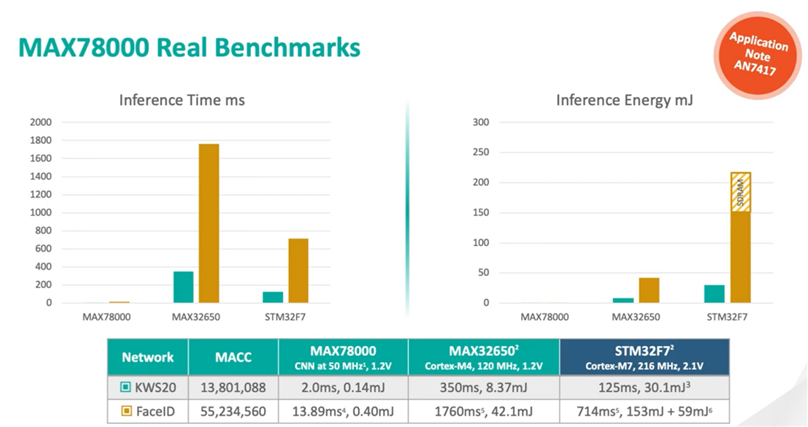
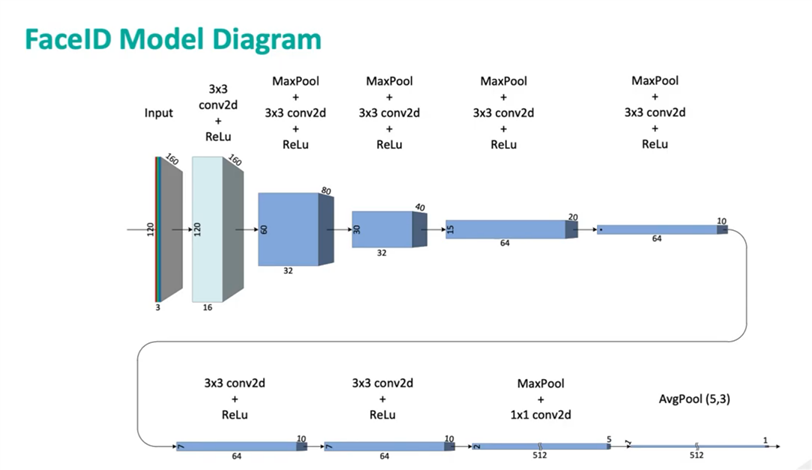
I've attended a few webinars on the MAX78000 and the low power performance is what I find really interesting.  I've tried the keyword spotting demo MAX78000FTHR Keyword Spotting and was impressed by the relative accuracy of the model, but what I really wanted to try was the face recognition model.  Maxim has two evaluation products based on the MAX78000, the MAX78000EVKIT and the MAX78000FTHR.  The early demos that I saw were using the MAX78000EVKIT.  Both kits use the same OMNIVISION OVM7692 VGA (640x480) image sensor.  The following slides show the structure and performance of the FaceID demo.  The model uses QVGA (160x120) color images as input.  It has been trained using 20 images from the CelebrityA dataset.  The impressive inference performance is obtained by using the onboard dedicated CNN accelerator.
image

image


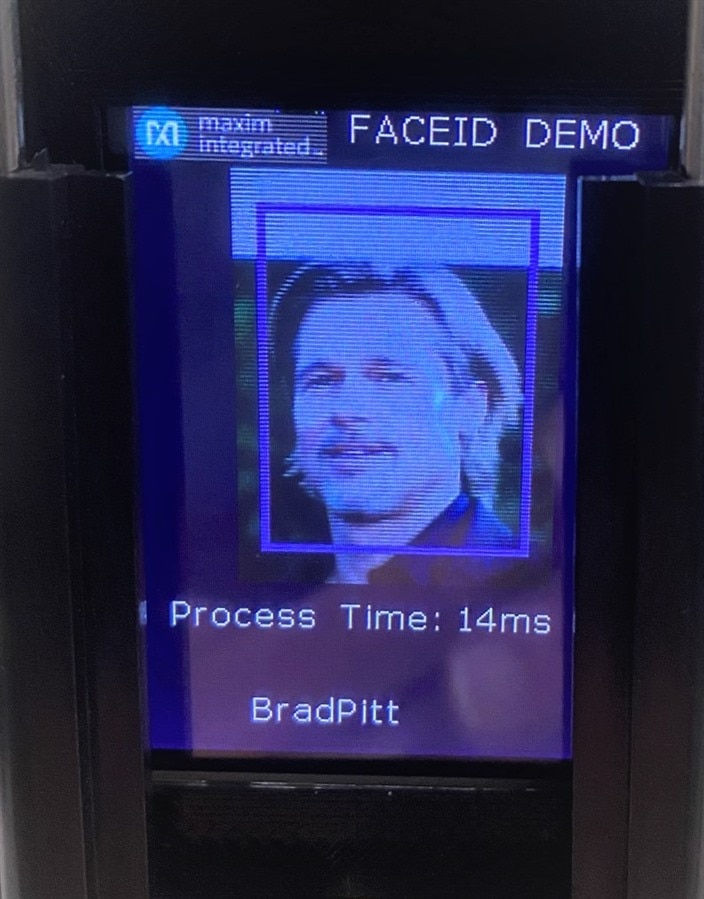
The first demo that I saw used the MAX78000EVKIT shown below.  I'm not sure why the Process Time is so long, maybe this was an early model.
image


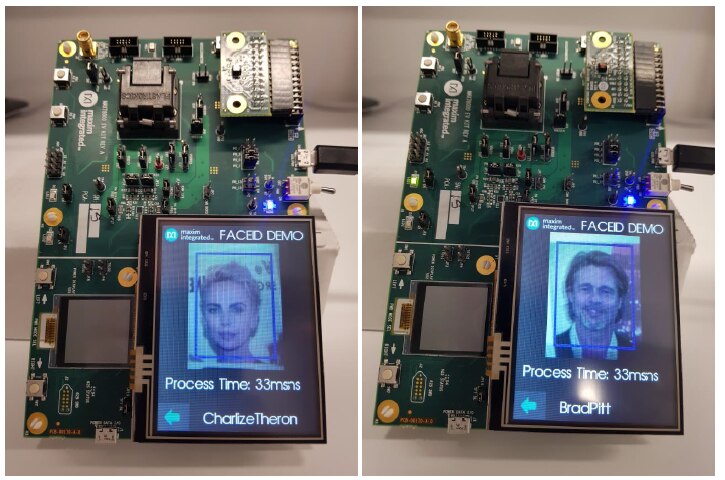
I then found a webinar that did demos with the MAX78000FTHR - Webinar - MAX78000 Neural Network Accelerator
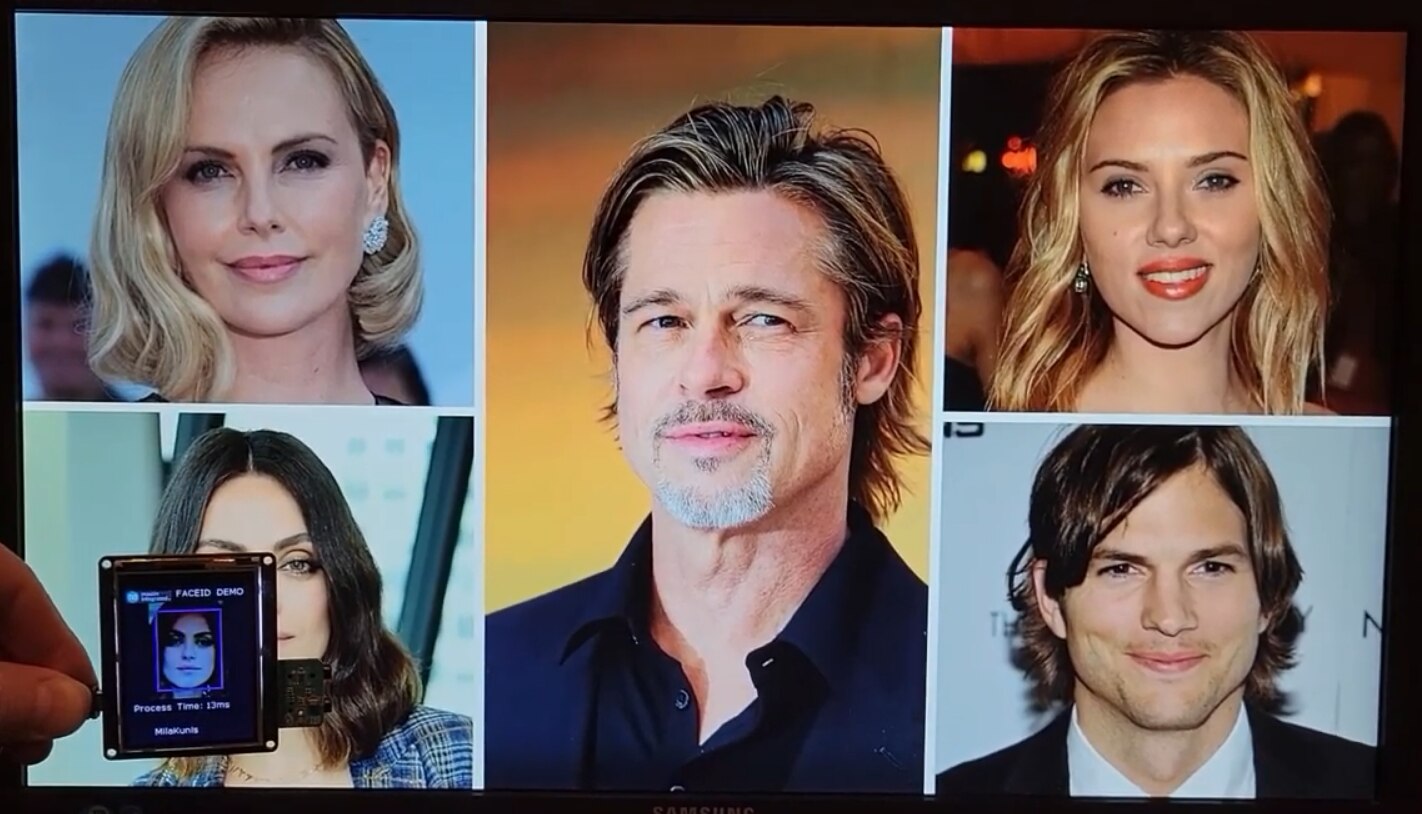
image


So, I set out to replicate the demo on my setup.  I had a lot of difficulty getting the board to synchronize with the OCD debugger (it would Build and Load fine, but wouldn't run).  Seems to be some timing issue between the Load and Reset, but I managed to get it to work after multiple resets.


My setup is shown below.  I mounted the MAX78000FTHR case in a cellphone clamp on a short tripod (I should have included a tripod attachment nut on the case).  I found celebrity images on the Internet that I displayed on the PC monitor.  I haven't figured out which 20 images they trained with, but I know 5 of them from the webinar demo.
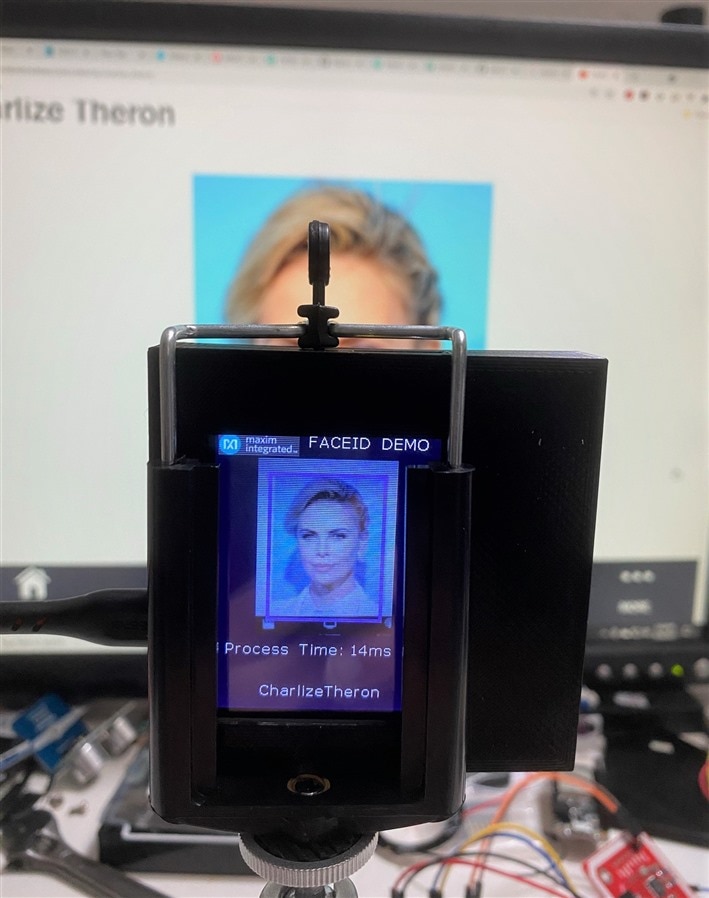
image


Here is short video showing the FaceID running.

You don't have permission to edit metadata of this video.
Edit media
x
image
Upload Preview
image


A quick capture of the output to the terminal.

image


And a few examples

image


It didn't know Angelina Jolie

image

image


And it thought Anne Heche resembled Aston Kutcher

image


The processing times were very consistently 13-14 ms as expected.  I found that the model was very sensitive to the size of the person in the image which is probably just an issue with the training data set.


Next step is to try training the model with a different data set.  That will require setting up additional software image.


I thought that I should show the front of my minimalist case.  I decided not to cover the top of the MAX78000FTHR board because I may need access to the GPIO pins and I would also need to make cutouts for the camera, buttons, and battery and audio jacks.  It also makes debugging easier...

image

  • Sign in to reply

Top Comments

  • ralphjy
    ralphjy over 4 years ago in reply to neilk +4
    Thanks, might end up being above my pay grade too - I haven’t found an online modeling service like Edge Impulse that supports the 78000 and I don’t have a Cuda GPU setup that is required to build new…
  • neilk
    neilk over 4 years ago +3
    Hi Ralph - fantastic, but way above my pay grade Neil
  • maxpowerr
    maxpowerr over 4 years ago +2
    Cool project great demo.
Parents
  • echotwozero
    echotwozero over 4 years ago

    I am following MAX78000 feather board tutorials to upload example code using Eclipse Maxim SDK. But I receive launch failed error. I had disabled the firewall and relaunched the IDE and tried just to see if the ports are blocked by firewall. But that did not work. Kindly help how to solve this problem.


    Error in final launch sequence
    Failed to execute MI command:
    -target-select remote localhost:3333
    Error message from debugger back end:
    localhost:3333: No connection could be made because the target machine actively refused it.
    Failed to execute MI command:
    -target-select remote localhost:3333
    Error message from debugger back end:
    localhost:3333: No connection could be made because the target machine actively refused it.
    localhost:3333: No connection could be made because the target machine actively refused it.

    • Cancel
    • Vote Up 0 Vote Down
    • Sign in to reply
    • More
    • Cancel
  • ralphjy
    ralphjy over 4 years ago in reply to echotwozero

    I'm afraid that I don't have a fix for you.  This is apparently caused by the GDB client looking for OpenCD before it is available - refer to Race Condition on GDB Connection to OpenOCD Server?


    I am new to the Eclipse tools and have not figured out how to delay the GDB client start.  The startup timing is probably dependent on your development setup.  I have not seen a fix for this.


    Maybe you should try running outside of Eclipse - I haven't tried it but it would give you manual control of the startup.


    You might try requesting technical support from Maxim.

    • Cancel
    • Vote Up +2 Vote Down
    • Sign in to reply
    • More
    • Cancel
Comment
  • ralphjy
    ralphjy over 4 years ago in reply to echotwozero

    I'm afraid that I don't have a fix for you.  This is apparently caused by the GDB client looking for OpenCD before it is available - refer to Race Condition on GDB Connection to OpenOCD Server?


    I am new to the Eclipse tools and have not figured out how to delay the GDB client start.  The startup timing is probably dependent on your development setup.  I have not seen a fix for this.


    Maybe you should try running outside of Eclipse - I haven't tried it but it would give you manual control of the startup.


    You might try requesting technical support from Maxim.

    • Cancel
    • Vote Up +2 Vote Down
    • Sign in to reply
    • More
    • Cancel
Children
No Data
element14 Community

element14 is the first online community specifically for engineers. Connect with your peers and get expert answers to your questions.

  • Members
  • Learn
  • Technologies
  • Challenges & Projects
  • Products
  • Store
  • About Us
  • Feedback & Support
  • FAQs
  • Terms of Use
  • Privacy Policy
  • Legal and Copyright Notices
  • Sitemap
  • Cookies

An Avnet Company © 2025 Premier Farnell Limited. All Rights Reserved.

Premier Farnell Ltd, registered in England and Wales (no 00876412), registered office: Farnell House, Forge Lane, Leeds LS12 2NE.

ICP 备案号 10220084.

Follow element14

  • X
  • Facebook
  • linkedin
  • YouTube