


We have upgraded the element14 Community site with two brand new features, making it easier to find the content, conversations and connections that matter to you.
We wanted to spend some time going over in a little more detail some of the key features to take notice of as you navigate through the community.
Activity Streams:
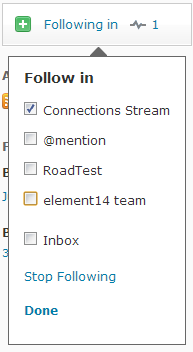
By going to your profile and selecting Inbox and Activity it will bring you to a menu that highlights all of your individual activity as well as the ability to create Activity Streams based around the members, technologies or groups that you would like to follow. You can create as many streams as you would like or use the “follow suggested streams” tool to find new content or members that you may not have otherwise known about.

Adding new content to your streams is easy, simply look for the blogs icon in the corner of your contacts, blogs or groups and move it into what stream you would like to classify it under, or create a new stream! 
@mentions
Effortlessly loop members into conversations by using the @mention feature. All you need to do while writing a blog, discussion, comment or reply is type the “@” symbol and start typing a member’s name who you want to include.

Once you have selected the member that member will be notified using our enhanced notification system.

Because of both the @mention and activity stream features the need to receive email notifications is greatly reduced, making it easier to keep up to date on the people, content and groups you care about without clogging up your inbox.
Have a question or would like to let us know how you like the new features? Post your comment on our Feedback and Support area.