


The project involves the development of an autonomous robotic system based on a 4-degree-of-freedom (4DOF) arm.
Devices & Components

Arduino Uno Rev3

Keyestudio 4DOF Robot Arm Kit
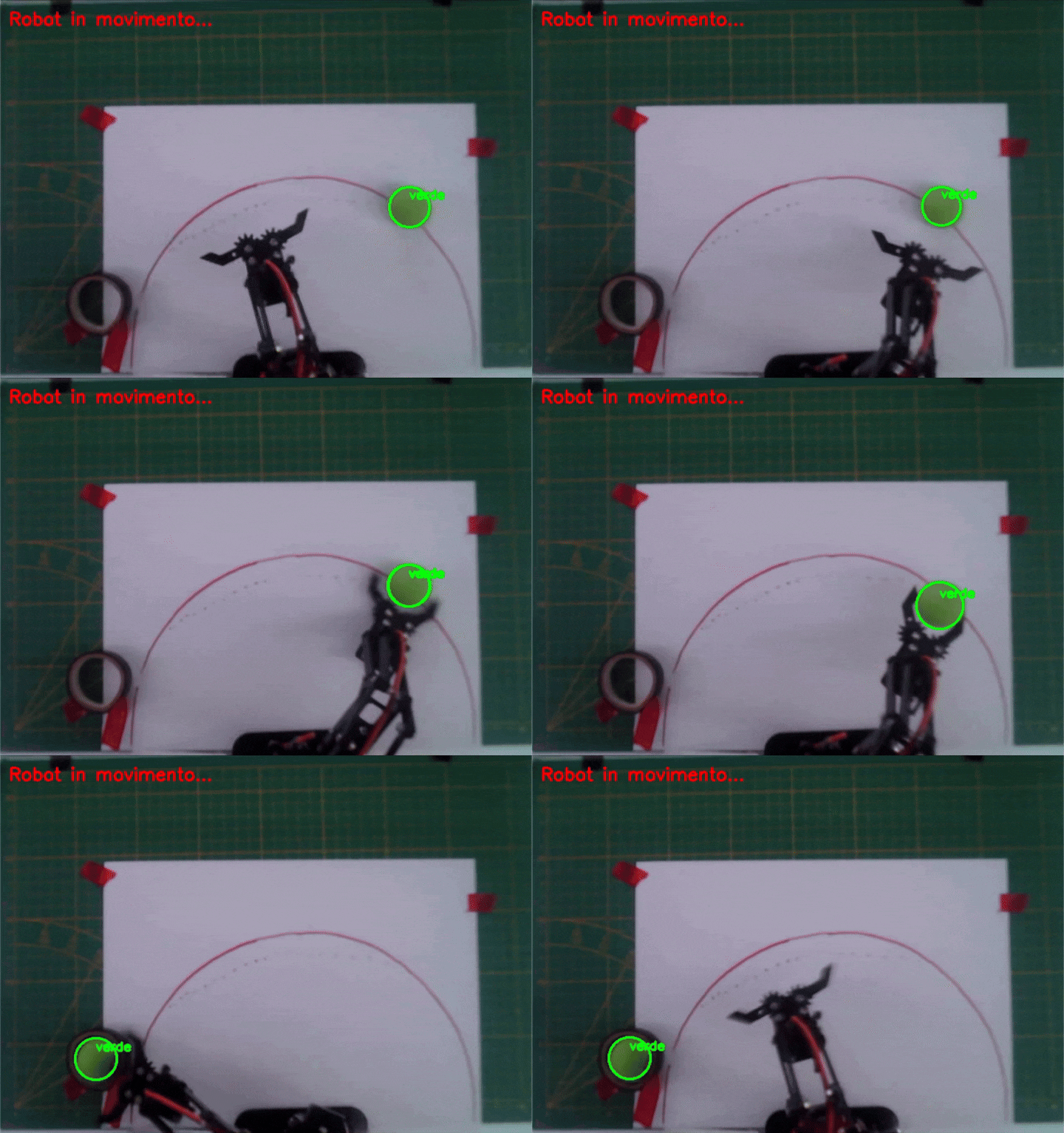
The system is capable of identifying objects (colored balls) on a workspace using a webcam, calculating their real coordinates in millimeters, and commanding the robotic arm to grab and deposit them into a predefined 'drop zone'. The software is written in Python and communicates with a microcontroller (Arduino R3) via Serial or Bluetooth Low Energy BT-24 module.
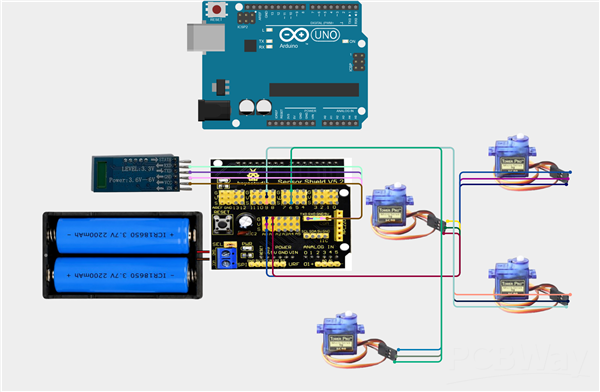
Wiring (-> motorshield pins)
| Servo | Funzione | Pin |
| 1 | Base | A1 |
| 2 | Shoulder | A0 |
| 3 | Elbow | 6 |
| 4 | Gripper | 9 |
| 5 | BT Module | v,g,rx,tx |
SOFTWARE
CALIBRATE_COLOR.PY
Opens the webcam with trackbars to find the correct min/max HSV values for your ball's color, under your lighting conditions. Move the trackbars until only the ball appears white in the "Mask" window (everything else black), then copy the values printed in the console into config.COLOR_RANGES. The values will be printed in the console after pressing 'q'.
CALIBRATE.PY
Camera -> table calibration via 4-point homography.
INSTRUCTIONS:
Fix the camera above the table, framing the arm's entire workspace (top-down view; it is fine if it is not perfectly perpendicular, the software will adjust it automatically). Place 4 markers at 4 points where you know the REAL coordinates in mm relative to the arm's base (measure them with a ruler: x = left/right of the base, y = forward from the base).Run this script, click the 4 points on the image IN THE SAME ORDER you defined them below in REAL_POINTS_MM, then press 's' to save (for example, I defined them clockwise: top-left -> top-right -> bottom-right -> bottom-left).
SCAN_BLE.PY
Diagnostic script to understand how to communicate with the BT-24 module via BLE.
INSTRUCTIONS:
Run python scan_ble.py. It will show all BLE devices found nearby (name + address). Identify the one for the arm (it is probably named "DX-BT24" or "BT24").It will show all BLE devices found nearby (name + address).
Identify the one for the arm (it is probably named "DX-BT24" or "BT24").
Run the script again, passing the address as an argument:
- python scan_ble.py AA:BB:CC:DD:EE:FF (Windows/Linux)
- python scan_ble.py 44BAD4C8-18F8-FAE0-ED97-FFFC3A69A296 (macOS uses UUID instead of MAC)
It will connect and print ALL services and characteristics, along with their respective properties (read/write/notify).
What to look for in the result of this step:
- A characteristic with "write" or "write-without-response" properties -> this is the one the PC writes to in order to SEND data to the arm (equivalent to PC TX / module RX).
- A characteristic with the "notify" property -> this is the one the module uses to NOTIFY data to the PC (equivalent to module TX / PC RX), useful for reading "OK"/"ERR" ACKs.
Note down the UUIDs of these two characteristics: you will need them for config.py (BLE_WRITE_CHAR_UUID and BLE_NOTIFY_CHAR_UUID) and to create ble_link.py.
Many inexpensive modules of this type use a SINGLE characteristic for both writing and notifying (e.g., a UUID ending in "FFE1"): if you see a single characteristic with BOTH write+notify properties, use it for both directions.
MAIN
Multithreading + Semicircular Trajectory. The main thread handles smooth 30fps video. The secondary thread moves the arm using predetermined safe angles (you need to upload arduino sketch on the board and decide if communicate via serial or bluetooth in Config.PY).
Conclusion
The project demonstrates the integration of an advanced computer vision system with low-cost hardware control. The inherent limitations of the budget-friendly mechanical components have been fully compensated for through rigorous software design and a practical approach to the system's geometry, resulting in a reliable, autonomous, and smooth-moving robot.
CODE -> Robot_Pick_Place