


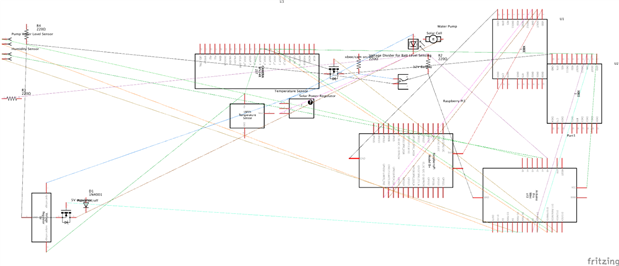
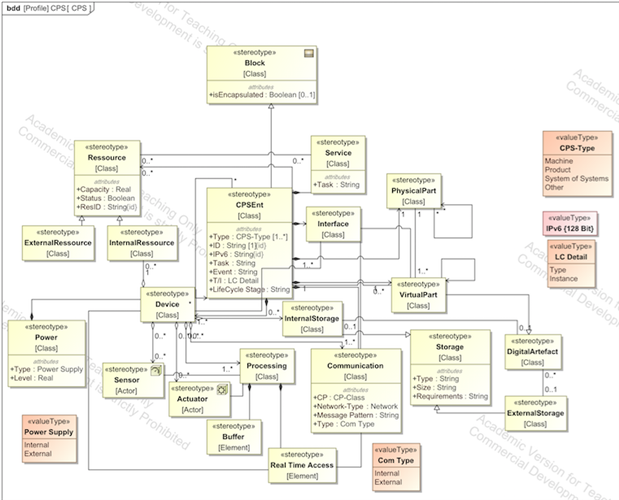
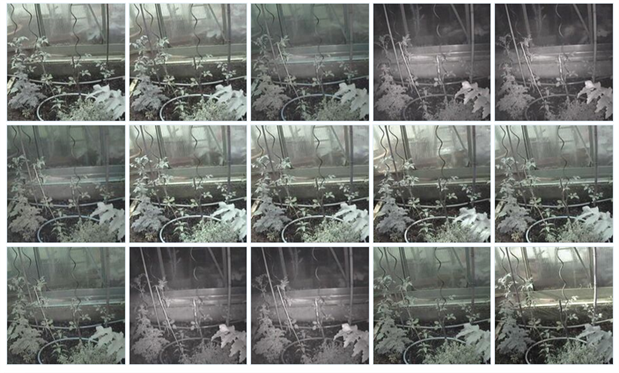
In order to control plants via Dropbox we built the following control circuit / Cyber Physical System (CPS) / Internet of Things application. To support sustainability, the water used is taken out of a natural pond. The required energy is supplied by a solar panel that charges an old automotive accumulator (battery). Images of the plant growth progress and data is being sent to dropbox constantly. This project was part of a thesis and the advanced development / recursive modelling has been performed with SysML to verify applicability of Model Based Systems Engineering (MBSE) in the context of IoT and CPS.
| {gallery} Layout |
|---|
Layout: |
Schema: |
SysML CPS Profile & abstract reference architecture (1/3): |

{gallery} Dropbox GUI and Hardware |
|---|
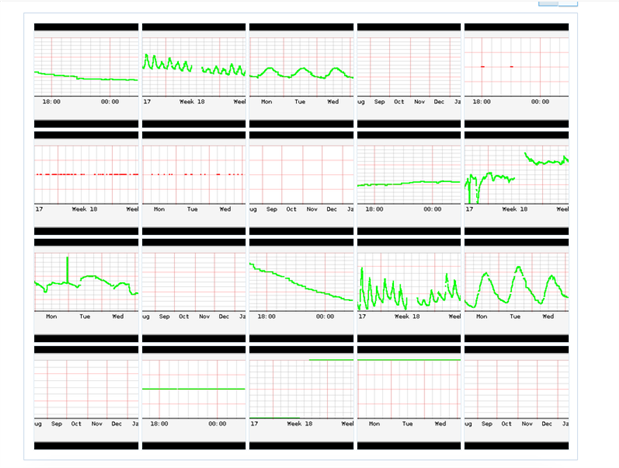
Measured data: Battery level; Humidity; Temperature; XBee connection; Water level |
Images sent to Dropbox: |
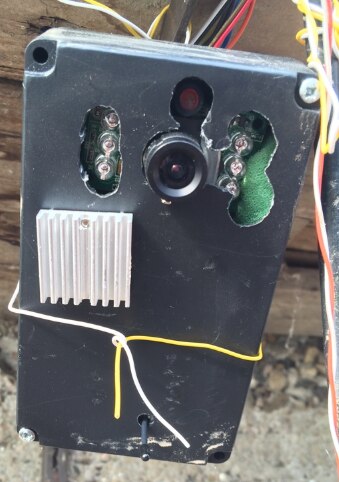
Arduino: |
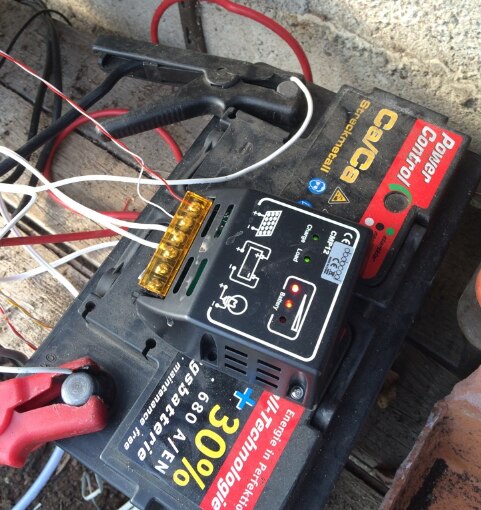
Battery: |
Arduino code:
#include <MemoryFree.h>
#include <avr/wdt.h>
#include <avr/sleep.h>
#include <avr/power.h>


#include "pb_encode.h"
#include "pb_decode.h"
#include "messages_pb.h"


#include <SoilHumidity2.h>
#include <LM35.h>


//#include <AltSoftSerial.h>
#include <SoftwareSerial.h>


#include <JPEGCamera.h>


// sensors


SoilHumidity2 hsensor(3, 1); // soil resistance sensor: digital out pin, analog in pin
LM35 tsensor(0); // temperature sensor: analog in pin


const int batVPin = 2;   // bat level analog pin
const int waterVPin = 3; // water level in pin
const int waterOPin = 5; // water level sensor digital out pin
const int pumpOPin = 6;  // pump digital out pin


long pumpEndT = -1; // time to turn pump off, -1 if pump is off


long lastCommand = millis(); // time of last command. if we do not receive a command within 2 min. we go to sleep for 56 secs -> save power
int pumpBattLevel = 0;  // level of bat while pumping


const int WATER_LEVEL = 400;


// communication
SoftwareSerial s(8,9);      // cam serial
SoftwareSerial s2(10,11);  // xbee serial


JPEGCamera cam(s);


// xbee comm protocol
const unsigned int MAGIC = 7557; // frame prefix


messages_SensorData sensorData;
messages_Command commandData;
messages_picData picData;
messages_Ok okData;


char rBuffer[16];      // read buffer
uint8_t wBuffer[32];   // write buffer
pb_ostream_t stream;


// xbee comm protocol parsing
int readState = 0; // 0: magic_h, 1: magic_l, 2: len_h, 3: len_l, 4: buffer
int readExpectedLen = 0;
int m;
uint8_t h;
uint8_t l;


uint8_t command = 255;
int command_arg;


// control led
int led = 13;
int value = HIGH;


// power control
volatile long sleepOn = 0;
int powerPin = 12;


void softReset() // Restarts program from beginning but does not reset the peripherals and registers
{
  asm volatile ("  jmp 0");
}


ISR(WDT_vect)
{
  //Serial.println("ISR");
  if (sleepOn > -1)
  {
  }
  else
  {
    softReset();
  }
}


void setupWDT()
{
  /*** Setup the WDT ***/


  /* Clear the reset flag. */
  MCUSR &= ~(1<<WDRF);


  /* In order to change WDE or the prescaler, we need to
   * set WDCE (This will allow updates for 4 clock cycles).
   */
  WDTCSR |= (1<<WDCE) | (1<<WDE);


  /* set new watchdog timeout prescaler value */
  WDTCSR = 1<<WDP0 | 1<<WDP3; /* 8.0 seconds */


  /* Enable the WD interrupt (note no reset). */
  WDTCSR |= _BV(WDIE);
}


void enterSleep()
{
//   set_sleep_mode(SLEEP_MODE_PWR_SAVE);   /* EDIT: could also use SLEEP_MODE_PWR_DOWN for lowest power consumption. */
  set_sleep_mode(SLEEP_MODE_PWR_DOWN);   /* EDIT: could also use SLEEP_MODE_PWR_DOWN for lowest power consumption. */


  /* Now enter sleep mode. */
  sleep_enable();
  sleep_mode();


}


void camSave()
{
  /*
   s.begin(38400);
    s.listen();
  wdt_reset();
  cam.reset();
  delay(6000);
  wdt_reset();
  cam.powerSaving(true);
  */
}


void sleepIt(long duration)
{
  LEDLow();
  sleepOn = duration/8000;
  if (sleepOn == 0)
    sleepOn = 1;
  digitalWrite(powerPin, LOW);
  while (sleepOn)
  {
    enterSleep();
  /* The program will continue from here after the WDT timeout*/
    sleepOn--;
  }
  sleep_disable(); /* First thing to do is disable sleep. */

  /* Re-enable the peripherals. */
  power_all_enable();
  delay(100);
  digitalWrite(powerPin, HIGH);


// camSave();
}


// parse xbee comm
void doSerial()
{
  s2.listen();
  //Serial.println("event");
  while (s2.available())
  {
    invertLED();
    switch (readState)
    {
    case 0:
      h = s2.read();
      if (h == highByte(MAGIC))
        readState = 1;
      break;
    case 1:
      l = s2.read();
      m = word(h,l);
      if (m != MAGIC)
        readState = 0;
      else
      {
        readState = 2;
      }
      m = 0;
      break;
    case 2:
      h = s2.read();
      readState = 3;
      break;
    case 3:
      l = s2.read();
      readExpectedLen = word(h, l);
      // Serial.print("len ");
      //  Serial.println(readExpectedLen, DEC);
      if (readExpectedLen > 32)
      {
        readState = 0;
      }
      else
      {
        readState = 4;
      }
      break;
    case 4:
      if (s2.readBytes(rBuffer, readExpectedLen) == readExpectedLen)
      {
        pb_istream_t stream = pb_istream_from_buffer((uint8_t *)rBuffer, sizeof(rBuffer));
        pb_decode(&stream, messages_Command_fields, &commandData);
        command = commandData.command;
        //  Serial.print(7,DEC);
        //  Serial.println(command,DEC);
      }
      readState = 0;
      break;
    default:
      readState = 0;
      break;
    }
  }
}


void setup()
{
  stream = pb_ostream_from_buffer(wBuffer, sizeof(wBuffer));
  s2.begin(9600);    // set low xbee baudrate to reduce error rate.
  s.begin(38400);    // default cam baudrate is 38400
//  Serial.begin(9600);  // use serial for debug, but may block if used together with software serial
//  Serial.println("setup");
  pinMode(led, OUTPUT);
  pinMode(batVPin, INPUT);
  pinMode(waterVPin, INPUT);
  pinMode(waterOPin, OUTPUT);
  pinMode(pumpOPin, OUTPUT);
  pinMode(powerPin, OUTPUT);
  // turn xbee on
  digitalWrite(powerPin, HIGH);


setupWDT();
lastCommand = millis();


// camSave();

// set LED to high
LEDHigh();
   // wdt_enable(WDTO_8S);   // set watchdog to 8 seconds. may be set lower in future


}


void loop()
{
  wdt_reset();   // trigger watchdog
  if (pumpEndT > 0 && pumpEndT < millis())  // check if pump is on
    offPump();
  doSerial();  // parse input
  if (command < 255)  // if we received a command: execute it
  {
    lastCommand = millis();
    invertLED();
    wdt_reset();
    doCommand();
    command = 255;
    // Serial.print(0,DEC);
    // Serial.print(command, DEC);
  }
  else
  {
    if (pumpEndT <= 0 && (millis() - lastCommand) > 60000)
    {
      sleepIt(56000);
      lastCommand = millis()-55000;
    }
  }


}


void LEDHigh()
{
   value = LOW;
invertLED();
}


void LEDLow()
{
   value = HIGH;
invertLED();
}


void invertLED()
{
  if (value == HIGH)
    value = LOW;
  else
    value = HIGH;
  digitalWrite(led, value);
}


void doPump()
{


  pb_ostream_t stream = pb_ostream_from_buffer(wBuffer, sizeof(wBuffer));
  if (pb_encode(&stream, messages_Ok_fields, &okData))
  {
    //Serial.print("b ");
    //Serial.println(stream.bytes_written, DEC);
     sendMessage(stream.bytes_written);
  }
//     else
//  Serial.println("error encoding ok in doPump");


  long duration = commandData.arg;
// Serial.print(millis(), DEC);Serial.print(" doPump ");Serial.println(duration, DEC);
  if (duration > 0)  // duration 0 == heart beat
  {
    pumpEndT = millis()+duration;
    digitalWrite(pumpOPin, HIGH);
    delay(500);
    pumpBattLevel = getBatLevel(); // get bat level only when bat is under load
  }


}


void doSleep()
{
  long duration = commandData.arg;

  pb_encode(&stream, messages_Ok_fields, &okData);


  sendMessage(stream.bytes_written);


  if (duration > 0)  // duration 0 == heart beat
  {
    sleepIt(duration);
  }


}


int getBatLevel()
{
   return analogRead(batVPin);
}


void getWaterLevel()
{
  digitalWrite(waterOPin, HIGH);
  delay(500);
  int x = analogRead(waterVPin);
  digitalWrite(waterOPin, LOW);
  bool hasWater = x > WATER_LEVEL;
  sensorData.hasWater = hasWater;
}


void offPump()
{
  //  Serial.print(millis(), DEC);Serial.println(" offPump");
  pumpEndT = -1;
  digitalWrite(pumpOPin, LOW);
}


void sendPic()
{
  // Serial.println();
  // Serial.println(9, DEC);
  // Serial port connected to the cam
  s.listen();
  delay(1000);
  cam.reset();
  delay(4000);
  wdt_reset();
// cam.powerSaving(false);


  /*
  delay(50);
   cam.chBaudRate(1);
   delay(50);
   s.end();
   s.begin(19200);
   delay(50);
   */
  invertLED();
  cam.takePicture();
  wdt_reset();
  delay(25);
  picData.size = cam.getSize();
  pb_ostream_t stream = pb_ostream_from_buffer(wBuffer, sizeof(wBuffer));
  pb_encode(&stream, messages_picData_fields, &picData);


  sendMessage(stream.bytes_written);
  delay(10);
  invertLED();
  wdt_reset();
  cam.readData(s2);
  s2.flush();
  cam.stopPictures();
  invertLED();
cam.powerSaving(true);


}


void sendSensorData()
{
  wdt_reset();
  sensorData.temperature = tsensor.temperature();
  wdt_reset();
  sensorData.humidity = hsensor.humidity();
  wdt_reset();
  if (pumpBattLevel > 0)
  {
    sensorData.batLevel = pumpBattLevel;
    pumpBattLevel = 0;
  }
  else
    sensorData.batLevel = getBatLevel();

  getWaterLevel();


  pb_ostream_t stream = pb_ostream_from_buffer(wBuffer, sizeof(wBuffer));
  pb_encode(&stream, messages_SensorData_fields, &sensorData);


  sendMessage(stream.bytes_written);
}


void sendMessage(size_t len)
{
// Serial.print("send ");Serial.println(len, DEC);
  sendStartMessage(len);
  s2.write(wBuffer, len);
  s2.flush();
  delay(100);
  //Serial.println("endsend");
}


void sendStartMessage(size_t len)
{
  s2.write(highByte(MAGIC));
  s2.write(lowByte(MAGIC));
  s2.write(highByte(len));
  s2.write(lowByte(len));
}


void doCommand()
{
  // Serial.print(8,DEC);
  // Serial.println(command,DEC);
  switch (command)
  {
  case 0:
    sendSensorData();
    break;
  case 1:
   doPump();
    break;
  case 2:
    sendPic();
    break;
  case 3:
    doSleep();
    break;
  default:
    break;
  }


}
BoM:
Top Comments