element14 Community
element14 Community
    Register Log In
  • Site
  • Search
  • Log In Register
  • Community Hub
    Community Hub
    • What's New on element14
    • Feedback and Support
    • Benefits of Membership
    • Personal Blogs
    • Members Area
    • Achievement Levels
  • Learn
    Learn
    • Ask an Expert
    • eBooks
    • element14 presents
    • Learning Center
    • Tech Spotlight
    • STEM Academy
    • Webinars, Training and Events
    • Learning Groups
  • Technologies
    Technologies
    • 3D Printing
    • FPGA
    • Industrial Automation
    • Internet of Things
    • Power & Energy
    • Sensors
    • Technology Groups
  • Challenges & Projects
    Challenges & Projects
    • Design Challenges
    • element14 presents Projects
    • Project14
    • Arduino Projects
    • Raspberry Pi Projects
    • Project Groups
  • Products
    Products
    • Arduino
    • Avnet & Tria Boards Community
    • Dev Tools
    • Manufacturers
    • Multicomp Pro
    • Product Groups
    • Raspberry Pi
    • RoadTests & Reviews
  • About Us
    About the element14 Community
  • Store
    Store
    • Visit Your Store
    • Choose another store...
      • Europe
      •  Austria (German)
      •  Belgium (Dutch, French)
      •  Bulgaria (Bulgarian)
      •  Czech Republic (Czech)
      •  Denmark (Danish)
      •  Estonia (Estonian)
      •  Finland (Finnish)
      •  France (French)
      •  Germany (German)
      •  Hungary (Hungarian)
      •  Ireland
      •  Israel
      •  Italy (Italian)
      •  Latvia (Latvian)
      •  
      •  Lithuania (Lithuanian)
      •  Netherlands (Dutch)
      •  Norway (Norwegian)
      •  Poland (Polish)
      •  Portugal (Portuguese)
      •  Romania (Romanian)
      •  Russia (Russian)
      •  Slovakia (Slovak)
      •  Slovenia (Slovenian)
      •  Spain (Spanish)
      •  Sweden (Swedish)
      •  Switzerland(German, French)
      •  Turkey (Turkish)
      •  United Kingdom
      • Asia Pacific
      •  Australia
      •  China
      •  Hong Kong
      •  India
      •  Japan
      •  Korea (Korean)
      •  Malaysia
      •  New Zealand
      •  Philippines
      •  Singapore
      •  Taiwan
      •  Thailand (Thai)
      •  Vietnam
      • Americas
      •  Brazil (Portuguese)
      •  Canada
      •  Mexico (Spanish)
      •  United States
      Can't find the country/region you're looking for? Visit our export site or find a local distributor.
  • Translate
  • Profile
  • Settings
Arduino
  • Products
  • More
Arduino
Blog Modify Variables on a Running Arduino
  • Blog
  • Forum
  • Documents
  • Quiz
  • Events
  • Polls
  • Files
  • Members
  • Mentions
  • Sub-Groups
  • Tags
  • More
  • Cancel
  • New
Join Arduino to participate - click to join for free!
  • Share
  • More
  • Cancel
Group Actions
  • Group RSS
  • More
  • Cancel
Engagement
  • Author Author: Former Member
  • Date Created: 29 Oct 2012 1:02 AM Date Created
  • Views 1835 views
  • Likes 3 likes
  • Comments 8 comments
  • arduino_debugger
  • visual_micro
  • arduino
  • visual_studio
Related
Recommended

Modify Variables on a Running Arduino

Former Member
Former Member
29 Oct 2012

New Release - Arduino Debugger


The Arduino Debugger has taken another step forward. Previously the debugger provided trace/break/step and graphical visualizations. The latest release allows the update of  variables and registers while an Arduino is running. Variables can be updated while the Arduino is running normally (in debug) or during a debug break (pause) event.


Read more about Modifying Variables On A Running Arduino at visualmicro.com


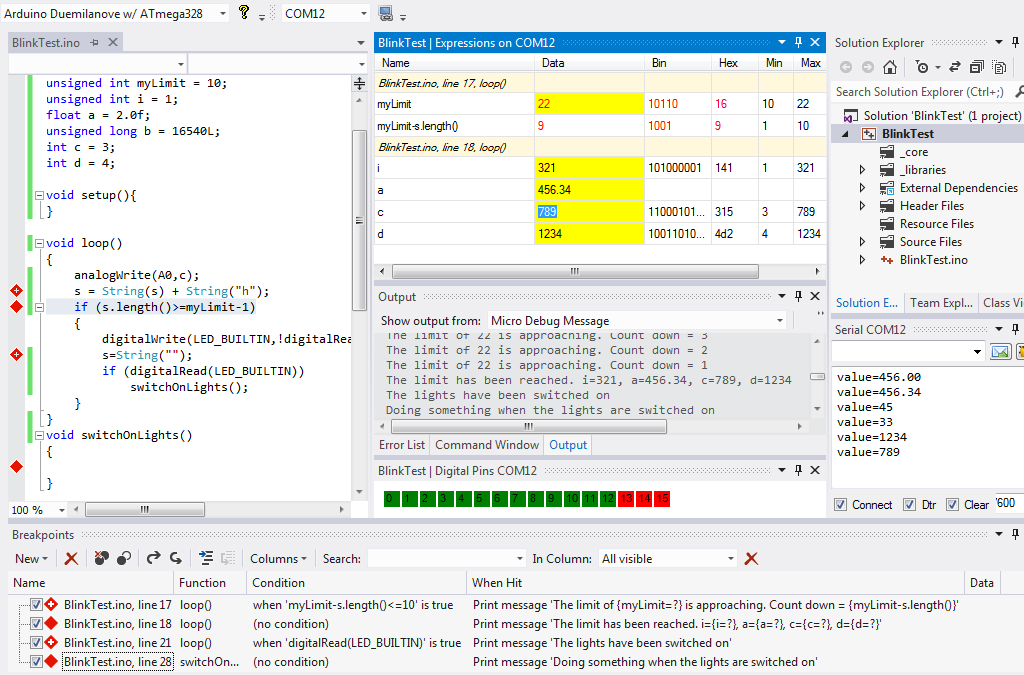
For this example we show a really pointless (and rubbish) arduino program in debug mode. The message trace has been frozen at a point that makes best reading. The entire arduino program code is shown, You can see that the values of variables are defined to be different to the current values shown in the expression watch window. The serial window shows confirmation that the changes to variable values were succesfully accepted by the Arduino. The variables with a yellow background color are read/write.


Visual Studio 2012 in debug mode with the Arduino plugin. Click the image to exand
http://www.visualmicro.com/pics/DebugSetVariableRunningExample2.png

Original Arduino Debugger Post

  • Sign in to reply
  • fustini
    fustini over 13 years ago in reply to Former Member

    That's good to here the majority is not VS specific.  I was most impressed that you've somehow figured how to add debugging capabilities to the Arduino.  Does one's sketch have to be instrumented for this to work or is it tapping into the AVR's debugging capabilities directly?

    • Cancel
    • Vote Up 0 Vote Down
    • Sign in to reply
    • More
    • Cancel
  • Former Member
    Former Member over 13 years ago in reply to fustini

    It would be nice to have a linux version but the current system needs Visual Studio Pro. However the majority of the system is not tied to Visual Studio, so if anyone would like to join the vm forum and collaborate on a different version they will be very welcome.


    Maybe "Mono" is a possibility? Eclipse seems like hard work but that is because I need simple things.


    Suggestions welcome thanks.

    • Cancel
    • Vote Up 0 Vote Down
    • Sign in to reply
    • More
    • Cancel
  • fustini
    fustini over 13 years ago

    That's exciting to see a debugger for Arduino as it's something I miss from a more traditional microcontroller environments.  Is any way to run this for Linux users like me?

    • Cancel
    • Vote Up 0 Vote Down
    • Sign in to reply
    • More
    • Cancel
<
element14 Community

element14 is the first online community specifically for engineers. Connect with your peers and get expert answers to your questions.

  • Members
  • Learn
  • Technologies
  • Challenges & Projects
  • Products
  • Store
  • About Us
  • Feedback & Support
  • FAQs
  • Terms of Use
  • Privacy Policy
  • Legal and Copyright Notices
  • Sitemap
  • Cookies

An Avnet Company © 2026 Premier Farnell Limited. All Rights Reserved.

Premier Farnell Ltd, registered in England and Wales (no 00876412), registered office: Farnell House, Forge Lane, Leeds LS12 2NE.

ICP 备案号 10220084.

Follow element14

  • X
  • Facebook
  • linkedin
  • YouTube