element14 Community
element14 Community
    Register Log In
  • Site
  • Search
  • Log In Register
  • Community Hub
    Community Hub
    • What's New on element14
    • Feedback and Support
    • Benefits of Membership
    • Personal Blogs
    • Members Area
    • Achievement Levels
  • Learn
    Learn
    • Ask an Expert
    • eBooks
    • element14 presents
    • Learning Center
    • Tech Spotlight
    • STEM Academy
    • Webinars, Training and Events
    • Learning Groups
  • Technologies
    Technologies
    • 3D Printing
    • FPGA
    • Industrial Automation
    • Internet of Things
    • Power & Energy
    • Sensors
    • Technology Groups
  • Challenges & Projects
    Challenges & Projects
    • Design Challenges
    • element14 presents Projects
    • Project14
    • Arduino Projects
    • Raspberry Pi Projects
    • Project Groups
  • Products
    Products
    • Arduino
    • Avnet & Tria Boards Community
    • Dev Tools
    • Manufacturers
    • Multicomp Pro
    • Product Groups
    • Raspberry Pi
    • RoadTests & Reviews
  • About Us
    About the element14 Community
  • Store
    Store
    • Visit Your Store
    • Choose another store...
      • Europe
      •  Austria (German)
      •  Belgium (Dutch, French)
      •  Bulgaria (Bulgarian)
      •  Czech Republic (Czech)
      •  Denmark (Danish)
      •  Estonia (Estonian)
      •  Finland (Finnish)
      •  France (French)
      •  Germany (German)
      •  Hungary (Hungarian)
      •  Ireland
      •  Israel
      •  Italy (Italian)
      •  Latvia (Latvian)
      •  
      •  Lithuania (Lithuanian)
      •  Netherlands (Dutch)
      •  Norway (Norwegian)
      •  Poland (Polish)
      •  Portugal (Portuguese)
      •  Romania (Romanian)
      •  Russia (Russian)
      •  Slovakia (Slovak)
      •  Slovenia (Slovenian)
      •  Spain (Spanish)
      •  Sweden (Swedish)
      •  Switzerland(German, French)
      •  Turkey (Turkish)
      •  United Kingdom
      • Asia Pacific
      •  Australia
      •  China
      •  Hong Kong
      •  India
      •  Japan
      •  Korea (Korean)
      •  Malaysia
      •  New Zealand
      •  Philippines
      •  Singapore
      •  Taiwan
      •  Thailand (Thai)
      •  Vietnam
      • Americas
      •  Brazil (Portuguese)
      •  Canada
      •  Mexico (Spanish)
      •  United States
      Can't find the country/region you're looking for? Visit our export site or find a local distributor.
  • Translate
  • Profile
  • Settings
Arduino
  • Products
  • More
Arduino
Arduino Forum Have a question about Arduino? Ask me!
  • Blog
  • Forum
  • Documents
  • Quiz
  • Events
  • Polls
  • Files
  • Members
  • Mentions
  • Sub-Groups
  • Tags
  • More
  • Cancel
  • New
Join Arduino to participate - click to join for free!
Actions
  • Share
  • More
  • Cancel
Forum Thread Details
  • Replies 1914 replies
  • Subscribers 528 subscribers
  • Views 68517 views
  • Users 0 members are here
  • jeremy_blum
  • expert
  • student
  • arduino
Related

Have a question about Arduino? Ask me!

sciguy14
sciguy14 over 15 years ago

This thread has been closed to new questions.

However, we welcome you to Post Your Questionabout Arduino in the element14 Community Arduino group.  You'll find many fellow members and experts who have just the answer you're looking to find! 


Thank You, Your Friends at element14 Community


image

Jeremy Blum

Jeremy is an Electrical and Computer Engineering Student at Cornell University. He has been building microcontroller projects since high school, from a prototype prosthetic hand with a novel control scheme, to a nerf gun that fires at the intruders and uploads their picture to the web.
  • Sign in to reply
  • Cancel

Top Replies

  • billabott
    billabott over 13 years ago in reply to e14 Contributor +2
    @Brendan Your video is somewhat adequate for the intended purpose, however, from an engineer's point of view it is lacking in providing pertinent facts. Such as the part number, data sheet, and source…
  • e14 Contributor
    e14 Contributor over 15 years ago +1
    Jeremy, thanks for your intro videos. I am just getting started myself in Arduino though I have done some simple electronics projects using Atmel chips. Here is an example using ATTiny13 chips. www.youtube…
  • e14 Contributor
    e14 Contributor over 15 years ago +1
    Hi Jeremy I've built a device (see picture) with an Arduino and Ethernet shield that connects to our Network Monitor (Nagios) and moves an arrow to indicate if any of the computers we monitor are not responding…
Parents
  • e14 Contributor
    e14 Contributor over 13 years ago

    Hi Jeremy,

    Firstly let me thank you for all your tutorial videos on Arduino. I have watched most of them and find them very helpful.


    I have been asking for advice in the Arduino forums but not getting anywhere, you’re my last hope!


    Arduino is quite new to me, I’ve only been playing for 6 months or so. I have taken on a large project based on a standard 8x8 matrix, I’ve simply upgraded it to a large 8x8 display, all homemade.

    I love the hardware side of these projects, soldering and sorting out power feeds is great fun. The code however is a very different animal.


    I'm stuck on the last bit of my project which is a Christmas present for my mum, so needs to be completed in the next day or two. I need some advice urgently if you could spare the time?


    Because I can’t code myself, I’ve had to cut and paste code from other people’s projects and this is where the problem lies.


    I have code which works correctly to play pong on my 8x8 matrix. I also have code to simply display an effect. What I'm trying to do is to have a button so that when it's pressed it will switch between the two modes. The best I’ve achieved so far is to have is to have it begin with pong, when the buttons pressed it switches to pattern, then the button gets ignored.


    NB, Not so important but it would also be nice to be able to choose the size of the paddles (set to 2 at least) and have the pattern displayed by default until the button is pressed.


    Please could you take a look at this code and try to work out what’s going wrong? My back is really against the wall, if you can/want to help, please do so quickly.


    All the best,

    Phillip


    Code is in the attached txt file.

    Attachments:
    jereny-help.txt.zip
    • Cancel
    • Vote Up 0 Vote Down
    • Sign in to reply
    • Cancel
Reply
  • e14 Contributor
    e14 Contributor over 13 years ago

    Hi Jeremy,

    Firstly let me thank you for all your tutorial videos on Arduino. I have watched most of them and find them very helpful.


    I have been asking for advice in the Arduino forums but not getting anywhere, you’re my last hope!


    Arduino is quite new to me, I’ve only been playing for 6 months or so. I have taken on a large project based on a standard 8x8 matrix, I’ve simply upgraded it to a large 8x8 display, all homemade.

    I love the hardware side of these projects, soldering and sorting out power feeds is great fun. The code however is a very different animal.


    I'm stuck on the last bit of my project which is a Christmas present for my mum, so needs to be completed in the next day or two. I need some advice urgently if you could spare the time?


    Because I can’t code myself, I’ve had to cut and paste code from other people’s projects and this is where the problem lies.


    I have code which works correctly to play pong on my 8x8 matrix. I also have code to simply display an effect. What I'm trying to do is to have a button so that when it's pressed it will switch between the two modes. The best I’ve achieved so far is to have is to have it begin with pong, when the buttons pressed it switches to pattern, then the button gets ignored.


    NB, Not so important but it would also be nice to be able to choose the size of the paddles (set to 2 at least) and have the pattern displayed by default until the button is pressed.


    Please could you take a look at this code and try to work out what’s going wrong? My back is really against the wall, if you can/want to help, please do so quickly.


    All the best,

    Phillip


    Code is in the attached txt file.

    Attachments:
    jereny-help.txt.zip
    • Cancel
    • Vote Up 0 Vote Down
    • Sign in to reply
    • Cancel
Children
  • e14 Contributor
    e14 Contributor over 13 years ago in reply to e14 Contributor

    Phillip,


    > What I'm trying to do is to have a button so that when it's pressed it will switch between the two modes. The best I’ve achieved so far is to have is to have it begin with pong, when the buttons pressed it switches to pattern, then the button gets ignored.


    The problem is these lines:


        if(currState == HIGH)    

        {      

           playing = true;    

        }


    They change the variable playing from false to true, but never change it back.

    I think it will work if you replace those four lines with the single line:


        playing = (currState == HIGH);


    As an alternative, you could leave those 4 lines as is, and add the line:

        playing = false;

    immediately before them.  Or you could use an else.

    • Cancel
    • Vote Up +1 Vote Down
    • Sign in to reply
    • Cancel
  • e14 Contributor
    e14 Contributor over 13 years ago in reply to e14 Contributor

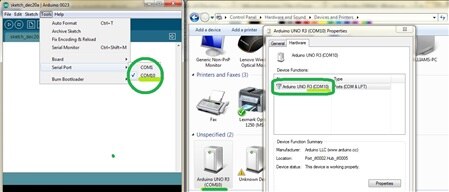
    MAYBE YOU CAN HELP ME.. I HAVE THE ARUDINO UNO AND I CANNOT TRANSFER THE CODE BECAUSE THEY NEED A COMM PORT AND WINDOWS DOES NOT Allow assignment of comm ports.

    THANKS

    rod galloway

    rod1932@yahoo.com

    • Cancel
    • Vote Up 0 Vote Down
    • Sign in to reply
    • Cancel
  • e14 Contributor
    e14 Contributor over 13 years ago in reply to e14 Contributor

    Coder27,

    I really appricate you taking the time to look at the code I submitted. I had been all round the Arduino forum asking for help and getting no-where. Thankfully a very kind person contacted me and spent all evening sorting out my mess. He pretty much rewrote the code so as to get it stable, complete and correct.

    My Xmas project is now finished, just fixing the legs to it before handing it over tomorrow evening. Mum will be so pleased :-)


    During the Xmas week and early Jan, I intend to photograph, video, detail, list hardware, draw schematics and upload the code for the whole project so that others can do the same.

    After Ive done that, Im going to stop with the hardware and spend a few months just learning the code as this side of Arduino is always problematic for me.

    I'll sure come back to give you a link to the project material after Xmas so that you can see what all the fuss has been about.

    All the best,

    Merry Christmas Everyone,

    Phillip

    • Cancel
    • Vote Up 0 Vote Down
    • Sign in to reply
    • Cancel
  • billabott
    billabott over 13 years ago in reply to e14 Contributor

    May I suggest one more item to add to that list:  a flowchart.


    Merry Christmas, Everyone.

    • Cancel
    • Vote Up 0 Vote Down
    • Sign in to reply
    • Cancel
  • billabott
    billabott over 13 years ago in reply to e14 Contributor

    1. Please keep your email private.  Some spammer will cull our discussion board for emails and then you will be bothered with junk emails.  Use IM (Instant Message) instead.

    2. Learn how to edit your posts to make improvements when needed.


    image

    • Cancel
    • Vote Up 0 Vote Down
    • Sign in to reply
    • Cancel
  • e14 Contributor
    e14 Contributor over 13 years ago in reply to billabott

    Thanks, Consider it added :-)


    I have watched many video tutorials and tried following the Arduino tutorials on code. I find that every tutorial I see walks you through the code nicely to do just that project without fully explaining why you'd do it that way. I have found trying to learn code very hard indeed. I can follow their tutorials but if I want to change something I'm lost. What makes it even harder is that everyone seems to a different way of coding. I have found at least 3 methods of setting up and sending data to a shirft register for example. There seems to be a lack of consistency. I'm unsure if it's because the code is "way simpler" than I expect and is very adapatble or wether Im getting led astray by people who know "a little" code.


    I found this book for sale,

    "Programming Arduino Getting Started with Sketches" and had planned to buy it. It looks like it'll explain everything but I'd welcome any other links or books which will help me learn why and how to code.


    NB, I already have Begining Arduino & Begining Arduino Programming but find these like the tutorials, tell me how to do that project but dont explain how or why I would change the code if I wanted to add another aspect to the project.


    All the best,

    • Cancel
    • Vote Up 0 Vote Down
    • Sign in to reply
    • Cancel
  • e14 Contributor
    e14 Contributor over 13 years ago in reply to e14 Contributor

    Phillip,

    >What makes it even harder is that everyone seems to a different way of coding. I have found at least 3 methods of setting up and sending data to a shirft register for example.


    That's just the way coding is.  There are usually multiple ways to code up the same

    algorithm, just like there are usually multiple ways to drive from one location to another.

    Language designers add "shortcuts" to their languages, like i++ in place of i=i+1,

    just like highway designers do.   Or they add "higher-level" abstractions without

    removing the "lower-level" features.  Math is the same way, you can say x+x,

    or 2*x, and they both get the same answer.


    Sometimes it's obvious that one way is better, but usually it depends whether the

    goal is the shortest program, or the fastest program, or the easiest to maintain

    program, etc., just like sometimes you drive the shortest route, sometimes the

    fastest route, and sometimes you take the scenic route. 


    One of the goals of learning to program is to recognize the various ways of

    coding up an algorithm, and choosing intelligently between them.

    • Cancel
    • Vote Up 0 Vote Down
    • Sign in to reply
    • Cancel
  • fischerjade
    fischerjade over 13 years ago in reply to e14 Contributor

    I just got a arduino UNO and I ran the Blink program from Makezine.  It worked but now I can't load another program from the arduino IDE from my mac.  The board just keeps blinking the light on the board.  When I push the reset button it just stops the program briefly and starts over again. I need to reset the chip/board somehow or am I doing it wrong I am a newbie.


    Jade Fischer

    • Cancel
    • Vote Up 0 Vote Down
    • Sign in to reply
    • Cancel
  • e14 Contributor
    e14 Contributor over 13 years ago in reply to fischerjade

    I'm also a newbie but I guess you have to just upload the other program and ... that's all !

    • Cancel
    • Vote Up 0 Vote Down
    • Sign in to reply
    • Cancel
element14 Community

element14 is the first online community specifically for engineers. Connect with your peers and get expert answers to your questions.

  • Members
  • Learn
  • Technologies
  • Challenges & Projects
  • Products
  • Store
  • About Us
  • Feedback & Support
  • FAQs
  • Terms of Use
  • Privacy Policy
  • Legal and Copyright Notices
  • Sitemap
  • Cookies

An Avnet Company © 2026 Premier Farnell Limited. All Rights Reserved.

Premier Farnell Ltd, registered in England and Wales (no 00876412), registered office: Farnell House, Forge Lane, Leeds LS12 2NE.

Follow element14

  • X
  • Facebook
  • linkedin
  • YouTube