element14 Community
element14 Community
    Register Log In
  • Site
  • Search
  • Log In Register
  • Community Hub
    Community Hub
    • What's New on element14
    • Feedback and Support
    • Benefits of Membership
    • Personal Blogs
    • Members Area
    • Achievement Levels
  • Learn
    Learn
    • Ask an Expert
    • eBooks
    • element14 presents
    • Learning Center
    • Tech Spotlight
    • STEM Academy
    • Webinars, Training and Events
    • Learning Groups
  • Technologies
    Technologies
    • 3D Printing
    • FPGA
    • Industrial Automation
    • Internet of Things
    • Power & Energy
    • Sensors
    • Technology Groups
  • Challenges & Projects
    Challenges & Projects
    • Design Challenges
    • element14 presents Projects
    • Project14
    • Arduino Projects
    • Raspberry Pi Projects
    • Project Groups
  • Products
    Products
    • Arduino
    • Avnet & Tria Boards Community
    • Dev Tools
    • Manufacturers
    • Multicomp Pro
    • Product Groups
    • Raspberry Pi
    • RoadTests & Reviews
  • About Us
  • Store
    Store
    • Visit Your Store
    • Choose another store...
      • Europe
      •  Austria (German)
      •  Belgium (Dutch, French)
      •  Bulgaria (Bulgarian)
      •  Czech Republic (Czech)
      •  Denmark (Danish)
      •  Estonia (Estonian)
      •  Finland (Finnish)
      •  France (French)
      •  Germany (German)
      •  Hungary (Hungarian)
      •  Ireland
      •  Israel
      •  Italy (Italian)
      •  Latvia (Latvian)
      •  
      •  Lithuania (Lithuanian)
      •  Netherlands (Dutch)
      •  Norway (Norwegian)
      •  Poland (Polish)
      •  Portugal (Portuguese)
      •  Romania (Romanian)
      •  Russia (Russian)
      •  Slovakia (Slovak)
      •  Slovenia (Slovenian)
      •  Spain (Spanish)
      •  Sweden (Swedish)
      •  Switzerland(German, French)
      •  Turkey (Turkish)
      •  United Kingdom
      • Asia Pacific
      •  Australia
      •  China
      •  Hong Kong
      •  India
      • Japan
      •  Korea (Korean)
      •  Malaysia
      •  New Zealand
      •  Philippines
      •  Singapore
      •  Taiwan
      •  Thailand (Thai)
      • Vietnam
      • Americas
      •  Brazil (Portuguese)
      •  Canada
      •  Mexico (Spanish)
      •  United States
      Can't find the country/region you're looking for? Visit our export site or find a local distributor.
  • Translate
  • Profile
  • Settings
Arduino
  • Products
  • More
Arduino
Arduino Forum Having trouble with Tutorial 5. Please help.
  • Blog
  • Forum
  • Documents
  • Quiz
  • Events
  • Polls
  • Files
  • Members
  • Mentions
  • Sub-Groups
  • Tags
  • More
  • Cancel
  • New
Join Arduino to participate - click to join for free!
Actions
  • Share
  • More
  • Cancel
Forum Thread Details
  • Replies 19 replies
  • Subscribers 403 subscribers
  • Views 1650 views
  • Users 0 members are here
Related

Having trouble with Tutorial 5. Please help.

Former Member
Former Member over 13 years ago

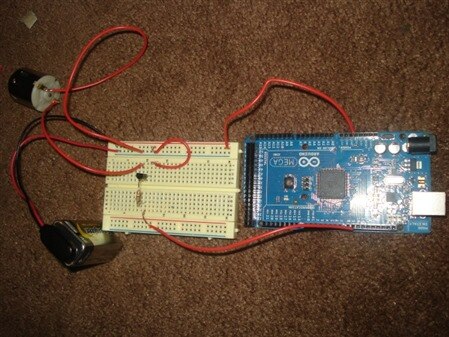
I am working on the first part of tutorial 5 (the first 7 minutes) and am trying to make the motor gradually increase and decrease in speed. The problem that I am running into is that my arduino is not giving my transistor any current. Here is my code and a picture of how I wired everything. Anyone see any potential problems? I would really appreciate any help!


int motorPin = 1;
void setup()
{
  pinMode (motorPin, OUTPUT);
}


void loop()
{
  for (int i=0; i<=255; i++)
  {
    analogWrite(motorPin, i);
    delay(10);
  }
 
  delay(500);
 
  for (int i=255; i>0; i--)
  {
    analogWrite(motorPin, i);
    delay(10);
  }
delay(500);
}


image

  • Sign in to reply
  • Cancel

Top Replies

  • dmaruska
    dmaruska over 13 years ago in reply to Former Member +2
    OK, that helps some. Now we need to see each piece. Connect just the motor to the battery. Does it work OK? If OK, You need to insure that the circuit is wired correctly. I have made a schematic for you…
Parents
  • Former Member
    Former Member over 13 years ago

    Hey, I'm no expert, but here's two things I noticed.


    1. Your code sets digital pin 1 as OUTPUT but your wire is connected elsewhere according to your picture.


    2. You need to connect the ground from the arduino to the ground from the battery.


    Hope this helps. Otherwise I see no errors in your code.

    • Cancel
    • Vote Up 0 Vote Down
    • Sign in to reply
    • Cancel
  • Former Member
    Former Member over 13 years ago in reply to Former Member

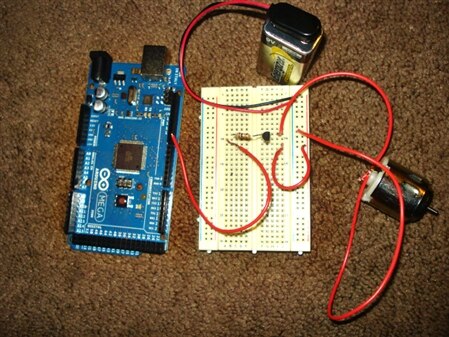
    Thank you. I fixed both of those. Unfortunately I am still getting no output from my arduino image Have I hooked the ground to ground correctly, or could that still be the problem?


    int motorPin = 9;
    void setup()
    {
      pinMode (motorPin, OUTPUT);
    }


    void loop()
    {
      for (int i=0; i<=255; i++)
      {
        analogWrite(motorPin, i);
        delay(10);
      }
     
      delay(500);
     
      for (int i=255; i>0; i--)
      {
        analogWrite(motorPin, i);
        delay(10);
      }
    delay(500);
    }


    image

    • Cancel
    • Vote Up 0 Vote Down
    • Sign in to reply
    • Cancel
  • dmaruska
    dmaruska over 13 years ago in reply to Former Member

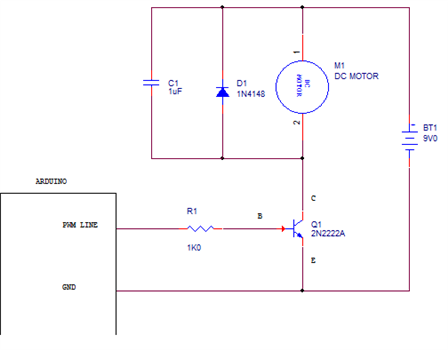
    OK, that helps some.  Now we need to see each piece.  Connect just the motor to the battery.  Does it work OK?  If OK, You need to insure that the circuit is wired correctly.  I have made a schematic for you just to make sure,  I have included a Diode and Cap that goes between the Motor terminals, but for testing they can be momited for now.  But should be included for correct circuit operation (removing noise made by motor).  Make sure the Ardunio GND and Battery GND and Emitter are all connected together.  On the PWM input, try the 5V to the resistor.  Motor should spin.  If not, replace the transistor.  If you have a meter, you can check to see if the transistor is OK.  Check all connections are GOOD.  nothing like thinking you have a bad part, and the wire turns out to be to problem or the solder joint.  I have used a 2N2222A2N2222A transistor, but any NPN that can handle the Current flow for the motor will work.  When looking at the data sheet.  MAKE sure you understand the orientation of the drawing when selection of the Emitter, Base and Colletor.  TO-92 parts have been installed countless times reversed because of the diagram.  Once you have the circuit working with just the 5V, Battery and GND.  Connect to the Arduino PWM line you have selected in the program.  All should be good at this point.  Good Luck. image

    • Cancel
    • Vote Up +2 Vote Down
    • Sign in to reply
    • Cancel
  • Former Member
    Former Member over 13 years ago in reply to dmaruska

    I would like to add that I'd recommend you to use solid copper wire, it looks stranded in your picture. Or you could neatly twist and solder the wire ends for better connection. I had similar problems when I just started and stranded wire was all I have. Additionaly, using black wire for ground and other colors for signals makes it easier to troubleshoot and understand when you take a picture.


    Please let us know how it goes.


    @dmaruska: I'd appreciate it if you let me know what app you used to create that neat schematic, thanks.

    • Cancel
    • Vote Up 0 Vote Down
    • Sign in to reply
    • Cancel
  • ntewinkel
    ntewinkel over 13 years ago in reply to Former Member

    An easy source for solid core wire is a chunk of cat5 or telephone cable - lots of different colours in there too. you might find some free cutoff chunks or old cables at a local computer store, for example.

    • Cancel
    • Vote Up 0 Vote Down
    • Sign in to reply
    • Cancel
  • dmaruska
    dmaruska over 13 years ago in reply to Former Member

    I have a license of OrCAD that I do schematics with.  It's a nice tool, could be made better, but I have been driving it since it went from DOS to Windows.  I cut and paste in to paint and post.


    Regards,


    Dave M.

    • Cancel
    • Vote Up 0 Vote Down
    • Sign in to reply
    • Cancel
  • Former Member
    Former Member over 13 years ago in reply to dmaruska

    Thanks.

    • Cancel
    • Vote Up 0 Vote Down
    • Sign in to reply
    • Cancel
  • billabott
    billabott over 13 years ago in reply to dmaruska

    This is TROY!       Actually it is NI Multisim 11.0 Breadboard view.

    Click on image for a much better resolution view.


    image

    • Cancel
    • Vote Up 0 Vote Down
    • Sign in to reply
    • Cancel
  • Former Member
    Former Member over 13 years ago in reply to billabott

    I believe that my transistor is the failure point. I set up a very simple circuit with the transistor and an LED. After hooking this up, the LED did not light up. But if I connected the far left pin and middle pin of the transistor, the LED did light up. Is this a confirmation that the transistor is dead?


    image

    • Cancel
    • Vote Up 0 Vote Down
    • Sign in to reply
    • Cancel
  • ntewinkel
    ntewinkel over 13 years ago in reply to Former Member

    What is the number on the transistor you are using?

    • Cancel
    • Vote Up 0 Vote Down
    • Sign in to reply
    • Cancel
  • Former Member
    Former Member over 13 years ago in reply to ntewinkel

    2N

    4401

    711

    • Cancel
    • Vote Up 0 Vote Down
    • Sign in to reply
    • Cancel
  • Former Member
    Former Member over 13 years ago in reply to Former Member

    It’s a 2N4401 made in 1987, 1997, or 2007, 11th week

    • Cancel
    • Vote Up 0 Vote Down
    • Sign in to reply
    • Cancel
Reply
  • Former Member
    Former Member over 13 years ago in reply to Former Member

    It’s a 2N4401 made in 1987, 1997, or 2007, 11th week

    • Cancel
    • Vote Up 0 Vote Down
    • Sign in to reply
    • Cancel
Children
No Data
element14 Community

element14 is the first online community specifically for engineers. Connect with your peers and get expert answers to your questions.

  • Members
  • Learn
  • Technologies
  • Challenges & Projects
  • Products
  • Store
  • About Us
  • Feedback & Support
  • FAQs
  • Terms of Use
  • Privacy Policy
  • Legal and Copyright Notices
  • Sitemap
  • Cookies

An Avnet Company © 2025 Premier Farnell Limited. All Rights Reserved.

Premier Farnell Ltd, registered in England and Wales (no 00876412), registered office: Farnell House, Forge Lane, Leeds LS12 2NE.

ICP 备案号 10220084.

Follow element14

  • X
  • Facebook
  • linkedin
  • YouTube