element14 Community
element14 Community
    Register Log In
  • Site
  • Search
  • Log In Register
  • Community Hub
    Community Hub
    • What's New on element14
    • Feedback and Support
    • Benefits of Membership
    • Personal Blogs
    • Members Area
    • Achievement Levels
  • Learn
    Learn
    • Ask an Expert
    • eBooks
    • element14 presents
    • Learning Center
    • Tech Spotlight
    • STEM Academy
    • Webinars, Training and Events
    • Learning Groups
  • Technologies
    Technologies
    • 3D Printing
    • FPGA
    • Industrial Automation
    • Internet of Things
    • Power & Energy
    • Sensors
    • Technology Groups
  • Challenges & Projects
    Challenges & Projects
    • Design Challenges
    • element14 presents Projects
    • Project14
    • Arduino Projects
    • Raspberry Pi Projects
    • Project Groups
  • Products
    Products
    • Arduino
    • Avnet & Tria Boards Community
    • Dev Tools
    • Manufacturers
    • Multicomp Pro
    • Product Groups
    • Raspberry Pi
    • RoadTests & Reviews
  • About Us
    About the element14 Community
  • Store
    Store
    • Visit Your Store
    • Choose another store...
      • Europe
      •  Austria (German)
      •  Belgium (Dutch, French)
      •  Bulgaria (Bulgarian)
      •  Czech Republic (Czech)
      •  Denmark (Danish)
      •  Estonia (Estonian)
      •  Finland (Finnish)
      •  France (French)
      •  Germany (German)
      •  Hungary (Hungarian)
      •  Ireland
      •  Israel
      •  Italy (Italian)
      •  Latvia (Latvian)
      •  
      •  Lithuania (Lithuanian)
      •  Netherlands (Dutch)
      •  Norway (Norwegian)
      •  Poland (Polish)
      •  Portugal (Portuguese)
      •  Romania (Romanian)
      •  Russia (Russian)
      •  Slovakia (Slovak)
      •  Slovenia (Slovenian)
      •  Spain (Spanish)
      •  Sweden (Swedish)
      •  Switzerland(German, French)
      •  Turkey (Turkish)
      •  United Kingdom
      • Asia Pacific
      •  Australia
      •  China
      •  Hong Kong
      •  India
      •  Japan
      •  Korea (Korean)
      •  Malaysia
      •  New Zealand
      •  Philippines
      •  Singapore
      •  Taiwan
      •  Thailand (Thai)
      •  Vietnam
      • Americas
      •  Brazil (Portuguese)
      •  Canada
      •  Mexico (Spanish)
      •  United States
      Can't find the country/region you're looking for? Visit our export site or find a local distributor.
  • Translate
  • Profile
  • Settings
Arduino
  • Products
  • More
Arduino
Arduino Forum Help with reading rotary encoder
  • Blog
  • Forum
  • Documents
  • Quiz
  • Events
  • Polls
  • Files
  • Members
  • Mentions
  • Sub-Groups
  • Tags
  • More
  • Cancel
  • New
Join Arduino to participate - click to join for free!
Actions
  • Share
  • More
  • Cancel
Forum Thread Details
  • Replies 2 replies
  • Subscribers 416 subscribers
  • Views 473 views
  • Users 0 members are here
Related

Help with reading rotary encoder

e14 Contributor
e14 Contributor over 13 years ago

My code currently is reading the falling edge of a rotary encoder and works good but how do I include the rising edge aslo in the code to improve accuracy?


Could you give me an idea on how to include the rising edge in my code? Thanks,

Here is the Encoder part of the code


[code]

void throttleLoop()  {

  encoder_ThrottleUp = digitalRead(pin_ThrottleUp); // Read encoder pins
  encoder_ThrottleDn = digitalRead(pin_ThrottleDn); // Read encoder pins
  if((!encoder_ThrottleUp) && (encoder_ThrottleUp_prev)){
    // A has gone from high to low
    if(encoder_ThrottleDn) {
      // B is high so clockwise
      // increase the throttle, dont go over 220
      if(servoPos + moveServoAmount <= 220) servoPos += moveServoAmount;
    }
    else {
      // B is low so counter-clockwise
      // decrease the throttle, dont go below 20
      if(servoPos - moveServoAmount >= 20) servoPos -= moveServoAmount;
    }
  }
  encoder_ThrottleUp_prev = encoder_ThrottleUp;     // Store value of ThrottleUp for next time
  // set the new location of servo:
  throttleServo.write(servoPos);
}

[/code]


Here is the whole code.


[code]#include <Bounce.h>
#include <Servo.h>
code][/code]

void setup(){
  buttonSetup();
  throttleSetup();
}

void loop(){
  throttleLoop();
  cruiseButtonLoop();
 
}

Servo throttleServo; // Define throttle Servo
int servoPos = 30;    // Initial power up “servo position”
int moveServoAmount = 2;    // move the servo 2 degrees per 1/125 pulse
const int pin_ThrottleUp = 4;
const int pin_ThrottleDn = A2;  // pin 14
unsigned char encoder_ThrottleUp;
unsigned char encoder_ThrottleDn;
unsigned char encoder_ThrottleUp_prev=0;

// set pin numbers:
const int buttonPin = 11; // the number of the button pin
const int buttonPin2 = 10;
const int buttonPin3 = 9;
const int buttonPin4 = 8;

long debounceDelay = 50;    // the debounce time; increase if the output flickers

//Debounce objects
// Instantiate a Bounce object with a 5 millisecond debounce time
Bounce cruiseUp = Bounce(buttonPin, debounceDelay);
Bounce cruiseDn = Bounce(buttonPin2, debounceDelay);
Bounce brakeReleaseToThrottle = Bounce(buttonPin4, debounceDelay);
Bounce clutchReleaseToThrottle = Bounce(buttonPin3, debounceDelay);

void throttleSetup()  {
  throttleServo.attach(12); // servo on digital pin 12
  throttleServo.write(30);
  pinMode(pin_ThrottleUp, INPUT);
  digitalWrite(pin_ThrottleUp, HIGH);// turn on pullup resistor
  pinMode(pin_ThrottleDn, INPUT);
  digitalWrite(pin_ThrottleDn, HIGH);// turn on pullup resistor
}

void throttleLoop()  {

  encoder_ThrottleUp = digitalRead(pin_ThrottleUp); // Read encoder pins
  encoder_ThrottleDn = digitalRead(pin_ThrottleDn); // Read encoder pins
  if((!encoder_ThrottleUp) && (encoder_ThrottleUp_prev)){
    // A has gone from high to low
    if(encoder_ThrottleDn) {
      // B is high so clockwise
      // increase the throttle, dont go over 220
      if(servoPos + moveServoAmount <= 220) servoPos += moveServoAmount;
    }
    else {
      // B is low so counter-clockwise
      // decrease the throttle, dont go below 20
      if(servoPos - moveServoAmount >= 20) servoPos -= moveServoAmount;
    }
  }
  encoder_ThrottleUp_prev = encoder_ThrottleUp;     // StAof ThrottleUp for next time
  // set the new location of servo:
  throttleServo.write(servoPos);
}

void buttonSetup(){
  // initialize the pushbutton pin as an input:
  pinMode(buttonPin, INPUT);
  pinMode(buttonPin2, INPUT);
  pinMode(buttonPin3, INPUT);
  pinMode(buttonPin4, INPUT);
}

void cruiseButtonLoop(){
  //Update debounce tool
  cruiseUp.update();
  cruiseDn.update();
  brakeReleaseToThrottle.update();
  clutchReleaseToThrottle.update();
  //Do not need to update these here are they are not used
  //bouncer3.update();
  //bouncer4.update();
  if (cruiseUp.read() == HIGH)
  {
    cruiseLoop(); //Enters button control loop
  }
  if (cruiseDn.read() == HIGH)
  {
    cruiseLoop(); //Enters button control loop
  }
      else if (brakeReleaseToThrottle.read() == HIGH)
    {
      servoPos = 30;
    }
}

/**
* If button control is enabled, loop and handle control buttons
* If exit buttons (To return to pot control) are pressed, exit loop and return
* to pot control
*/
void cruiseLoop(){
  servoPos = throttleServo.read(); //reads current servo location
  int btnControlEnabled = 1; //If button control is enabled this equals 1, else it equals 0
  while(btnControlEnabled == 1)
  {
    //Update all debounce tools
    cruiseUp.update();
    cruiseDn.update();
    brakeReleaseToThrottle.update();
    clutchReleaseToThrottle.update();
    if (cruiseUp.read() == HIGH)
    {
      throttleServo.write(servoPos + 1); //Add 2 degrees to servo position for increased motor rpm
      servoPos = throttleServo.read();
      delay(40); //allows time for switch ro reset
    }
    //If first button not pressed, check the next...
    else if (cruiseDn.read() == HIGH)
    {
      throttleServo.write(servoPos - 1); //Subtract 2 degrees to servo position for decreased motor rpm
      servoPos = throttleServo.read(); //Read new servo position
      delay(40); //allows time for switch ro reset
    }
    else if (clutchReleaseToThrottle.read() == HIGH)
    {
      servoPos = 30;
      btnControlEnabled = 0; //Set loop exit condition
      throttleLoop();
    }
    else if (brakeReleaseToThrottle.read() == HIGH)
    {
      servoPos = 30;
      btnControlEnabled = 0; //Set loop exit condition
      throttleLoop();
    }
  }
}code]

  • Sign in to reply
  • Cancel
Parents
  • e14 Contributor
    e14 Contributor over 13 years ago

    Any help here?


    It is this piece of the program I am being told only reads the falling side.


    void throttleLoop() {

    encoder_ThrottleUp = digitalRead(pin_ThrottleUp); // Read encoder pins
    encoder_ThrottleDn = digitalRead(pin_ThrottleDn); // Read encoder pins
    if((!encoder_ThrottleUp) && (encoder_ThrottleUp_prev)){
    // A has gone from high to low
    if(encoder_ThrottleDn) {
    // B is high so clockwise
    // increase the throttle, dont go over 220
    if(servoPos + moveServoAmount <= 220) servoPos += moveServoAmount;
    }
    else {
    // B is low so counter-clockwise
    // decrease the throttle, dont go below 20
    if(servoPos - moveServoAmount >= 20) servoPos -= moveServoAmount;
    }

    • Cancel
    • Vote Up 0 Vote Down
    • Sign in to reply
    • Cancel
Reply
  • e14 Contributor
    e14 Contributor over 13 years ago

    Any help here?


    It is this piece of the program I am being told only reads the falling side.


    void throttleLoop() {

    encoder_ThrottleUp = digitalRead(pin_ThrottleUp); // Read encoder pins
    encoder_ThrottleDn = digitalRead(pin_ThrottleDn); // Read encoder pins
    if((!encoder_ThrottleUp) && (encoder_ThrottleUp_prev)){
    // A has gone from high to low
    if(encoder_ThrottleDn) {
    // B is high so clockwise
    // increase the throttle, dont go over 220
    if(servoPos + moveServoAmount <= 220) servoPos += moveServoAmount;
    }
    else {
    // B is low so counter-clockwise
    // decrease the throttle, dont go below 20
    if(servoPos - moveServoAmount >= 20) servoPos -= moveServoAmount;
    }

    • Cancel
    • Vote Up 0 Vote Down
    • Sign in to reply
    • Cancel
Children
  • shabaz
    shabaz over 13 years ago in reply to e14 Contributor

    Hi Matthew,


    It can get very complicated trying to do this in conventional program flow. Ideally, you want to rely on interrupts to perform this

    operation, and then it is very simple.


    Take a look here which describes how you can set up an interrupt to occur on a level or edge. It does require you to connect to

    pin(s) that can function as interrupt inputs.


    There are many techniques, personally I like this one which does (unfortunately) need some hardware assistance in the form

    of an XOR gate.


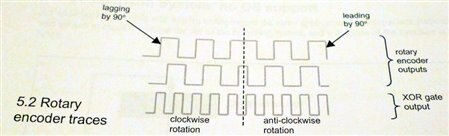
    image


    Basically, the encoder inputs go to two places; the microcontroller (any input pins, no need for them to be interrupt pins) and also to a 2-input XOR gate. The output of the XOR gate goes to an interrupt pin. Notice from the diagram above that the XOR gate will change level every 90 degrees.

    So, your code can generate an interrupt whenever the level changes. Then, all you need to do is read the 2-bit code and compare with the previously recorded value. If the encoder is turned in one direction then expect the sequence 0,2,3,1,0,2,3... and if it is turned in the other direction then expect the reverse of this sequence.

    Note that this works nice and cleanly with an optical encoder. There are lower cost mechanical encoders, and there you can expect some contact bounce, so you need to take that into consideration - usually with a delay for a few millisec, although it is not nice to do this in an interrupt routine

    which should ordinarily exit quickly. So, it complicates your code somewhat but the principle is the same.


    If you don't wish to use an XOR gate, then it is still possible of course using interrupts, but then you're burning two interrupt pins (and often they are a scarce resource).

    • Cancel
    • Vote Up 0 Vote Down
    • Sign in to reply
    • Cancel
element14 Community

element14 is the first online community specifically for engineers. Connect with your peers and get expert answers to your questions.

  • Members
  • Learn
  • Technologies
  • Challenges & Projects
  • Products
  • Store
  • About Us
  • Feedback & Support
  • FAQs
  • Terms of Use
  • Privacy Policy
  • Legal and Copyright Notices
  • Sitemap
  • Cookies

An Avnet Company © 2026 Premier Farnell Limited. All Rights Reserved.

Premier Farnell Ltd, registered in England and Wales (no 00876412), registered office: Farnell House, Forge Lane, Leeds LS12 2NE.

Follow element14

  • X
  • Facebook
  • linkedin
  • YouTube