element14 Community
element14 Community
    Register Log In
  • Site
  • Search
  • Log In Register
  • Community Hub
    Community Hub
    • What's New on element14
    • Feedback and Support
    • Benefits of Membership
    • Personal Blogs
    • Members Area
    • Achievement Levels
  • Learn
    Learn
    • Ask an Expert
    • eBooks
    • element14 presents
    • Learning Center
    • Tech Spotlight
    • STEM Academy
    • Webinars, Training and Events
    • Learning Groups
  • Technologies
    Technologies
    • 3D Printing
    • FPGA
    • Industrial Automation
    • Internet of Things
    • Power & Energy
    • Sensors
    • Technology Groups
  • Challenges & Projects
    Challenges & Projects
    • Design Challenges
    • element14 presents Projects
    • Project14
    • Arduino Projects
    • Raspberry Pi Projects
    • Project Groups
  • Products
    Products
    • Arduino
    • Avnet & Tria Boards Community
    • Dev Tools
    • Manufacturers
    • Multicomp Pro
    • Product Groups
    • Raspberry Pi
    • RoadTests & Reviews
  • About Us
    About the element14 Community
  • Store
    Store
    • Visit Your Store
    • Choose another store...
      • Europe
      •  Austria (German)
      •  Belgium (Dutch, French)
      •  Bulgaria (Bulgarian)
      •  Czech Republic (Czech)
      •  Denmark (Danish)
      •  Estonia (Estonian)
      •  Finland (Finnish)
      •  France (French)
      •  Germany (German)
      •  Hungary (Hungarian)
      •  Ireland
      •  Israel
      •  Italy (Italian)
      •  Latvia (Latvian)
      •  
      •  Lithuania (Lithuanian)
      •  Netherlands (Dutch)
      •  Norway (Norwegian)
      •  Poland (Polish)
      •  Portugal (Portuguese)
      •  Romania (Romanian)
      •  Russia (Russian)
      •  Slovakia (Slovak)
      •  Slovenia (Slovenian)
      •  Spain (Spanish)
      •  Sweden (Swedish)
      •  Switzerland(German, French)
      •  Turkey (Turkish)
      •  United Kingdom
      • Asia Pacific
      •  Australia
      •  China
      •  Hong Kong
      •  India
      •  Japan
      •  Korea (Korean)
      •  Malaysia
      •  New Zealand
      •  Philippines
      •  Singapore
      •  Taiwan
      •  Thailand (Thai)
      •  Vietnam
      • Americas
      •  Brazil (Portuguese)
      •  Canada
      •  Mexico (Spanish)
      •  United States
      Can't find the country/region you're looking for? Visit our export site or find a local distributor.
  • Translate
  • Profile
  • Settings
Arduino
  • Products
  • More
Arduino
Arduino Forum Laser Harp issue please help
  • Blog
  • Forum
  • Documents
  • Quiz
  • Events
  • Polls
  • Files
  • Members
  • Mentions
  • Sub-Groups
  • Tags
  • More
  • Cancel
  • New
Join Arduino to participate - click to join for free!
Actions
  • Share
  • More
  • Cancel
Forum Thread Details
  • Replies 14 replies
  • Subscribers 418 subscribers
  • Views 1667 views
  • Users 0 members are here
Related

Laser Harp issue please help

e14 Contributor
e14 Contributor over 13 years ago

Good Evening,


I was hoping you could help I am attempting to build a laser buzzer type harp with my Arduino I have followed a tutorial I found online however when it came to the programming I am experiencing an issue Error compiling


C:\Users\Scott\Documents\Arduino\libraries\Tone\Tone.cpp: In member function 'void Tone::begin(uint8_t)':

C:\Users\Scott\Documents\Arduino\libraries\Tone\Tone.cpp:121: error: 'bitWrite' was not declared in this scope

C:\Users\Scott\Documents\Arduino\libraries\Tone\Tone.cpp:123: error: 'digitalPinToPort' was not declared in this scope

C:\Users\Scott\Documents\Arduino\libraries\Tone\Tone.cpp:123: error: 'portOutputRegister' was not declared in this scope

C:\Users\Scott\Documents\Arduino\libraries\Tone\Tone.cpp:124: error: 'digitalPinToBitMask' was not declared in this scope

C:\Users\Scott\Documents\Arduino\libraries\Tone\Tone.cpp: In member function 'void Tone::play(uint16_t, uint32_t)':

C:\Users\Scott\Documents\Arduino\libraries\Tone\Tone.cpp:198: error: 'OUTPUT' was not declared in this scope

C:\Users\Scott\Documents\Arduino\libraries\Tone\Tone.cpp:198: error: 'pinMode' was not declared in this scope

C:\Users\Scott\Documents\Arduino\libraries\Tone\Tone.cpp:294: error: 'bitWrite' was not declared in this scope

C:\Users\Scott\Documents\Arduino\libraries\Tone\Tone.cpp: In member function 'void Tone::stop()':

C:\Users\Scott\Documents\Arduino\libraries\Tone\Tone.cpp:361: error: 'digitalWrite' was not declared in this scope


here is the tutorial I have followed: http://www.radioshack.com/graphics/uc/rsk/Support/ProductManuals/Laser_Harp_Online_Instructions.pdf


Here is the code:


#include <Tone.h>


const boolean DEBUG = false;


const int CALIBRATION_PIN = A5;

const int SPEAKER_PIN = 8;

const int SENSOR_COUNT = 3;


typedef struct

{

  int pin;

  int note;

} sensor_type;


sensor_type sensor[SENSOR_COUNT];


Tone notePlayer;


void setup(void)

{

  if (DEBUG) {

    Serial.begin(9600);

  }

  sensor[0].pin = A0; // analog input 0, etc...

  sensor[0].note = NOTE_G3;

  sensor[1].pin = A1;

  sensor[1].note = NOTE_D4;

  sensor[2].pin = A2;

  sensor[2].note = NOTE_A4;


  notePlayer.begin(SPEAKER_PIN);

}


void loop(void)

{

  int calibration = analogRead(CALIBRATION_PIN);

  if (DEBUG) {

    Serial.print("cal: ");

    Serial.print(calibration);

  }

  int activeSensor = -1;

  for (int p = 0 ; p < SENSOR_COUNT ; p++) {

    int sensor_value = analogRead(sensor[p].pin);

    if (DEBUG) {

      Serial.print("\tsensor ");

      Serial.print(p);

      Serial.print(": ");

      Serial.print(sensor_value);

    }

    if ( sensor_value < calibration ) {

      activeSensor = p;

      if (DEBUG) Serial.print("!"); // "!" indicates note being played

    }

  }

  if (DEBUG) Serial.println();

  if (activeSensor == -1) {

    notePlayer.stop();

  } else {

    notePlayer.play(sensor[activeSensor].note);

  }

  if (DEBUG) delay(1000);

}


I look forward to your reply thanks in advance!


Scott

  • Sign in to reply
  • Cancel
Parents
  • billabott
    billabott over 13 years ago

    Dude!


    There is nothing wrong with the example program or the Tone library.

    The problem is the Arduino IDE.  It can be a little uncooperative when adding a new library.


    Make sure you have the Tone folder where it is supposed to be.  Delete the #include <Tone>; line from the sketch.  Save the sketch.  Close down all Arduino IDE windows.  (Maybe even reboot your computer)  Open the sketch in the IDE.  Use the menu tab to Import the library.  Compile the sketch.


    Can I assume that this is you first go around with a library?  Allow me to share the "Facts of Arduino Life" with you about 3rd party Contributed Libraries.

    On 11/30/2011 10:08 PM, David Cuartielles wrote:


    When it comes to the software, it is not Arduino's responsibility to

    fix the libraries developed by third parties. It is like in any other

    systems, the responsibility of those third parties to fix what stops

    working at each update.

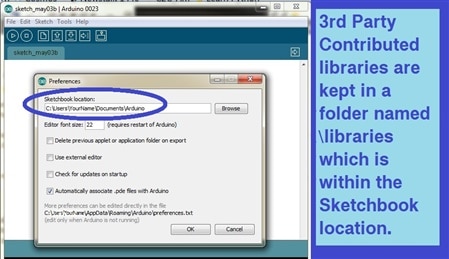
    These contributed libraries live in a folder called: C:\...\Arduino\libraries\  whereas the officially supported libraries live in a folder called: C:\...\Arduino\arduino-0023\arduino-0023\libraries.  If the contributed libraries folder does not exist then you must create it.


    image

    Please note: A professional quality library will come with one or more example sketches.  Do not ignore them; they are valuable resources.


    Just like the Radio Shack document said:

    Install the Tone Library

    For this project, you’ll need to install the “Tone” library, which can be downloaded here:   http://code.google.com/p/rogue-code/wiki/ToneLibraryDocumentation


    When you unzip the downloaded file, it will create a “Tone” folder. This folder should be moved to the “Libraries” folder, which is in your Arduino sketchbook folder. If you’re not sure of your sketchbook folder location, it can be found in your Arduino preferences. If the “libraries” folder doesn’t exist, create it, then copy the “Tone” folder to that location. Restart your Arduino application. You should now see “Tone” when you select from the menu bar:    


    Sketch > Import Library... (look under “Contributed”)


    • Cancel
    • Vote Up 0 Vote Down
    • Sign in to reply
    • Cancel
  • mcb1
    mcb1 over 13 years ago in reply to billabott

    Billabot


    To save that pain, I simply install them in the same libraries folder as the official ones.


    Yes you need to restart the IDE again to pick them up, but they are there.


    This method means if you have different libraries for the different versions (not so bad now) you can keep them apart.


    Cheers

    Mark

    • Cancel
    • Vote Up 0 Vote Down
    • Sign in to reply
    • Cancel
Reply
  • mcb1
    mcb1 over 13 years ago in reply to billabott

    Billabot


    To save that pain, I simply install them in the same libraries folder as the official ones.


    Yes you need to restart the IDE again to pick them up, but they are there.


    This method means if you have different libraries for the different versions (not so bad now) you can keep them apart.


    Cheers

    Mark

    • Cancel
    • Vote Up 0 Vote Down
    • Sign in to reply
    • Cancel
Children
  • billabott
    billabott over 13 years ago in reply to mcb1

    @Mark

    If both library folders have different versions of the same library (by name), which one gets compiled into the sketch?


    RE New Zealand can't get no respect  image

    http://www.atmel.com/microsite/tech_tour/?utm_campaign=TOT_Q2_2013_Reminder%202&utm_medium=email&utm_source=Eloqua

    • Cancel
    • Vote Up 0 Vote Down
    • Sign in to reply
    • Cancel
  • mcb1
    mcb1 over 13 years ago in reply to billabott

    billabott wrote:


    @Mark

    If both library folders have different versions of the same library (by name), which one gets compiled into the sketch?


    Arduino IDE gets very confused.

    The idea is not to name them the same...


    For my hacked version of RCSwitch, I changed the names and that included the .cpp and .h file.


    The problem I see with the c:\user\xyz is that the files aren't available if multiple people use the program.

    I also prefer to have it in one directory so my copy/backup contains everything, and can get transferred onto the laptop, etc.


    Yes NZ isn't on the list, but I think AUS wasn't as well.

    Pity they are missing the great scenery and maybe a few hobbits.


    Mark

    • Cancel
    • Vote Up 0 Vote Down
    • Sign in to reply
    • Cancel
element14 Community

element14 is the first online community specifically for engineers. Connect with your peers and get expert answers to your questions.

  • Members
  • Learn
  • Technologies
  • Challenges & Projects
  • Products
  • Store
  • About Us
  • Feedback & Support
  • FAQs
  • Terms of Use
  • Privacy Policy
  • Legal and Copyright Notices
  • Sitemap
  • Cookies

An Avnet Company © 2026 Premier Farnell Limited. All Rights Reserved.

Premier Farnell Ltd, registered in England and Wales (no 00876412), registered office: Farnell House, Forge Lane, Leeds LS12 2NE.

Follow element14

  • X
  • Facebook
  • linkedin
  • YouTube