element14 Community
element14 Community
    Register Log In
  • Site
  • Search
  • Log In Register
  • Community Hub
    Community Hub
    • What's New on element14
    • Feedback and Support
    • Benefits of Membership
    • Personal Blogs
    • Members Area
    • Achievement Levels
  • Learn
    Learn
    • Ask an Expert
    • eBooks
    • element14 presents
    • Learning Center
    • Tech Spotlight
    • STEM Academy
    • Webinars, Training and Events
    • Learning Groups
  • Technologies
    Technologies
    • 3D Printing
    • FPGA
    • Industrial Automation
    • Internet of Things
    • Power & Energy
    • Sensors
    • Technology Groups
  • Challenges & Projects
    Challenges & Projects
    • Design Challenges
    • element14 presents Projects
    • Project14
    • Arduino Projects
    • Raspberry Pi Projects
    • Project Groups
  • Products
    Products
    • Arduino
    • Avnet & Tria Boards Community
    • Dev Tools
    • Manufacturers
    • Multicomp Pro
    • Product Groups
    • Raspberry Pi
    • RoadTests & Reviews
  • About Us
  • Store
    Store
    • Visit Your Store
    • Choose another store...
      • Europe
      •  Austria (German)
      •  Belgium (Dutch, French)
      •  Bulgaria (Bulgarian)
      •  Czech Republic (Czech)
      •  Denmark (Danish)
      •  Estonia (Estonian)
      •  Finland (Finnish)
      •  France (French)
      •  Germany (German)
      •  Hungary (Hungarian)
      •  Ireland
      •  Israel
      •  Italy (Italian)
      •  Latvia (Latvian)
      •  
      •  Lithuania (Lithuanian)
      •  Netherlands (Dutch)
      •  Norway (Norwegian)
      •  Poland (Polish)
      •  Portugal (Portuguese)
      •  Romania (Romanian)
      •  Russia (Russian)
      •  Slovakia (Slovak)
      •  Slovenia (Slovenian)
      •  Spain (Spanish)
      •  Sweden (Swedish)
      •  Switzerland(German, French)
      •  Turkey (Turkish)
      •  United Kingdom
      • Asia Pacific
      •  Australia
      •  China
      •  Hong Kong
      •  India
      • Japan
      •  Korea (Korean)
      •  Malaysia
      •  New Zealand
      •  Philippines
      •  Singapore
      •  Taiwan
      •  Thailand (Thai)
      • Vietnam
      • Americas
      •  Brazil (Portuguese)
      •  Canada
      •  Mexico (Spanish)
      •  United States
      Can't find the country/region you're looking for? Visit our export site or find a local distributor.
  • Translate
  • Profile
  • Settings
Arduino
  • Products
  • More
Arduino
Arduino Forum Complete beginner requiring help with Bluefruit Feather programming
  • Blog
  • Forum
  • Documents
  • Quiz
  • Events
  • Polls
  • Files
  • Members
  • Mentions
  • Sub-Groups
  • Tags
  • More
  • Cancel
  • New
Join Arduino to participate - click to join for free!
Actions
  • Share
  • More
  • Cancel
Forum Thread Details
  • State Suggested Answer
  • Replies 25 replies
  • Answers 18 answers
  • Subscribers 403 subscribers
  • Views 3738 views
  • Users 0 members are here
Related

Complete beginner requiring help with Bluefruit Feather programming

marks+
marks+ over 6 years ago

Hello, I’m completely new to the Arduino family of PCBs & I have no experience of using them. So I have found myself in at the deep end without a clue!


We use Bluefruit Feather PCB nRF52832 for our products. The software we’re using is the official Arduino software.


It appears we can plug the boards into the PC via a standard USB lead and program them by opening a “sketch” and select “upload”.

The software compiles the sketches and then attempts to transfer them to the Feather. We then start getting messages saying there are errors or we need to update the bootloader or the boards are not in “DFU”mode.


We have tried updating and looked up and tried DFU mode but have had no joy.


I believe I may have discovered that our USB cable maybe of the wrong type, so I have another I'm going to be trying in the morning.

I have also downloaded the software on a different laptop to see if that makes a difference.


I have no doubt I am doing something incredibly simply wrong but would appreciate some advice on how to proceed.


TIA

Mark

  • Sign in to reply
  • Cancel

Top Replies

  • fmilburn
    fmilburn over 6 years ago in reply to marks+ +5 suggested
    I have not used the Nrf Bluefruit feathers so can’t really comment on that. I have used a M0 and M4 express feather without a problem on Windows 10. They both came configured to use Circuit Python if I…
  • cstanton
    cstanton over 6 years ago in reply to marks+ +3 suggested
    marks+ , looks like you're getting two different error messages here. Your error message at https://www.element14.com/community/message/283091/l/re-complete-beginner-requiring-help-with-bluefruit-feather…
  • 14rhb
    14rhb over 6 years ago +2 suggested
    Hi marks+ Just to check, have you selected the correct board under the board manager tab? Looks like you need to set a few things up first as well: https://learn.adafruit.com/bluefruit-nrf52-feather-learning…
Parents
  • 14rhb
    0 14rhb over 6 years ago

    Hi marks+


    Just to check, have you selected the correct board under the board manager tab?


    Looks like you need to set a few things up first as well: https://learn.adafruit.com/bluefruit-nrf52-feather-learning-guide/arduino-bsp-setup

    • Cancel
    • Vote Up +2 Vote Down
    • Sign in to reply
    • Verify Answer
    • Reject Answer
    • Cancel
  • marks+
    0 marks+ over 6 years ago in reply to 14rhb

    Thanks for the link. Will give that a try in the morning!

    • Cancel
    • Vote Up +2 Vote Down
    • Sign in to reply
    • Verify Answer
    • Cancel
  • 14rhb
    0 14rhb over 6 years ago in reply to marks+

    There's a slightly hidden link in that one as well for updating the DFU bootloader: the link takes you to https://learn.adafruit.com/bluefruit-nrf52-feather-learning-guide/updating-the-bootloader


    Good luck and I'd be interested to hear if you get them working and how you fix them.

    • Cancel
    • Vote Up +1 Vote Down
    • Sign in to reply
    • Verify Answer
    • Reject Answer
    • Cancel
  • marks+
    0 marks+ over 6 years ago in reply to 14rhb

    cheers, I'll update this thread when I've been able to give everything a try

    • Cancel
    • Vote Up +2 Vote Down
    • Sign in to reply
    • Verify Answer
    • Cancel
  • marks+
    0 marks+ over 6 years ago in reply to 14rhb

    Hi


    I have updated everything correctly (i think) but I'm getting the following error while updating the bootloader


    Error: Invalid value for "-pkg" / "--package": Path "C:\Users\Mark D\Documents\ArduinoData\packages\adafruit\hardware\nrf52\0.14.0/bootloader/feather_nrf52832/feather_nrf52832_bootloader-0.2.13_s132_6.1.1.zip" does not exist.

    Error while burning bootloader.


    For the record this is the set up I'm trying to use.

    Arduino: 1.8.9 (Windows Store 1.8.21.0) (Windows 10), Board: "Adafruit Bluefruit Feather nRF52832, 0.2.13 SoftDevice s132 6.1.1, Level 0 (Release)"


    I have moved onto my home laptop with a different USB lead and I have had a quick go with an Arduino starter kit using an UNO board. I have been successfully tinkering with the blink sketch. So I'm happy my laptop and arduino software is all working as it should. I have remembered to swap over the board names beforehand too. I have then again followed your advice and appear to have everything in place. As it says the bootloader doesn't exist I have downloaded it seperately and copied it into the the correct folder ***0.14.0 BUT it doesn't have the forward slash / part meaning bootloader/feather_nrf52832/

    Do I simply rename the file with the above front it on?


    regards

    Mark

    • Cancel
    • Vote Up 0 Vote Down
    • Sign in to reply
    • Verify Answer
    • Reject Answer
    • Cancel
  • 14rhb
    0 14rhb over 6 years ago in reply to marks+

    OK - hopefully fixable image.


    My first observation is the space in your path between "Mark" and "D"....often a source of gumbling with OS's. I'd try getting that replaced with a underscore if you can both in your commandline and physically on the filesystem.

    • Cancel
    • Vote Up +1 Vote Down
    • Sign in to reply
    • Verify Answer
    • Reject Answer
    • Cancel
Reply
  • 14rhb
    0 14rhb over 6 years ago in reply to marks+

    OK - hopefully fixable image.


    My first observation is the space in your path between "Mark" and "D"....often a source of gumbling with OS's. I'd try getting that replaced with a underscore if you can both in your commandline and physically on the filesystem.

    • Cancel
    • Vote Up +1 Vote Down
    • Sign in to reply
    • Verify Answer
    • Reject Answer
    • Cancel
Children
  • 14rhb
    0 14rhb over 6 years ago in reply to 14rhb

    I must confess I hadn't actually read through those instructions on flashing the boot loader. Options (1) and (3) require the use of a Segger J-Link device which is some expensive hardware. Option (2) appears to allow you to flash the bootloader from Arduino IDE using the nRF5x command line tools from Nordic....I'm assuming that was what you tried?


    However reflashing the bootloader is quite drastic so perhaps it is a good job we haven't managed it yet. I'm thinking there may be something far more simple causing these issues.


    When I installed the nRF board from the Arduino board manager to see the issues you were facing I noticed there were three different packages available. Perhaps your selected one isn't quite matched to the board still? Some screen shots and a photo of the board might help in identifying the issue. For example any silkscreen id off the board would help as well.

    • Cancel
    • Vote Up +2 Vote Down
    • Sign in to reply
    • Verify Answer
    • Reject Answer
    • Cancel
  • marks+
    0 marks+ over 6 years ago in reply to 14rhb

    image

    image


    I wasn't sure what programmer to select but as I've seen the DFU being mentioned in threads elsewhere I chose that.

    • Cancel
    • Vote Up 0 Vote Down
    • Sign in to reply
    • Verify Answer
    • Reject Answer
    • Cancel
  • 14rhb
    0 14rhb over 6 years ago in reply to marks+

    Your first photo might just be because the board is using a generic USB adapter...could be a red herring.


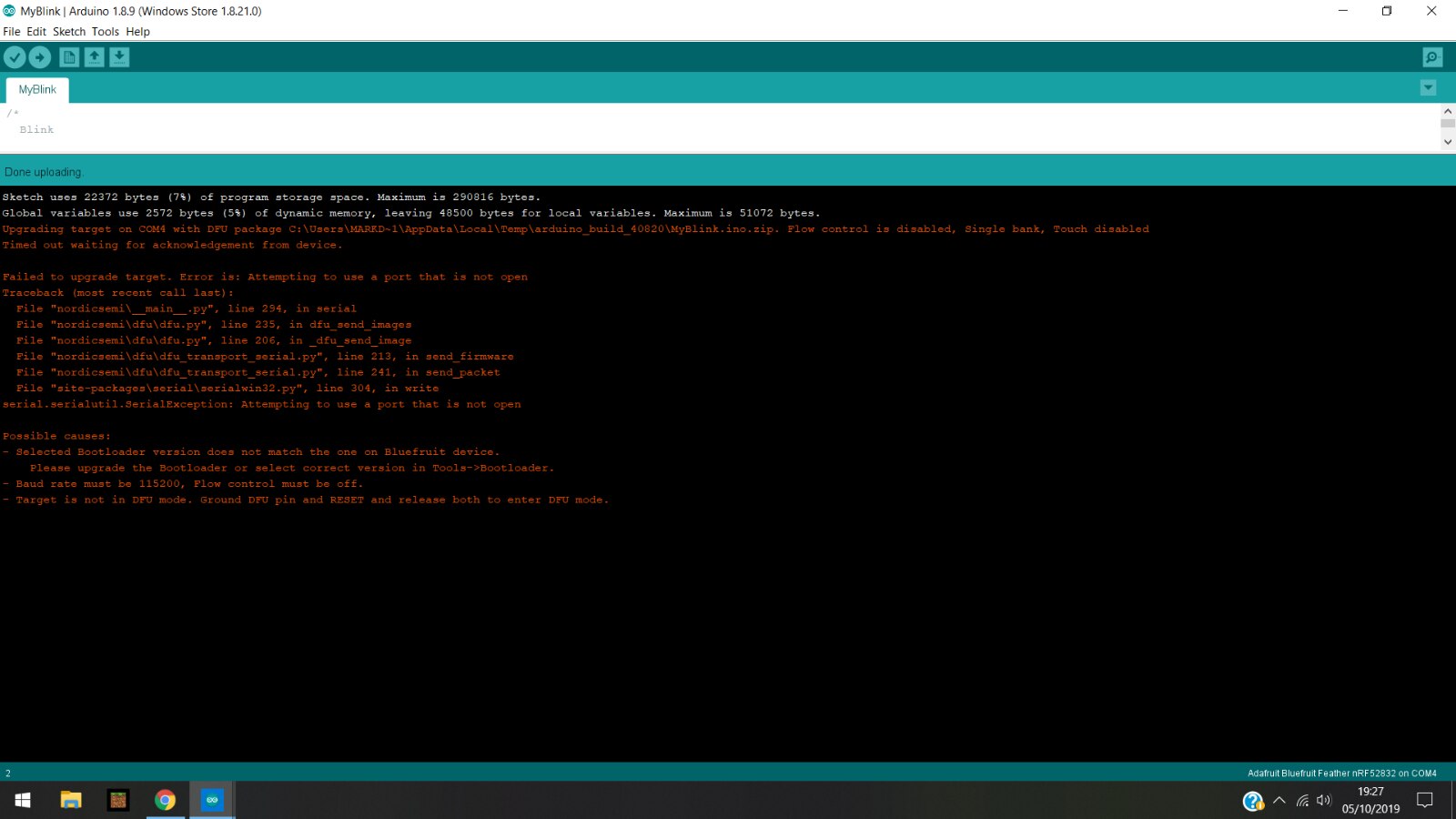
    Please could you post a screenhot of what error(s) you get when attempting to build/upload your sketch?

    • Cancel
    • Vote Up 0 Vote Down
    • Sign in to reply
    • Verify Answer
    • Cancel
  • marks+
    0 marks+ over 6 years ago in reply to 14rhb

    Will do, just been trying to get rid of the space between my User Name, Mark D, which has proved problematic, so I'm trying to move the Arduino folders higher up the drive

    • Cancel
    • Vote Up 0 Vote Down
    • Sign in to reply
    • Verify Answer
    • Cancel
  • marks+
    0 marks+ over 6 years ago in reply to 14rhb

    Here is the screenshot of the error message when I try to upload a sketch. Interestingly (or not) the root for the sketch remains the original one despite  me moving it.


    image

    • Cancel
    • Vote Up 0 Vote Down
    • Sign in to reply
    • Verify Answer
    • Reject Answer
    • Cancel
  • 14rhb
    0 14rhb over 6 years ago in reply to marks+

    I was almost out of ideas, you know the USB cable is good as you programmed other boards and also seem to be selecting the correct board etc. So I used your screenshot and searched the internet and found this article: https://forums.adafruit.com/viewtopic.php?f=8&t=151796


    The errors are almost identical to your screenshot....which is promising, and the posts are from back in May 2019 (so not too old either).


    They discuss a "double reset" to force into dfu mode. The Original Poster expressed thanks that it worked so it might work for you also.

    • Cancel
    • Vote Up 0 Vote Down
    • Sign in to reply
    • Verify Answer
    • Reject Answer
    • Cancel
  • marks+
    0 marks+ over 6 years ago in reply to 14rhb

    Thanks again, I'll take a look.

    Before posting on this forum, a few days ago, I did try doing factory resets for the boards. This involved grounding the DFU pin and pressing reset button for 5 seconds....after no success I then posted on here.....


    I'll have a read and attempt what's in the link, cheers!!

    • Cancel
    • Vote Up +1 Vote Down
    • Sign in to reply
    • Verify Answer
    • Reject Answer
    • Cancel
  • 14rhb
    0 14rhb over 6 years ago in reply to marks+

    The third post on this thread https://forums.adafruit.com/viewtopic.php?t=87391  talks about pressing the reset quickly as you would a mouse button e.g. the "fast double reset"


    Hopefully that might work for you also.

    • Cancel
    • Vote Up 0 Vote Down
    • Sign in to reply
    • Verify Answer
    • Reject Answer
    • Cancel
  • marks+
    0 marks+ over 6 years ago in reply to 14rhb

    Sadly still cannot do either, upload the sketch or update the bootloader.

    • Cancel
    • Vote Up 0 Vote Down
    • Sign in to reply
    • Verify Answer
    • Reject Answer
    • Cancel
  • 14rhb
    0 14rhb over 6 years ago in reply to marks+

    I'm sorry I couldn't help you on this marks+ . Maybe with your screenshots posted someone will notice what the issue is or suggest what to try next.


    The only thing I can still see is the "tools/burn bootloader"....but that might end in bricking the device!

    • Cancel
    • Vote Up +1 Vote Down
    • Sign in to reply
    • Verify Answer
    • Cancel
element14 Community

element14 is the first online community specifically for engineers. Connect with your peers and get expert answers to your questions.

  • Members
  • Learn
  • Technologies
  • Challenges & Projects
  • Products
  • Store
  • About Us
  • Feedback & Support
  • FAQs
  • Terms of Use
  • Privacy Policy
  • Legal and Copyright Notices
  • Sitemap
  • Cookies

An Avnet Company © 2025 Premier Farnell Limited. All Rights Reserved.

Premier Farnell Ltd, registered in England and Wales (no 00876412), registered office: Farnell House, Forge Lane, Leeds LS12 2NE.

ICP 备案号 10220084.

Follow element14

  • X
  • Facebook
  • linkedin
  • YouTube