element14 Community
element14 Community
    Register Log In
  • Site
  • Search
  • Log In Register
  • Community Hub
    Community Hub
    • What's New on element14
    • Feedback and Support
    • Benefits of Membership
    • Personal Blogs
    • Members Area
    • Achievement Levels
  • Learn
    Learn
    • Ask an Expert
    • eBooks
    • element14 presents
    • Learning Center
    • Tech Spotlight
    • STEM Academy
    • Webinars, Training and Events
    • Learning Groups
  • Technologies
    Technologies
    • 3D Printing
    • FPGA
    • Industrial Automation
    • Internet of Things
    • Power & Energy
    • Sensors
    • Technology Groups
  • Challenges & Projects
    Challenges & Projects
    • Design Challenges
    • element14 presents Projects
    • Project14
    • Arduino Projects
    • Raspberry Pi Projects
    • Project Groups
  • Products
    Products
    • Arduino
    • Avnet & Tria Boards Community
    • Dev Tools
    • Manufacturers
    • Multicomp Pro
    • Product Groups
    • Raspberry Pi
    • RoadTests & Reviews
  • About Us
  • Store
    Store
    • Visit Your Store
    • Choose another store...
      • Europe
      •  Austria (German)
      •  Belgium (Dutch, French)
      •  Bulgaria (Bulgarian)
      •  Czech Republic (Czech)
      •  Denmark (Danish)
      •  Estonia (Estonian)
      •  Finland (Finnish)
      •  France (French)
      •  Germany (German)
      •  Hungary (Hungarian)
      •  Ireland
      •  Israel
      •  Italy (Italian)
      •  Latvia (Latvian)
      •  
      •  Lithuania (Lithuanian)
      •  Netherlands (Dutch)
      •  Norway (Norwegian)
      •  Poland (Polish)
      •  Portugal (Portuguese)
      •  Romania (Romanian)
      •  Russia (Russian)
      •  Slovakia (Slovak)
      •  Slovenia (Slovenian)
      •  Spain (Spanish)
      •  Sweden (Swedish)
      •  Switzerland(German, French)
      •  Turkey (Turkish)
      •  United Kingdom
      • Asia Pacific
      •  Australia
      •  China
      •  Hong Kong
      •  India
      • Japan
      •  Korea (Korean)
      •  Malaysia
      •  New Zealand
      •  Philippines
      •  Singapore
      •  Taiwan
      •  Thailand (Thai)
      • Vietnam
      • Americas
      •  Brazil (Portuguese)
      •  Canada
      •  Mexico (Spanish)
      •  United States
      Can't find the country/region you're looking for? Visit our export site or find a local distributor.
  • Translate
  • Profile
  • Settings
Arduino
  • Products
  • More
Arduino
Arduino Forum Series 2 Coordinator and End Devices not responding to Andrew Rapp's Xbee-Arduino Library--- need help
  • Blog
  • Forum
  • Documents
  • Quiz
  • Events
  • Polls
  • Files
  • Members
  • Mentions
  • Sub-Groups
  • Tags
  • More
  • Cancel
  • New
Join Arduino to participate - click to join for free!
Actions
  • Share
  • More
  • Cancel
Forum Thread Details
  • State Suggested Answer
  • Replies 6 replies
  • Answers 6 answers
  • Subscribers 401 subscribers
  • Views 693 views
  • Users 0 members are here
  • xbee_series_2
  • wireless_sensor_network
Related

Series 2 Coordinator and End Devices not responding to Andrew Rapp's Xbee-Arduino Library--- need help

Former Member
Former Member over 12 years ago

I want to build a Wireless Sensor Network with a XB24-B Series 2 XBee connected to Arduino Mega 2560 acting as a Coordinator and three XB24-B Series 2 XBees connected to three Arduino Uno boards respectively, acting as End Devices. To each Uno board at end is connected a temperature sensor. I have configured my XBees using X-CTU in the following ways:


Coordinator Xbee (ZNET2.5 COORDINATOR API) ->

PAN ID = 200

DH=0

Dl=0

NI=COORD

AP=2


End node_0 Xbee (ZNET2.5 ROUTER/END DEVICE API) ->


PAN ID =200

DH=0013A200 (High byte of Coordinator)

DL= 4060647B (Low byte of Coordinator)

JV = 1

NI = R1

AP=2


My Coordinator side Sketch is as follows :-


#include <XBee.h>


XBee xbee = XBee();

ZBRxResponse zbRx = ZBRxResponse();


uint8_t payload[5] = {0,0,0,0,0};  //initialises the data array with 0s


void setup(){

  delay(1000);

  xbee.setSerial(Serial3);

  xbee.begin(9600);

  Serial.begin(9600);

  Serial.println("Ready");

}


void loop(){

  xbee.readPacket();

  if(xbee.getResponse().isAvailable()){

    if(xbee.getResponse().getApiId() == ZB_RX_RESPONSE){

      xbee.getResponse().getZBRxResponse(zbRx);

      for(int i = 0; i < zbRx.getDataLength(); i++){

        payload [i] = zbRx.getData(i);

      }

      uint8_t analogHi = payload[0];

      uint8_t analogLo = payload[1];

      int value = analogLo + (analogHi*256);


      int A = value;

      int C = payload[3];

      int E = payload[4];

      int flag = payload[2];


      if(E == 0){

        Serial.print("BOARD IDENTIFIER -> ");

        Serial.println(E);

        Serial.print("Temperature ");

        Serial.println(A);

        if (flag == 0){

          Serial.print("-");

          Serial.println(C);

        }

        else{

          Serial.println(C);

        }

      }

       else if (E == 1){

        Serial.print("BOARD IDENTIFIER -> ");

        Serial.println(E);

        Serial.print("Temperature " );

        Serial.println(A);

        if (flag == 0){

          Serial.print("-");

          Serial.println(C);

        }

        else{

          Serial.println(C);

        }

       }

       else{

         Serial.println("ERROR IDENTIFYING BOARD");

       }

       delay(1000);

    }

  }

  // Serial.println("Inside loop");

   //delay(1000);

}

My Router Side Sketch is as follows :-


#include <XBee.h>


uint8_t payload[5] = {0,0,0,0,0};

XBee xbee = XBee();

XBeeAddress64 remoteAddress = XBeeAddress64(0x0013A200 ,0x4060647B);


ZBTxRequest zbTx = ZBTxRequest(remoteAddress,payload,sizeof(payload));


int tempPin =0; //Analog pin 0

int ledPin = 13;

int tempReading;

int flag;

int ID =0;                            //change this accordingly to you node


void setup(){

  Serial.begin(9600);

  pinMode(ledPin,OUTPUT);

  pinMode(tempPin,OUTPUT);

  analogReference(INTERNAL);


}


void loop(){

  tempReading = analogRead(tempPin);

  Serial.println(tempReading);

  int celcius = getTemp(tempReading);

  Serial.print("Temperature in celcius");

  Serial.println(celcius);

  delay(100);

  digitalWrite(ledPin,HIGH);

  delay(1000);

  digitalWrite(ledPin,LOW);

  delay(1000);


  payload[0] = tempReading >> 8 & 0xff;

  payload[1] = tempReading & 0xff;


  if(celcius<0){

    flag=0;

  }

  else{

    flag=1;

  }


  payload[2] = flag;

  payload[3] = celcius;

  payload [4] = ID;


  xbee.send(zbTx);

  delay(60000); 

}


float getTemp(float k){


  k = (k * 110)/1024.0;

  float celcius = k;

  return celcius;


}


I have connected the Dout of XBee coordinator to Rx3 of Mega and Din of XBee coordinator to Tx3 of Mega

.

Now , when I open serial terminals in both the sides I could see nothing on the Coordinator Side serial window , except ready which I have printed statically.However, I could see the temperature readings being printed on the serial terminal on the end device side followed by a frame of random numbers.


Can anybody tell me where have I gone wrong? I am eagerly waiting for your advices.


image


  • Sign in to reply
  • Cancel

Top Replies

  • Former Member
    Former Member over 12 years ago in reply to Former Member +1 suggested
    Hello Sriramreddy, You have to use X-CTU itself.But you have to put the arduino in RESET mode while configuring the XBee. This is done by connecting the RESET pin of the Arduino to its GND pin. From the…
Parents
  • Former Member
    0 Former Member over 12 years ago

    Hai

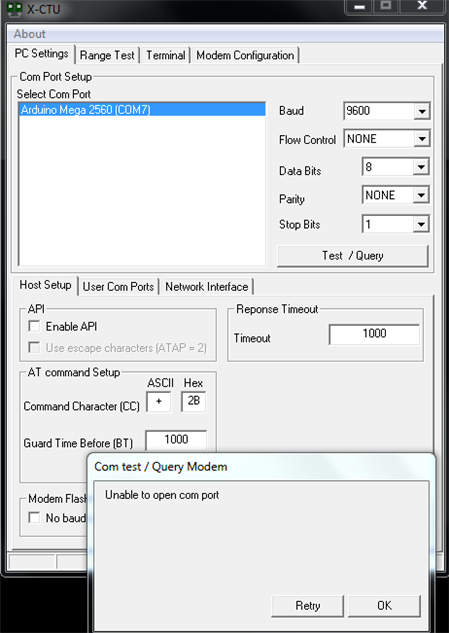
    even i am working on the same issue but iam using Xbee S2 connected to Arduino mega 2560  where i am facing problem in configuring Xbee as acoordinator;can you please provide me the connection layout and firmware you used in your configuration. when i am trying to configure using X-CTU it am getting unable to connect with modem:can you please help me how you configured the Xbee as coordinator.

    image

    • Cancel
    • Vote Up 0 Vote Down
    • Sign in to reply
    • Verify Answer
    • Reject Answer
    • Cancel
  • Former Member
    0 Former Member over 12 years ago in reply to Former Member

    Hello Sriramreddy,


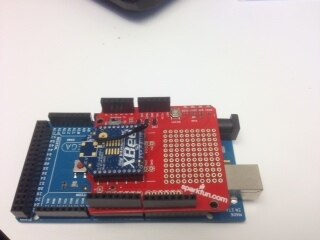
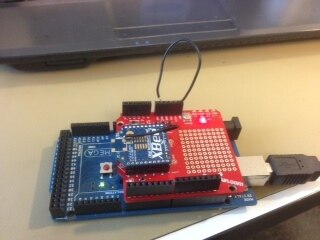
    You have to use X-CTU itself.But you have to put the arduino in RESET mode while configuring the XBee. This is done by connecting the RESET pin of the Arduino to its GND pin. From the picture it is clear that you haven't done that.

    • Cancel
    • Vote Up +1 Vote Down
    • Sign in to reply
    • Verify Answer
    • Reject Answer
    • Cancel
Reply
  • Former Member
    0 Former Member over 12 years ago in reply to Former Member

    Hello Sriramreddy,


    You have to use X-CTU itself.But you have to put the arduino in RESET mode while configuring the XBee. This is done by connecting the RESET pin of the Arduino to its GND pin. From the picture it is clear that you haven't done that.

    • Cancel
    • Vote Up +1 Vote Down
    • Sign in to reply
    • Verify Answer
    • Reject Answer
    • Cancel
Children
  • Former Member
    0 Former Member over 12 years ago in reply to Former Member

    Hi manas,


    Thank you for responce in configuring the Xbee definately i will try today and come back to you. In regarding your issue before trying with the code canyou try sending the simple custome hello message from your end decvice to the coordinator by using Xbee router terminal port .if the coordinator receives the message sucessfully then we will have a look on your code.

    Even in my project i am trying to collect the sensor values from different nodes presently i am using 8 different sensors (temp,pressure,vibration ,accceleration sensors)connected to lilypad arduino and each sensor should transmit the sensor value with respect to an event .the coordinator is connected to the beagleboard  where i have to read the data trough coordinator in serial port .in beagleboard i have to store the data in alocal data base and this data is to accesed trough internet .i am using 4g router provided by the telecom service provider.


    any ways its very nice for me to echange our views.

    image

    • Cancel
    • Vote Up 0 Vote Down
    • Sign in to reply
    • Verify Answer
    • Reject Answer
    • Cancel
  • Former Member
    0 Former Member over 12 years ago in reply to Former Member

    hai 

    As per your suggestion i have tried cofiguring the xee node using Arduino mega 2560 by connecting rst to gnd. but i am getting the same error can you please show me your connection layout and the Xbee parameters for router and the coordinator.here is my connection layout  and the error as a picture.imageimage

    • Cancel
    • Vote Up 0 Vote Down
    • Sign in to reply
    • Verify Answer
    • Reject Answer
    • Cancel
element14 Community

element14 is the first online community specifically for engineers. Connect with your peers and get expert answers to your questions.

  • Members
  • Learn
  • Technologies
  • Challenges & Projects
  • Products
  • Store
  • About Us
  • Feedback & Support
  • FAQs
  • Terms of Use
  • Privacy Policy
  • Legal and Copyright Notices
  • Sitemap
  • Cookies

An Avnet Company © 2025 Premier Farnell Limited. All Rights Reserved.

Premier Farnell Ltd, registered in England and Wales (no 00876412), registered office: Farnell House, Forge Lane, Leeds LS12 2NE.

ICP 备案号 10220084.

Follow element14

  • X
  • Facebook
  • linkedin
  • YouTube