element14 Community
element14 Community
    Register Log In
  • Site
  • Search
  • Log In Register
  • Community Hub
    Community Hub
    • What's New on element14
    • Feedback and Support
    • Benefits of Membership
    • Personal Blogs
    • Members Area
    • Achievement Levels
  • Learn
    Learn
    • Ask an Expert
    • eBooks
    • element14 presents
    • Learning Center
    • Tech Spotlight
    • STEM Academy
    • Webinars, Training and Events
    • Learning Groups
  • Technologies
    Technologies
    • 3D Printing
    • FPGA
    • Industrial Automation
    • Internet of Things
    • Power & Energy
    • Sensors
    • Technology Groups
  • Challenges & Projects
    Challenges & Projects
    • Design Challenges
    • element14 presents Projects
    • Project14
    • Arduino Projects
    • Raspberry Pi Projects
    • Project Groups
  • Products
    Products
    • Arduino
    • Avnet & Tria Boards Community
    • Dev Tools
    • Manufacturers
    • Multicomp Pro
    • Product Groups
    • Raspberry Pi
    • RoadTests & Reviews
  • About Us
  • Store
    Store
    • Visit Your Store
    • Choose another store...
      • Europe
      •  Austria (German)
      •  Belgium (Dutch, French)
      •  Bulgaria (Bulgarian)
      •  Czech Republic (Czech)
      •  Denmark (Danish)
      •  Estonia (Estonian)
      •  Finland (Finnish)
      •  France (French)
      •  Germany (German)
      •  Hungary (Hungarian)
      •  Ireland
      •  Israel
      •  Italy (Italian)
      •  Latvia (Latvian)
      •  
      •  Lithuania (Lithuanian)
      •  Netherlands (Dutch)
      •  Norway (Norwegian)
      •  Poland (Polish)
      •  Portugal (Portuguese)
      •  Romania (Romanian)
      •  Russia (Russian)
      •  Slovakia (Slovak)
      •  Slovenia (Slovenian)
      •  Spain (Spanish)
      •  Sweden (Swedish)
      •  Switzerland(German, French)
      •  Turkey (Turkish)
      •  United Kingdom
      • Asia Pacific
      •  Australia
      •  China
      •  Hong Kong
      •  India
      • Japan
      •  Korea (Korean)
      •  Malaysia
      •  New Zealand
      •  Philippines
      •  Singapore
      •  Taiwan
      •  Thailand (Thai)
      • Vietnam
      • Americas
      •  Brazil (Portuguese)
      •  Canada
      •  Mexico (Spanish)
      •  United States
      Can't find the country/region you're looking for? Visit our export site or find a local distributor.
  • Translate
  • Profile
  • Settings
Arduino
  • Products
  • More
Arduino
Arduino Forum Arduino timer issues
  • Blog
  • Forum
  • Documents
  • Quiz
  • Events
  • Polls
  • Files
  • Members
  • Mentions
  • Sub-Groups
  • Tags
  • More
  • Cancel
  • New
Join Arduino to participate - click to join for free!
Actions
  • Share
  • More
  • Cancel
Forum Thread Details
  • State Verified Answer
  • Replies 7 replies
  • Answers 1 answer
  • Subscribers 403 subscribers
  • Views 586 views
  • Users 0 members are here
Related

Arduino timer issues

Former Member
Former Member over 12 years ago

Hi Gurus


I am a first time Arduino user and  have had no experience with code writing at all and have decided to start learning, so this is my first sketch. I want to turn on an LED with the push of a button then delay the LED turning off, I have it functioning but the off delay period is not the same with each release of the button. Due to my lack of knowledge on writing code I need a little help with solving the problem which is driving me mad


I Have attached a copy of my code for you experts to look at (don't laugh)


Any help / guidance would be greatly appreciated


Thanks again

Lincoln

  • Sign in to reply
  • Cancel

Top Replies

  • billabott
    billabott over 12 years ago in reply to Former Member +1
    No Problem. The circuit diagram calls for using a pull down resistor. On rare occassions, it is possible run into a resistor that has an internal intermittant open. Otherwise, I don't know without seeing…
  • kjhart0133
    kjhart0133 over 12 years ago +1 verified
    Lincoln, I sent you a private message with some info. Let me know if you have any trouble reading it. Kevin H.
  • billabott
    0 billabott over 12 years ago

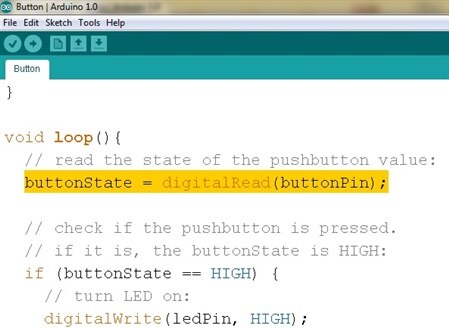
    image

    • Cancel
    • Vote Up 0 Vote Down
    • Sign in to reply
    • Verify Answer
    • Cancel
  • Former Member
    0 Former Member over 12 years ago in reply to billabott

    Hi Billabott


    Thanks for the speedy reply, because i am so green at writing code would you please be able to explain what error you have found in my code


    Much appreciated

    • Cancel
    • Vote Up 0 Vote Down
    • Sign in to reply
    • Verify Answer
    • Cancel
  • billabott
    0 billabott over 12 years ago in reply to Former Member

    No Problem.  The circuit diagram calls for using a pull down resistor.  On rare occassions, it is possible  run into a resistor that has an internal intermittant open.  Otherwise, I don't know without seeing a circuit diagram and checking your physical circuit.


    I suggest that you rewire the circuit using the internal pullup resistor.  This is accomplilshed by pinMode(buttonPin, INPUT_PULLUP).  The physical button then goes between digital pin 2, aka buttonPin, and Ground.  Try them all (the Ground connections) to verify that there is not a fault on the board.  If they all checkout okay, then it was the resistor which needs to have its legs amputated and disposed of in the trash.


    It is good to explore and experiment on your own.  But, you probably should spend some more time completing your basic arduino training with all the sample sketches.


    I just started reading a fun book : Arduino Adventures, Escape from Gemini Station by James Kelly and Harold Timmis.  Ask your local library to buy it or try to borrow it via Inter Library Loan.

    • Cancel
    • Vote Up +1 Vote Down
    • Sign in to reply
    • Verify Answer
    • Cancel
  • kjhart0133
    0 kjhart0133 over 12 years ago

    Lincoln ,


    Welcome to the world of Arduino. 


    To address your question: first, do you want to start timing the LED turnoff time from the moment you initially depress the switch, or from the moment you release the switch?  Second, in either case you will have to debounce the switch in order to get a consistent delay time.  Go to http://playground.arduino.cc//Code/Bounce for an excellent library that handles switch debounce.  Look at the example code at the end of the page and study the various "methods."  Soon you'll figure out how it works.


    Lastly, are you using the delay() function to time when to turn off the LED?  This is probably the simplest way to do it.  Just remember, though, delay() doesn't play well with one or more of the explicitly programmable timers or with interrupts.  Look at the Blink program for how to turn on and off an LED with a delay.


    Kevin H.

    • Cancel
    • Vote Up 0 Vote Down
    • Sign in to reply
    • Verify Answer
    • Reject Answer
    • Cancel
  • billabott
    0 billabott over 12 years ago in reply to billabott

    RE: Arduino Adventures, Escape from Gemini Station by James Kelly and Harold Timmis.


    Unfortunately, I found "error" on page 66, it says "the digitaRead(3) will detect a flow of voltage".  That is an incorrect mixed description of what takes place.  Current flows.  Electrons move due to electromotive force called Voltage.  Voltage is felt or Voltage is present or Voltage is detected .


    Please review my in depth explanation and insights at http://www.element14.com/community/message/46379#46379/l/re-question-on-a-part-i-need and also follow the //(Alternative Option) link at the bottom of the post for a real eye opener.


    By using pinMode(A0, INPUT_PULLUP);, Arduino sketches will not need to include digitalWrite(inPIN, HIGH);.   Although it works, doing the digitalWrite, an output function, for a PIN which has been declared to function as in INPUT  "is highly illogical" (Spock).


    Harold Timmis said to me: "You are correct it should just be “detect voltage”."

    • Cancel
    • Vote Up 0 Vote Down
    • Sign in to reply
    • Verify Answer
    • Cancel
  • Former Member
    0 Former Member over 12 years ago

    Welcome to the exciting world of Arduino, there's no limit to what you can do now image


    Anyways, it might help to analyse the examples provided by the IDE, they're pretty well commented. Also, I have a few arduino tutorials on YouTube, check them out, they should help with any future projects in general!


    In your code, you forgot to turn on the pullup resistor - just do a digitalWrite(buttonPin, HIGH);


    http://www.youtube.com/user/000Plasma000

    • Cancel
    • Vote Up 0 Vote Down
    • Sign in to reply
    • Verify Answer
    • Cancel
  • kjhart0133
    0 kjhart0133 over 12 years ago

    Lincoln,


    I sent you a private message with some info.  Let me know if you have any trouble reading it.


    Kevin H.

    • Cancel
    • Vote Up +1 Vote Down
    • Sign in to reply
    • Reject Answer
    • Cancel
element14 Community

element14 is the first online community specifically for engineers. Connect with your peers and get expert answers to your questions.

  • Members
  • Learn
  • Technologies
  • Challenges & Projects
  • Products
  • Store
  • About Us
  • Feedback & Support
  • FAQs
  • Terms of Use
  • Privacy Policy
  • Legal and Copyright Notices
  • Sitemap
  • Cookies

An Avnet Company © 2025 Premier Farnell Limited. All Rights Reserved.

Premier Farnell Ltd, registered in England and Wales (no 00876412), registered office: Farnell House, Forge Lane, Leeds LS12 2NE.

ICP 备案号 10220084.

Follow element14

  • X
  • Facebook
  • linkedin
  • YouTube