element14 Community
element14 Community
    Register Log In
  • Site
  • Search
  • Log In Register
  • Community Hub
    Community Hub
    • What's New on element14
    • Feedback and Support
    • Benefits of Membership
    • Personal Blogs
    • Members Area
    • Achievement Levels
  • Learn
    Learn
    • Ask an Expert
    • eBooks
    • element14 presents
    • Learning Center
    • Tech Spotlight
    • STEM Academy
    • Webinars, Training and Events
    • Learning Groups
  • Technologies
    Technologies
    • 3D Printing
    • FPGA
    • Industrial Automation
    • Internet of Things
    • Power & Energy
    • Sensors
    • Technology Groups
  • Challenges & Projects
    Challenges & Projects
    • Design Challenges
    • element14 presents Projects
    • Project14
    • Arduino Projects
    • Raspberry Pi Projects
    • Project Groups
  • Products
    Products
    • Arduino
    • Avnet & Tria Boards Community
    • Dev Tools
    • Manufacturers
    • Multicomp Pro
    • Product Groups
    • Raspberry Pi
    • RoadTests & Reviews
  • About Us
  • Store
    Store
    • Visit Your Store
    • Choose another store...
      • Europe
      •  Austria (German)
      •  Belgium (Dutch, French)
      •  Bulgaria (Bulgarian)
      •  Czech Republic (Czech)
      •  Denmark (Danish)
      •  Estonia (Estonian)
      •  Finland (Finnish)
      •  France (French)
      •  Germany (German)
      •  Hungary (Hungarian)
      •  Ireland
      •  Israel
      •  Italy (Italian)
      •  Latvia (Latvian)
      •  
      •  Lithuania (Lithuanian)
      •  Netherlands (Dutch)
      •  Norway (Norwegian)
      •  Poland (Polish)
      •  Portugal (Portuguese)
      •  Romania (Romanian)
      •  Russia (Russian)
      •  Slovakia (Slovak)
      •  Slovenia (Slovenian)
      •  Spain (Spanish)
      •  Sweden (Swedish)
      •  Switzerland(German, French)
      •  Turkey (Turkish)
      •  United Kingdom
      • Asia Pacific
      •  Australia
      •  China
      •  Hong Kong
      •  India
      • Japan
      •  Korea (Korean)
      •  Malaysia
      •  New Zealand
      •  Philippines
      •  Singapore
      •  Taiwan
      •  Thailand (Thai)
      • Vietnam
      • Americas
      •  Brazil (Portuguese)
      •  Canada
      •  Mexico (Spanish)
      •  United States
      Can't find the country/region you're looking for? Visit our export site or find a local distributor.
  • Translate
  • Profile
  • Settings
Arduino
  • Products
  • More
Arduino
Arduino Forum Reading analog values Arduino
  • Blog
  • Forum
  • Documents
  • Quiz
  • Events
  • Polls
  • Files
  • Members
  • Mentions
  • Sub-Groups
  • Tags
  • More
  • Cancel
  • New
Join Arduino to participate - click to join for free!
Actions
  • Share
  • More
  • Cancel
Forum Thread Details
  • State Verified Answer
  • Replies 11 replies
  • Answers 2 answers
  • Subscribers 402 subscribers
  • Views 1927 views
  • Users 0 members are here
  • arduino
  • analog
  • sensor
Related

Reading analog values Arduino

Former Member
Former Member over 12 years ago

Hello everyone,


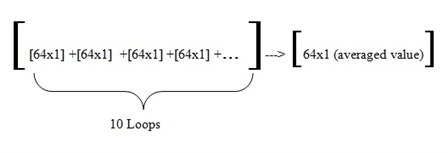
Currently I am working a project..I have 8x8  piezoresistive sensor matrix (i simply used 2 muxs) and I have only 1 analog output that gives me 64 different voltage values (changes depending on the pressure,and its between 2.5 V -5V) for each scan..so what i want to do is,to scan the matrix 10 times and get the averaged values of each cell of the matrix called smoothing..I do know how to do it for single readings but as i mentioned above I get 64 values..so somehow for each loop i have to store 64 values each time and smooth the data..Here what I have wrote..


const int numReadings = 64;           // Number of readings for each scan
const int numLoop=10;                   //Number of loops for each scan
float readings[numReadings];         // the readings from the analog input after each scan
float totReadings[numLoop];         //total readings from the analog input  scan
int   index_readings = 0;              // the index of the current reading
int   index_loop=0;                      // the index of the current loop

float average[numReadings];       //Averaged value

int   total[numReadings][numLoop];


int inputPin = A0;                     //Determine the pin

void setup()
{
   Serial.begin(9600);                  
  // initialize all the readings
  for (int i = 0; i < numReadings; i++)
  readings[i] = 0; 
  // initialize all the loops
  for(int j=0; j<numLoop;j++)
  totReadings[j]=0;
}
void loop() {
 
  // read from the sensor: 


  totReadings[numLoop]=totReadings[numLoop]+readings[index_readings];


  readings[index_readings] = analogRead(inputPin);  //Read the data from sensor (64 values)
 
  // advance to the next position in the array: 
  index_readings = index_readings + 1;


  index_loop = index_loop + 1;   
 
  // if we're at the end of the array...
  if (index_readings >= numReadings)             
    // ...wrap around to the beginning:
    index_readings = 0;  
   
  if (index_loop >= numLoop)             
    // ...wrap around to the beginning:
  index_loop = 0;
 
  //Take the average value
  average[numReadings]=totReadings[numLoop]/numLoop;  //Averaged value divided by 10(number of loops)

  Serial.println(average[numReadings]);                              //Print the averaged value 64x1
  delay(100);


}
  }
    }
 

image

I havent tested it yet but I do not feel satisfied though..I would be grateful to you if you can give me some ideas for improvement..Thanks a lot in advance..

  • Sign in to reply
  • Cancel

Top Replies

  • billabott
    billabott over 12 years ago +1
    The ADC is 10 bits of resolution. 2^10=1024. You have thrown away half of your range: 0 to 2.5 volts. Consider doing something to correct that. At some point you will divide by 10 > 8 =2^3. So, the lower…
  • billabott
    0 billabott over 12 years ago

    The ADC is 10 bits of resolution.  2^10=1024.  You have thrown away half of your range: 0 to 2.5 volts.  Consider doing something to correct that.


    At some point you will divide by 10 > 8 =2^3.  So, the lower three bits are of no value any where along the line.  I recommend [0..63]/8 sampled and summed 8 times will produce the average [0..63].    Use a right shift of 3 positions to do the /8 for efficiency.


    Since the [0..63] vector must use 16 bit integers you could do [0..63]/8 sampled and summed 16 times then [0..63]/2 will produce the average.

    • Cancel
    • Vote Up +1 Vote Down
    • Sign in to reply
    • Verify Answer
    • Cancel
  • Former Member
    0 Former Member over 12 years ago in reply to billabott

    Thanks for your informative reply..


    Actually output range can be changed depending on the circuit I use so that the output range can be between 0V-5V (eg voltage divider circuit..)..nevertheless,your point was pretty cool,I did not consider it ..So what do you think about the code? are there any points missing? Thanks a lot..


    PS:I will add threshold value also..I will not show the output values which are lower than threshold..

    • Cancel
    • Vote Up 0 Vote Down
    • Sign in to reply
    • Verify Answer
    • Cancel
  • billabott
    0 billabott over 12 years ago in reply to Former Member

    It compiles with Arduino 0023 after removing the two extra } at the end. 


    Sorry, I am too tired to read it in depth right now. I would try to stick to integer everything, but that is just me.

    • Cancel
    • Vote Up 0 Vote Down
    • Sign in to reply
    • Verify Answer
    • Cancel
  • Former Member
    0 Former Member over 12 years ago

    Hello everyone again;)


    So any other recommendation or ideas?


    Thanks..

    • Cancel
    • Vote Up 0 Vote Down
    • Sign in to reply
    • Verify Answer
    • Cancel
  • billabott
    0 billabott over 12 years ago in reply to Former Member

    Are you wanting to do the computed average for samples sets 1..10 and then a separate computed average for sample sets 11..20, etc?    Or are looking to have a sliding window on the data input stream so you can compute the average for arbitrary sample sets x..x+9?   


    Can you add more comments to you code?

    • Cancel
    • Vote Up 0 Vote Down
    • Sign in to reply
    • Verify Answer
    • Cancel
  • Former Member
    0 Former Member over 12 years ago in reply to billabott

    actually not..let me make it clearer.--my sensor output gives 64 different voltage values for each loop. [its a sensor matrix 8*8 , 8 rows and 8 columns..i used 2 counter with different speed so that i can scan the whole matrix--after 1 scan i will get 64 different values 64x1] ..I want to make 10 loops[ 10 scans] and show the averaged value at the end..I have put the image in the previous answer..

    • Cancel
    • Vote Up 0 Vote Down
    • Sign in to reply
    • Reject Answer
    • Cancel
  • billabott
    0 billabott over 12 years ago

    readings[index_readings] = analogRead(inputPin); //Read the data from sensor (64 values)


    // advance to the next position in the array:
    index_readings = index_readings + 1;


    The above is not how arduino code works.

    Using a nested loop structure is required.


    for (i =0; i < numLoop; i++;)

    {

         for (j=0; j < numReadings; j++)

         {

              readings[i,j] = analogRead(inputPin);     // opt to >>3  which is /8 if going that way

              // possible other i/o or calc here

         }

    }


    http://arduino.cc/en/Reference/For


    for (initialization; condition; increment) {


    //statement(s);


    }

    • Cancel
    • Vote Up 0 Vote Down
    • Sign in to reply
    • Verify Answer
    • Reject Answer
    • Cancel
  • Former Member
    0 Former Member over 12 years ago in reply to billabott

    Hello Billabott;


    Thank for your reply.. I modified the codes a bit..


    float readings[64];                    // the readings from the analog input after each scan
    float totReadings[10];               //total readings from the analog input  scan
    int i = 0;                                // the index of the current reading
    int j=0;                                   // the index of the current loop
    float average[64];                     //Averaged value
    int inputPin = A0;                     //Determine the pin

    void setup()
    {
    Serial.begin(9600);                  
    }
    void loop() {
       // initialize all the readings
      for (int i = 0; i < 64; i++)
      // initialize all the loops
      for(int j=0; j<10;j++)
      // read from the sensor: 
     
      totReadings[i,j]=totReadings[i,j]+ readings[i];
      readings[i] = analogRead(inputPin);  //Read the data from sensor (64 values)
      
      //Take the average value
      average[64]=totReadings[i,j]/j;                        //Averaged value divided by 10(number of loops)

      Serial.println(average[64]);                              //Print the averaged value 64x1

    • Cancel
    • Vote Up 0 Vote Down
    • Sign in to reply
    • Verify Answer
    • Cancel
  • billabott
    0 billabott over 12 years ago in reply to Former Member

    Great!   But you need for use the curly braces open and close, { } ,to control the range of the for statements.

    • Cancel
    • Vote Up 0 Vote Down
    • Sign in to reply
    • Verify Answer
    • Reject Answer
    • Cancel
  • Former Member
    0 Former Member over 12 years ago in reply to billabott

    Hello again,


    I have noticed some mistakes..and marked them using arrow..


    float readings[64];                 // the readings from the analog input after each scan

    float totReadings[10];           //total readings from the analog input scan                                 -->>>one dimension array but below i used it as 2-dim array??

    int i = 0;                            // the index of the current reading

    int j=0;                            // the index of the current loop

    float average[64];            //Averaged value                                                                           -->>here must be 63..becoz i have 64 values..0...63 ??

    int inputPin = A0;          //Determine the pin

    void setup()
    {
    Serial.begin(9600);
    }
    void loop() {
    // initialize all the readings
    for (int i = 0; i < 64; i++)

    {

    for(int j=0; j<10;j++)

    {
    // read from the sensor:


    totReadings[i,j]=totReadings[i,j]+ readings[i];               //               --->>>>> here i have used totReadings as two-dimensional array ??
    readings[i] = analogRead(inputPin); //Read the data from sensor (64 values)


    //Take the average value
    average[64]=totReadings[i,j]/j;                                    //Averaged value divided by 10(number of loops)   

    Serial.println(average[64]);                                         //Print the averaged value 64x1


    }

    }

    }

    • Cancel
    • Vote Up 0 Vote Down
    • Sign in to reply
    • Verify Answer
    • Cancel
>
element14 Community

element14 is the first online community specifically for engineers. Connect with your peers and get expert answers to your questions.

  • Members
  • Learn
  • Technologies
  • Challenges & Projects
  • Products
  • Store
  • About Us
  • Feedback & Support
  • FAQs
  • Terms of Use
  • Privacy Policy
  • Legal and Copyright Notices
  • Sitemap
  • Cookies

An Avnet Company © 2025 Premier Farnell Limited. All Rights Reserved.

Premier Farnell Ltd, registered in England and Wales (no 00876412), registered office: Farnell House, Forge Lane, Leeds LS12 2NE.

ICP 备案号 10220084.

Follow element14

  • X
  • Facebook
  • linkedin
  • YouTube