element14 Community
element14 Community
    Register Log In
  • Site
  • Search
  • Log In Register
  • Community Hub
    Community Hub
    • What's New on element14
    • Feedback and Support
    • Benefits of Membership
    • Personal Blogs
    • Members Area
    • Achievement Levels
  • Learn
    Learn
    • Ask an Expert
    • eBooks
    • element14 presents
    • Learning Center
    • Tech Spotlight
    • STEM Academy
    • Webinars, Training and Events
    • Learning Groups
  • Technologies
    Technologies
    • 3D Printing
    • FPGA
    • Industrial Automation
    • Internet of Things
    • Power & Energy
    • Sensors
    • Technology Groups
  • Challenges & Projects
    Challenges & Projects
    • Design Challenges
    • element14 presents Projects
    • Project14
    • Arduino Projects
    • Raspberry Pi Projects
    • Project Groups
  • Products
    Products
    • Arduino
    • Avnet & Tria Boards Community
    • Dev Tools
    • Manufacturers
    • Multicomp Pro
    • Product Groups
    • Raspberry Pi
    • RoadTests & Reviews
  • About Us
  • Store
    Store
    • Visit Your Store
    • Choose another store...
      • Europe
      •  Austria (German)
      •  Belgium (Dutch, French)
      •  Bulgaria (Bulgarian)
      •  Czech Republic (Czech)
      •  Denmark (Danish)
      •  Estonia (Estonian)
      •  Finland (Finnish)
      •  France (French)
      •  Germany (German)
      •  Hungary (Hungarian)
      •  Ireland
      •  Israel
      •  Italy (Italian)
      •  Latvia (Latvian)
      •  
      •  Lithuania (Lithuanian)
      •  Netherlands (Dutch)
      •  Norway (Norwegian)
      •  Poland (Polish)
      •  Portugal (Portuguese)
      •  Romania (Romanian)
      •  Russia (Russian)
      •  Slovakia (Slovak)
      •  Slovenia (Slovenian)
      •  Spain (Spanish)
      •  Sweden (Swedish)
      •  Switzerland(German, French)
      •  Turkey (Turkish)
      •  United Kingdom
      • Asia Pacific
      •  Australia
      •  China
      •  Hong Kong
      •  India
      • Japan
      •  Korea (Korean)
      •  Malaysia
      •  New Zealand
      •  Philippines
      •  Singapore
      •  Taiwan
      •  Thailand (Thai)
      • Vietnam
      • Americas
      •  Brazil (Portuguese)
      •  Canada
      •  Mexico (Spanish)
      •  United States
      Can't find the country/region you're looking for? Visit our export site or find a local distributor.
  • Translate
  • Profile
  • Settings
Arduino
  • Products
  • More
Arduino
Arduino Forum ~ ANSWERED ~ If this is a repeat, my apologies - 4 servos all turning at once with one potentiometer...This is NOT the way the project is to work.  Please help
  • Blog
  • Forum
  • Documents
  • Quiz
  • Events
  • Polls
  • Files
  • Members
  • Mentions
  • Sub-Groups
  • Tags
  • More
  • Cancel
  • New
Join Arduino to participate - click to join for free!
Actions
  • Share
  • More
  • Cancel
Forum Thread Details
  • State Verified Answer
  • Replies 67 replies
  • Answers 3 answers
  • Subscribers 406 subscribers
  • Views 4321 views
  • Users 0 members are here
  • answered
Related

~ ANSWERED ~ If this is a repeat, my apologies - 4 servos all turning at once with one potentiometer...This is NOT the way the project is to work.  Please help

Former Member
Former Member over 12 years ago

Hello all,

I am working on a project with 4 servos, and 4 potentiometers.

I will include my coding momentarily.  Here is my dilemma.

As the title states: "4 servos all turning at once with one potentiometer...This is NOT the way the project is to work."

The project is to turn each servo unit with its own potentiometer (dial style).  I have compiled my coding and it all comes out ok, I then upload it with no issue.

I then attempt to turn the pot and all 4 turn, and if I may add, with quite a bit of jitterness.

Can you please take a moment, look at the code and advise where you think the problem is.

This code was the KNOB example from the Arduino UNO example library.  I removed the name of the person as I have continued to add to the program.

You will see the things I have added as I have notated them.


Thanks in advance,

Anna


Now the code:


#include <Servo.h>

Servo myservo0;  // create servo object to control a servo
Servo myservo1;  // i added
Servo myservo2;  // i added
Servo myservo3;  // i added


int potpin0 = 0;  // analog pin used to connect the potentiometer (i added the zero to the potpin before the equal sign)
int val0;    // variable to read the value from the analog pin

int potpin1 = 1;  // i added
int val1;         // i added


int potpin2 = 2;  // i added
int val2;         // i added 


int potpin3 = 3;  //  i added
int val3;         //  i added


void setup()
{
  myservo0.attach(3);  // attaches the servo on pin 3 to the servo object --- I changed it to 3 from previously 9 - Anna
  myservo1.attach(5);  // i added
  myservo2.attach(6);  // i added
  myservo3.attach(9);  // i added
}

void loop()
{
  val0 = analogRead(potpin0);            // reads the value of the potentiometer (value between 0 and 1023)
  val0 = map(val0, 0, 1023, 0, 179);     // scale it to use it with the servo (value between 0 and 180)
  myservo0.write(val0);                  // sets the servo position according to the scaled value
  delay(15);                             // waits for the servo to get there


val1 = analogRead(potpin1);            // i added
  val1 = map(val1, 0, 1023, 0, 179);     // i added
  myservo1.write(val1);                  // i added 
  delay(15);


  val2 = analogRead(potpin2);            // i added
  val2 = map(val2, 0, 1023, 0, 179);     // i added
  myservo2.write(val2);                  // i added
  delay(15);


  val3 = analogRead(potpin3);            // i added
  val3 = map(val3, 0, 1023, 0, 179);     // i added
  myservo3.write(val3);                  // i added
  delay(15);
}


Message was edited by: Annasta Brandon My project question was answered, now on to part 2... http://www.element14.com/community/thread/24030

  • Sign in to reply
  • Cancel

Top Replies

  • mcb1
    mcb1 over 12 years ago in reply to billabott +2
    I had a look at this discussion last night, but unfortunately our IT department does some weird java filtering, so I can't reply. Thanks Bill for the invite. The suggestions made so far look correct, but…
  • terrydark
    terrydark over 12 years ago in reply to mcb1 +2
    Hi Just to confirm Mark's statements... "The Arduino reference has mixed messages regarding the name to use for the Analogue inputs. A0, 0 all seem to work BUT it has to know its doing an analogue reading…
  • Former Member
    Former Member over 12 years ago +1
    Annasta, Did you intend for server0 and potpin3 to both use pin 3?
Parents
  • billabott
    0 billabott over 12 years ago

    @Anna


    Q:  What are the resistance values of your 4 potentiometers?  100 ohms, 1K ohms, 10K ohms, 100K ohms, 1M ohms, 10M ohms?


    v = i * r

    i = 5V / 100 = 50 mA per pot.


    And what is the total capacity for the USB port driven supply on the UNO?  I think 200 mA.


    The PC/laptop is capable of a maximum current drain of 100mA-500mA(max) and it is overcurrent protected.  Your mileage may vary.

    • Cancel
    • Vote Up 0 Vote Down
    • Sign in to reply
    • Verify Answer
    • Cancel
Reply
  • billabott
    0 billabott over 12 years ago

    @Anna


    Q:  What are the resistance values of your 4 potentiometers?  100 ohms, 1K ohms, 10K ohms, 100K ohms, 1M ohms, 10M ohms?


    v = i * r

    i = 5V / 100 = 50 mA per pot.


    And what is the total capacity for the USB port driven supply on the UNO?  I think 200 mA.


    The PC/laptop is capable of a maximum current drain of 100mA-500mA(max) and it is overcurrent protected.  Your mileage may vary.

    • Cancel
    • Vote Up 0 Vote Down
    • Sign in to reply
    • Verify Answer
    • Cancel
Children
  • mcb1
    0 mcb1 over 12 years ago in reply to billabott

    I had a look at this discussion last night, but unfortunately our IT department does some weird java filtering, so I can't reply.


    Thanks Bill for the invite.

    The suggestions made so far look correct, but I think the issue is in the analogue reading, not the proximity of the output wiring.


    There is one thing that needs to be done.

    The 5v supply unless its a large analogue model with knobs and meters, will be suffering from a lack of decent capacitors.


    Please try to add one or two 1000uF or larger (multiples also work) across the servo 5v supply close to the actual servo.

    Motors draw 3-4 times their running current when starting, and hence your little servos that are 100mA suddenly all turn into 3-400mA devices.

    Coupled with the fact they are all incorrectly driving at the same time, and they all beat each other to death.


    The Arduino reference has mixed messages regarding the name to use for the Analogue inputs.

    A0, 0 all seem to work BUT it has to know its doing an analogue reading.


    It does clearly say to connect the other pins.(as Nico pointed out)

    If the analog input pin is not connected to anything, the value returned by analogRead() will fluctuate based on a number of factors (e.g. the values of the other analog inputs, how close your hand is to the board, etc.).

    Delay

    The examples all use a delay(15) to allow the servo to actually get there, before trying to change where it is.

    This may be enough but will depend on the loading and performance of the servo.


    Annasta

    I suggest trying your single pot on potpin0 (A0) but with the others (potpin1,2,3) shorted to ground (or use a 1k to 10k). This ensures their value is known to be zero.

    I also recommend sending the value to terminal so you can see what is happening.

    I've also added a delay to slow it all down. You need something to allow the servo to get there.


    hence

    #include <Servo.h>

    Servo myservo0;  // create servo object to control a servo
    Servo myservo1;  // i added
    Servo myservo2;  // i added
    Servo myservo3;  // i added


    int potpin0 = 0;     // analog pin used to connect the potentiometer (i added the zero to the potpin before the equal sign)
    int val0;               // variable to read the value from the analog pin

    int potpin1 = 1;    // i added
    int val1;               // i added

    int potpin2 = 2;    // i added
    int val2;               // i added 

    int potpin3 = 5;    // i added
    int val3;               // i added


    void setup()
    {


    Serial.begin(57600);


      myservo0.attach(5);       // attaches the servo on pin 5 which conicides with A0 object potpin 0
      myservo1.attach(7);       //  i added pin  7 which conicides with A1 to the servo object potpin 1
      myservo2.attach(8);       //  i added pin  8 which conicides with A2 to the servo object potpin 2
      myservo3.attach(12);     //  i added pin 12 which conicides with A5 to the servo object potpin 3
    }

    void loop()
    {


      val0 = analogRead(potpin0);            // reads the value of the potentiometer (value between 0 and 1023)
      val0 = map(val0, 0, 1023, 0, 179);     // scale it to use it with the servo (value between 0 and 180)
      myservo0.write(val0);                  // sets the servo position according to the scaled value


      Serial.println(val0, DEC);


      val1 = analogRead(potpin1);            // i added
      val1 = map(val1, 0, 1023, 0, 179);     // i added
      myservo1.write(val1);                  // i added 


    Serial.println(val1, DEC);


      val2 = analogRead(potpin2);            // i added
      val2 = map(val2, 0, 1023, 0, 179);     // i added
      myservo2.write(val2);                  // i added


      Serial.println(val2, DEC);


      val3 = analogRead(potpin3);            // i added
      val3 = map(val3, 0, 1023, 0, 179);     // i added
      myservo3.write(val3);                  // i added


    Serial.println(val3, DEC);


    delay(300);          //add the delay back in and slow the whole thing down.
    }


    I also recommend slowing down the loop, as the analogRead only takes 0.001 seconds.


    See how this goes, and then we can look at some other diagnostic tricks like forcing the servo to a known value.


    Mark

    • Cancel
    • Vote Up +2 Vote Down
    • Sign in to reply
    • Verify Answer
    • Cancel
  • terrydark
    0 terrydark over 12 years ago in reply to mcb1

    Hi


    Just to confirm Mark's statements...


    "The Arduino reference has mixed messages regarding the name to use for the Analogue inputs.

    A0, 0 all seem to work BUT it has to know its doing an analogue reading.


    It does clearly say to connect the other pins.(as Nico pointed out)"


    To add to answer on analog pin naming. I was curious about this as I knew the A0, A1 ... etc were constants but I had never checked what value they represented.


    Well ...A0 is a constant equating to 14, A1 = 15, A2 = 16 ... and so on but in the analogRead function, A0 and 0 are treated as A0, A1 and 1 as 1, etc


    And on A/D pins

    -----------------------

    Unconnected analog inputs tend to track the value on the connected input(s).  This I proved by experimentation by connecting a pot on A0 and leaving the rest unconnected.  The results were:


    A0 = 495

    A1 = 486

    A2 = 476

    A3 = 465


    ... and as I varied the pot and A0 followed steadily, A1,2,3 all followed along, albeit, shifting somewhat randomly around the A0 value.


    This will explain the servos being tied together


    Hope this helps


    Terry

    • Cancel
    • Vote Up +2 Vote Down
    • Sign in to reply
    • Verify Answer
    • Cancel
  • Former Member
    0 Former Member over 12 years ago in reply to mcb1

    @Mark -

    Hello Mark, I just seen your post, and after seeing everyone go nuts about me using the non digital pins, I figured I would just go back to them.

    I posted a pic of my wiring diagram.

    I have no problem trying out your coding, its an easy change back to the non digital pins if needed; just a question if I may....if I do use the digital pins, all i need to do is change the int potpin numbers, and the myservo.attach(*) to 3, 5, 6, & 9 ?

    I just dont get why these wont work...I am so trying to get this.

    As far as the UF's what is the lowest to highest number I can use, and also if I understand correctly you want me to connect one to each servo motors ground?


    ~Anna

    • Cancel
    • Vote Up 0 Vote Down
    • Sign in to reply
    • Verify Answer
    • Cancel
  • mcb1
    0 mcb1 over 12 years ago in reply to Former Member

    Annasta


    I think the servo library documentation gave a hint as to what pins to use, and I believe they were the ones handling PWM.


    re capacitors

    The general rule with any power supply is you have 1000uF per amp.

    Assumming your power supply has some capacitors, then 1000uF should help.


    You place them between the 5v of the servo supply and ground as close to the servo as you can.

    You may get a way with 4 x 470uF across the 5v and gnd at each servo, and it will work.


    Do you have access to any capacitors. (They need to be greater than 5volts).?


    Your drawing shows the final configuration with 4 pots installed.

    I don't suppose you've tried it with all 4 connected.?


    Mark

    • Cancel
    • Vote Up 0 Vote Down
    • Sign in to reply
    • Verify Answer
    • Reject Answer
    • Cancel
  • Former Member
    0 Former Member over 12 years ago in reply to mcb1

    Anna,

    Mark's final question is the one the one that I'm  still not clear on.

    Bill,

    servo 'standards' are really quite loose and there is no completely accepted standard. Most are close enough to be interoperable. The two biggest radio manufacturers have 1500uS and 1520uS as their defined centre point. Even this is not always true, as some specialised type have a shorter mid point e.g. 760uS so that the updates can be faster. This would be the case for a tail servo for a helicopter where the gyro needs to update quickly to give a good tail control.  Normal update rate is about 50Hz but most digital servos will accept faster than this. Analog ones will burn out. As far as I know, all servos will give a change of output position of about 90 degrees for a change of input pulse of 1000uS. This is subject to manufacturing tolerances. Due to manufacturing tolerances it is not possible for this travel to be at the ends of the internal feedback pot so that they will travel beyond + and - 45 degrees of neutral if the input signal extends beyond the + and - 500uS of the nominal neutral. Exactly how much depends on the individual servo. I do not see any advantage in trying to use this extended range as if the servo motion is being converted into a linear motion by say a push rod, then beyond+/- 45 degrees the motion becomes very non linear. Radio control sets will use a little of this extended travel to allow trimming of the centre position to compensate for manufacturing tolerances in the servo and in the model setup.

    I have just tested a random sample of the 40 odd servos of various makes and types that I have and they all conform to these numbers. (judged by eye) In practise the difference between 1500 and 1520 neutral is unimportant as some form of trimming is usually needed. However there may be strange ones out there, some early ones I beleive had a neutral of about 1300uS.

    For anyone not sure the difference between analog and digital servos it is in the processing and drive of the motor, not the form of the input signal. (Other than the rate as mentioned above)

    Chris

    • Cancel
    • Vote Up +1 Vote Down
    • Sign in to reply
    • Verify Answer
    • Reject Answer
    • Cancel
  • Former Member
    0 Former Member over 12 years ago in reply to mcb1

    @Mark -

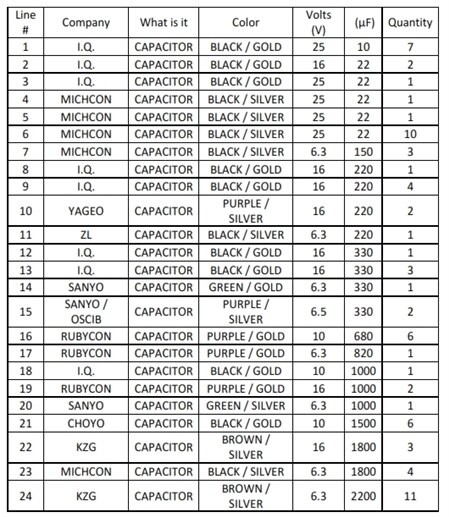
    Mark I have approximately 75 capacitors.  Using the line number, can you tell me which ones I can use for optimal performance

    Note I have also attached a pdf file if this list doesnt show up nice.

    ~Anna


    Line #CompanyWhat is itColorVolts (V) (μF) Quantity
    1I.Q.CAPACITORBLACK / GOLD25107
    2I.Q.CAPACITORBLACK / GOLD16222
    3I.Q.CAPACITORBLACK / GOLD25221
    4MICHCONCAPACITORBLACK / SILVER25221
    5MICHCONCAPACITORBLACK / SILVER25221
    6MICHCONCAPACITORBLACK / SILVER252210
    7MICHCONCAPACITORBLACK / SILVER6.31503
    8I.Q.CAPACITORBLACK / GOLD162201
    9I.Q.CAPACITORBLACK / GOLD162204
    10YAGEOCAPACITORPURPLE / SILVER162202
    11ZLCAPACITORBLACK / SILVER6.32201
    12I.Q.CAPACITORBLACK / GOLD163301
    13I.Q.CAPACITORBLACK / GOLD163303
    14SANYOCAPACITORGREEN / GOLD6.33301
    15SANYO / OSCIBCAPACITORPURPLE / SILVER6.53302
    16RUBYCONCAPACITORPURPLE / GOLD106806
    17RUBYCONCAPACITORPURPLE / GOLD6.38201
    18I.Q.CAPACITORBLACK / GOLD1010001
    19RUBYCONCAPACITORPURPLE / GOLD1610002
    20SANYOCAPACITORGREEN / SILVER6.310001
    21CHOYOCAPACITORBLACK / GOLD1015006
    22KZGCAPACITORBROWN / SILVER1618003
    23MICHCONCAPACITORBLACK / SILVER6.318004
    24KZGCAPACITORBROWN / SILVER6.3220011


    image

    • Cancel
    • Vote Up 0 Vote Down
    • Sign in to reply
    • Verify Answer
    • Cancel
  • mcb1
    0 mcb1 over 12 years ago in reply to Former Member

    Annasta


    A single capacitor from Line 18 down will help when placed across the 5v servo supply.


    BUT

    What happened to the other suggestion and question posed earlier ?

    1.     I suggest trying your single pot on potpin0 (A0) but with the others (potpin1,2,3) shorted to ground (or use a 1k to 10k). This ensures their value is known to be zero.
    2.     I don't suppose you've tried it with all 4 connected.?


    Is there a reason you don't want to try our suggestion.?


    Mark

    • Cancel
    • Vote Up 0 Vote Down
    • Sign in to reply
    • Verify Answer
    • Cancel
  • Former Member
    0 Former Member over 12 years ago in reply to mcb1

    @Mark -

    No fears, i wanted to get this over to you..being saturday I had to photograph some students for their senior prom image

    ~AnnA

    • Cancel
    • Vote Up 0 Vote Down
    • Sign in to reply
    • Verify Answer
    • Cancel
element14 Community

element14 is the first online community specifically for engineers. Connect with your peers and get expert answers to your questions.

  • Members
  • Learn
  • Technologies
  • Challenges & Projects
  • Products
  • Store
  • About Us
  • Feedback & Support
  • FAQs
  • Terms of Use
  • Privacy Policy
  • Legal and Copyright Notices
  • Sitemap
  • Cookies

An Avnet Company © 2025 Premier Farnell Limited. All Rights Reserved.

Premier Farnell Ltd, registered in England and Wales (no 00876412), registered office: Farnell House, Forge Lane, Leeds LS12 2NE.

ICP 备案号 10220084.

Follow element14

  • X
  • Facebook
  • linkedin
  • YouTube