element14 Community
element14 Community
    Register Log In
  • Site
  • Search
  • Log In Register
  • Community Hub
    Community Hub
    • What's New on element14
    • Feedback and Support
    • Benefits of Membership
    • Personal Blogs
    • Members Area
    • Achievement Levels
  • Learn
    Learn
    • Ask an Expert
    • eBooks
    • element14 presents
    • Learning Center
    • Tech Spotlight
    • STEM Academy
    • Webinars, Training and Events
    • Learning Groups
  • Technologies
    Technologies
    • 3D Printing
    • FPGA
    • Industrial Automation
    • Internet of Things
    • Power & Energy
    • Sensors
    • Technology Groups
  • Challenges & Projects
    Challenges & Projects
    • Design Challenges
    • element14 presents Projects
    • Project14
    • Arduino Projects
    • Raspberry Pi Projects
    • Project Groups
  • Products
    Products
    • Arduino
    • Avnet & Tria Boards Community
    • Dev Tools
    • Manufacturers
    • Multicomp Pro
    • Product Groups
    • Raspberry Pi
    • RoadTests & Reviews
  • About Us
    About the element14 Community
  • Store
    Store
    • Visit Your Store
    • Choose another store...
      • Europe
      •  Austria (German)
      •  Belgium (Dutch, French)
      •  Bulgaria (Bulgarian)
      •  Czech Republic (Czech)
      •  Denmark (Danish)
      •  Estonia (Estonian)
      •  Finland (Finnish)
      •  France (French)
      •  Germany (German)
      •  Hungary (Hungarian)
      •  Ireland
      •  Israel
      •  Italy (Italian)
      •  Latvia (Latvian)
      •  
      •  Lithuania (Lithuanian)
      •  Netherlands (Dutch)
      •  Norway (Norwegian)
      •  Poland (Polish)
      •  Portugal (Portuguese)
      •  Romania (Romanian)
      •  Russia (Russian)
      •  Slovakia (Slovak)
      •  Slovenia (Slovenian)
      •  Spain (Spanish)
      •  Sweden (Swedish)
      •  Switzerland(German, French)
      •  Turkey (Turkish)
      •  United Kingdom
      • Asia Pacific
      •  Australia
      •  China
      •  Hong Kong
      •  India
      •  Japan
      •  Korea (Korean)
      •  Malaysia
      •  New Zealand
      •  Philippines
      •  Singapore
      •  Taiwan
      •  Thailand (Thai)
      •  Vietnam
      • Americas
      •  Brazil (Portuguese)
      •  Canada
      •  Mexico (Spanish)
      •  United States
      Can't find the country/region you're looking for? Visit our export site or find a local distributor.
  • Translate
  • Profile
  • Settings
Arduino
  • Products
  • More
Arduino
Arduino Forum My Nokia LCD 5110 isn't work (just blue screen from backlight)
  • Blog
  • Forum
  • Documents
  • Quiz
  • Events
  • Polls
  • Files
  • Members
  • Mentions
  • Sub-Groups
  • Tags
  • More
  • Cancel
  • New
Join Arduino to participate - click to join for free!
Actions
  • Share
  • More
  • Cancel
Forum Thread Details
  • State Not Answered
  • Replies 21 replies
  • Subscribers 411 subscribers
  • Views 6567 views
  • Users 0 members are here
  • arduino
Related

My Nokia LCD 5110 isn't work (just blue screen from backlight)

Former Member
Former Member over 12 years ago

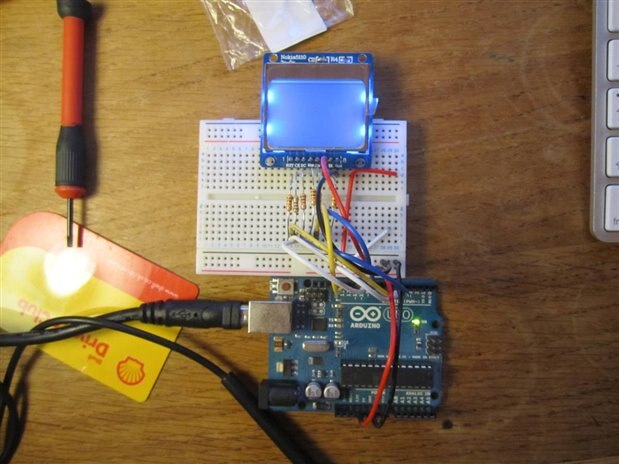
Hello everyone, I'm new in arduino, and i have a project by using nokia lcd 5110 and i bought it yesterday. But when i connect it with my arduino like in this tutorial https://learn.sparkfun.com/tutorials/graphic-lcd-hookup-guide/hardware-assembly--hookup , the backlight is on but the screen is blank(nothing show up in there just a blue color from backlight).         So can you please help me to solve this problem?image

  • Sign in to reply
  • Cancel

Top Replies

  • Former Member
    Former Member over 12 years ago in reply to saurocksall +1
    Ok, these are the pictures, can you please help me?
  • Former Member
    Former Member over 10 years ago in reply to mcb1 +1
    Thanks for the tip! there is now a 330 ohm resistor in series with the BL(led) pin. I got this to work in the end by tweaking the bias and contrast settings on the lcd this tutorial: https://www.youtube…
  • Former Member
    0 Former Member over 12 years ago in reply to saurocksall

    i've searched on the internet and i realize there are so many types of this lcd like in sparkfun product https://www.sparkfun.com/products/10168 and Adafruit product http://www.adafruit.com/products/338 . The different is just in the pin configuration. The configuration i followed from sparkfun tutorial (in the web https://learn.sparkfun.com/tutorials/graphic-lcd-hookup-guide/hardware-assembly--hookup it said that the device have to plug in with resistor and i use different value of the resistor but it still same like before then i tried not to connect it with resistor and the result was still same) and also the code. But after that like i said before the BL(backlight) was turning on and the trouble was just in text or in graphic/bitmap. And i think it's not come from the lcd because i've just bought it yesterday

    • Cancel
    • Vote Up 0 Vote Down
    • Sign in to reply
    • Verify Answer
    • Cancel
  • saurocksall
    0 saurocksall over 12 years ago in reply to Former Member

    i think the LCD it self is defective, try it on another LCD.. 

    • Cancel
    • Vote Up 0 Vote Down
    • Sign in to reply
    • Verify Answer
    • Cancel
  • Former Member
    0 Former Member over 12 years ago in reply to saurocksall

    Ok, oh is it necessary to connect the lcd with level shifter ic (5v logic to 3.3v logic) ? i still confuse with this ic

    • Cancel
    • Vote Up 0 Vote Down
    • Sign in to reply
    • Verify Answer
    • Cancel
  • saurocksall
    0 saurocksall over 12 years ago in reply to Former Member

    These LCD's do work with 5 volt logic so it should not be necessary, watch the video below it has all information u need...


    You don't have permission to edit metadata of this video.
    Edit media
    x
    image
    Upload Preview
    image

    • Cancel
    • Vote Up 0 Vote Down
    • Sign in to reply
    • Verify Answer
    • Cancel
  • Former Member
    0 Former Member over 12 years ago in reply to saurocksall

    Yes i've watch it, but it's still same, just blue screen

    • Cancel
    • Vote Up 0 Vote Down
    • Sign in to reply
    • Verify Answer
    • Cancel
  • michaelwylie
    0 michaelwylie over 12 years ago in reply to Former Member

    Did this get resolved, or are you still working on it?

    • Cancel
    • Vote Up 0 Vote Down
    • Sign in to reply
    • Verify Answer
    • Cancel
  • Former Member
    0 Former Member over 12 years ago in reply to michaelwylie

    i'm still working on sir, and i'll try it to solve this

    • Cancel
    • Vote Up 0 Vote Down
    • Sign in to reply
    • Verify Answer
    • Cancel
  • Former Member
    0 Former Member over 10 years ago

    I to am having this problem using the same LCD Module that you had pictured

    image

    After reading this link: How to use a Nokia 5110 84X48 LCD display with your Arduino (It's easy and cheap!) (in the comments section) someone mentioned this displays might be rather picky with their VCC voltage so i tried limiting it with a voltage divider but that didn't work and then i tried limiting the voltage down from the 5v supply but all that did was fry the trim pot i was using.


    The only other thing i could think of was that it was a problem with the code which i used from this link https://learn.sparkfun.com/tutorials/graphic-lcd-hookup-guide and i have also tried the Adafruit code using the supplied libraries which still didn't work, finally i tried adjusting the contrast PWM setting and still nothing.


    Is it a faulty display ? I brought 3 from ebay and they all have this problem.

    • Cancel
    • Vote Up 0 Vote Down
    • Sign in to reply
    • Verify Answer
    • Cancel
  • mcb1
    0 mcb1 over 10 years ago in reply to Former Member

    synj24


    I see from the attached image you are using the 3v3 regulator on the Arduino UNO board.


    The 3v3 regulator is capable of 50mA only, but with the backlight on there was this comment from SparkFun.

    image

    You might need to do some limiting of the backlight supply ...


    Mark

    • Cancel
    • Vote Up 0 Vote Down
    • Sign in to reply
    • Verify Answer
    • Cancel
  • Former Member
    0 Former Member over 10 years ago in reply to mcb1

    Thanks for the tip!

    there is now a 330 ohm resistor in series with the BL(led) pin.


    I got this to work in the end by tweaking the bias and contrast settings on the lcd

    this tutorial: https://www.youtube.com/playlist?list=PLjzGSu1yGFjXWp5F4BPJg4ZJFbJcWeRzk

    and this data sheet: https://www.sparkfun.com/datasheets/LCD/Monochrome/Nokia5110.pdf

    helped a lot.


    however i think this model of LCD differs slightly from the one shown because the backlight doesn't turn on when pulled low, it probably needs to be controlled via PWM.

    image

    • Cancel
    • Vote Up +1 Vote Down
    • Sign in to reply
    • Verify Answer
    • Cancel
<>
element14 Community

element14 is the first online community specifically for engineers. Connect with your peers and get expert answers to your questions.

  • Members
  • Learn
  • Technologies
  • Challenges & Projects
  • Products
  • Store
  • About Us
  • Feedback & Support
  • FAQs
  • Terms of Use
  • Privacy Policy
  • Legal and Copyright Notices
  • Sitemap
  • Cookies

An Avnet Company © 2026 Premier Farnell Limited. All Rights Reserved.

Premier Farnell Ltd, registered in England and Wales (no 00876412), registered office: Farnell House, Forge Lane, Leeds LS12 2NE.

ICP 备案号 10220084.

Follow element14

  • X
  • Facebook
  • linkedin
  • YouTube