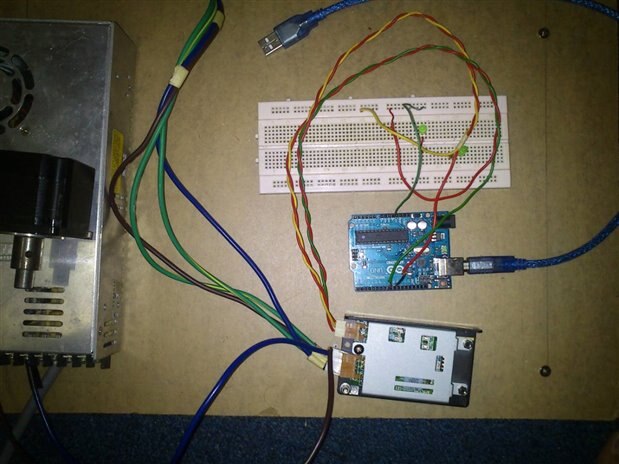
Does somebody can help me connect this driver to arduino unowww.escapmotor.com/MYCOM/pdf/2_phase_stepper/ims200.pdf.....im trying drive 6 wire stepper motor using it and didnt know it wiring connection....here i attach it datasheet
Dear Zamir,
what is the link with a post in the legislative part of this blog ?
I think you are in the wrong place if you want technical answer.
Best regards
Franck Deschamps
Hi zamir,
You can connect it has shown in point 5 (connection diagram), CW+ and CCW+ connected t 5V of the arduino, and CW- and CCW- connected to two different digital outputs of the arduino. But take into account that for this driver, the stepper library for arduino will not work.
If you need more help with on how to program the arduino to move your stepper motor with this driver, ask.
By the way, how will you connect the driver with the stepper?
Regards,
Miguel
thanks gihu.........now i wonder why the motor wont work. i try this simple arduino code and connected it but its not functioning. so if the library for the arduino is not suppport how can i drive this driver ?gihu
// define the pins that the motor is attached to. You can use
// any digital I/O pins.
#include <Stepper.h>
#define motorSteps 200 // change this depending on the number of steps
// per revolution of your motor
#define motorPin1 8
#define motorPin2 9
#define ledPin 13
// initialize of the Stepper library:
Stepper myStepper(motorSteps, motorPin1,motorPin2);
void setup() {
// set the motor speed at 60 RPMS:
myStepper.setSpeed(60);
// Initialize the Serial port:
Serial.begin(9600);
// set up the LED pin:
pinMode(ledPin, OUTPUT);
// blink the LED:
blink(3);
}
void loop() {
// Step forward 100 steps:
Serial.println("Forward");
myStepper.step(100);
delay(500);
// Step backward 100 steps:
Serial.println("Backward");
myStepper.step(-100);
delay(500);
}
// Blink the reset LED:
void blink(int howManyTimes) {
int i;
for (i=0; i< howManyTimes; i++) {
digitalWrite(ledPin, HIGH);
delay(200);
digitalWrite(ledPin, LOW);
delay(200);
}
}
You sholud drive pulses directly to the digital outputs
Try this, not using the library.
Check that the jumpers in your driver are like this:
JP1: 1-2
JP2: 1-2
code (I could not check errors):
// define the pins that the motor is attached to. You can use
// any digital I/O pins.
//#include <Stepper.h>
#define motorSteps 200 // change this depending on the number of steps
// per revolution of your motor
#define CW 8
#define CCW 9
#define ledPin 13
// initialize of the Stepper library:
//Stepper myStepper(motorSteps, motorPin1,motorPin2);
void setup() {
// set the motor speed at 60 RPMS:
//myStepper.setSpeed(60);
int i =0;
// Initialize the Serial port:
Serial.begin(9600);
// set up the LED pin:
pinMode(ledPin, OUTPUT);
pinMode(CW, OUTPUT);
pinMode(CCW, OUTPUT);
// blink the LED:
blink(3);
digitalWrite(CW, HIGH);
digitalWrite(CCW, HIGH);
}
void loop() {
// Step forward 100 steps:
Serial.println("Forward");
//myStepper.step(100);
for (i=0; i<100; i++){
digitalWrite(CW, LOW);
delayMicroseconds(20);
digitalWrite(CW, HIGH);
delayMicroseconds(20);
};
delay(500);
// Step backward 100 steps:
Serial.println("Backward");
//myStepper.step(-100);
for (i=0; i<100; i++){
digitalWrite(CCW, LOW);
delayMicroseconds(20);
digitalWrite(CCW, HIGH);
delayMicroseconds(20);
};
delay(500);
}
// Blink the reset LED:
void blink(int howManyTimes) {
int i;
for (i=0; i< howManyTimes; i++) {
digitalWrite(ledPin, HIGH);
delay(200);
digitalWrite(ledPin, LOW);
delay(200);
}
}
If it works, we can try to create a new library for your driver from the original Stepper lib.
Regards,
Miguel
hurmm i connected and use your instruction correctly but the motor still wont move
Can you check if you have pulses in the digital outputs 8 and 9?
It seems someone else worked on this.
Check this library for arduino:
https://github.com/ronivaldo/Arduino-StepperMSeries
But it seems to work for pulse/direction mode, not CW/CCW mode, so if you use it don't forget change hardware configuration