element14 Community
element14 Community
    Register Log In
  • Site
  • Search
  • Log In Register
  • Community Hub
    Community Hub
    • What's New on element14
    • Feedback and Support
    • Benefits of Membership
    • Personal Blogs
    • Members Area
    • Achievement Levels
  • Learn
    Learn
    • Ask an Expert
    • eBooks
    • element14 presents
    • Learning Center
    • Tech Spotlight
    • STEM Academy
    • Webinars, Training and Events
    • Learning Groups
  • Technologies
    Technologies
    • 3D Printing
    • FPGA
    • Industrial Automation
    • Internet of Things
    • Power & Energy
    • Sensors
    • Technology Groups
  • Challenges & Projects
    Challenges & Projects
    • Design Challenges
    • element14 presents Projects
    • Project14
    • Arduino Projects
    • Raspberry Pi Projects
    • Project Groups
  • Products
    Products
    • Arduino
    • Avnet & Tria Boards Community
    • Dev Tools
    • Manufacturers
    • Multicomp Pro
    • Product Groups
    • Raspberry Pi
    • RoadTests & Reviews
  • About Us
  • Store
    Store
    • Visit Your Store
    • Choose another store...
      • Europe
      •  Austria (German)
      •  Belgium (Dutch, French)
      •  Bulgaria (Bulgarian)
      •  Czech Republic (Czech)
      •  Denmark (Danish)
      •  Estonia (Estonian)
      •  Finland (Finnish)
      •  France (French)
      •  Germany (German)
      •  Hungary (Hungarian)
      •  Ireland
      •  Israel
      •  Italy (Italian)
      •  Latvia (Latvian)
      •  
      •  Lithuania (Lithuanian)
      •  Netherlands (Dutch)
      •  Norway (Norwegian)
      •  Poland (Polish)
      •  Portugal (Portuguese)
      •  Romania (Romanian)
      •  Russia (Russian)
      •  Slovakia (Slovak)
      •  Slovenia (Slovenian)
      •  Spain (Spanish)
      •  Sweden (Swedish)
      •  Switzerland(German, French)
      •  Turkey (Turkish)
      •  United Kingdom
      • Asia Pacific
      •  Australia
      •  China
      •  Hong Kong
      •  India
      • Japan
      •  Korea (Korean)
      •  Malaysia
      •  New Zealand
      •  Philippines
      •  Singapore
      •  Taiwan
      •  Thailand (Thai)
      • Vietnam
      • Americas
      •  Brazil (Portuguese)
      •  Canada
      •  Mexico (Spanish)
      •  United States
      Can't find the country/region you're looking for? Visit our export site or find a local distributor.
  • Translate
  • Profile
  • Settings
Arduino
  • Products
  • More
Arduino
Arduino Forum How to run my atmega 328 chip from 4 AAA batteries?
  • Blog
  • Forum
  • Documents
  • Quiz
  • Events
  • Polls
  • Files
  • Members
  • Mentions
  • Sub-Groups
  • Tags
  • More
  • Cancel
  • New
Join Arduino to participate - click to join for free!
Actions
  • Share
  • More
  • Cancel
Forum Thread Details
  • State Not Answered
  • Replies 23 replies
  • Subscribers 405 subscribers
  • Views 3178 views
  • Users 0 members are here
  • embed
  • atmega328
  • power
  • arduino
  • aaa
Related

How to run my atmega 328 chip from 4 AAA batteries?

Former Member
Former Member over 11 years ago

Hello,


Im currently working on my first real noobish project, its a temp/moisture sensor for my brother for his organic garden,

i have all my leds and 330 resitors soldered on, but i need to know waht componets i need to take 4 AAA batteries and power my chip without the Arduino,

everything can fit into the container i want it in (an altoid can) but i need to know what resistors/capactors or regukaters i need ino order to safely run my hardware.


also what ways can i use my multimeter so i can measure the volts and amps, so i can calculate how long the batteries would power the device.

I hear alot of great things about the element 14 community and i cant wait to hear what you guys have to say image

  • Sign in to reply
  • Cancel
Parents
  • Robert Peter Oakes
    0 Robert Peter Oakes over 11 years ago

    Hi there, nice to have you aboard


    first things first


    Can you draw up a sketch of what you envision , on paper then a cell phone picture if necessary but layout what your trying to do showing all the various components, battery, sensors, led outputs, displays, micro-controller etc


    You say without an Arduino, what do you mean by that, are you going old school analogue or digital or still keeping a microcontroller in the system


    is that a count of 330 resistors or a resistor of 330 Ohms ?, how many LEDs, how are you sensing or planning to sense temp and humidity, see if you can show this in your diagram


    Then we can be better prepared to help


    Thanks and look forward to your response


    Peter

    • Cancel
    • Vote Up 0 Vote Down
    • Sign in to reply
    • Verify Answer
    • Cancel
  • Former Member
    0 Former Member over 11 years ago in reply to Robert Peter Oakes

    hey ive been busy ill give you all info and pics in a few days so you can help me out, just had a long 50 hour work week and it ate all of my free time up.

    • Cancel
    • Vote Up 0 Vote Down
    • Sign in to reply
    • Verify Answer
    • Cancel
  • Robert Peter Oakes
    0 Robert Peter Oakes over 11 years ago in reply to Former Member

    I know the feeling, Look forward to the additional info

    • Cancel
    • Vote Up 0 Vote Down
    • Sign in to reply
    • Verify Answer
    • Cancel
  • Former Member
    0 Former Member over 11 years ago in reply to Robert Peter Oakes

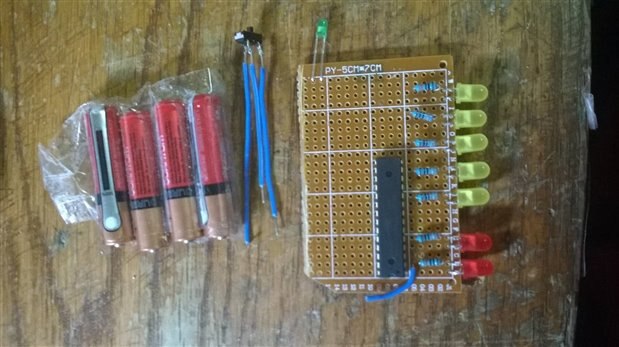
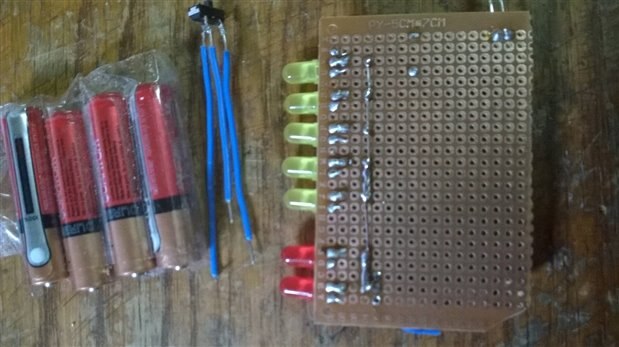
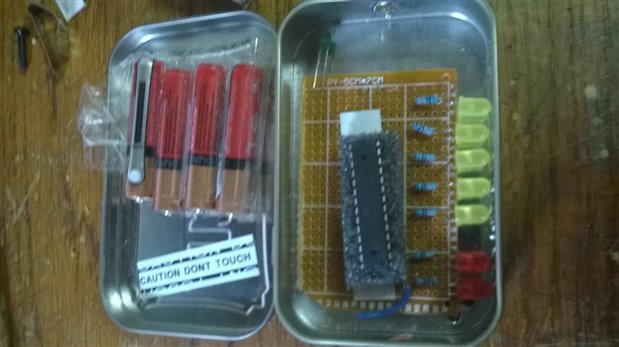
    ,here is my setup, and i want to power the chip with just 3- 4 AAA batterys

    imageimageimage


    Here is my code :


    int soundPin  = 2;

    int ledPwerPin  = 6;

    int ledAlrm1Pin  = 12;

    int ledAlrm2Pin  = 13;

    int ledTempPin [] = {7,8,9,10,11};

    const int tempPin  = 0;


    void setup() {

      // put your setup code here, to run once:

      pinMode(soundPin, OUTPUT);

      pinMode(ledAlrm1Pin, OUTPUT);


      pinMode(ledAlrm2Pin, OUTPUT);

       pinMode(ledPwerPin, OUTPUT);

      pinMode(ledTempPin[0], OUTPUT);

      pinMode(ledTempPin[1], OUTPUT);

      pinMode(ledTempPin[2], OUTPUT);

      pinMode(ledTempPin[3], OUTPUT);

      pinMode(ledTempPin[4], OUTPUT);


      Serial.begin(9600);

    }


    int alarmSpeed = 9;

    int waitPerphMode = false;


    //////main process


    void loop() {


    float voltage, degreesC, degreesF;


    digitalWrite(ledPwerPin, HIGH  ) ;


    voltage = getVoltage(tempPin);

    degreesC = (voltage - 0.604) * 100.0;

    degreesF = degreesC * (9.0/5.0) + 32.0;


    if (degreesF > 100 && degreesF <= 105 ) { alarm1(); }

        else if (degreesF > 102) { noPerph(); }


    if (degreesF > 16.6) { digitalWrite(ledTempPin[0],HIGH ); }

        if (degreesF < 16.6) { digitalWrite(ledTempPin[0],LOW ); }

    if (degreesF > 33.2) { digitalWrite(ledTempPin[1],HIGH ); }

        if (degreesF < 33.2) { digitalWrite(ledTempPin[1],LOW ); }

    if (degreesF > 49.8) { digitalWrite(ledTempPin[2],HIGH ); }

        if (degreesF < 49.8) { digitalWrite(ledTempPin[2],LOW ); }

    if (degreesF > 66.4) { digitalWrite(ledTempPin[3],HIGH ); }

        if (degreesF < 66.4) { digitalWrite(ledTempPin[3],LOW ); }

    if (degreesF > 83) { digitalWrite(ledTempPin[4],HIGH ); }

      if (degreesF < 83) { digitalWrite(ledTempPin[4],LOW ); }


    if (degreesF < 100) {ledReset(); }


      Serial.print("voltage: ");

      Serial.print(voltage);

      Serial.print("  deg C: ");

      Serial.print(degreesC);

      Serial.print("  deg F: ");

      Serial.println(degreesF);


    delay(100);


    }


    void ledReset() { digitalWrite(ledAlrm1Pin,LOW); digitalWrite(ledAlrm2Pin,LOW); }


    //Alarm priocess


    void alarm1()  {

    alarmSpeed = 500/2;

    // alarmSpeed = alarmSpeed + 100;


      tone(soundPin,100,1000);


      digitalWrite(ledAlrm2Pin,LOW);

      digitalWrite(ledAlrm1Pin,HIGH);


        delay(alarmSpeed);


      digitalWrite(ledAlrm1Pin,LOW);

      digitalWrite(ledAlrm2Pin,HIGH);


      noTone(soundPin);


      tone(soundPin,200,1000);


        delay(alarmSpeed);


      digitalWrite(ledAlrm1Pin,HIGH);

      digitalWrite(ledAlrm2Pin,LOW);


      noTone(soundPin);


    }


    void noPerph() {


        digitalWrite(ledTempPin[0],LOW);

        digitalWrite(ledTempPin[1],LOW);

        digitalWrite(ledTempPin[2],LOW);

        digitalWrite(ledTempPin[3],LOW);

        digitalWrite(ledTempPin[4],LOW);


         digitalWrite(ledTempPin[0],LOW);

        digitalWrite(ledTempPin[1],HIGH);


        delay(300);


        delay(300);


        digitalWrite(ledTempPin[1],LOW);

        digitalWrite(ledTempPin[2],HIGH);

        delay(300);


        delay(300);

        digitalWrite(ledTempPin[2],LOW);

        digitalWrite(ledTempPin[3],HIGH);

        delay(300);


        delay(300);

        digitalWrite(ledTempPin[3],LOW);

        digitalWrite(ledTempPin[4],HIGH);

        delay(300);


        delay(300);

        digitalWrite(ledTempPin[4],LOW);

        digitalWrite(ledTempPin[0],HIGH);

        delay(300);


        delay(300);


    }


    float getVoltage(int pin)

    {

      // This function has one input parameter, the analog pin number

      // to read. You might notice that this function does not have

      // "void" in front of it; this is because it returns a floating-

      // point value, which is the true voltage on that pin (0 to 5V).


      // You can write your own functions that take in parameters

      // and return values. Here's how:


        // To take in parameters, put their type and name in the

        // parenthesis after the function name (see above). You can

        // have multiple parameters, separated with commas.


        // To return a value, put the type BEFORE the function name

        // (see "float", above), and use a return() statement in your code

        // to actually return the value (see below).


        // If you don't need to get any parameters, you can just put

        // "()" after the function name.


        // If you don't need to return a value, just write "void" before

        // the function name.


      // Here's the return statement for this function. We're doing

      // all the math we need to do within this statement:


      return (analogRead(pin) * 0.004882814);


      // This equation converts the 0 to 1023 value that analogRead()

      // returns, into a 0.0 to 5.0 value that is the true voltage

      // being read at that pin.

    }

    • Cancel
    • Vote Up 0 Vote Down
    • Sign in to reply
    • Verify Answer
    • Cancel
Reply
  • Former Member
    0 Former Member over 11 years ago in reply to Robert Peter Oakes

    ,here is my setup, and i want to power the chip with just 3- 4 AAA batterys

    imageimageimage


    Here is my code :


    int soundPin  = 2;

    int ledPwerPin  = 6;

    int ledAlrm1Pin  = 12;

    int ledAlrm2Pin  = 13;

    int ledTempPin [] = {7,8,9,10,11};

    const int tempPin  = 0;


    void setup() {

      // put your setup code here, to run once:

      pinMode(soundPin, OUTPUT);

      pinMode(ledAlrm1Pin, OUTPUT);


      pinMode(ledAlrm2Pin, OUTPUT);

       pinMode(ledPwerPin, OUTPUT);

      pinMode(ledTempPin[0], OUTPUT);

      pinMode(ledTempPin[1], OUTPUT);

      pinMode(ledTempPin[2], OUTPUT);

      pinMode(ledTempPin[3], OUTPUT);

      pinMode(ledTempPin[4], OUTPUT);


      Serial.begin(9600);

    }


    int alarmSpeed = 9;

    int waitPerphMode = false;


    //////main process


    void loop() {


    float voltage, degreesC, degreesF;


    digitalWrite(ledPwerPin, HIGH  ) ;


    voltage = getVoltage(tempPin);

    degreesC = (voltage - 0.604) * 100.0;

    degreesF = degreesC * (9.0/5.0) + 32.0;


    if (degreesF > 100 && degreesF <= 105 ) { alarm1(); }

        else if (degreesF > 102) { noPerph(); }


    if (degreesF > 16.6) { digitalWrite(ledTempPin[0],HIGH ); }

        if (degreesF < 16.6) { digitalWrite(ledTempPin[0],LOW ); }

    if (degreesF > 33.2) { digitalWrite(ledTempPin[1],HIGH ); }

        if (degreesF < 33.2) { digitalWrite(ledTempPin[1],LOW ); }

    if (degreesF > 49.8) { digitalWrite(ledTempPin[2],HIGH ); }

        if (degreesF < 49.8) { digitalWrite(ledTempPin[2],LOW ); }

    if (degreesF > 66.4) { digitalWrite(ledTempPin[3],HIGH ); }

        if (degreesF < 66.4) { digitalWrite(ledTempPin[3],LOW ); }

    if (degreesF > 83) { digitalWrite(ledTempPin[4],HIGH ); }

      if (degreesF < 83) { digitalWrite(ledTempPin[4],LOW ); }


    if (degreesF < 100) {ledReset(); }


      Serial.print("voltage: ");

      Serial.print(voltage);

      Serial.print("  deg C: ");

      Serial.print(degreesC);

      Serial.print("  deg F: ");

      Serial.println(degreesF);


    delay(100);


    }


    void ledReset() { digitalWrite(ledAlrm1Pin,LOW); digitalWrite(ledAlrm2Pin,LOW); }


    //Alarm priocess


    void alarm1()  {

    alarmSpeed = 500/2;

    // alarmSpeed = alarmSpeed + 100;


      tone(soundPin,100,1000);


      digitalWrite(ledAlrm2Pin,LOW);

      digitalWrite(ledAlrm1Pin,HIGH);


        delay(alarmSpeed);


      digitalWrite(ledAlrm1Pin,LOW);

      digitalWrite(ledAlrm2Pin,HIGH);


      noTone(soundPin);


      tone(soundPin,200,1000);


        delay(alarmSpeed);


      digitalWrite(ledAlrm1Pin,HIGH);

      digitalWrite(ledAlrm2Pin,LOW);


      noTone(soundPin);


    }


    void noPerph() {


        digitalWrite(ledTempPin[0],LOW);

        digitalWrite(ledTempPin[1],LOW);

        digitalWrite(ledTempPin[2],LOW);

        digitalWrite(ledTempPin[3],LOW);

        digitalWrite(ledTempPin[4],LOW);


         digitalWrite(ledTempPin[0],LOW);

        digitalWrite(ledTempPin[1],HIGH);


        delay(300);


        delay(300);


        digitalWrite(ledTempPin[1],LOW);

        digitalWrite(ledTempPin[2],HIGH);

        delay(300);


        delay(300);

        digitalWrite(ledTempPin[2],LOW);

        digitalWrite(ledTempPin[3],HIGH);

        delay(300);


        delay(300);

        digitalWrite(ledTempPin[3],LOW);

        digitalWrite(ledTempPin[4],HIGH);

        delay(300);


        delay(300);

        digitalWrite(ledTempPin[4],LOW);

        digitalWrite(ledTempPin[0],HIGH);

        delay(300);


        delay(300);


    }


    float getVoltage(int pin)

    {

      // This function has one input parameter, the analog pin number

      // to read. You might notice that this function does not have

      // "void" in front of it; this is because it returns a floating-

      // point value, which is the true voltage on that pin (0 to 5V).


      // You can write your own functions that take in parameters

      // and return values. Here's how:


        // To take in parameters, put their type and name in the

        // parenthesis after the function name (see above). You can

        // have multiple parameters, separated with commas.


        // To return a value, put the type BEFORE the function name

        // (see "float", above), and use a return() statement in your code

        // to actually return the value (see below).


        // If you don't need to get any parameters, you can just put

        // "()" after the function name.


        // If you don't need to return a value, just write "void" before

        // the function name.


      // Here's the return statement for this function. We're doing

      // all the math we need to do within this statement:


      return (analogRead(pin) * 0.004882814);


      // This equation converts the 0 to 1023 value that analogRead()

      // returns, into a 0.0 to 5.0 value that is the true voltage

      // being read at that pin.

    }

    • Cancel
    • Vote Up 0 Vote Down
    • Sign in to reply
    • Verify Answer
    • Cancel
Children
No Data
element14 Community

element14 is the first online community specifically for engineers. Connect with your peers and get expert answers to your questions.

  • Members
  • Learn
  • Technologies
  • Challenges & Projects
  • Products
  • Store
  • About Us
  • Feedback & Support
  • FAQs
  • Terms of Use
  • Privacy Policy
  • Legal and Copyright Notices
  • Sitemap
  • Cookies

An Avnet Company © 2025 Premier Farnell Limited. All Rights Reserved.

Premier Farnell Ltd, registered in England and Wales (no 00876412), registered office: Farnell House, Forge Lane, Leeds LS12 2NE.

ICP 备案号 10220084.

Follow element14

  • X
  • Facebook
  • linkedin
  • YouTube