element14 Community
element14 Community
    Register Log In
  • Site
  • Search
  • Log In Register
  • Community Hub
    Community Hub
    • What's New on element14
    • Feedback and Support
    • Benefits of Membership
    • Personal Blogs
    • Members Area
    • Achievement Levels
  • Learn
    Learn
    • Ask an Expert
    • eBooks
    • element14 presents
    • Learning Center
    • Tech Spotlight
    • STEM Academy
    • Webinars, Training and Events
    • Learning Groups
  • Technologies
    Technologies
    • 3D Printing
    • FPGA
    • Industrial Automation
    • Internet of Things
    • Power & Energy
    • Sensors
    • Technology Groups
  • Challenges & Projects
    Challenges & Projects
    • Design Challenges
    • element14 presents Projects
    • Project14
    • Arduino Projects
    • Raspberry Pi Projects
    • Project Groups
  • Products
    Products
    • Arduino
    • Avnet & Tria Boards Community
    • Dev Tools
    • Manufacturers
    • Multicomp Pro
    • Product Groups
    • Raspberry Pi
    • RoadTests & Reviews
  • About Us
    About the element14 Community
  • Store
    Store
    • Visit Your Store
    • Choose another store...
      • Europe
      •  Austria (German)
      •  Belgium (Dutch, French)
      •  Bulgaria (Bulgarian)
      •  Czech Republic (Czech)
      •  Denmark (Danish)
      •  Estonia (Estonian)
      •  Finland (Finnish)
      •  France (French)
      •  Germany (German)
      •  Hungary (Hungarian)
      •  Ireland
      •  Israel
      •  Italy (Italian)
      •  Latvia (Latvian)
      •  
      •  Lithuania (Lithuanian)
      •  Netherlands (Dutch)
      •  Norway (Norwegian)
      •  Poland (Polish)
      •  Portugal (Portuguese)
      •  Romania (Romanian)
      •  Russia (Russian)
      •  Slovakia (Slovak)
      •  Slovenia (Slovenian)
      •  Spain (Spanish)
      •  Sweden (Swedish)
      •  Switzerland(German, French)
      •  Turkey (Turkish)
      •  United Kingdom
      • Asia Pacific
      •  Australia
      •  China
      •  Hong Kong
      •  India
      •  Japan
      •  Korea (Korean)
      •  Malaysia
      •  New Zealand
      •  Philippines
      •  Singapore
      •  Taiwan
      •  Thailand (Thai)
      •  Vietnam
      • Americas
      •  Brazil (Portuguese)
      •  Canada
      •  Mexico (Spanish)
      •  United States
      Can't find the country/region you're looking for? Visit our export site or find a local distributor.
  • Translate
  • Profile
  • Settings
Arduino
  • Products
  • More
Arduino
Arduino Forum Traveling X Z for Raspberry Pi Camera Module 3 via arduino mega 2560
  • Blog
  • Forum
  • Documents
  • Quiz
  • Events
  • Polls
  • Files
  • Members
  • Mentions
  • Sub-Groups
  • Tags
  • More
  • Cancel
  • New
Join Arduino to participate - click to join for free!
Actions
  • Share
  • More
  • Cancel
Forum Thread Details
  • Replies 25 replies
  • Subscribers 404 subscribers
  • Views 944 views
  • Users 0 members are here
Related

Traveling X Z for Raspberry Pi Camera Module 3 via arduino mega 2560

coincoin_2026
coincoin_2026 1 month ago

Hello everyone,

I want to slide a Raspberry Pi Camera Module 3 along the X-axis, then the Z-axis, to center it on the target subject for a time-lapse.

To do this, I have two CH-SM1545-M3xP0.5 micro motors (2-phase, 4-wire bipolar – 12V – with a threaded shaft travel of 80mm), and each will be controlled by its own A4988 motor controller. Selecting or powering on one of the two motors will be done with a KCD3 ON-OFF-ON SPDT 3-position toggle switch. Depending on the switch position (right or left), the target motor will be powered, while the other will be off. One of the powered motors will be controlled by a potentiometer.

Here is the electrical diagram for a single motor and its Arduino code. This works well with IR boundary sensors.

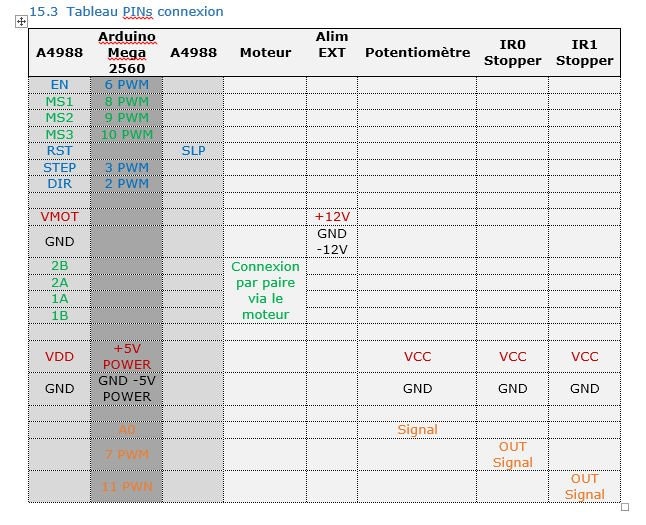
image

image

I have several questions about the electrical schematic.

I don't want to replicate my schematic for each motor. I'll end up with two 12V power supplies and two potentiometers for positioning the X-axis motor on the X-axis and the same for the Z-axis.
Can I power both A4988s with 12V via a third A4988?
Or should I place the toggle switch between the third A4988 and the other two, or is it possible to connect it directly to the Arduino Mega 2560?

Thank you for your time and ideas. I have little experience and am very curious.

/* 
Arduino Mega + A4988
Capteurs (IR en U) + potentiomètre contrôle distance et direction après recul
 
--- Diagramme d’état : Moteur + Potar + Capteurs ---
 
[START / Moteur immobile]
         |
         | Potar bougé → au-delà zone morte
         v
[Déplacement par potar]
         |
         | Capteur déclenché (IR)
         v
[Recul 1 cm en micro-pas]
         |
         | Recul terminé
         v
[Moteur en PAUSE après recul]
         |
         | Potar manipulé par l'utilisateur (delta > zone morte)
         v
[Reprise contrôle par potar]
         |
         +--> [Déplacement par potar]
 
*/
 
// Moteur PIN
const int MOTOR_DIR_PIN = 2;
const int MOTOR_STEP_PIN = 3;
const int MOTOR_ENABLE_PIN = 6;
 
// EndStop PIN signal
const int ENDSTOP_IR0 = 7;
const int ENDSTOP_IR1 = 11;
 
// EndStop MSx PIN
const int MS1_PIN = 8;
const int MS2_PIN = 9;
const int MS3_PIN = 10;
 
// Potentiomètre PIN Signal
const int POT_PIN = A0;
 
// Paramètres moteur
const int Nb_Recul = 200;        // 1cm en full-step=400pas --- 0.5cm en full-step=200pas
const int microStepFactor = 16;   // micro-pas pour recul
 
/* 
Le moteur avance d’un pas à chaque impulsion STEP.
La vitesse du moteur dépend uniquement du temps entre deux impulsions.
motorDelayMax est grand, plus le mouvement minimal est lent et précis.
Plus motorDelayMin est petit, plus le moteur va vite.
*/
const int motorDelayMax = 1500;   // microsecondes max STEP µs (lent)  1500 ≈ 1 mm/s
const int motorDelayMin = 400;    // microsecondes min STEP µs (rapide) 400 ≈ 3,9 mm/s
 
/* 
La zone morte (deadZone) est un intervalle central autour de la valeur neutre du potar où aucun mouvement du moteur n’est déclenché.
Exemple : const int deadZone = 50;
Si le potentiomètre est entre -50 et +50 autour du centre, le moteur reste immobile.
*/
const int deadZone = 200;          // zone morte du potar
 
const int accelStep = 1;          // incrément de lissage pour acceleration 2  4
 
bool reculEffectue = false;       // vrai après recul
bool pauseAfterRecul = false;     // moteur en pause après recul
int potRef = 0;                   // valeur de référence du potar après recul
int ir0LastState = 0;
int ir1LastState = 0;
 
 
int currentDelay = motorDelayMax;
bool potInverted = false;         // true = inverser la direction du potar
 
// Fonction STEP simple
void stepMotor(int delayMicro) {
  digitalWrite(MOTOR_STEP_PIN, HIGH);
  delayMicroseconds(delayMicro);
  digitalWrite(MOTOR_STEP_PIN, LOW);
  delayMicroseconds(delayMicro);
}
 
void setup() {
  pinMode(MOTOR_DIR_PIN, OUTPUT);
  pinMode(MOTOR_STEP_PIN, OUTPUT);
  pinMode(MOTOR_ENABLE_PIN, OUTPUT);
 
  // pinMode(ENDSTOP_MECA, INPUT_PULLUP);
  pinMode(ENDSTOP_IR0, INPUT);
  pinMode(ENDSTOP_IR1, INPUT);
 
  pinMode(MS1_PIN, OUTPUT);
  pinMode(MS2_PIN, OUTPUT);
  pinMode(MS3_PIN, OUTPUT);
 
  // Micro-pas 1/16 pour recul
  digitalWrite(MS1_PIN, HIGH);
  digitalWrite(MS2_PIN, HIGH);
  digitalWrite(MS3_PIN, HIGH);
  digitalWrite(MOTOR_ENABLE_PIN, LOW);
 
  delay(100); // stabilisation capteurs
  ir0LastState = digitalRead(ENDSTOP_IR0);
  ir1LastState = digitalRead(ENDSTOP_IR1);
}
 
void loop() {
  // ===== Lecture potar =====
  int potValue = analogRead(POT_PIN) - 512;
  int potAbs = abs(potValue);
 
  // Détermination direction potar avec inversion si activé
  bool direction = potInverted ? (potValue < 0) : (potValue > 0);
 
  // ===== Lecture capteurs =====
  int ir0State = digitalRead(ENDSTOP_IR0);
  int ir1State = digitalRead(ENDSTOP_IR1);
 
  bool ir0Triggered  = (ir0State == HIGH && ir0LastState == LOW);
  bool ir1Triggered  = (ir1State == HIGH && ir1LastState == LOW);
 
  // ===== Recul 1 cm si capteur déclenché =====
  if(!reculEffectue && (ir0Triggered || ir1Triggered)){
    delay(50);
 
    // Micro-pas pour recul
    digitalWrite(MS1_PIN, HIGH);
    digitalWrite(MS2_PIN, HIGH);
    digitalWrite(MS3_PIN, HIGH);
    digitalWrite(MOTOR_DIR_PIN, !direction); // reculer dans sens opposé au potar
    for(int i=0; i<Nb_Recul*microStepFactor; i++){
      stepMotor(motorDelayMin);
    }
 
    // Recul terminé → moteur en pause
    reculEffectue = true;
    pauseAfterRecul = true;
    potRef = potValue; // mémoriser la valeur du potar après recul
 
    // Mise à jour états capteurs
    ir0LastState = digitalRead(ENDSTOP_IR0);
    ir1LastState = digitalRead(ENDSTOP_IR1);
 
    return; // ne rien faire d'autre
  }
 
  // ===== Vérification pause après recul =====
  if(pauseAfterRecul){
    int deltaPot = abs(potValue - potRef);
    if(deltaPot > deadZone){
      // l'utilisateur a bougé le potar → reprise
      pauseAfterRecul = false;
    } else {
      return; // moteur reste en pause
    }
  }
 
  // ===== STEP proportionnel au potar avec acceleration =====
  if(potAbs >= deadZone){
    // Micro-pas 1/16 pour recul
    digitalWrite(MS1_PIN, HIGH);
    digitalWrite(MS2_PIN, HIGH);
    digitalWrite(MS3_PIN, HIGH);
    /* 
    // Passer en full-step pour potar
    digitalWrite(MS1_PIN, LOW);
    digitalWrite(MS2_PIN, LOW);
    digitalWrite(MS3_PIN, LOW); 
    */
    digitalWrite(MOTOR_DIR_PIN, direction);
 
    // Calcul vitesse cible selon potar
    int targetDelay = map(potAbs, deadZone, 512, motorDelayMax, motorDelayMin);
    targetDelay = constrain(targetDelay, motorDelayMin, motorDelayMax);
 
    // Lissage acceleration/déceleration
    if(currentDelay < targetDelay)
      currentDelay += accelStep;
    else if(currentDelay > targetDelay)
      currentDelay -= accelStep;
 
    currentDelay = constrain(currentDelay, motorDelayMin, motorDelayMax);
 
    stepMotor(currentDelay);
 
    // Autoriser un nouveau recul si le potar est utilisé après recul
    if(reculEffectue){
      reculEffectue = false;
    }
  }
 
  // Mise à jour derniers états des capteurs
  ir0LastState = ir0State;
  ir1LastState = ir1State;
}

  • Sign in to reply
  • Cancel

Top Replies

  • coincoin_2026
    coincoin_2026 27 days ago in reply to coincoin_2026 +1
    For the moment, I'm focusing on powering the two A4988s in parallel. I'm using two linear micro stepper motors: CH-SM1545-M3xP0.5 - 2 phases - 4 bipolar wires - 12V. In my first lab setup (see first…
  • beacon_dave
    beacon_dave 27 days ago in reply to Jan Cumps +1
    There may be gearing involved which could prevent back-driving under gravity.
  • Jan Cumps
    Jan Cumps 27 days ago in reply to coincoin_2026 +1
    coincoin_2026 said: CH-SM1545-M3xP0.5 I used a similar motor , with the same driver IC. They are good https://youtu.be/r3zlFKSM6s8 https://youtu.be/HuXfmYXk8QY
  • dougw
    dougw 1 month ago

    The Mega has enough pins to connect both motor controllers at the same time. The switch can tell the Mega which motor to move with the pot.

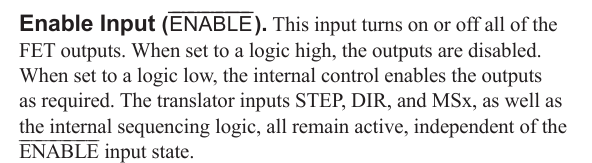
    Both motor controllers can likely use the same power supply, just connect both in parallel. If the power supply can't supply enough power, you may need to use the motor controller enable pins to disable the controller that is not in use.

    • Cancel
    • Vote Up 0 Vote Down
    • Sign in to reply
    • Cancel
  • coincoin_2026
    coincoin_2026 27 days ago in reply to dougw

    Thank you for your reply.
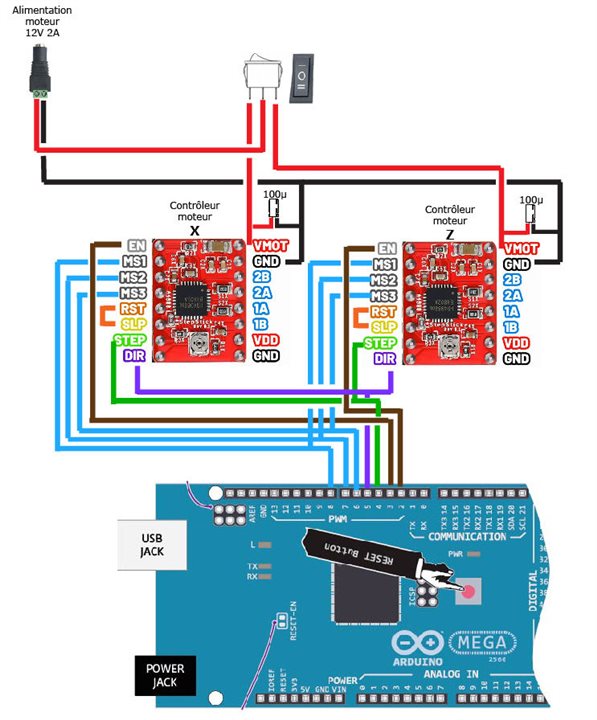
    Here is the wiring diagram for two A4988 motor controllers.

    However, I'm not sure about the parallel connections for the 12V supply between VMOT and the 3-pin toggle switch.image

    • Cancel
    • Vote Up 0 Vote Down
    • Sign in to reply
    • Cancel
  • Jan Cumps
    Jan Cumps 27 days ago in reply to coincoin_2026

    That toggle switch is indeed strange. You are expected to always have the 12V connected to both boards. And use the software to send commands to motor 1 or 2. If you remove the 12V from a controller, it will not be able to hold the motor at its current position (it can't "keep its hold torque")

    • Cancel
    • Vote Up 0 Vote Down
    • Sign in to reply
    • Cancel
  • Jan Cumps
    Jan Cumps 27 days ago in reply to coincoin_2026

    That toggle switch is indeed strange. You are expected to always have the 12V connected to both boards. And use the software to send commands to motor 1 or 2. If you remove the 12V from a controller, it will not be able to hold the motor at its current position (it can't "keep its hold torque")

    • Cancel
    • Vote Up 0 Vote Down
    • Sign in to reply
    • Cancel
  • beacon_dave
    beacon_dave 27 days ago in reply to coincoin_2026

    As Doug points out above, you could achieve similar in software by using the Enable pins that are already wired to the Arduino. The switch then becomes a logic level input to the Arduino instead of a power switch to the controllers.

    image

    • Cancel
    • Vote Up 0 Vote Down
    • Sign in to reply
    • Cancel
  • coincoin_2026
    coincoin_2026 27 days ago in reply to coincoin_2026

    To select the motor, both drivers must be kept permanently powered (switching between them to select one or the other is not recommended).

    • Cancel
    • Vote Up 0 Vote Down
    • Sign in to reply
    • Cancel
  • beacon_dave
    beacon_dave 27 days ago in reply to coincoin_2026

    You might want to consider powering your driver. You appear to have disconnected VDD and GND.

    • Cancel
    • Vote Up 0 Vote Down
    • Sign in to reply
    • Cancel
  • Jan Cumps
    Jan Cumps 27 days ago in reply to beacon_dave

    there is a caveat with using enable: if the motor has to stay fixed in position, you need to have the enable on. Without the enable asserted, the driver puts the motor in "free" mode, where it has no breaking/keep-in-place power.

    Everything can be done in software, but EN may not be the way to do it. Sending the pulses to the right controller would work. It requires that STEP and DIR are separate signals for both motors.

    • Cancel
    • Vote Up 0 Vote Down
    • Sign in to reply
    • Cancel
  • coincoin_2026
    coincoin_2026 27 days ago in reply to coincoin_2026

    For the moment, I'm focusing on powering the two A4988s in parallel.

    I'm using two linear micro stepper motors:
    CH-SM1545-M3xP0.5
    - 2 phases
    - 4 bipolar wires
    - 12V.
    In my first lab setup (see first image), the motor stays in place once the power is cut.

    • Cancel
    • Vote Up +1 Vote Down
    • Sign in to reply
    • Cancel
  • coincoin_2026
    coincoin_2026 27 days ago in reply to coincoin_2026

    The four IR limit sensors, controlled by a pentometer, will be connected to VDD and GND, allowing the motor to move while powered.

    • Cancel
    • Vote Up 0 Vote Down
    • Sign in to reply
    • Cancel
>
element14 Community

element14 is the first online community specifically for engineers. Connect with your peers and get expert answers to your questions.

  • Members
  • Learn
  • Technologies
  • Challenges & Projects
  • Products
  • Store
  • About Us
  • Feedback & Support
  • FAQs
  • Terms of Use
  • Privacy Policy
  • Legal and Copyright Notices
  • Sitemap
  • Cookies

An Avnet Company © 2026 Premier Farnell Limited. All Rights Reserved.

Premier Farnell Ltd, registered in England and Wales (no 00876412), registered office: Farnell House, Forge Lane, Leeds LS12 2NE.

ICP 备案号 10220084.

Follow element14

  • X
  • Facebook
  • linkedin
  • YouTube