Last month I bought a cheap CNC3018 from China. Is a good machine and I can produce PCBs with satisfying quality. The big noise was however a big problem, so I built a "soundproof" box in which I placed the machine.
This setup needs some extras to fully satisfy me and I decided to implement everything with Avnet's Azure Sphere starter kit.
In order to follow this tutorial you need to have already acquired the basic knowledge of azure sphere environment. Follow Brian Willes series to learn how to install the board and generate connection strings.
FEATURES: 
- Temperature sensing (heat builds up fast in the box);
- Air quality sensing (detects the formation of smoke);
- LED strip that turns ON when the door is opened;
- Spindle status monitoring (rotating or not);
- Some sort of predictive maintenance informations (in the Azure cloud).
HARDWARE REQUIREMENTS: 
- Avnet MT3620 starter kit;
- Transistor (TIP112 or generic);
- MQ136 sensor;
- 24V LED strip;
- Optocupler, two 1kOhm and one 4.7kOhm resistors;
- Limit switch (with pull-down resistor!);
- (optional but recommended) a CNC3018 or similar with a box like mine.
SOFTWARE REQUIREMENTS:
- Azure Sphere Subscription (free trial/pay-as-you-go/other);
- Visual Studio 2019 with Azure Sphere environment configured;
- Source code is available at the bottom of the page.
HARDWARE SETUP AND SCHEMATICS:
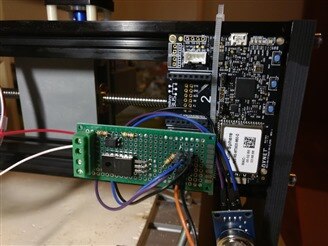
The project is fully replicable on bredboard and with dupont jumpers. I preferred to build a perfboard including the transistor, the optocupler and the resistors.
EDIT: pull-down resistors are required for the limit switch and the optocupler! They are not indicated in the schematics but must be used.
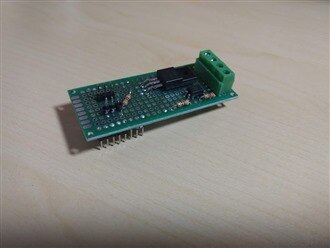
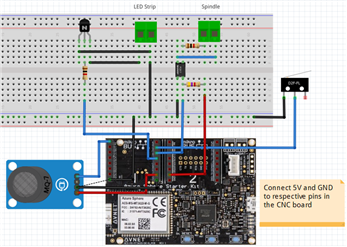
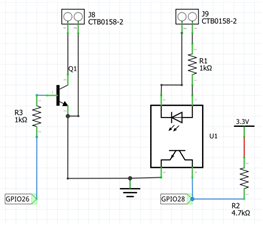
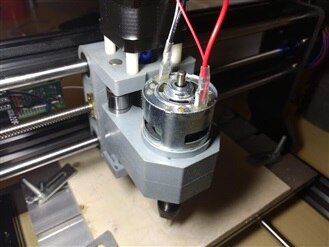
The board is powered by the 5V and GND pins of wookpecker controller. You need a way to get a 24V line (for LED strip) from the power supply, I have cut the cable and made a junction with plastic caps. Then you have to connect two cables in parallel to the spindle +/-. Do it where you prefer, I have connected them at the top of the spindle. Connect the limit switch and place it in a way that the door triggers it. Fix the board in a safe place, better if inside a box or however protected from dust and shortcuts.


AZURE IOT CENTRAL SETUP:
Log-in to Azure IoT Central. Create a new application using a name of your choice. Create a new template specifying "Custom board" as base template and set-up telemetry fields as shown in the table below.
Telemetry:
Display Name | Field Name | Units | Minimum Value | Maximum Value | Decimal Places |
Air quality | air | - | - | - | - |
Spindle ON cycles | cycles | - | - | - | - |
Temperature | temp | degC | 0 | 80 | 2 |
State:
Display Name | Field Name | Value 1 | Value 1 Disp. name | Value 2 | Value 2 Disp. name |
Door | door | 1 | Closed | 0 | OPEN |
Spindle | spindle | 1 | Running | 0 | STOP |
Go to the "Rules" tap and add some events that you like to invoke. For example I have added a temperature alarm that triggers when temp is bigger than 40 and sends a email to my address.
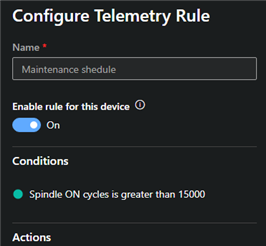
An other rule may send you a mail when cycles reaches a value to remember you scheduled maintenance.
Now add a new "real device" in the Device explorer tab. Leave the fields as default and click create.
Generate the connection string and jump to the next chapter.

SOFTWARE SETUP AND USAGE:
Download and open the solution with Visual Studio. Populate the required fields in variables.h (MY_CONNECTION_STRING) and in app_manifest.json ("CmdArgs" and "AllowedConnections").
Connect the board to the PC via a USB cable and click "Remote GDB Debugger" to compile and upload the code to the board. Now you can unplug the USB cable and turn ON the CNC machine.
The usage is basilar and easy. When you open the door, the limit switch is triggered and Azure Sphere will turn ON the LED strip. Spindle status (ON/OFF) will be monitored for each cycle of the loop, incrementing cycles value locally and sending the value to Azure Cloud when available. The value is resettable by pressing B button on the board.
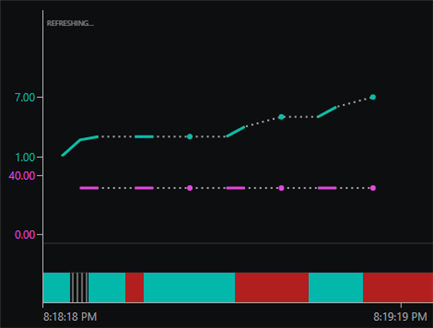
Spindle cycles count, temperature, air quality and door status are sent to the cloud when a connection is available.
Source code: https://github.com/VassilyDev/CNCMaintenance