element14 Community
element14 Community
    Register Log In
  • Site
  • Search
  • Log In Register
  • Community Hub
    Community Hub
    • What's New on element14
    • Feedback and Support
    • Benefits of Membership
    • Personal Blogs
    • Members Area
    • Achievement Levels
  • Learn
    Learn
    • Ask an Expert
    • eBooks
    • element14 presents
    • Learning Center
    • Tech Spotlight
    • STEM Academy
    • Webinars, Training and Events
    • Learning Groups
  • Technologies
    Technologies
    • 3D Printing
    • FPGA
    • Industrial Automation
    • Internet of Things
    • Power & Energy
    • Sensors
    • Technology Groups
  • Challenges & Projects
    Challenges & Projects
    • Design Challenges
    • element14 presents Projects
    • Project14
    • Arduino Projects
    • Raspberry Pi Projects
    • Project Groups
  • Products
    Products
    • Arduino
    • Avnet & Tria Boards Community
    • Dev Tools
    • Manufacturers
    • Multicomp Pro
    • Product Groups
    • Raspberry Pi
    • RoadTests & Reviews
  • About Us
  • Store
    Store
    • Visit Your Store
    • Choose another store...
      • Europe
      •  Austria (German)
      •  Belgium (Dutch, French)
      •  Bulgaria (Bulgarian)
      •  Czech Republic (Czech)
      •  Denmark (Danish)
      •  Estonia (Estonian)
      •  Finland (Finnish)
      •  France (French)
      •  Germany (German)
      •  Hungary (Hungarian)
      •  Ireland
      •  Israel
      •  Italy (Italian)
      •  Latvia (Latvian)
      •  
      •  Lithuania (Lithuanian)
      •  Netherlands (Dutch)
      •  Norway (Norwegian)
      •  Poland (Polish)
      •  Portugal (Portuguese)
      •  Romania (Romanian)
      •  Russia (Russian)
      •  Slovakia (Slovak)
      •  Slovenia (Slovenian)
      •  Spain (Spanish)
      •  Sweden (Swedish)
      •  Switzerland(German, French)
      •  Turkey (Turkish)
      •  United Kingdom
      • Asia Pacific
      •  Australia
      •  China
      •  Hong Kong
      •  India
      •  Korea (Korean)
      •  Malaysia
      •  New Zealand
      •  Philippines
      •  Singapore
      •  Taiwan
      •  Thailand (Thai)
      • Americas
      •  Brazil (Portuguese)
      •  Canada
      •  Mexico (Spanish)
      •  United States
      Can't find the country/region you're looking for? Visit our export site or find a local distributor.
  • Translate
  • Profile
  • Settings
Freedom development platform
  • Products
  • Dev Tools
  • Freedom development platform
  • More
  • Cancel
Freedom development platform
Blog Freescale’s Freedom Board augments the Raspberry Pi and HID mouse project
  • Blog
  • Forum
  • Documents
  • Files
  • Members
  • Mentions
  • Sub-Groups
  • Tags
  • More
  • Cancel
  • New
Join Freedom development platform to participate - click to join for free!
  • Share
  • More
  • Cancel
Group Actions
  • Group RSS
  • More
  • Cancel
Engagement
  • Author Author: Catwell
  • Date Created: 9 May 2014 2:48 AM Date Created
  • Views 613 views
  • Likes 1 like
  • Comments 0 comments
  • raspberry
  • pi
  • project
  • freescale
  • on_campus
  • cabeatwell
  • development
  • tandem
  • kl25z
  • innovation
Related
Recommended

Freescale’s Freedom Board augments the Raspberry Pi and HID mouse project

Catwell
Catwell
9 May 2014

image

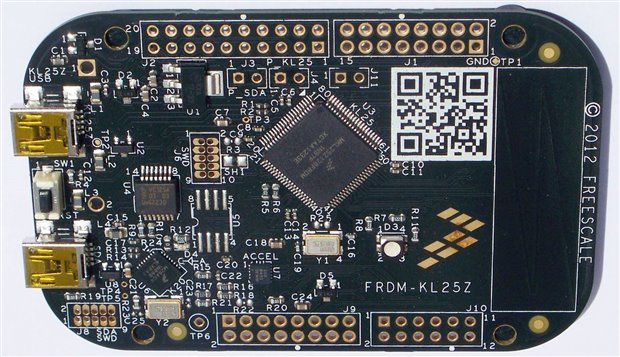
Freescale’s Freedom KL25Z development board. (via element14)


The Raspberry Pi is an incredible simple base platform to use. With add-on boards bring just about any and every project you could think of. They also allow us to prototype those projects without the need to mortgage our houses and can be repeatedly reused or repurposed depending on the task needed. One of the better development boards currently on the market that’s compatible for the popular Raspberry Pi SBC comes from semiconductor giant Freescale. The company’s Freedom KL25Z development platform Isn’t exactly new but it packs an incredible amount of features, making it much more than a simple prototyping board. Actually, it’s probably best to think of it as a single-board computer all on its own, however it complements the Raspberry Pi quite nicely and gives Arduino a run for its money in terms of technology.


The KL25Z sports an ARM Cortex MO+ Core (clocked @ 48MHz) along with 16KB of RAM, 128KB of Flash storage and 16KB of SRAM. Connections include 2xSPI, 2x12C, 3xUART, 6xPWM and 6xADC along with plenty of digital GPIO pins for almost any project imaginable. The board also features a PWM-controlled tri-colored (RGB) LED, 3-axis accelerometer and a handy touch-capacitive ‘slider-type’ interface. While the KL25Z was meant to support Kinetis L Series MCUs, it can be ‘made’ to work with the Raspberry Pi using a bit of ingenuity. Some users opt for using the SPI interface while others prefer to use the USB connection method. The latter uses a go-between program for the Freedom board in order for it to be a detected device recognized by the Pi, while an additional program (GNU Screen) is used to act as a serial terminal for programming (a tutorial can be found here: http://raspberryalphaomega.org.uk/2013/03/25/using-raspberry-pi-with-a-freescale-kl25z/). No matter how you prefer to connect the two together, the projects that can be done using Freescale’s KL25Z development board are astounding, especially turning it into a HID mouse.

image

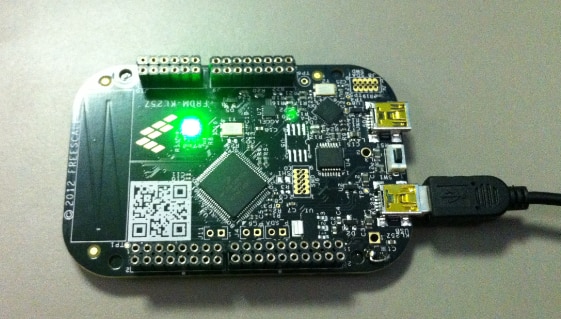
Erich Styger’s HID mouse using Freescale’s Freedom KL25Z development board. (via Styger)


One of the better projects to come out using Freescale’s KL25Z was done by programmer Erich Styger, who took the dev-board and turned it into functioning HID (fancy word for USB) mouse. To get the board to function like a mouse, Erich needed to tweak the onboard accelerometer’s axis range and get it to communicate through the USB stack using CodeWarrior IDE. His fleshed-out code augments the accelerometer for movement, which is then registered by the KL25Z’s onboard RGB LED, with blue indicating the boards lying flat, green for when it’s lying on its side and red when it’s standing up. Erich used the KL25Z’s reset button as the mouse’s input (clicker) button in order to interact with onscreen icons much like traditional mice. All the code Erich used and wrote to get Freescale’s development board up and running as a mouse can be found on MCU on Eclipse, with links to everything you need. Each step is mapped out complete with code, however bear in mind that he sometimes updates those codes to give added function to his mouse project, so use the codes accordingly as his revisions are stated or your mouse may not function correctly.


C

See more news at:

http://twitter.com/Cabe_Atwell

  • Sign in to reply
element14 Community

element14 is the first online community specifically for engineers. Connect with your peers and get expert answers to your questions.

  • Members
  • Learn
  • Technologies
  • Challenges & Projects
  • Products
  • Store
  • About Us
  • Feedback & Support
  • FAQs
  • Terms of Use
  • Privacy Policy
  • Legal and Copyright Notices
  • Sitemap
  • Cookies

An Avnet Company © 2025 Premier Farnell Limited. All Rights Reserved.

Premier Farnell Ltd, registered in England and Wales (no 00876412), registered office: Farnell House, Forge Lane, Leeds LS12 2NE.

ICP 备案号 10220084.

Follow element14

  • X
  • Facebook
  • linkedin
  • YouTube