


This is in continuation to part-1 (for details click here), In this tutorial Here we are adding fsl_tpm and Debug UART to display the timer on Slcd and to hyperterminal.
Tutorial instructions to demonstrate the project
Create a new project as explained in part-1 and follow below instruction
We have added the below 4 components for our tutorial:
- fsl_lcd
- fsl_debug_console
- fsl_tpm
- fsl_gpio
For details about the fsl_lcd component please refer to my earlier blog (part-1 HERE)
fsl_debug_console details:
We are adding debug console in order to show/display the timer out value on hyperterminal. Configure the settings for debug console as shown below:

Its TX/RX is connected to PTA1/PTA2 pins and baud rate is configured to 115200 bps
fsl_tpm details:
We are adding TPM module and configured it as counter to give interrupt of every 1 second, its settings are as shown below:
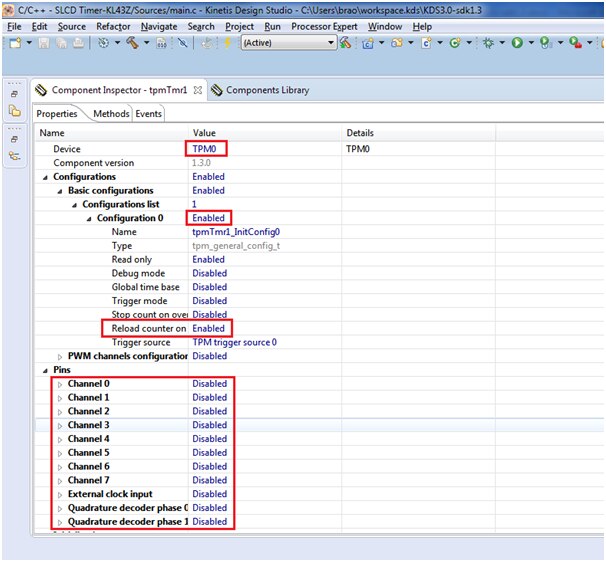

The counter calculation is as shown below:
Clock source 8MHz
Prescaler is divide by 128
8MHz/128=62.5 kHz
So our counter final value must be: (for 1 sec delay)
One timer tick is 62.5kHz i.e 1/62.5kHz = 0.16 ms
For 1 sec (0.16ms)* X=1 sec
X = (1/0.16)*103
=62500
So the final counter value has to be 62500 to get 1 sec interrupt
fsl_gpio details:
We are connecting green LED to toggle for every one second interrupt we get, its configuration is as shown below:

We have to toggle the LED inside the timer/counter ISR, this is explained in coding section
We need to add the driver header file for slcd “s401m16kr.c” and “s401m16kr.h” inside the source folder:
These files can be found from location where you have installed KSDK 1.3.0 version
“C:\Freescale\KSDK_1.3.0\examples\frdmkl43zkl33z4\demo_apps\slcd_low_power_demo”
Import these files as shown.
Select the file location as mentioned and select the two files “s401m16kr.c” and “s401m16kr.h” in the check box as shown:

After adding these components we shall proceed to generate the corresponding code by clicking on the ‘generate code’ as shown below:

Insert the Code:
Now its time to add our code to execute the timer on slcd and hyperterminal.
We need to add a global flag in "Event.c" file to get an interrupt from a Timer/counter overflow as shown below:
int sec = 0,flag=0;

void tpmTmr1_IRQHandler(void)
{
  TPM_DRV_IRQHandler(tpmTmr1_IDX);
  /* Write your code here ... */
  //sec++;
  flag=1;
  GPIO_DRV_TogglePinOutput(LED1_GREEN);

}
We are toggling the Green LED inside the tpmTmr1_IRQHandler() isr routine and we are enabling the flag to 1.
i.e every time the counter overflows the interrupt occurs and the value of the flag is changed to 1
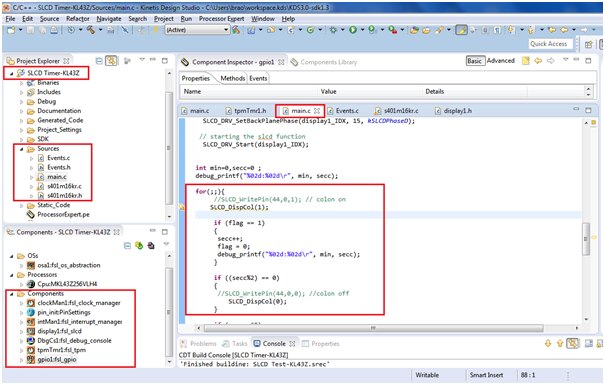
Add these lines of code inside main as shown below
int main(void)
/*lint -restore Enable MISRA rule (6.3) checking. */
{
  /* Write your local variable definition here */

  /*** Processor Expert internal initialization. DON'T REMOVE THIS CODE!!! ***/
  PE_low_level_init();
  /*** End of Processor Expert internal initialization. ***/

  /* Write your code here */
  /* For example: for(;;) { } */

  extern int flag;

  // setting of Backplane connected to com0-com3
  SLCD_DRV_SetBackPlanePhase(display1_IDX, 59, kSLCDPhaseA);
  SLCD_DRV_SetBackPlanePhase(display1_IDX, 60, kSLCDPhaseB);
  SLCD_DRV_SetBackPlanePhase(display1_IDX, 14, kSLCDPhaseC);
  SLCD_DRV_SetBackPlanePhase(display1_IDX, 15, kSLCDPhaseD);

// starting the slcd function
  SLCD_DRV_Start(display1_IDX);


int min=0,secc=0 ;


debug_printf("%02d:%02d\r", min, secc);

for(;;){
             //SLCD_WritePin(44,0,1); // colon on
            SLCD_DispCol(1);

             if (flag == 1)
             {
              secc++;
              flag = 0;
              debug_printf("%02d:%02d\r", min, secc);
             }

             if ((secc%2) == 0)
             {
              //SLCD_WritePin(44,0,0); //colon off
                         SLCD_DispCol(0);
             }

             if (secc==60)
             {
              secc=0;
              min++;
             }

             if (min ==60)
              {
               min=0;
              }

            // SLCD_DispDot(1,1);

             SLCD_DispNum(3, secc%10);
             SLCD_DispNum(2, secc/10);
             SLCD_DispNum(1, min%10);
             SLCD_DispNum(0, min/10);

  }

  /*** Don't write any code pass this line, or it will be deleted during code generation. ***/
  /*** RTOS startup code. Macro PEX_RTOS_START is defined by the RTOS component. DON'T MODIFY THIS CODE!!! ***/
  #ifdef PEX_RTOS_START
    PEX_RTOS_START();                  /* Startup of the selected RTOS. Macro is defined by the RTOS component. */
  #endif
  /*** End of RTOS startup code.  ***/
  /*** Processor Expert end of main routine. DON'T MODIFY THIS CODE!!! ***/
  for(;;){}
  /*** Processor Expert end of main routine. DON'T WRITE CODE BELOW!!! ***/
  }
/*** End of main routine. DO NOT MODIFY THIS TEXT!!! ***/
We need to add the function SLCD_DispCol() in “s401m16kr.c” to glow the LCD segment for colon position which is located at pos(3,1) (com-3 segment-1)
void SLCD_DispCol(bool status)
{
    SLCD_WritePin(Pos2PinTable[3][1], 0, status);
}
Now compile and build the project by clicking the hammer button as shown below:

You can see the build result in console window as shown below:

Now we will execute our code by debug method:

Next select the PEMicro debugging interface and OpenSDA type as shown below:

After clicking on debug the system launches our project and below window appears.

You will see a Debug execution window, press Resume button as shown below:

You can see the timer value displaying on SLCD as shown below:

Output on hyperterminal can be seen by opening the application putty terminal as shown below:


Video output for the same can be seen below:
I have enclosed the project folder and executables for your quick reference.