


When it comes to 32bit cores ARM is pretty much at the top of the pile for embedded applications. One of the great things about the ARM core is so many people are repackaging this core into different chips and applications. Its the ARM core that's powering the Raspberry Pi and if its good enough for them, then is must be good enough for your project too then!?
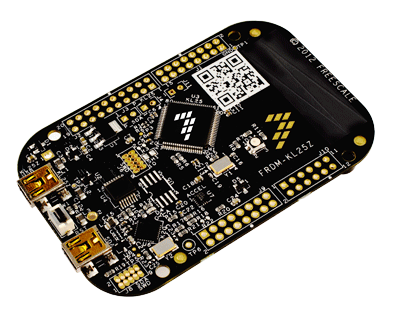
There are however lots of cores to pick from in the ARM family and one of the best picks for the embedded environment is the Cortex-M series. Starting with the smaller M0 as found in this development kit you will also find others like the M3 in the mbed or Leaflabs Maple. But the important parts of a Development kit is how easy it is to use, how it shows off its features and can you then move forward on the development path after the first Blinky demo. Well I was one of a few to get the pre-pre-distribution of the Freescale FRDM-KL25Z so lets see how I got on and what you get for £8.17?
At the heart of the development board sits a KL25Z128VLK4-Cortex-M0+ microcontroller, this has 128KB of Flash and 16KB of SRAM running at 48Mhz. It also has a new and fancy openSDA debug interface. You also get the stock, wait for it, super funky tri-colour LED and accelerometer on the board. Where would we be if a dev kit did not have these.!? You will also get a capacitive touch “slider” which is just a bit of tracking, but a useful interface in today's human machine interface expectations. The board is powered from the USB or a connector at 5 to 9Vdc. There are both 5volt and 3.3volt I/O headers making it easy to interface to other stuff. One of the claims is that the board has the I/O form factor to allow Arduino shields plug in. The board I received however did not come with header sockets for me to plug in an Arduino shield but I hear this may change ( waits for a element14 person to comment below on that! ) and as I did not have an Arduino Shield under my desk so I could not try it anyway.
Out the box you will get the following; The board and a I/O crib sheet. The box is nice by the way, one of the better packaged boards I have seen. The crib sheet also gives you a URL to help you get started. At the time of getting the dev kit this page was not up but having posted this after the 25th I can now see lots of useful information like user guides etc. This explains the hardware on the board, pinouts etc and is a real must if you want to move forward with the board after the Demo’s are done. So from a documentation side I am happy you will find all you need online and Freescale need a well done for this as other chips manufacturers fail at this point.
You will need to start downloading these zip files and openSDA drivers etc to use your board. This did take some time to do and there is not one All-In-One download and install. So a little bit of a fiddle. Just also to comment that lots of these files and documentaion can also be found on the element14 pages supporting the dev kit too!
Once I got set up I found the Drag-and-Drop programming feature. This is all very mbed style where you drag the compiled code, or Demo’s in my case, over to the board because it looks like a USB flash drive when connected to your PC. The code runs as soon as the copy is finished, however I did find one odd thing. When you copy another over it will not work. hit the reset, nothing. You have to unplug and replug in the USB to get it to clear the previous file before you can copy over another. Not quite as nice as the mbed just copy and press reset method but still good.
The Demo’s are as normal with most dev kits, not that mind blowing. A blinking LED even tri-colour stops being funky and sexy wow factor in less time that it does to say it. The slider and accelerometer all worked as expected and happy this is a good way of checking the hardware.
The next step after all this fun is to compile and flash over your own code. About 2 hours later after I downloaded and installed the Keil IDE over my 3Mbps broadband connection I was ready to go. The next step for Keil 4.54 is to install a patch that allows you to talk to the dev kit over the openSDA interface that I installed at the beginning. Now I like to be honest here and say that two nights later I still can’t get the Keil IDE to see and talk to the board. Personally I think this is a me and my computer issue as others are not having this problem. Dose mean I could not actually follow out a compile and program of the board, however...
...I have used Keil before with ARM chips. So I can say hand on heart that its a good IDE and with a bit of a learning curve it is easy enough to use. OK its not as easy to use as the Arduino IDE or the mbed internet based compiler. But Keil will allow one thing the others don't - you can debug your target.!
In all the Freescale FRDM-KL25Z dev kit was not the easiest or quickest kit to set up and get going with. Writing code for the ARM is a little more complex for beginners than using interfaces like the Arduino or mbed, but as the old saying goes you get what you pay for and £8 is pretty cheap, sorry, low cost.
Personally for new people to writing code and wanting to experience an 32bit ARM, have fun and build hobby stuff then look at kits like the Leaflabs Maple Arduino clone and you can’t go wrong with an mbed either. The FRDM-KL25Z is just a little more complex and ideal for the more confident software and hardware engineer or hobbyist. This is one of those kits that lets you move beyond what other kits can do and start using the true grunt of the 32bit ARM core.
I’ll just end on saying that I hope that once I figure out the openSDA issue I have I’ll also start to enjoy some of the features the board offers and would really like to hear from others on how you get on with the kit.
If you want to see any of my other blogs or see what else I get up to then you can by visiting my facebook page here.
Many thanks,
Paul (aka @monpjc)
