

Symbisa - Mobile IoT Sensing Kit


The Symbisa sensing kit combines a variety of sensors and GSM modem coupled with a secure global communication network to allow development of an easy to implement, truly plug and play global mobile sensing solution that displays data directly into an Excel worksheet.




Features






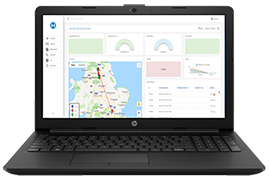

Symbisa empowers you to quickly and easily measure, capture and analyse your world. Developing, deploying and maintaining your own IoT applications has never been easier. The Symbisa Portal enables you to receive data from any of your devices and send messages back remotely, meaning you can display messaging, transmit instructions or display barcode data.
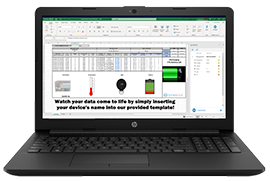
Unlike complex proprietary systems, Symbisa is off-the-shelf and comes with a complete international GSM connectivity and 100 free credits which means you're ready to configure and go-live within minutes. Symbisa's hardware carries multiple sensors enabling users to track everything from GPS location and altitude through to temperature, light, orientation and light. Data can be viewed via the Symbisa Portal, through an API or even directly into Excel cells through Microsoft Office 365.
Thanks to Symbisa, anyone with basic spreadsheet knowledge can start exploring the possibilities of IoT - from unboxing to live data streams in just minutes.



Required Tools
Accessory Tools
Documents
Data Sheet
Quick Start Guide
User Manual/Guide
Whitepaper
FAQs
What measurements do I get from the various sensors and devices?
- Humidity -Min, Max, Avg in 0.1 increments of RH
- Temperature - Min, Max, Avg in 0.1 increments °C
- Pressure - Min, Max, Avg in increments of 1 hPa
- Light - Min, Max, Avg in increments of 1 Lux
- Tilt -Interrupt notification when an angular variation of more than 35° in any direction is detected
- Freefall - Interrupt notification of a freefall event of 50cm or more.
- Orientation - Identification of which side is facing up
- Pedometer - Number of steps taken since last device activation
- Message - a message to be displayed on the devices e-ink screen, alpha-numeric message (max 26 characters)
- Message Counter - Incremental count of messages generated by device since last activated
- Barcode - Barcode to be displayed on the device screen, Barcode format - Code39 (max 15 characters)
- Cell Info
- Signal Quality
- Latitude & Longitude - Longitude in dddmm.mmmm and Latitude in ddmm.mmmm format
- Altitude - Mean sea level altitude in meters
- Horizontal Dilution of Precision - standard GGA message format
- USB - plugged/unplugged
- Charging / Not Charging
- State of battery charge
- Button press - number of times button on board has been pressed
- Date & Time - RTC date and time based on GSM or GPS time
- Firmware Version
- Serial Number
- Interval - The reporting interval between payloads of data sent in minutes
What data package comes with each Symbisa unit?
Each unit ships with 500 events for free, further data packages can be purchased through Premier Farnell at $12.50 for a 1000 event bundle . Purchasers are sent a code by Farnell which they can then add to their account.
What is an event?
An event is a point-in-time when the Symbisa device securely sends a payload of sensor array data (from all or selected sensors) via the Symbisa service to the user. The interval between events is set-up by the customer via the Symbisa User Portal. Events can be set at regular intervals - it's completely down to user preferences, the time-critical nature of the application and the economics of event-usage.
Can event bundles be shared across multiple devices?
Is there a data plan?
No, the Symbisa model is based around pay-per-bundle events. An event is a packet of encoded data sent from the Symbisa device. The data is un-packed via the Symbisa User Portal before sending the feature-rich data to the user through an API or directly via streamed function into Excel.
Why no data plan?
What is the Hanhaa Mobile network?
Symbisa runs on the dedicated Hanhaa Mobile network which means there are no data-roaming surcharges for the service. For the Symbisa development release Symbisa services will be limited to Mainland Europe and North America USA/Canada.
How does Excel import data from the Symbisa device?
Excel data can be imported as a live feed using streamed functions in the Office365 version of Excel or the data can be imported as a data export from the Symbisa User Portal. Data exports can be imported into the desktop version of Excel.
When is the Excel plugin available?
During the Symbisa development release the plugin will be available from a dedicated URL: www.hanhaa.com/symbisa/get-started
Do I have to use Excel?
No, you can set-up an API with the Symbisa User Portal to import live or historic data into 3rd party applications.
Is data 2-way?
Yes, data will flow 2-ways which allows for remote configuration of the event cycles and the configuration of the text or barcode that is displayed on the screen of the Symbisa device.